Test Environment Strategy
3.5 Test environment strategy
A test environment is a setup of hardware, software, and network configurations that mimics the real-world production environment where an application will run. It provides a controlled space for testers and developers to verify that applications behave as expected before release.
It usually includes:
- Operating systems and versions
- Application servers, databases, and middleware
- Configurations, integrations, and APIs
- Test data (mock or anonymised real data)
- Tools for monitoring, logging, and debugging
Test environments help teams to:
- Ensure tests are performed under conditions similar to production.
- Prevent issues from reaching production, reducing downtime and the cost of fixes.
- Allow testing of new features, patches, and upgrades without affecting real users.
- Provide stable and repeatable conditions for regression, integration, and system testing.
- Align QA, developers, and stakeholders on testing results using a shared reference environment.
3.5.1 Environment hierarchy and progression
DHI uses a standard progression of environment levels to ensure that code moves through controlled stages of validation before reaching customers. Each environment serves a specific purpose in the testing lifecycle and aligns with the quality gates defined in section 4.5.
Standard environment levels
| Environment | Primary Purpose | Who Uses It | Key Characteristics |
|---|---|---|---|
| Development (Dev) | Individual developer testing and debugging | Developers | Local machines or shared dev servers Rapid iteration and experimentation Minimal data volumes Frequent configuration changes |
| Test | Functional and regression testing | QA Engineers, Developers, Technical Leads | Shared stable environment Integration with dependencies Automated test execution Representative test data |
| Staging | Pre-production validation and UAT | Product Owners, QA Engineers, Selected Users | Production-like configuration Realistic data volumes Final validation before release Performance and security testing |
| Production | Live customer-facing system | End Users, Operations, DevOps (monitoring) | Fully secured and monitored Real customer data High availability requirements Change control processes |
Environment progression and quality gates
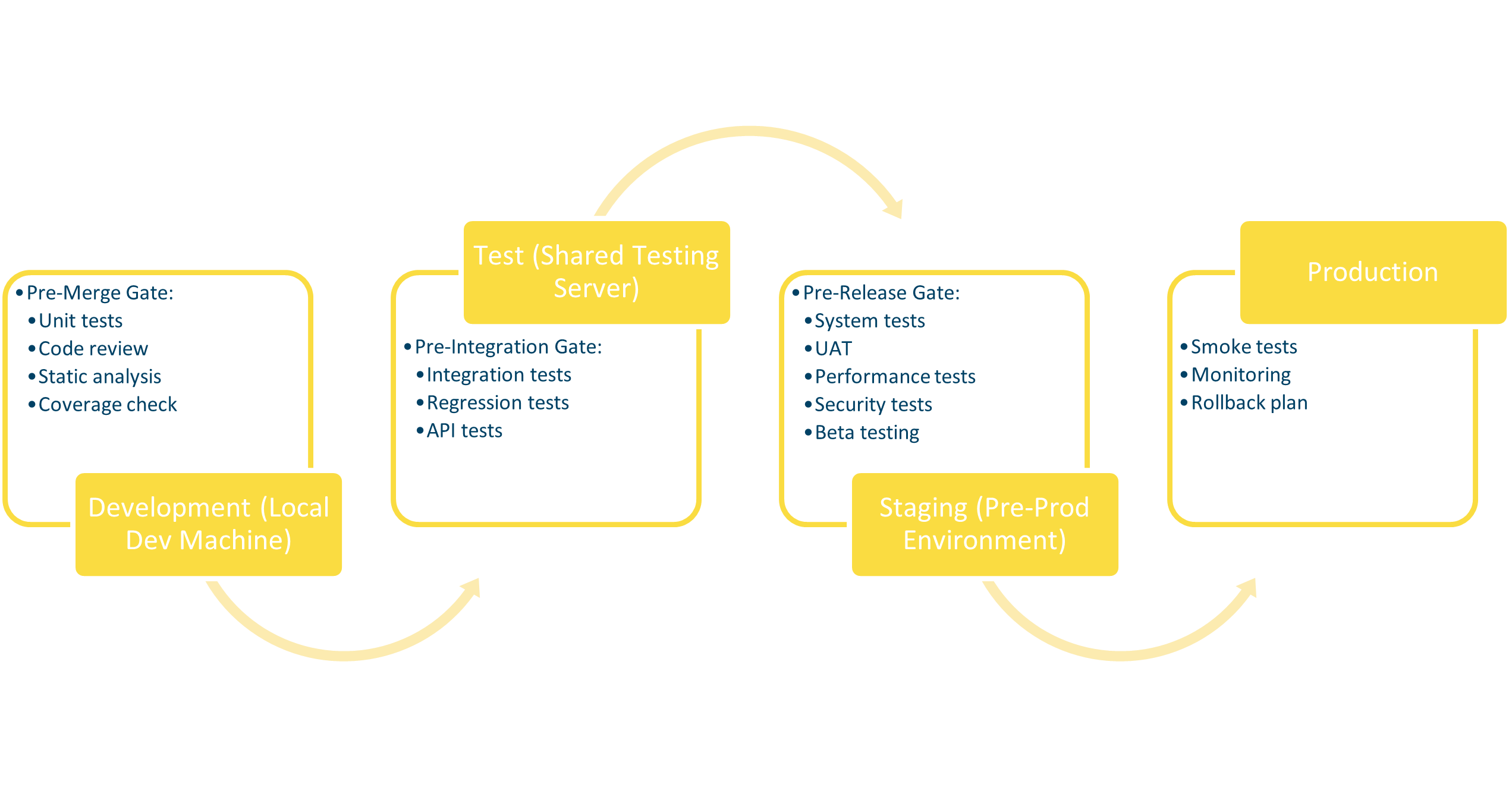
Key points:
- Pre-merge and pre-integration gates may be executed in the Development or Test environment through CI/CD pipelines.
- Small projects or internal tools may skip Staging and move directly from Test to Production if risk is low (see section 3.3 for selection criteria).
- Existing products may use different terminology (e.g., “QA” instead of “Test”). The important principle is having distinct levels of validation.
Environment characteristics by testing phase
| Test Type | Development | Test | Staging | Production |
|---|---|---|---|---|
| Unit Testing | Primary | CI/CD | N/A | N/A |
| Integration Testing | Local | Primary | Final check | N/A |
| System Testing | N/A | Primary | Final check | N/A |
| Regression Testing | N/A | Primary | Pre-release | N/A |
| UAT | N/A | N/A | Primary | N/A |
| Beta Testing | N/A | N/A | Primary | Limited users |
| Performance Testing | N/A | Initial | Production-scale | N/A |
| Security Testing | Static analysis | Vulnerability scans | Penetration tests | Monitoring |
| Exploratory Testing | Early builds | Primary | Final validation | N/A |
| Smoke Testing | After build | After deployment | After deployment | After release |
Promotion criteria between environments
Code and builds must meet defined criteria before moving from one environment to the next.
Development → Test - All unit tests pass. - Code review completed and approved. - Static code analysis passes (no critical issues). - Pre-merge quality gate satisfied (section 4.5.1).
Test → Staging - Integration tests pass. - Functional regression suite passes. - No critical or major bugs open. - Pre-integration quality gate satisfied (section 4.5.2).
Staging → Production - All system tests pass. - UAT approved by Product Owner. - Performance and security tests completed (as required by project risk). - Pre-release quality gate satisfied (section 4.5.3). - Release documentation complete.
3.5.2 Test environment for desktop applications
Desktop software may behave differently across OS versions or hardware setups. Dedicated test environments help catch compatibility, performance, and installation issues early.
For desktop or client-based software, test environments often rely on virtual machines (VMs) or containerised setups to simulate different operating systems and hardware conditions.
Creating a test environment for desktop applications may include:
- Create VMs with different OS versions (Windows, Linux, macOS).
- Configure dependencies (frameworks, runtime libraries, drivers).
- Prepare sample datasets for offline and online usage.
- Automate VM snapshots to reset environments quickly.
3.5.3 Test environment for web applications
Different browsers and devices may interpret web standards differently, leading to layout, performance, or functionality issues. Having a dedicated environment ensures cross-browser and cross-device consistency.
For web-based projects, test environments are typically designed to replicate:
- Browsers and versions (Chrome, Edge, Firefox, Safari).
- Devices (desktop, tablet, mobile).
- Operating systems and resolutions.
- Servers, APIs, and databases matching production.
Creating a test environment for web applications may include:
- Deploy the web application to a dedicated test server that mirrors production.
- Connect to testing instances of dependencies.
- Ensure test accounts and roles are available for realistic validation of permissions and workflows.
- Configure test monitoring and logging to capture errors during manual exploration.
- Provide access to multiple browsers and devices (using BrowserStack, Selenium Grid, or real devices).
- Automate environment setup (e.g., using Docker or IaC tools) for consistency and repeatability.