FEFLOW and Python
The integration of Python in FEFLOW or FEFLOW in Python provides an additional option to interact with FEFLOW using your own code.
There are three options for Python use with FEFLOW:
Requirements:
-
Installation of FEFLOW 7.1 (default includes an internal FEFLOW-related Python version)
-
For using the FEFLOW kernel in an external Python interpreter the interpreter needs to support Python 2.7. Other versions are currently not supported.
The FEFLOW-Python integration provides three basic method blocks:
Available Methods
FEFLOW IFM-related methods
Methods available without the need to load the FEFLOW document. There is a distinction whether the ifm module is loaded from the console / Python interpreter or from the Scripting menu in the graphical interface.
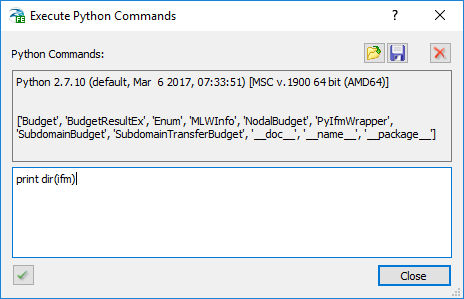
In addition to the methods shown in figure above though the Scripting menu, the methods forceLicense, getKernelVersion and loadDocument are available in the console / Python interpreter.
import sys

sys.path.append('C:\\Program Files\\DHI\\2017\\FEFLOW 7.1\\bin64')

import ifm

dir(ifm)
FEFLOW Document-related methods (doc)
All the different methods available only if the document is loaded via doc = ifm.loadDocument('myFile.fem').
import sys

sys.path.append('C:\\Program Files\\DHI\\2017\\FEFLOW 7.1\\bin64')

import ifm

dir(doc)
FEFLOW GUI-related methods
These methods are only available through the Execute Python Commands dialog of the Scripting menu in the graphical interface.
Python Kernel Control Methods
Kernel control methods enable the user to start/stop the kernel, to load/save documents, and to control the simulation.
The following kernel control methods are provided:
ifm.forceLicense()
Initializes the FEFLOW kernel with a certain license, e.g., ‘feflow:server=netlm’. The syntax is the same as for the FEFLOW command-line mode.
doc = ifm.loadDocument()
The loadDocument method tries to load the given FEFLOW model. The single argument is the full path to the document. The method returns the loaded document in case of success. Otherwise the method returns a boolean value isinstance(doc, bool) == true:
-
true: an internal error occurred (kernel not started, no license, file not found, …)
-
false: an external error occurred (no argument or argument not of type string)
Warning
FEFLOW can currently only handle one document (model or results file) at a time. Thus you have to make sure to close the previously loaded document before loading a new one. To copy or compare data between two models, you'll have to open the first file, then keep the data to copy/compare in memory, close the first file, and only then open the second file as shown in the code examples.
doc.saveDocument()
Next to file name, the function support several arguments parsed through a Python list: file[, [list time-steps, version[, file format]]])
Saves the current document using the given file name. Optional a file version (e.g., 7000) and the file type (0: default, 1 = binary, 2 = ASCII) can be specified. For DAC files only an optional list of output time-steps can be defined. The method returns true if succeeded, otherwise false.
doc.startSimulator()
Starts the simulation of the current document or continues a paused simulation. Returns true if successful. Optionally, up to three arguments are supported:
filename to an output DAR or DAC file
File format to be stored: 0 = default, 1 = binary and 2 = ASCII.
doc.pauseSimulator()
Pauses the current simulation. Returns true if successful. This method may throw an exception.
doc.stopSimulator()
Stops the current (running) simulation or terminates the simulation mode after simulation has completed. Returns true if successful. This method may throw an exception.
doc.getNumberOfTimeSteps()
Returns the number existing time steps (DAC only).
doc.getTimeSteps()
Returns the list of time-step tuples [ [index, time],… ] (DAC only).
doc.loadTimeStep(n)
Load time step t (DAC only) with n <= 0 < doc.getNumberOfTimeSteps(). Returns true if successful, otherwise false.
doc.submitPendingChanges()
Forces a rebuild of changed structures, e.g., Multilayer wells. Implicitly done and thus not required after changes done in a callback and before running a simulation or saving a file.
A complete list of kernel control methods and API functions can be retrieved by the Python command dir(ifm).
Python API Functions
Almost all methods of the IFM document API are also available within the Python integration. Currently not supported are methods in the fields of amr, archive, diagram, graphics, module, and the (former) regionalization API.
The syntax of Python methods is equal to the IFM API syntax except for the missing prefix “Ifm”. Furthermore, the first method character has to be lower case, e.g.,:
import sys

sys.path.append('C:\\Program Files\\DHI\\2017\\FEFLOW 7.1\\bin64')

import ifm

FEM = "..\\femdata\\MyFile.fem"

nodes = doc.getNumberOfNodes()
Python Callbacks
Currently, the following callbacks are supported:
Document Callbacks| Simulator Callbacks| Time-Steps Callbacks| Problem-Class Callbacks ---|---|---|---| postLoadDocument | preEnterSimulator | preTimeStep | preFlowSimulation preSaveDocument | postEnterSimulator | postTimeStep| postFlowSimulation postSaveDocument | preLeaveSimulator | onTimeStepConstraint| preMassSimulation |postLeaveSimulator |postTimeLoaded | postMassSimulation |preSimulation | |preHeatSimulation |postSimulation | |postHeatSimulation
A basic description of most of the callbacks can be found in the IFM Callbacks. Each callback provides at least the current document as argument. Callbacks do not support any return value. Some callbacks provide some additional arguments:
postLoadDocument, preSaveDocument, postSaveDocument
These callbacks support five arguments: doc, fname, ftype, fmode and fversion:
-
ftype: 1 = Supermesh file, 2 = FEM problem file, 3 = DAC results file
-
fmode: 1 = binary, 2= ASCII, 4 = DEMO data format (DHI use only), 16 = binary with encryption, 32 = XML interchange format
-
fversion: current or target file version in decimal format, e.g., 7000 for FEFLOW 7.0 format
{pre|post}{Flow|Heat}Simulation
The {pre|post}{Flow|Heat}Simulation callbacks support two arguments: doc, {phase, species, energy} as integer. Phase and energy are reserved for future usage only, species can be used in multi-species simulations.
onTimeStepConstraint
The onTimeStepConstraint callback has three arguments: doc, current time (double), proposed time step length (double) and expects a double as return value (the accepted time step length).
postLoadTimeStep
The postLoadTimeStep has three arguments: doc, loaded step number (integer), loaded time (double). It does not support any return values.
Example
import sys, os
sys.path.append('C:\\Program Files\\DHI\\2016\\FEFLOW 7.0\\bin64')
import ifm
def IdentifyTailingNodes():
    ID = doc.getNodalRefDistrIdByName("TailingNodes")
    nn = doc.getNumberOfNodes()
    for i in range(0,nn):
        ref_value = doc.getNodalRefDistrValue(ID,i)
        if ref_value > 0:
            TailingNodes.append(i)
            TailingActivationTimes.append(ref_value)
    return
def GetElevation(node_list):
    for i in range(0,len(node_list)):
        node = node_list[i]
        Elevations.append(doc.getZ_d(node))
    return
def GetTailingTS(TS_id):
    PowerPoints = doc.powerGetNumberOfPoints(TS_id)
    return PowerPoints
try:
# Get current working directory
    dir=os.getcwd()
    print dir
    global Elevations, TailingNodes, TailingActivationTimes
    global DictTailingNodes
    global DictTailingNodesTimes
    global TailingTSTime
    global TailingTSValue
    global TailingTS
    global TailingNodes
    global ts_input
    global POW_List
    Elevations = []
    TailingNodes = []
    TailingActivationTimes = []
    TailingUniqueTimes = []
    TailingTSTime = []
    TailingTSValue = []
    DictTailingTS = {}
    POW_List = []
    ##### USer defined TS ID
    if len(sys.argv) > 1:
        ts_input = int(sys.argv[1])
    else:
        ts_input = 1000
  ################### INPUT FILES ##################
    FEM_FILE_IN = "D:\\Carlos\\Projects\\Barrick\\work\\scripts\\tailing.fem"
    POW_IN = dir + "\\TailingTimeSeries.pow"
    DAT_IN = dir + "\\AssociationTS.dat"
  ################### LOG FEFLOW DOCUMENT & EXTRACT INFO ######
    doc = ifm.loadDocument(FEM_FILE_IN)
    IdentifyTailingNodes()
    TailingUniqueTimes = list(set(TailingActivationTimes))
    GetElevation(TailingNodes)
    PowerPoints = GetTailingTS(ts_input)
    ################ PRINT INFO ####################
    print "Number of tailing nodes: ", str(len(TailingNodes))
    print "Tailing times [d]: ", TailingUniqueTimes
    print "Tailing TS ID: ", str(ts_input)
    if PowerPoints < 0:
        print "Error: TS does not exits"
    else:
        print "Number of times in the tailing TS: ", str(PowerPoints)
    DictTailingNodes = dict(zip(TailingNodes,Elevations))               # node id, elevation
    DictTailingNodesTimes = dict(zip(TailingNodes,TailingActivationTimes))   # node id, times
    #print DictTailingNodes
    #print DictTailingNodesTimes
    ##### WRITE POW FILE
    POW_Counter = 20000
    POW = open(POW_IN, "w")
    for i in range(0,len(TailingNodes)):
        POW_List.append(POW_Counter)
        POW.write("# " + str(POW_Counter) + "\n")
        POW.write("! Node:" + str(TailingNodes[i]) + "\n")
        POW.write("0 " + " " + str(Elevations[i]) + "\n")
        POW.write(str(TailingActivationTimes[i]) + " " + str(Elevations[i]) + "\n")
        for j in range(0, PowerPoints):
            POW.write(str(doc.powerGetPoint(1000, j)[0]) + " ")
            POW.write(str(doc.powerGetPoint(1000, j)[1]) + "\n")
        POW.write("END" + "\n")
        POW_Counter = POW_Counter + 1
    POW.write("END")
    POW.close()
    #### WRITE DAT FILE
    DAT = open (DAT_IN, "w")
    DAT.write("NODE" + "\t" + "TS" + "\n")
    for i in range(0, len(TailingNodes)):
        DAT.write(str(TailingNodes[i]) + "\t" + str(POW_List[i]) + "\n")
    DAT.close()
########## SAVING DOCUMENT WITH NEW SELECTIONS #########
  #print "Saving document: ", FEM_FILE_OUT
  #doc.saveDocument(FEM_FILE_OUT)
except Exception as err:
print >> sys.stderr, 'Error: ' + str(err) + '!'
sys.exit(-1);
Python with the FEFLOW Command-line Version
The FEFLOW console version can be called in Python interpreter mode by using the command switch “-python”:
"C:\Program Files\DHI\2017\FEFLOW 7.1\bin64\feflow71c" -python
Python 2.7.7 (default, Jun 17 2014, 08:55:38) [MSC v.1500 64 bit (AMD64)] on win32 Type "help", "copyright", "credits" or "license" for more information.

>>>
Using the FEFLOW console version in Python mode starts a Python 2.7 environment and adds the FEFLOW kernel as Python module (called “ifm”). Required initialization is performed automatically, so that the kernel is ready to use right away.
Note
Arguments specified before the “-python” argument are handled by FEFLOW, while all arguments following the “-python” argument are passed to the Python console:
"C:\Program Files\DHI\2017\FEFLOW 7.1\bin64\feflow71c" -demo -python -v
This command starts the FEFLOW Python console with demo license and in Python verbose mode.
FEFLOW Kernel in an External Python Interpreter
The FEFLOW kernel is also provided as a Python module (named ifm) which can be used within a standalone Python environment. Since this module is not a standard Python module, the location of the FEFLOW Python module needs to be specified:
import sys

sys.path.append('C:\\Program Files\\DHI\\2017\\FEFLOW 7.1\\bin64')

import ifm
See the example "Processing minimum/maximum head distribution with ESRI ArcGIS" for a practical application.
Scripting Menu
FEFLOW Python scripting capabilities are activated via Global Settings options from the Tools menu. The option Enable Scripting is part of the section Tool Properties. Once this scripting option has been activated, FEFLOW will remember the user-defined setting and provide access to the Scripting menu.
The operation in the Scripting menu differs slightly to an external Python interpreter or Python Shell outside FEFLOW. The import of the ifm module is not required. The document variable, typically referred as doc, is automatically initialized and referred to the current document instance (either FEM file or DAC file) loaded in the FEFLOW Graphical Interface.
Table below shows an example about the operation differences between an external Python interpreter and the Scripting menu. The simple example just print the total number of nodes in the finite-element mesh.
External Python Interpreter
# Import FEFLOW ifm module

import sys
sys.path.append('C:\\Program Files\\DHI\\2017\\FEFLOW 7.1\\bin64')
import ifm

# Load document
doc = ifm.loadDocument('myFile.fem')

# Carry out an action
print 'Number of nodes: ' + doc.getNumberOfNodes()
Python Shell FEFLOW Scripting menu
# Carry out an action
print 'Number of nodes: ' + doc.getNumberOfNodes()
Warning
The variable doc is reserved for referring to the current document in the graphical interface. Another variable to point the FEFLOW document is not supported, e.g. d.getNumberOfNodes() will return an error message.
Edit FEFLOW Python Script
FEFLOW Python scripts can be loaded from an external file (.py) via the Edit Script option in the Scripting menu. The Edit FEFLOW Python Script dialog provides access for simple editing of the loaded script as well as to export the modification in a Python document (.py). Script available on the FEFLOW Python Script dialog becomes part of the client-section of the FEFLOW document (.fem) after the document is saved.
Execute Python Command
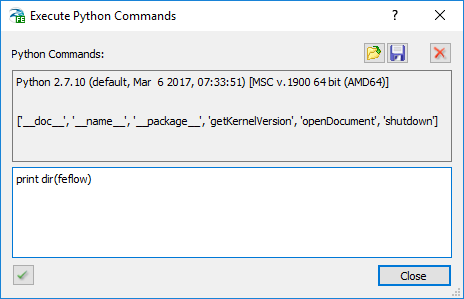
The Execute Python Command dialog allows simple capabilities of a Python console. For example, the user can test parts of the scripts, e.g. functions defined already in the Edit FEFLOW Python Script dialog. The command dialog provides exclusive access the GUI-module (feflow) methods, which includes shutdown, getKernelVersion, openDocument, etc. An example of the operation of the Execute Python Commands dialog is shown below.
# Display available methods

print dir(feflow)

# Load a document

FEM = "..\\femdata\\MyFile.fem"

feflow.openDocument(FEM)

# Close FEFLOW Graphical Interface

feflow.shutdown()
Python Code Samples
Minimum/maximum head distribution
Steps:
-
Load FEM
-
Implementation of
postTimeStepcallback -
Simulation of the FEM
-
Calculated overall minimum/maximum flow head value (per node)
-
Stores the fem file containing minimum/maximum flow head distribution in the User Data section of FEFLOW
Example
__author__ = 'DHI WASY'
# Example: Minimum/maximum head distribution #
import os, sys
# Define location of FEFLOW Python module. NOTE: This path needs to be accroding to the FEFLOW installation and compatible with Python (32 bit or 64 bit)
sys.path.append('C:\\Program Files\\DHI\\2017\\FEFLOW 7.1\\bin64')
import ifm
minDist = -1
maxDist = -1
globals()['headBounds'] = [+sys.float_info.max, -sys.float_info.max]
def postTimeStep(doc):
    sys.stderr.write('Time = ' + str(doc.getAbsoluteSimulationTime()) + os.linesep)
    for node in range(0, doc.getNumberOfNodes()):
        v = doc.getResultsFlowHeadValue(node)
        globals()['headBounds'] = [ min(globals()['headBounds'][0], v), max(globals()['headBounds'][1], v) ]
        doc.setNodalRefDistrValue(minDist, node, min(v, doc.getNodalRefDistrValue(minDist, node)))
        doc.setNodalRefDistrValue(maxDist, node, max(v, doc.getNodalRefDistrValue(maxDist, node)))
doc = ifm.loadDocument('..\\femdata\\test.fem')
if isinstance(doc, bool): exit(-1)
minDist = doc.createNodalRefDistr('minRefD')
maxDist = doc.createNodalRefDistr('maxRefD')
for node in range(0, doc.getNumberOfNodes()):
    v = doc.getResultsFlowHeadValue(node)
    globals()['headBounds'] = [ min(globals()['headBounds'][0], v), max(globals()['headBounds'][1], v) ]
    doc.setNodalRefDistrValue(minDist, node, v)
    doc.setNodalRefDistrValue(maxDist, node, v)
doc.startSimulator()
doc.stopSimulator()
sys.stderr.write('Overall head bounds = ' + str(globals()['headBounds']) + os.linesep)
doc.saveDocument(‘..\\femdata\\test.fem')
Simulation and results file storage
Steps:
-
Input FEM
-
Implementation of
preTimeStepcallback -
Performs simulation of the FEM
-
Stores the result file test.dac at output times 10d, 20d, 30d
Example
__author__ = 'DHI WASY'
# Example: Simulation and results file storage #
import os, sys
# Define location of FEFLOW Python module. NOTE: This path needs to be accroding to the FEFLOW installation and compatible with Python (32 bit or 64 bit)
sys.path.append('C:\\Program Files\\DHI\\2017\\FEFLOW 7.1\\bin64')
import ifm
FEM_FILE = '..\\femdata\\test.fem'
DAC_FILE = '..\\results\\test.dac'
def preTimeStep(doc):
    print >> sys.stderr, doc.getAbsoluteSimulationTime()
doc = ifm.loadDocument(FEM_FILE)
if (not(isinstance(doc, ifm.IfmPyWrapper))):
    print >> sys.stderr, 'Failed to load FEM:' + FEM_FILE sys.exit(-1)
doc.startSimulator(DAC_FILE, 0, [10, 20, 30])
doc.stopSimulator()
Minimum/maximum difference between two results
This script compares resulting flow head values of two DAC files for a certain number of times.
Steps:
-
Loading DAC file A
-
Copying resulting flow head values for certain times to a Python list
-
Loading DAC file B
-
Calculating the difference between resulting flow head values of DAC B with stored values of DAC A
-
Printing minimum and maximum difference for each (given) time
-
Saving a result DAC containing a nodal user distribution per (given) time with the calculated differences
Example
__author__ = 'DHI WASY'

# Example: Minimum/maximum difference between two results #

import os, sys
# Define location of FEFLOW Python module. NOTE: This path needs to be accroding to the FEFLOW installation and compatible with Python (32 bit or 64 bit)
sys.path.append('C:\\Program Files\\DHI\\2017\\FEFLOW 7.1\\bin64')
import ifm

# Definition of source DAC files, result DAC file, and times to be processed

fnDAC_A = '..\\results\\scenario_A.dac'
fnDAC_B = '..\\results\\scenario_B.dac'
fnDAC_Result = '..\\results\\scenario_result.dac'
times = [ 38657, 38958, 40113, 40117]
print 'Timesteps to analyze: ' + str(times)

# Method to find time step by time in the current document
def loadDacTime(d, t):
    dacTimes = d.getTimeSteps()
    for idx in range(0, len(dacTimes)):
        if abs(dacTimes[idx][1]-t) <= sys.float_info.epsilon*2:
            d.loadTimeStep(dacTimes[idx][0])
            return idx print >> sys.stderr, 'Time ' + str(t) + ' not found'
            sys.exit(-1)

# Load first DAC to be processed
doc = ifm.loadDocument(fnDAC_A)
if (not(isinstance(doc, ifm.IfmPyWrapper))):
    print >> sys.stderr, 'Failed to load DAC: ' + fnDAC_A sys.exit(-1)
print 'File: ' + doc.getProblemPath()
np = doc.getNumberOfNodes()
ne = doc.getNumberOfElements()
print ' No of Nodes : ' + str(np)
print ' No of Elements : ' + str(ne)
print ' No of timesteps : ' + str(doc.getNumberOfTimeSteps())

# Get head values of current DAC file for given times
headlist = []
for t in times:
    timestep = loadDacTime(doc, t) print ' Timestep ' + str(timestep) + ' loaded (' + str(doc.getAbsoluteSimulationTime()) + ' d)'
    headValues = []
    for node in range(0, np):
        headValues.append(doc.getResultsFlowHeadValue(node))
        headlist.append(headValues)

# Load second DAC to be processed
doc = ifm.loadDocument(fnDAC_B)
if (not(isinstance(doc, ifm.IfmPyWrapper))):
    print >> sys.stderr, 'Failed to load DAC: ' + fnDAC_B
    sys.exit(-1)
print 'File: ' + doc.getProblemPath()
np = doc.getNumberOfNodes()
ne = doc.getNumberOfElements()
print ' No of Nodes : ' + str(np) print ' No of Elements : ' + str(ne)
print ' No of timesteps : ' + str(doc.getNumberOfTimeSteps())

# Calculate difference between the (loaded) values of first DAC file and the current second DAC file
minDif = []
maxDif = []
resultSteps = []
for ts in range(0, len(times)):
    minDif.append(+sys.float_info.max)
    maxDif.append(-sys.float_info.max)

# Create nodal distribution for current time
refDist = doc.createNodalRefDistr('Time_' + str(times[ts]))
timestep = loadDacTime(doc, times[ts])
resultSteps.append(timestep)
print ' Timestep ' + str(timestep) + ' loaded (' + str(doc.getAbsoluteSimulationTime()) + ' d)'
for node in range(0, np):
    diff = headlist[ts][node] - doc.getResultsFlowHeadValue(node)
    doc.setNodalRefDistrValue(refDist, node, diff)
    if diff > maxDif[ts]:
        maxDif[ts] = diff
    if diff < minDif[ts]:
        minDif[ts] = diff

# Save resulting DAC file containing nodal distributions for the given times
doc.saveDocument(fnDAC_Result, resultSteps)
print '\n\n--------------------\n'
for ts in range(0, len(times)):
    print 'Head diff time ' + str(times[ts]) + ' d: min = ' + str(minDif[ts]) + ' max = ' + str(maxDif[ts])
Controlling boundary conditions
Steps:
-
Load FEM file plume_multipow.fem
-
Simulation of FEM writing reference DAC (uncontrolled, well BC rate 0 qm/d at node 694 and 1005)
-
Reload FEM file
-
Simulation of FEM with controlled wells (well activation by mass concentration thresholds at certain nodes, well BC rate 5000 qm/d at node 694 and 1005)
-
Store result DAC (controlled)
-
Include a time-dependent reference distribution
-
Difference between reference mass concentration and controlled mass concentration
Example
__author__ = 'DHI WASY'
# Example: Controlling boundary conditions #
import os, sys, math
# Define location of FEFLOW Python module. NOTE: This path needs to be accroding to the FEFLOW installation and compatible with Python (32 bit or 64 bit)
sys.path.append('C:\\Program Files\\DHI\\2017\\FEFLOW 7.1\\bin64')
import ifm
# Definition of source DAC files, result DAC file, and times to be processed
fnFEM = '..\\femdata\\plume_multipow.fem'
fnDAC_Ref = '..\\results\\plume_multipow_Reference.dac'
fnDAC_Control = '..\\results\\plume_multipow_Result.dac'
refDistName = 'WellControl'
# Times used for output times
Output = range(0, 501, 1)
# Reference mass values per output time
massRef = {}
# Control = false: reference simulation
doControl = False
# List for controlling wells
ctrlList = {}
# Nodal, ref dist for Ref-Solution - Control-Solution
refDistMass = -1
def postTimeStep(d):
    t = int(math.ceil(d.getAbsoluteSimulationTime()))
    if doControl:
        # controlled
        for node in range(0, d.getNumberOfNodes()):
            d.setNodalRefDistrValue(refDistMass, node, massRef[t][node] - d.getResultsTransportMassValue(node))
    else:
        # reference
        massRef[t] = []
        for node in range(0, d.getNumberOfNodes()):
            massRef[t].append(d.getResultsTransportMassValue(node))
def preTimeStep(d):
    if not(doControl):
        return
    massCon = float(0)
    for node in ctrlList[694]:
        massCon = massCon + d.getResultsTransportMassValue(node)
    massCon = massCon / len(ctrlList[694])
    # print >> sys.stderr, 'Well 694: avg = ' + str(massCon) bcData = d.getBcFlowData(694-1)
    if massCon > 30 and bcData.getValues()[0] > sys.stderr, 'Activate Well 694: ' + str(d.getAbsoluteSimulationTime())
        bcData.putValues([5000])
        d.setBcFlowData(694-1, bcData)
    massCon = float(0)
    for node in ctrlList[1005]:
        massC2 = d.getResultsTransportMassValue(node)
        if massC2 > massCon:
            massCon = massC2
    bcData = d.getBcFlowData(1005-1)
    if massCon > 45 and bcData.getValues()[0] > sys.stderr, 'Activate Well 1005: ' + str(d.getAbsoluteSimulationTime())
        bcData.putValues([5000])
        d.setBcFlowData(1005-1, bcData)
    massCon = float(0)
    for node in ctrlList[593]:
        massCon = massCon + d.getResultsTransportMassValue(node)
# Load FEM to be processed
doc = ifm.loadDocument(fnFEM)
if (not(isinstance(doc, ifm.IfmPyWrapper))):
    print >> sys.stderr, 'Failed to FEM: ' + fnFEM sys.exit(-1)
print 'File: ' + doc.getProblemPath()
np = doc.getNumberOfNodes()
ne = doc.getNumberOfElements()
print ' No of Nodes : ' + str(np) print ' No of Elements : ' + str(ne)
# Process initial step (t=0)
postTimeStep(doc)
# Build un-controlled reference: output day steps
print >> sys.stderr, 'build reference result...'
doc.startSimulator(fnDAC_Ref, 0, timesOutput)
doc.stopSimulator()
# Build set of control data
refDistId = doc.getNodalRefDistrIdByName(refDistName)
if refDistId > sys.stderr, 'RefDist not found: ' + refDistName
    sys.exit(-1)
#
for node in range(0, doc.getNumberOfNodes()):
    wellNode = int(doc.getNodalRefDistrValue(refDistId, node))
    if wellNode > 0:
        if not(ctrlList.has_key(wellNode)):
            ctrlList[wellNode] = [] ctrlList[wellNode].append(node)
# Build controlled result: output day steps
doc = ifm.loadDocument(fnFEM)
if (not(isinstance(doc, ifm.IfmPyWrapper))):
    print >> sys.stderr, 'Failed to FEM: ' + fnFEM
    sys.exit(-1)
print >> sys.stderr, 'build controlled result...'
doControl = True
refDistMass = doc.createNodalRefDistr('MassResult')
doc.enableNodalRefDistrRecording(refDistMass, True)
#
postTimeStep(doc)
doc.startSimulator(fnDAC_Control, 0, timesOutput)
doc.stopSimulator()
Time-dependent result evaluation
Comparison of two DACs. Steps:
-
Loading DAC A
-
Reading transport mass value per node and time
-
Loading DAC B
-
Reading transport mass value per node and time
-
Creation of two time-dependent nodal reference distributions:
-
DAC A values “mass at final time – mass at current time”
-
DAC B values “mass at final time – mass at current time”
-
Writing result DAC
Example
__author__ = 'DHI WASY'
# Example: Time-dependent result evaluation #
import os, sys, math
# Define location of FEFLOW Python module. NOTE: This path needs to be accroding to the FEFLOW installation and compatible with Python (32 bit or 64 bit)
sys.path.append('C:\\Program Files\\DHI\\2017\\FEFLOW 7.1\\bin64')
import ifm
# Definition of source DAC files, result DAC file, and times to be processed
fnDAC_ControlRef = '..\\results\\plume_multipow_Reference.dac'
fnDAC_ControlRes = '..\\results\\plume_multipow_Result.dac'
fnDAC_ControlFinal = '..\\results\\plume_multipow_Final.dac'
refDistName = 'MassDiff'
refDistMassId = -1
resDistMassId = -1
finalMass = []
refMass = {}
buildRefMass = False
def postLoadTimeStep(d, s, t):
    if resDistMassId >= 0:
        for node in range(0, d.getNumberOfNodes()):
            massDiff = doc.getResultsTransportMassValue(node) - finalMass[node]
            d.setNodalRefDistrValue(refDistMassId, node, refMass[t][node])
            d.setNodalRefDistrValue(resDistMassId, node, massDiff)
    else:
        if buildRefMass:
            refDiff = []
            for node in range(0, d.getNumberOfNodes()):
                refDiff.append(doc.getResultsTransportMassValue(node) - finalMass[node])
                refMass[t] = refDiff
# Load Reference DAC to be analyzed
print >> sys.stderr, 'Processing: ' + fnDAC_ControlRef
doc = ifm.loadDocument(fnDAC_ControlRef)
if (not(isinstance(doc, ifm.IfmPyWrapper))):
    print >> sys.stderr, 'Failed to FEM: ' + fnFEM
    sys.exit(-1)
# Load last time step
doc.loadTimeStep(doc.getNumberOfTimeSteps()-1)
# Get mass values of final time step
finalMass = []
for node in range(0, doc.getNumberOfNodes()):
    finalMass.append(doc.getResultsTransportMassValue(node))
# build reference mass
buildRefMass = True
for ts in range(0, doc.getNumberOfTimeSteps()):
    doc.loadTimeStep(ts)
buildRefMass = False
# Load DAC to be analyzed
print >> sys.stderr, 'Processing: ' + fnDAC_ControlRes
doc = ifm.loadDocument(fnDAC_ControlRes)
if (not(isinstance(doc, ifm.IfmPyWrapper))):
    print >> sys.stderr, 'Failed to FEM: ' + fnFEM
    sys.exit(-1)
# Load last time step
doc.loadTimeStep(doc.getNumberOfTimeSteps()-1)
# Get mass values of final time step
finalMass = []
for node in range(0, doc.getNumberOfNodes()):
    finalMass.append(doc.getResultsTransportMassValue(node))
# Create result ref dist (time-dependent)
refDistMassId = doc.createNodalRefDistr(refDistName + '_Reference')
doc.enableNodalRefDistrRecording(refDistMassId, True)
resDistMassId = doc.createNodalRefDistr(refDistName + '_Result')
doc.enableNodalRefDistrRecording(resDistMassId, True)
# Store result DAC
print >> sys.stderr, 'Writing: ' + fnDAC_ControlFinal
doc.saveDocument(fnDAC_ControlFinal)
Processing minimum/maximum head distribution with ESRI ArcGIS
Based on the previous example the current script not only creates a resulting DAC file, but stores the results of all matching time steps in an ESRI ArcGIS database for further processing. Therefore, an ESRI ArcGIS installation (Version >= 10.1) is required. The script has to be executed from the ArcGIS Python console!
Steps:
-
Using ArcGIS Python console
-
Loading DACs/calculating differences
-
Storing results in Personal Geodatabase using ESRI ArcGIS Python integration
Example
__author__ = 'DHI WASY'
# Example: Processing minimum/maximum head distribution with ESRI ArcGIS #
import os, sys
# Define location of FEFLOW Python module. NOTE: This path needs to be accroding to the FEFLOW installation and compatible with Python (32 bit or 64 bit)
# This example requires a 32-bit version of FEFLOW in order to be compitable with ArcGIS
sys.path.append('C:\\Program Files\\DHI\\2017\\FEFLOW 7.1\\bin32')
import ifm

# Initialize FEFLOW kernel with licence server 'mylicserv'
ifm.forceLicense('feflow:server=mylicserv')

# Definition of source DAC files
fnDAC_A = '..\\results\\Variante_A.dac'
fnDAC_B = '..\\results\\Variante_B.dac'

# Import ESRI ArcGIS components
import arcpy
ws = '..\\import+export\\DemoDatabase.mdb'
layer = 'HeadResults'
fc = ws + '\\' + layer
print 'Target ESRI Feature Class: ' + fc

# Method to find time-step by time in the current document
def loadDacTime(d, t):
    dacTimes = d.getTimeSteps()
    for idx in range(0, len(dacTimes)):
        if abs(dacTimes[idx][1]-t) <= sys.float_info.epsilon*2:
            d.loadTimeStep(dacTimes[idx][0])
            return idx
    print >> sys.stderr, 'Time ' + str(t) + ' not found'
    sys.exit(-1)

# Build list of req. times (all times which exist in both DACs)
doc = ifm.loadDocument(fnDAC_A)
if (not(isinstance(doc, ifm.IfmPyWrapper))):
    print >> sys.stderr, 'Failed to load DAC: ' + fnDAC_A
    sys.exit(-1)
times_A = set()
for ts in doc.getTimeSteps():
    times_A.add(ts[1])
doc = ifm.loadDocument(fnDAC_B)
if (not(isinstance(doc, ifm.IfmPyWrapper))):
    print >> sys.stderr, 'Failed to load DAC: ' + fnDAC_A
    sys.exit(-1)
times_B = set()
for ts in doc.getTimeSteps():
    times_B.add(ts[1])

times = []
for t in times_A.intersection(times_B):
    times.append(t)
times.sort()

# (Re-)load first DAC to be processed
doc = ifm.loadDocument(fnDAC_A)
if (not(isinstance(doc, ifm.IfmPyWrapper))):
    print >> sys.stderr, 'Failed to load DAC: ' + fnDAC_A
    sys.exit(-1)
print 'Number of times to analyze: ' + str(len(times)) print 'File: ' + doc.getProblemPath()
np = doc.getNumberOfNodes()
ne = doc.getNumberOfElements()
print ' No of Nodes : ' + str(np) print ' No of Elements : ' + str(ne)
print ' No of timesteps : ' + str(doc.getNumberOfTimeSteps())

# Get head values of current DAC file for given times
headlist = []
for t in times:
    timestep = loadDacTime(doc, t)
    print ' Timestep ' + str(timestep) + ' loaded (' + str(doc.getAbsoluteSimulationTime()) + ' d)'
    headValues = []
    for node in range(0, np):
        headValues.append(doc.getResultsFlowHeadValue(node))
        headlist.append(headValues)

# Load second DAC to be processed
doc = ifm.loadDocument(fnDAC_B)
if (not(isinstance(doc, ifm.IfmPyWrapper))):
    print >> sys.stderr, 'Failed to load DAC: ' + fnDAC_B sys.exit(-1); print 'File: ' + doc.getProblemPath()
np = doc.getNumberOfNodes()
np_2d = doc.getNumberOfNodesPerSlice()
ne = doc.getNumberOfElements()
print ' No of Nodes : ' + str(np) print ' No of Nodes per Slice : ' + str(np) print ' No of Elements : ' + str(ne) print ' No of timesteps : ' + str(doc.getNumberOfTimeSteps())

# Create insert cursor for ESRI ArcGIS database
edit = arcpy.da.Editor(ws)
edit.startEditing(False, True)
edit.startOperation()
cur = arcpy.da.InsertCursor(fc, ('SHAPE', 'Node', 'Slice', 'SimTime', 'Head'))

# Calculate difference between the (loaded) values of first DAC file
# and the current second DAC file
minDif = []
maxDif = []
resultSteps = []
resultTimes = []
for ts in range(0, len(times)):
    minDif.append(+sys.float_info.max)
    maxDif.append(-sys.float_info.max)
    timestep = loadDacTime(doc, times[ts])
    print ' Timestep ' + str(timestep) + ' loaded (' + str(doc.getAbsoluteSimulationTime()) + ' d)'
    t = doc.getAbsoluteSimulationTime()
    resultTimes.append(t)
    resultSteps.append(timestep)
    for node in range(0, np):
        diff = headlist[ts][node] - doc.getResultsFlowHeadValue(node)

# Append values to ESRI AcGIS database
cur.insertRow([(doc.getX_d(node), doc.getY_d(node), 0, diff), node+1, (node/np_2d)+1, t, diff])
if diff > maxDif[ts]:
    maxDif[ts] = diff
if diff < minDif[ts]:
    minDif[ts] = diff

# Store edits of ArcGIS database
edit.stopOperation()
edit.stopEditing(True)
print '\n\n--------------------\n'
for ts in range(0, len(resultTimes)):
    print 'Head diff time ' + str(resultTimes[ts]) + ' d: min = ' + str(minDif[ts]) + ' max = ' + str(maxDif[ts])