Job Automator Project Template
You can find the official source for the template here:
GitHub – JobAutomator Template
What this template provides
- Background service (Windows Service host by default) that runs every
ExecutionIntervalSeconds - Trigger execution engine (
AutomationExecutor) that evaluates conditions and returns dynamic task parameters - Host-group–aware job creation using a routing map (e.g.,
Minion,Titan, …) - Scalar writes for:
…/<HostGroup>/Last Job Id…/<HostGroup>/<TriggerId>/Is Met(or…/<HostGroup>/Is Metfor “all-AND” mode)
- Cached automations with freshness check via the Automations API
/api/automations/version - Token management (username/password -> access + refresh token) for calling external Domain Services APIs
- Serilog logging (console + rolling file)
Prerequisites
- Auth Server running and reachable (for token issuance) See Authorization Server Project Template.
- Jobs Automations Web API reachable (for listing automations & version endpoint) See Jobs Automations Web API Project Template.
Configuration
All settings live in appsettings.json (environment overrides supported).
Example
{
  "Authentication": {
    "Url": "http://DS-DEV1:81",
    "UserName": "demo_admin_to_be_deleted",
    "Password": "webapi"
  },
  "ConnectionStrings": {
    "Scalars": "http://DS-DEV1:82",
    "Automations": "http://DS-DEV1:82",
    "Jobs": "http://DS-DEV1:82"
  },
  "JobAutomator": {
    "ExecutionIntervalSeconds": 10.0,
    "LogTriggerStatus": false
  },
  "JobHostGroupRouting": {
    "DefaultKey": "wf-jobs-Minion",
    "ContainsMap": {
      "minion": "wf-jobs-Minion",
      "titan":  "wf-jobs-Titan"
    }
  },
  "Cache": {
    "LocalVersionFilePath": "C:\\Services\\JobAutomator\\Automations\\Version"
  },
  "Serilog": {
    "Using": ["Serilog.Sinks.Console","Serilog.Sinks.File"],
    "MinimumLevel": "Debug",
    "WriteTo": [
      { "Name": "Console" },
      {
        "Name": "File",
        "Args": {
          "path": "C:\\Services\\JobAutomator\\Log\\JobAutomation-.log",
          "rollingInterval": "Day",
          "retainedFileCountLimit": 30
        }
      }
    ]
  }
}
Key settings
- Authentication Base URL of Auth Server and credentials used by the automator to obtain/refresh JWTs.
- ConnectionStrings
These are base URLs for the Domain Services web APIs (the template uses DS providers that call HTTP endpoints, not direct DB connections):
Automations: e.g.,http://.../api/automationsScalars: e.g.,http://.../api/scalarsJobs: e.g.,http://.../api/jobsand…/api/tasks
- JobAutomator
ExecutionIntervalSeconds: poll intervalLogTriggerStatus: log a line for each automation with the trigger result
- JobHostGroupRouting
DefaultKey: fallback service key (must match a Jobs Web API service key)ContainsMap: maps substrings inHostGroup(from the automation JSON) to service keys used by Jobs Web API, e.g."minion" -> "wf-jobs-Minion"
- Cache
LocalVersionFilePath: path to a localversion.txtthat mirrors the server-side/api/automations/versiontimestamp (used by the caching repo to invalidate)- Serilog
- Console + rolling file out-of-the-box
Tip: Store secrets via environment variables or user-secrets. Credentials here are for development only.
How it works
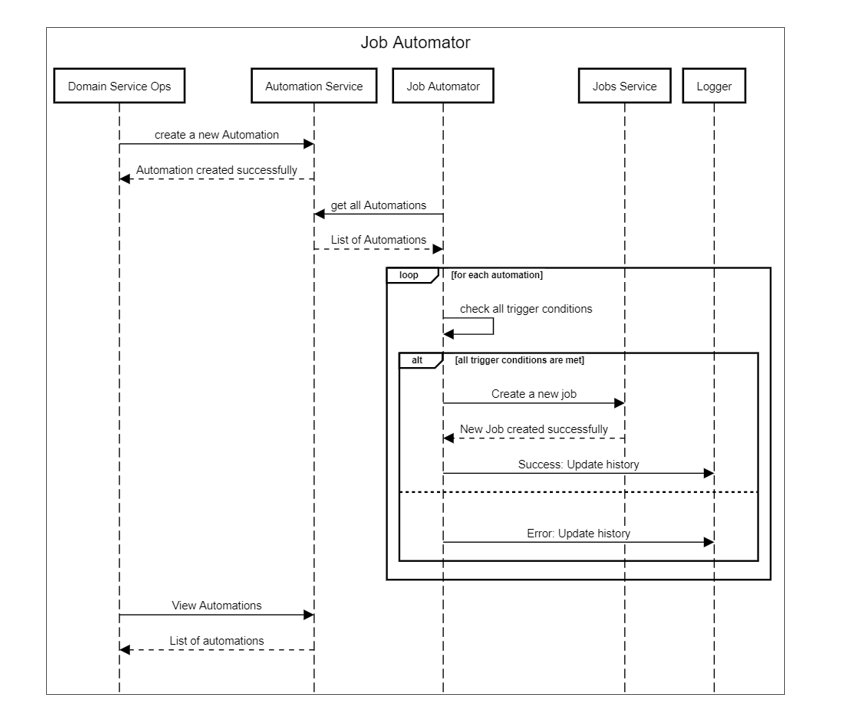
Where things live (at a glance)
- Service host / lifecycle
AutomatorBackgroundService.StartAsync()-> starts timers and token refreshAutomatorBackgroundService.StopAsync()-> stops timers
- Main loop & decisions
JobAutomator.Start()/Stop()/ExecutionTimerElapsed(...)AutomationExecutor.Execute(...)(trigger evaluation & “Is Met” scalars)
- Job routing & submission
JobServiceFactory.GetJobService(hostGroup)(maps host group -> jobs service key)JobAutomator.CreateNewJob(...)(constructs & enqueues the job)
- Last job state (duplicate-prevent)
JobAutomator.ReadLastJobIdScalar(...)JobAutomator.WriteLastJobIdScalar(...)
- HTTP providers, token, and caching
DependencyFactory(builds DS HTTP providers)AccessTokenProvider(auth + refresh)CachingAutomationRepository(server-driven cache invalidation)
1) Dependency wiring (HTTP-based DS providers)
DependencyFactory builds the HTTP-based providers with circuit breakers/retries:
- Automations:
DHI.Services.Provider.DS.AutomationRepository({Automations}/api/automations) - Scalars:
DHI.Services.Provider.DS.ScalarRepository({Scalars}/api/scalars/wf-scalars) - Jobs:
DHI.Services.Provider.DS.JobRepository({Jobs}/api/jobs/{serviceKey}) - Tasks:
DHI.Services.Provider.DS.CodeWorkflowRepository({Jobs}/api/tasks/wf-tasks)
It also constructs:
AccessTokenProvider: handles login + refresh token rotation against Auth Server.CachingAutomationRepository: wraps the HTTP repo with in-memory cache and server-driven invalidation via/api/automations/version.
2) Caching & freshness
CachingAutomationRepository caches GetAll, Get(id), GetByGroup(...), and ContainsGroup(...).
On every read it compares:
- Server timestamp =
GET {Automations}/api/automations/version(requires Bearer token) - Local timestamp =
Cache.LocalVersionFilePath\version.txt
If server > local, it clears cache and rewrites local timestamp.
Note: In this template, only
LocalVersionFilePathis used fromCache; TTLs are fixed internally.
3) Execution loop
JobAutomator runs every ExecutionIntervalSeconds:
- Pull all automations (
AutomationService.GetAll()). - Skip if
IsEnabled = false. - Evaluate with
AutomationExecutor:- Two modes
- All-AND (no
Conditionalstring): every enabled trigger must pass. - Expression mode (
Conditional: e.g.,A && (B || C)), whereA/B/Care trigger IDs.
- All-AND (no
- Each trigger returns
AutomationResultwith optional dynamic task parameters. - Writes trigger “Is Met” scalars for observability.
- Two modes
- If met:
- Read
…/<HostGroup>/Last Job Idscalar (if any). - If last job is Pending/Starting/InProgress, do not enqueue again.
- Else create job:
TaskIdfrom the automation- Parameters = automation’s
TaskParameterstrimmed + dynamic params from triggers HostGroup,Priority,Tagcopied across
- Write
…/<HostGroup>/Last Job Idscalar to the new job id.
- Read
Scalar paths written by the automator
- Trigger result:
Job Automator/<MachineName>/<AutomationId>/<HostGroup>[/<TriggerId>]/Is Met->bool - Last job id:
Job Automator/<MachineName>/<AutomationId>/<HostGroup>/Last Job Id->Guid
4) Host-group routing
JobServiceFactory resolves which Jobs Web API service key to use from an automation’s HostGroup:
- Check
ContainsMap(substring match onhostGroup) -> map to a service key, e.g."minion" -> "wf-jobs-Minion". - If unmatched, fall back to
DefaultKey. - Registers one
JobServiceper service key, backed by{Jobs}/api/jobs/{serviceKey}.
This mirrors how the Automations Web API reads from multiple host job databases (it registers all and composes for read). Here, the automator writes to the single host selected per automation.
Triggers & dynamic parameters
Automations include a TriggerCondition with a list of $typed triggers (e.g., SqlTrigger).
At runtime, the automator deserializes trigger instances (you must reference their assemblies) and calls Execute():
Execute()returnsAutomationResult.Met(Dictionary<string,string> parameters)orNotMet().- Returned
parametersare merged (and trimmed to the workflow’s expected keys) before job creation.
Example: SqlTrigger (built-in) supports Postgres, SQL Server/Azure SQL, SQLite, MySQL.
For bespoke logic, add your own trigger class to a referenced assembly and point $type at it in your automation JSON.
Running the Job Automator
Windows Service (default)
The template configures a Windows Service host:
applicationBuilder.Services.AddWindowsService(options => {
  options.ServiceName = AutomatorBackgroundService.ServiceName; // "DHI Job Automator"
});
- Build & install your service (e.g., with
sc.exeor your deploy scripts). - Logs go to console (when run interactively) and to the Serilog file sink configured in
appsettings.json.
Console / container
If you prefer a console app or container:
- Remove/guard the
AddWindowsService(...)call with environment conditions. - Run the host normally; health is in logs.
Deploy & Install (Windows Service or Container)
The template runs best as a Windows Service (already wired via AddWindowsService). You can also run it as a console or in a container.
0) Prereqs
- .NET 8 Runtime (for framework-dependent publish) or publish self-contained.
- A service account with:
- Read access to the app folder and
appsettings*.json - Write access to:
Cache.LocalVersionFilePathdirectory (e.g.,C:\Services\JobAutomator\Automations\Version)- Serilog log folder (e.g.,
C:\Services\JobAutomator\Log\)
- Outbound HTTPS/HTTP to your DS endpoints (
Authentication.Url,ConnectionStrings:Automations/Scalars/Jobs)
- Read access to the app folder and
- Auth Server + DS Web APIs reachable and configured.
1) Publish the app
From the solution root:
# Framework-dependent (requires .NET 8 runtime on the server)
dotnet publish JobAutomator.csproj -c Release -o .\publish\win-x64

# OR self-contained (no runtime needed on the server)
dotnet publish JobAutomator.csproj -c Release -r win-x64 --self-contained true -p:PublishSingleFile=true -o .\publish\win-x64-sc
Copy the output to the server, e.g. C:\Services\JobAutomator\app\.
Put your environment config next to the exe:
appsettings.json(shared)appsettings.Prod.json(overrides)- Logs:
C:\Services\JobAutomator\Log\ - Cache version file directory:
C:\Services\JobAutomator\Automations\Version\
2) Configure settings
Edit appsettings.json (or appsettings.Prod.json) on the server:
Authentication:Url/UserName/PasswordConnectionStrings:Automations/Scalars/Jobs-> base URLs of your DS Web APIJobAutomator:ExecutionIntervalSecondsJobHostGroupRouting-> ensure keys (e.g.,wf-jobs-Minion) match your Jobs Web API service keysCache:LocalVersionFilePath-> a writable folder path (the template writesversion.txtthere)
3) Install as a Windows Service
The binary path must include the full path to the exe. If you use
appsettings.Prod.json, pass--Environment Prodor set an env var.
PowerShell (recommended)
$svcName = "DHI Job Automator"
$exePath = "C:\Services\JobAutomator\app\JobAutomator.exe"
$bin    = "`"$exePath`" --Environment Prod"

New-Service -Name $svcName `
  -BinaryPathName $bin `
  -DisplayName $svcName `
  -StartupType Automatic `
  -Description "Polls Automations, evaluates triggers, creates jobs, writes scalars."

# Set recovery (restart on failure)
sc.exe failure  "DHI Job Automator" reset= 86400 actions= restart/5000/restart/5000/restart/5000 | Out-Null
sc.exe failureflag "DHI Job Automator" 1 | Out-Null

# Start it
Start-Service "DHI Job Automator"
Using sc.exe directly
sc create "DHI Job Automator" binPath= "\"C:\Services\JobAutomator\app\JobAutomator.exe\" --Environment Prod" start= auto
sc description "DHI Job Automator" "Polls Automations, evaluates triggers, creates jobs, writes scalars."
sc start "DHI Job Automator"
Tip: If you run under a custom account, grant “Log on as a service” and NTFS Modify on
Log\and theCache.LocalVersionFilePathdirectory.
4) Verify
Get-Service "DHI Job Automator"->Running- Check logs at
C:\Services\JobAutomator\Log\JobAutomation-*.log- You should see:
- “Authenticating… / Token refreshed”
- “Execution timer started.”
- Lines about automations count, trigger status (enable
JobAutomator:LogTriggerStatus=truefor detail)
- You should see:
5) Update (in-place)
Stop-Service "DHI Job Automator"
# Replace files in C:\Services\JobAutomator\app\ with new publish output
Start-Service "DHI Job Automator"
If you change the service name or move paths, uninstall/reinstall (below).
6) Uninstall
Stop-Service "DHI Job Automator"
sc.exe delete "DHI Job Automator"
Running as a Console (no service)
For quick testing:
cd C:\Services\JobAutomator\app
.\JobAutomator.exe --Environment Prod
Press Ctrl+C to stop.
Container deployment (optional)
If you prefer to run the automator in a container:
-
Guard the Windows service registration (optional): if you keep
AddWindowsService, run on a Windows container; for Linux containers, run as a plain console host (you can conditionally add it only on Windows). -
Dockerfile (Linux)
FROM mcr.microsoft.com/dotnet/runtime:8.0
WORKDIR /app
COPY publish/ ./
# Environment overrides (examples):
# ENV ASPNETCORE_ENVIRONMENT=Prod \
#     Authentication__Url=https://auth.example.com \
#     ConnectionStrings__Automations=https://ds.example.com \
#     ConnectionStrings__Scalars=https://ds.example.com \
#     ConnectionStrings__Jobs=https://ds.example.com
ENTRYPOINT ["./JobAutomator"]
- Run
docker run -d --name job-automator \
  -e ASPNETCORE_ENVIRONMENT=Prod \
  -e Authentication__Url=https://auth.example.com \
  -e Authentication__UserName=automator \
  -e Authentication__Password=*** \
  -e ConnectionStrings__Automations=https://ds.example.com \
  -e ConnectionStrings__Scalars=https://ds.example.com \
  -e ConnectionStrings__Jobs=https://ds.example.com \
  -v C:/Services/JobAutomator/Log:/app/Log \
  -v C:/Services/JobAutomator/Automations/Version:/app/Version \
  yourrepo/job-automator:latest
Mount volumes for logs and for
Cache.LocalVersionFilePath(or override the path to a container-local folder).
Common Pitfalls
- 401/403 to DS APIs -> wrong
Authenticationconfig, user lacks roles, or clock skew; verify logs show “Token refreshed…”. - No jobs created -> trigger not met; enable
JobAutomator.LogTriggerStatus=trueand check “Is Met” scalars; also ensureHostGroupmaps to a registered service key. - Cache never refreshes ->
Cache.LocalVersionFilePathnot writable or Automations API/api/automations/versionunreachable. - TLS issues -> use trusted certs on DS endpoints; install root CA on the server if using internal PKI.
Related
- Auth setup: Authorization Server Project Template
- Backend API: Jobs Automations Web API Project Template
- Architecture: Job Automator – Architecture Overview
Minimal wiring checklist
- Auth Server reachable at
Authentication.Urlwith valid credentials. - Jobs/Scalars/Automations base URLs set under
ConnectionStrings. - Job service keys exist in your Jobs Web API (e.g.,
wf-jobs-Minion,wf-jobs-Titan) and your routing maps to them. - Automations contain
HostGroupvalues that match your routing. - Automations Web API exposes
/api/automations/version(used by cache freshness).
Troubleshooting
- 401/403: Auth URL or credentials wrong; token not attached; clock skew; or missing roles/policies on the target APIs.
- Jobs never enqueue
- Trigger not met (enable
JobAutomator.LogTriggerStatus = true). HostGroupnot matching any routing rule -> falls back to default (check logs).
- Trigger not met (enable
- Cache never refreshes
- Verify Automations API
GET /api/automations/versionreturns an ISO-8601 timestamp. - Check
Cache.LocalVersionFilePathis writable.
- Verify Automations API
- Custom trigger not executing
- Ensure the assembly containing the trigger type is referenced and
$typein JSON is fully qualified.
- Ensure the assembly containing the trigger type is referenced and
Related Documentation
- Job Automator – Architecture Overview
- Jobs Automations Web API Project Template
- Authorization Server Project Template