Reusable Assets and Components
When designing new components or assets, a part of the design phase requires that the existing asset catalogue is investigated to see if components or assets solving the task or part of the task is already present and can be used in for the new development task.
- Asset
A software asset refers to any software-related item that holds value for DHI like a licensed product, a development tool or a software service. -
Component
A software component is a modular, reusable, and self-contained unit of software that encapsulates a specific functionality or set of related functions.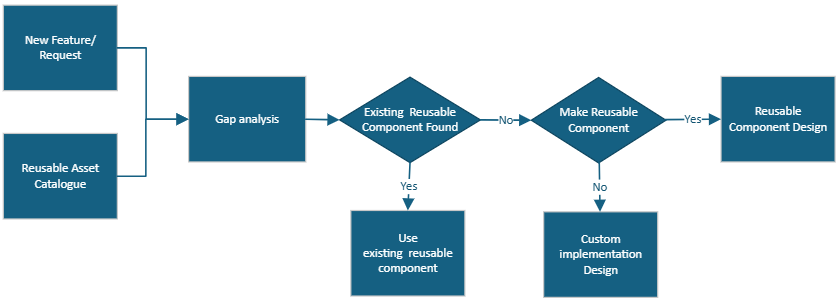
The diagram shows the process flow to follow when using and developing reusable assets and components.
New Feature/Request
Having clear requirements of a new feature, is key for being able to plan and design a new component or asset.
It is recommended that the requirements specification is made as a document based on the requirements specification template found on SharePoint.
Asset Catalogue
The Asset Catalogue is a catalogue (Excel spreadsheet) of reusable assets and components to be shared throughout DHI.
Use the catalog for finding existing components satisfying feature requirements.
Being reusable means that an asset or a component will/can:
- Be used in more than three projects
- Saves time when being used
- Provides higher quality
- Known commitment status (part of commercial engagement or LCM)
- Active technology stack, not End of Life
- Require documentation
- Have an owner
The asset catalogue/spreadsheet can be found here
AI Generated Asset Catalogue Planned
Note that the assets catalogue in the spreadsheet is not being maintained as an AI generated asset catalogue is planned.
Asset Catalogue Content
The asset catalogue contains the following content/information.
- Asset ID
Asset id in the form - Name
Name of the asset. - Description
Short description describing the resuable asset and what it does. - Category
The category of the asset. (Web UI, Backend, Executable, Web API, Service). - Source Data Type
The type of the input that that the reusable asset is using as input or requires. - Output Data Type
The type of the output data that the reusable asset produces. - Source Product/Project
The product or project that the reusable asset was initially made for or is part of. - API/Framework
The target framework that the reusable component is using (.NET Standard 2.0, .NET Framework 4.7.2, .NET Framework 4.8, .NET 8.0, .NET 10.0, Python, React) - Deployment Type
The way that the resuable component is deployed (NPM, NuGet package, Python Library, Repository, File share). - Location
Link to the location of the reusable componnet. - License
The type of license required if any. - Documentation
Link to documentation describing the reusable component. - Repository
Repository where the reusable component can be found. - Owner
Initials of the owner or contact of the reusable component. - Used by
List of projects or products having experience using the reusable component.
Gap Analysis
The gap analysis identifies the gaps like,
- Missing features
- Performance deficiencies
- Incomplete functionalities
between the existing asset features compared to the requirements of the new asset or component.
Use the gap analysis framework template found on SharePoint.
Existing Reusable Component Found?
In case the Gab Analysis identifies an existing reusable component in the Reusable Asset Catalogue satisfying the requirements, this component should be used. In case no existing reusable component was found, it should be investigated if is makes sense to “Make a Reusable Component”.
Make Reusable Component?
A part of the process is to decide if a new component to be made should be developed as a reusable components to be shared among projects.
To make that decision, the asset/component should meet criteria described in the Asset Catalog above.