FAQ
This section contains answers to Frequently Asked Questions.
PostgreSQL: Where is the password stored
The PostgreSQL password is not stored and not accessible unless the user of pgAdmin decides to accept storing the password during login.
In case the password is stored, it can be found in the file pgpass.conf in the user data folder.
%APPDATA%\postgresql\pgpass.conf
Read more about the pgpass.conf file on postgresql.org.
PostgreSQL: I cannot login after installating MIKE OPERATIONS 2023
With MIKE OPERATIONS 2023, the database user login has changed, so that the existing database users cannot login anymore.
Due to security concerns, database user access has chnaged, to support disabling, removing and updating database users.
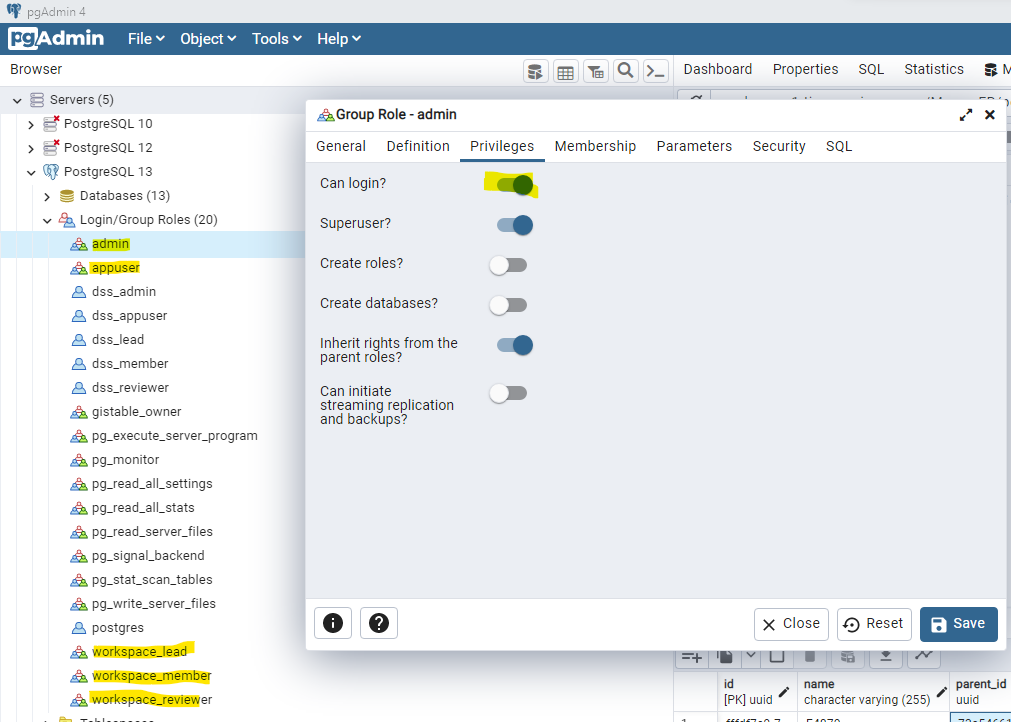
This means that existing database users (admin, appuser, workspace_lead, workspace_memmber and workspace_reviewer) has been changed to database group roles. so that it is not allowed to use these users for database login.
New database login users (dss_admin, dss_appuser, dss_lead, dss_memmber and dss_reviewer) has been added. The new users are members of the group roles. This means that database login users can be changed, removed and new users can be added.
It is highly recommended that database users are only allowed to access data required by the user.
If the MIKE OPERATIONS database is not placed in an highly secured environment, it is vital to data security that database login users and passwords are maintained by administrators and that default passwords are changed to custom passwords.
I'm using both MIKE OPERATIONS 2023 and previous versions of MIKE OPERATIONS.
In case you are storing databases for different versions of MIKE OPERATIONS on the same database server, you should enable database login for the old database users (admin, appuser, workspace_lead, workspace_memmber and workspace_reviewer) in pgAdmin.
I'm using MIKE OPERATIONS Web
Update the connection string so that it contains database user name and password for a user satisfying the database access restructions needed.
Create your own database user or use one of the existing users (dss_admin, dss_appuser, dss_lead, dss_memmber and dss_reviewer).
The connection string below shows how to specify the username and password.
"host=localhost;port=5432;database=final_Napa;username=[username];password=[password]"
I'm using DHI Domain Services on a MIKE OPERATIONS database (MCLite or MC providers)
The default database user of the Domain Services Provider MCLite, is admin.
Update the connection string so that it contains database user name and password for a user satisfying the database access restructions needed.
Create your own database user or use one of the existing users (dss_admin, dss_appuser, dss_lead, dss_memmber and dss_reviewer).
The connection string below shows how to specify the username and password.
"host=localhost;port=5432;database=final_Napa;username=[username];password=[password]"