Overview
Introduction
The Domain Services Workflow functionality allows execution of workflows based on building blocks orchestrated in a structured fashion.
The core building blocks in the workflows are called Actions and there are currently over 100 Actions allowing for the most common tasks in the operational systems buit and deployed in DHI. Thee range from simple Actions like CopyFile which simply wraps standard .NET functionalty enriching it with comprehensive logging to Actions like BuildTimeseries that features advanced automated time series manipulation.
There are several ways that workflows can be executed. If integrated into a web solution, then the Domain Services offers a Web API for doing on-demand execution of workflows, but the the Web API can also be invoked in an automated fashion allowing scheduled execution of workflows.
Components and Interactions
The workflow components and their interactions are illustrated in below figure. The workflow functionality is invoked through the Job Orchestrator which is documented here (Job Orchestrator)
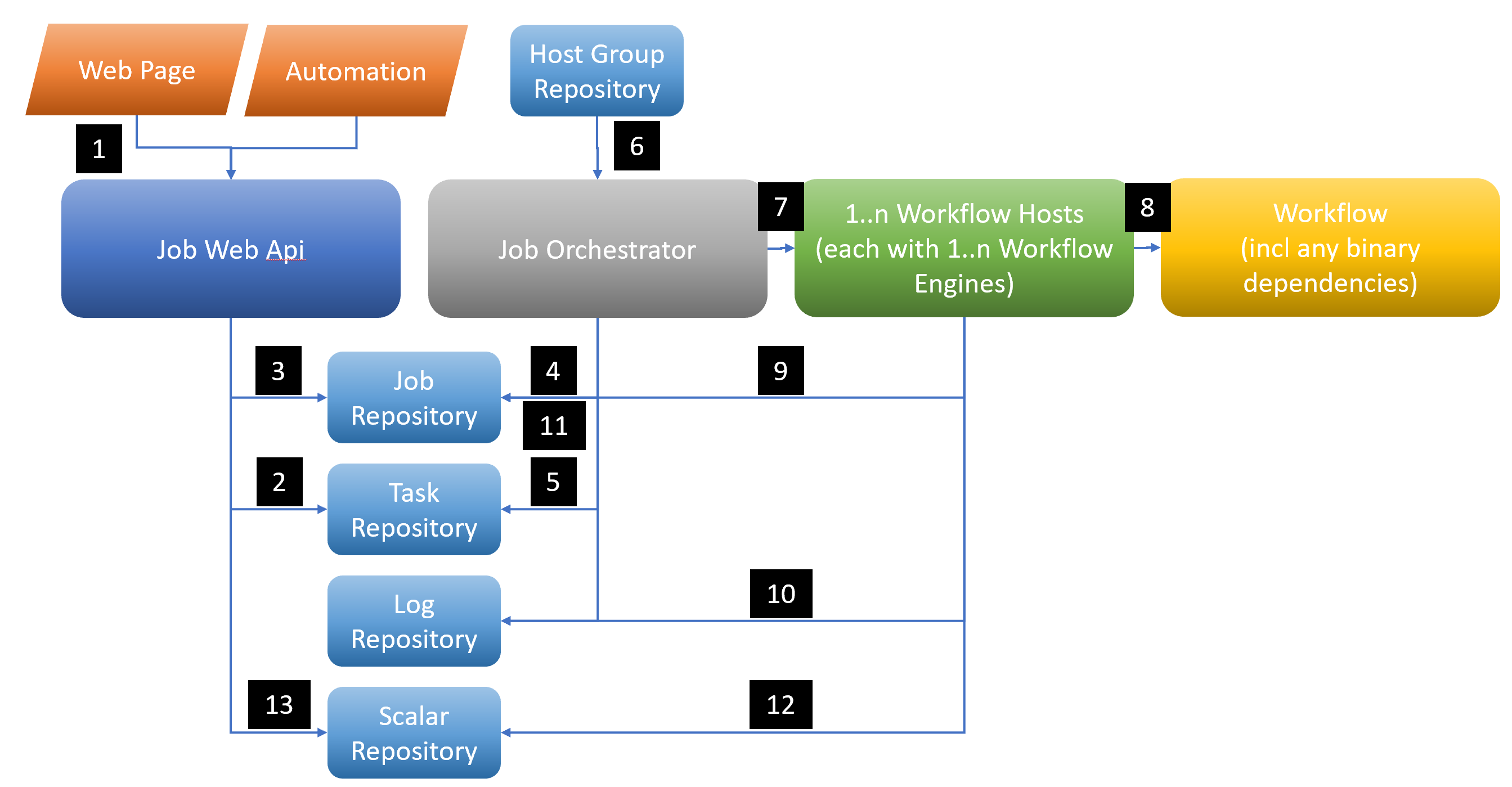
The following use case illustrates the execution of a workflow by invocation from a web page
- The user presses an execute button on the web page or the workflow is started by the Job Automater, which issues a request to execute a workflow to the Jobs Web Api.
- The
Jobs Web Apiqueries theTask Repositoryto ensure the workflow is valid and any parameters sent matches what the workflow accepts. This step is optional and if no task repository is injected in the JobService, then this will be omitted. - The request for a job is stored in the
Jobs Repositorywith a state of Pending - The
Job Orchestratormonitors theJobs Repositorywhere theWeb APIstored the job - When it detects the new job, it ensures the validity of the request if a task repositry has been injected
- In parallel to this. A
Workflow Hostregister its availability with the Job Orchestrator via Signal R in an internal host register in the Job Orchestrator. The information registered includes which host group the particular host belongs to. The host group a host belongs to is configured on the host itself in a json file. - The Job Orchestrator will identify a
Workflow Hostthat has capacity and priority and send the request for execution is sent to the host - The
Workflow Hostthen initiates theWorkflow Engineexecution based on the parameters sent through using the binaries on the host - The
Workflow Engineupdates job status, progress and heart beat - As well as handles logging from the workflow execution.
- The
Job Orchestratormonitors heart beats on the jobs and potentially reacts to abnormal situations in case contact has been lost with hosts - Parallel to this, the
Workflow Hostoptionally keeps scalars updated with current status information - And so does the
Job Orchestrator
Setting up the Web Apis, Job Orchestrator and Workflow Host is easiest done by installing the Domain Services VS Project Templates found through Software Centre. This sets up the scaffolding and makes it easy to implement the choices of repositories and configuration of these.
When the Job Orchestrator detects a pending job, it cross references whats running on hosts already. The new job execution will be delegated to host, optionally within a hostgroup, with the highest priority that has available job execution slots. If no host has any available slots, then the job will remain pending until a job in progress ends, which will free up a slot.
Each environment (e.g. develop, qa, production) requires its own Job Orchestrator. This component can be hosted as a container or run as a Windows service.
Each server to be running workflows requires the Workflow Host to be installed, and running as a Service. It also requires that the Workflow Engine be deployed to that server. The Workflow Host invokes the Workflow Engine to run a workflow when signalled by the Job Orchestrator.
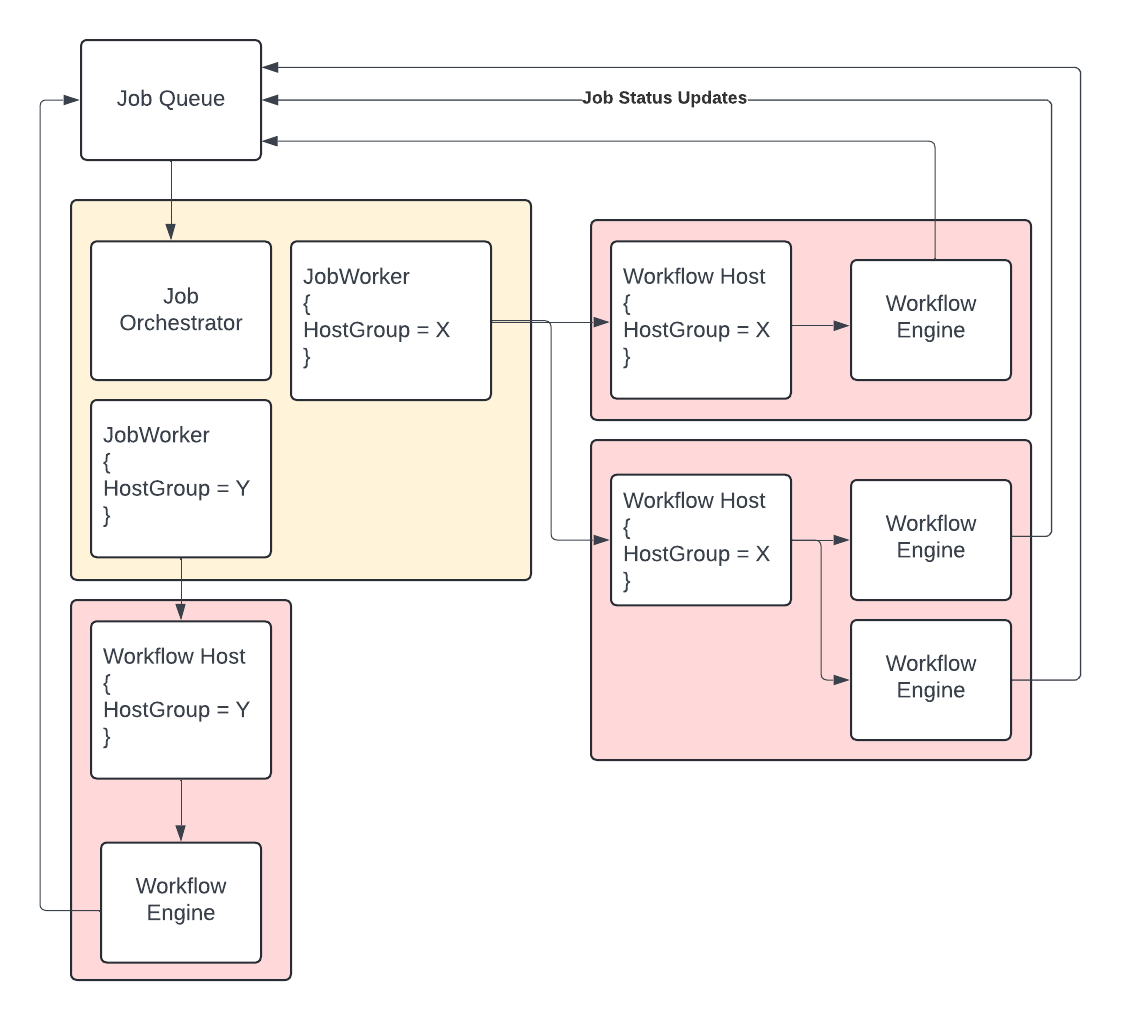
A Job Orchestrator can service multiple host groups as shown in the picture below, where two Workflow Hosts report back to the Job Orchestrator respectively in host group X and Y
Jobs Repository
Worth noting about above use case is that the Job Repository being accessed typically would not be the same in the three places where its used. The Web Api would use the PostgreSQL Provider and its Job Repository whereas both the Job Orchestrator and Workflow Host will use the Domain Services Provider. The purpose of the Domain Services Provider is to allow for connecting to Domain Services own Web Apis and by doing this the Web Api in turn uses the PostgreSQL provider. This pattern allows for deployment of the individual services only exposing Web APIs and not databases.
Workflow Repository
If the optional step of injected a task respository in the Job Service has been included, any requests are validated against the workflow and the workflow parameters. In order to do this, a metadata json file must be created for the workflow repository to avoid having to deploy all binaries to the web api and the Job Orchestrator. The information in the json file originates from the C# based workflows, but in order to avoid deploying the workflow binaries and all dependencies in order to serve this metadata, a procesing step is inserted to extract relevant information. This is done by running a converter that sits on the CodeWorkflowService and is run e.g. as part of the CICD when full access to the binaries is present.
Extraction of meta data from workflow code
  var assembly = Assembly.LoadFrom("Workflows.dll");
  var fileName = $"{assembly.GetName().Name}.json";
  var workflowRepository = new CodeWorkflowRepository(fileName);
  var workflows = new CodeWorkflowService(workflowRepository);
  workflows.ImportFrom(assembly, true);
Optionally, the hosts can be configured as cloud instances, e.g. virtual machines in the Microsoft Azure or Amazon cloud. Then the Job Orchestrator will start and stop cloud instances as needed. Starting and stopping the cloud instances is done using so-called cloud instance handlers, that are plugins to the Job Runner. In the below host repository two hosts with cloud instance handlers for Microsoft Azure virtual machines are configured.
Cloud instance host repository example:
{
  "$type": "System.Collections.Generic.Dictionary`2[[System.String, mscorlib],[DHI.Services.Jobs.Host, DHI.Services.Jobs]], mscorlib",
  "23.102.46.105": {
    "Name": "AzureVM-FloodRiskWorker1",
    "Id": "23.102.46.105",
    "RunningJobsLimit": 5,
    "Priority": 1,
    "CloudInstanceHandlerType": "DHI.Services.Provider.AzureCompute.VirtualMachineHandler, DHI.Services.Provider.AzureCompute",
    "CloudInstanceParameters": {
      "ResourceGroupName": "FloodRisk",
      "VirtualMachineName": "FloodRiskWorker1",
      "AuthorizationFilePath": "C:\\FloodRisk\\JobRunner\\azureauth.properties"
    }
  },
  "40.87.131.196": {
    "Name": "AzureVM-FloodRiskWorker2",
    "Id": "40.87.131.196",
    "RunningJobsLimit": 10,
    "Priority": 2,
    "CloudInstanceHandlerType": "DHI.Services.Provider.AzureCompute.VirtualMachineHandler, DHI.Services.Provider.AzureCompute",
    "CloudInstanceParameters": {
      "ResourceGroupName": "FloodRisk",
      "VirtualMachineName": "FloodRiskWorker2",
      "AuthorizationFilePath": "C:\\FloodRisk\\JobRunner\\azureauth.properties"
    }
  }
}
Scalar Repository
An optional Scalar Respository can be configured in both the Job Orchestrator and Workflow Host that allows for updating state variables. Several such repositories exists, but in production context, the PostgreSQL Provider provider and its repository should be used
Configurations
Job Orchestrator
The Job Orchestrator is a long running process, and is responsible for: - Setting up and running a SignalR host - Maintaining a list of connected servers, and their HostGroups. - Maintaining JobWorkers for each HostGroup.
Each JobWorker will require a connection string to instanciate a JobRepository, and a connection string to instanciate a WorkflowRepository.
The Job repository serves the jobs being queued by the Api.
The workflow repository serves the workflow definitions of the workflows that may be executed on that hostgroup.
JobWorkers can be configured in a json array in appsettings.json.
"Workers": {
    "Example": {
      "HostGroup": "example",
      "JobRepositoryConnectionString": "baseUrl=http://localhost:5000/api/jobs/wf-jobs2;baseUrlTokens=https://domainservices.dhigroup.com;userName=admin;password=Solutions!",
      "WorkflowRepositoryConnectionString": "baseUrl=http://localhost:5000/api/tasks/wf-tasks2;baseUrlTokens=https://domainservices.dhigroup.com;userName=admin;password=Solutions!"
    }
  },
The Job Orchestrator should be available on port 443 to the Workflow Host servers. The url or dns address will be required for configuration of the Workflow Hosts.
The Job Orchestrator can be hosted in a number of ways - As a container in a docker or kubernetes environment - As a Windows service - As a website within a cloud provider (as long as signalr or websockets can be configured)
When run as a container a dockerfile is required, and references to Windows service can be removed from the code.
Below is an example of a docker file that should be considered a starting point. It will build a container suitable for publishing to a kubernetes cluster, exposing port 80.
FROM mcr.microsoft.com/dotnet/aspnet:6.0-bullseye-slim AS base

WORKDIR /app
EXPOSE 80

# Copy the Projects
FROM mcr.microsoft.com/dotnet/sdk:6.0-bullseye-slim AS build
WORKDIR /src

COPY ./DHI.JobOrchestrator.Docker/DHI.JobOrchestrator.Docker.csproj  DHI.JobOrchestrator.Docker/

# Copy nuget.config (if necessary, try without first
# COPY ./nuget.config .

# Restore
RUN dotnet restore "DHI.JobOrchestrator.Docker/DHI.JobOrchestrator.Docker.csproj" --configfile nuget.config

# Remove nuget.config so it's not published...
# RUN rm ./nuget.config

# Copy files
COPY DHI.JobOrchestrator.Docker/ /DHI.JobOrchestrator.Docker/

# Build
WORKDIR /src
RUN dotnet build "/DHI.JobOrchestrator.Docker/DHI.JobOrchestrator.Docker.csproj" -c Release -f net6.0 -o /app/build

# Publish
RUN echo 'Publish all the things!!!'
FROM build AS publish
RUN dotnet publish "/DHI.JobOrchestrator.Docker/DHI.JobOrchestrator.Docker.csproj" -c Release -f net6.0 -o /app/publish

# Build runtime image
FROM base AS final
WORKDIR /app
COPY --from=publish /app/publish .

RUN mkdir /app/bin/

ENTRYPOINT ["dotnet", "DHI.JobOrchestrator.Docker.dll"]
The Workflow Hosts will authenticate with Job Orchestrator using a public private key pair. This pair should be generated and configured in Workflow Hosts and Job Orchestrator.
If Scalars are enabled, the Job Orchestrator will update:
Jobs In Progress: The number of jobs that has the state InProgressJobs Pending: The number of jobs that has the state PendingJobs Completed Last 24 Hours: The number of jobs completed over the last 24 hoursAverage Execution Time (seconds) for Jobs Completed Last 24 Hours: Average Execution Time (seconds) for Jobs Completed Last 24 HoursJobs With Errors Last 24 Hours: The number of jobs with the status of Error over the last 24 hours The scalars are attributed with the host name
SignalR
SignalR is a websockets protocol for establishing a long lived connection between components over web.
SignalR performs the following functions between the Job Orchestrator and the Workflow Host
- The connection forms the basis of the presence of the host within the workflow environment. If a Host is connected to the Job Orchestrator then it may be contacted for work.
- The hostgroup of the Workflow Host is communicated to the job Orchestator as a claim within the authentication token.
- The Job Orchestrator will use the SignalR connection to query availablitity, and to queue Workflow tasks.
Authentication between the JobOrchestrator and the Workflow Host relies on a matched set of authentication keys. This is a purely machine to machine exchange and there is no dependency on an authentication server.
The Job Orchestrator must be deployed such that the Workflow hosts can access on port 433. Be mindful of firewalls within servers, as well as within cloud providers. It will be more resilient to use a DNS entry to reference the Job Orchestrator rather than an IP address.
Workflow Host
In the Workflow Host template, several decisions can be made configuring the behaviour. This is done in the Program.cs file, and through appsettings, command line arguments etc
The Workflow Host is a long running process, i.e. windows service. It's main responsibility is to:
- Maintain a persistent SignalR connection with the Job Orchestrator
- Start Workflow engines on demand from the Job Orchestrator
- Respond to Availability queries from the Job Orchestrator
Workflow hosts are grouped by their business function into HostGroups.
The Workflow Host process can also be configured to perform housekeeping tasks on the server.
Maintain Workflow Engine deployments folders.
Workflow engine files are deployed to the Workflow Host server. They comprise Code Workflows, Actions and the CodeWorkflowEngine compiled into an executable file (and supporting configuration, dlls etc).
The Workflow Host process needs the location on disk of the Workflow Engine executable in order to start it. This location on disk is represented in the Workflow Host as a release file object.
Workflow Engine files can either be manually deployed, or deployed by CICD. The type of release file used will depend on this decision.
For a manual release then a StaticReleaseFile can be used:
services.AddSingleton(context => new Dictionary<string, ReleaseFile>(){
  ["Static"] = new StaticReleaseFile("Path/To/Your/WorkflowEngine")
});
For CICD deployment, using Azure Devops (though other systems would be similar)
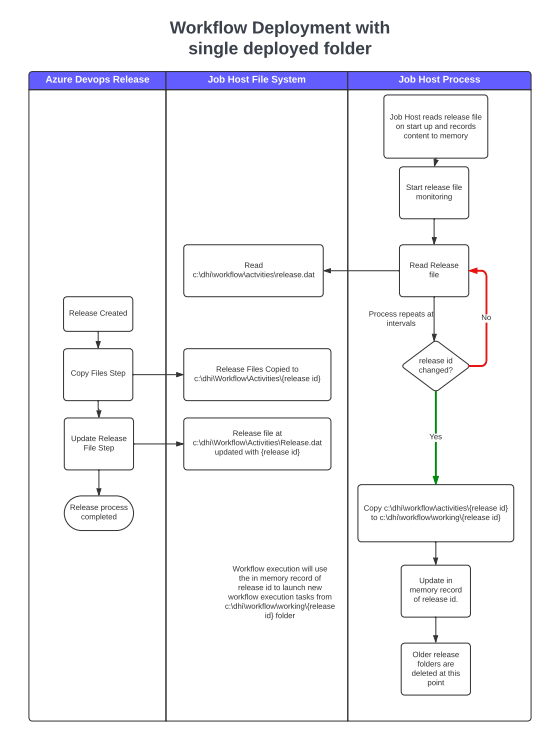
Release pipeline should:
- Identify a unique identifier {{Id}} for the release. For Azure Devops this can be Release.ReleaseId
- Deploy release files to a holding folder. e.g. c:\dhi\workflow\activitiesengine\{{Id}}
- Write the {{Id}} to a release file (at the path configured)
The release file is a text file just containing that release id.
In configuration of Workflow Host
"ReleaseFolderManagement": {
    "ReleaseRootFolder": "C:\\DHI\\Workflow",
    "CheckInterval": -1,
    "WorkingFolderCache": 2
  },
  "ActivitiesEngineReleaseFile": {
    "ReleaseFilePath": "C:\\DHI\\Workflow\\activitiesengine\\release.dat"
  },
  "EngineRunner": {
    "EngineExecutableName": "{Name of the executable}",
    "ReleaseRootFolder": "C:\\DHI\\Workflow",
    "ExecutionEnvironment": "Prod"
  },
- ReleaseFolderManagement configures the Workflow Engine updating process.
- ActivitiesEngineReleaseFile configures the release file path
- EngineRunner configures the EngineRunner with required locations and the environment.
The working folders allows for multiple folders which means new releases can be done while existing working folders are in use. This is useful as long running processes can continue to run despite new releases being done. Once the long running processes have finished and these working folders are not in use anymore, these will be deleted in the cleanup step.
In the Program.cs of WorkflowHost
// --------------- Release Management
services.AddSingleton(b =>
{
    var model = new ReleaseFolderManager.Config();
    b.GetRequiredService<IConfiguration>().GetSection("ReleaseFolderManagement").Bind(model);
    return model;
});

services.AddSingleton<Dictionary<string, ReleaseFile>>(c =>
{
    // Base release file(s)
    var retry = c.GetRequiredService<IFunctionRetryPolicy>();
    var logger = c.GetRequiredService<ILogger>();
    var result = new Dictionary<string, ReleaseFile>();

    var config = new ReleaseFile.Config();
    var section = c.GetRequiredService<IConfiguration>().GetSection($"ActivitiesEngineReleaseFile");
    section.Bind(config);
    var isRemote = section.GetValue<bool>("IsRemote");

    ReleaseFile releaseFile = new StandardReleaseFile(config, retry, logger);

    // the key added this dictionary must match the directory in the file system.
    // e.g. "ReleaseFilePath": "C:\\DHI\\Workflow\\activitiesengine\\release.dat",
    result.Add("ActivitiesEngine", releaseFile);

    return result;
});

services.AddSingleton<ReleaseFolderManager>();
services.AddHostedService<ReleaseFolderManager>();
ReleaseFolderManager is responsible for checking on the value in the release file, and then updating a Working copy of the release if the value has changed against its stored release id.
EngineRunner will use the functions within ReleaseFile, and its configuration to find and run the correct release.
Startup Commands
If the workflows need to use mounted network drives, then the Workflow Host allows for a command to be run upon startup to mount these. There are multiple uses for this. It could be that Azure drives needs to be mounted, but it has to be done in the process and user the service runs as. It could be that due to Windows restrictions the normal process of mounting network drives does not work as these drives are only mounted when users log into an interactive session. The StartupCommandRunner allows referencing e.g. a batch (.bat) file that mounts a drive as shown below. The StartupCommandRunner allows for the keywords [ServicePath] which allows for dynamic replacement of where the service sits. If the service runs as an administrator account the current direction will be the system32 folder
Include the following in Program.cs
var startupCommandConfig = new StartupCommandRunner.Config();
host.Services.GetRequiredService<IConfiguration>().Bind("StartupCommands", startupCommandConfig);
if (startupCommandConfig.Commands?.Any() ?? false)
{
    new StartupCommandRunner(startupCommandConfig, host.Services.GetRequiredService<ILogger>()).RunCommands();
}
  "StartUp": {
    "Commands": [
      {
        "FileName": "MapDrives.bat",
        "Arguments": ""
      }
    ]
  },
Batch file example:
cmdkey /add:<TargetName> /user:<UserName> /pass:<Password>
net use S: "\\<TargetName>\<UserName>" /PERSISTENT:YES /SAVECRED
Windows Updates
The Workflow Host can be configured to restart the server when Windows updates are installed and require a restart. In this case a server is configured to install updates, but not restart as this might happen while workflows are being executed and needs to be coordinated by the Workflow Host
Add com reference WUApiLib to your Workflow Host project.
The following class (implemented in the template) should be created as a wrapper to WUApiLib class.
public class WindowsSystemInformation : WindowsUpdate.ISystemInformationWrapper
{
    public bool RebootRequired()
    {
        var systemInfo = new SystemInformation();
        return systemInfo.RebootRequired;
    }
}
Add the following to startup
services.AddTransient<ISystemInformationWrapper, WindowsSystemInformation>();

services.AddSingleton(b =>
{
    var model = new WindowsUpdate.Config();
    b.GetRequiredService<IConfiguration>().GetSection("WindowsUpdate").Bind(model);
    return model;
});

services.AddHostedService<WindowsUpdate>();
With configuration
"WindowsUpdate": {
  "Type": "HandleRestartOnly",
  "IntervalMinutes": 30
},
On a restart being necessary the Workflow Host will set itself as unavailable, and allow existing jobs to complete, and then restart the server.
Host Groups
The Workflow Host is able to include a Host group in the metadata of its connection to Job Orchestrator.
The Job Orchestrator will contain matching Hostgroup configuration and will use this information to route the appropriate jobs to the Workflow Host.
The Workflow Host may require configuration that is specific to environment, for example the DNS address of the correct Job Orchestrator to connect to, as well as configuration for its role in a specific Host Group.
This can be acheived in a CICD deployment through using appsettings override files for each purpose.
This deployment will need to be coordinated with the Job Orchestrator deployment as follows:
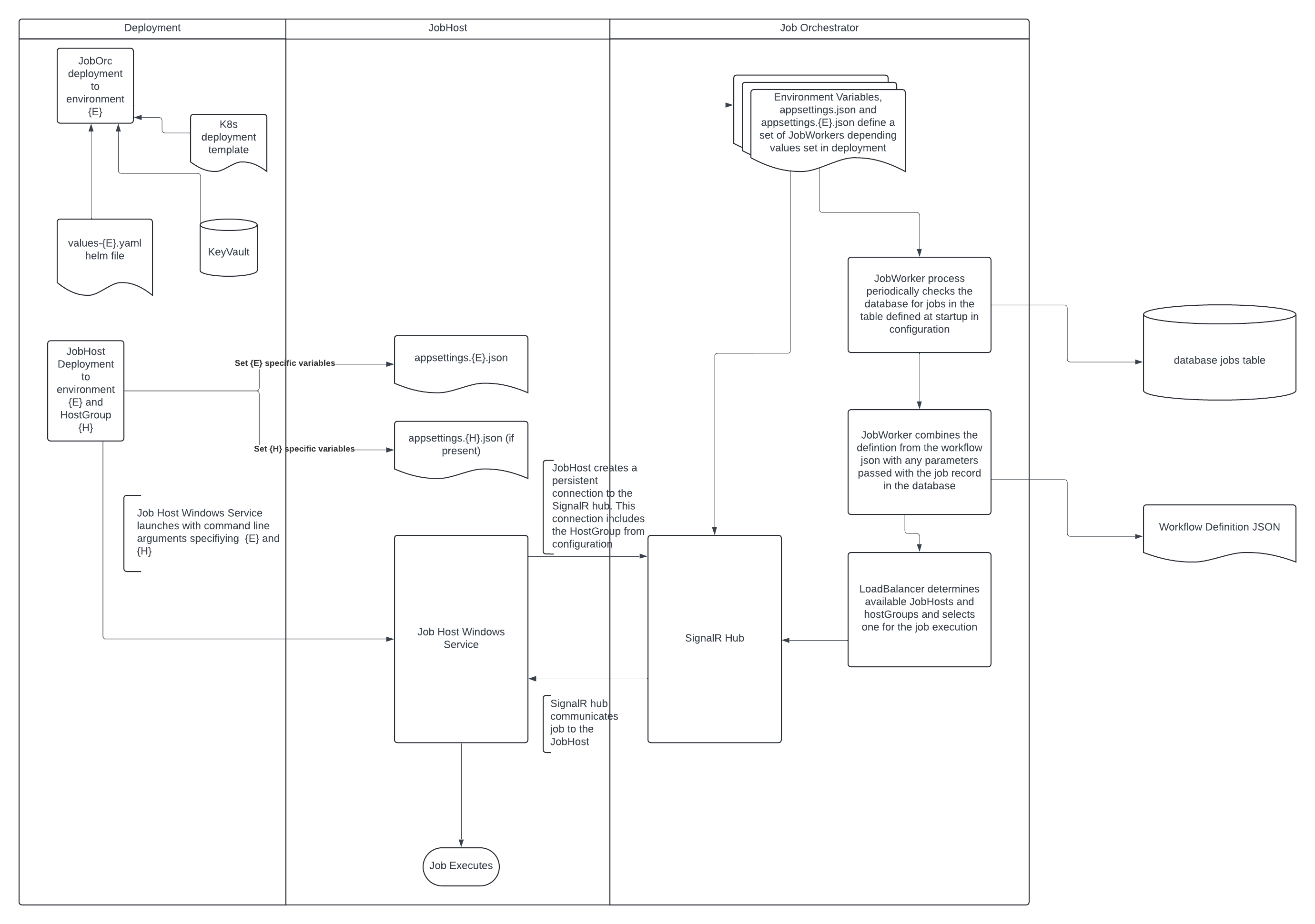
In configuration:
"Tokens": {
  "Issuer": "dhigroup.com",
  "Audience": "dhigroup.com",
  "ExpirationInMinutes": 10000,
  "RefreshExpirationInDays": 365,
  "Priority": 1,
  "RunningJobsLimit": 1,
  "HostGroup": "xyz"
},
In Program.cs
// ---------------  SignalR Dependencies
services.AddSingleton(b =>
{
    var model = new SignalRAuthentication.Config();
    b.GetRequiredService<IConfiguration>().GetSection("Tokens").Bind(model);
    return model;
});

services.AddSingleton<SignalRAuthentication>();

services.AddSingleton<HubConnection>(sb =>
{
    var config = sb.GetRequiredService<IConfiguration>();
    var url = config["JobOrchestratorUrl"];
    if (string.IsNullOrEmpty(url))
    {
        throw new ArgumentException("JobOrchestratorUrl must be configured");
    }
    return new HubConnectionBuilder()
    .WithUrl(url, options =>
    {
        options.AccessTokenProvider = async () => await sb.GetRequiredService<SignalRAuthentication>().GenerateToken();
    })
    .Build();
});
var hostgroup = initialConfig.GetValue<string>("hostgroup") ?? Environment.GetEnvironmentVariable("hostgroup");

using var host = Host.CreateDefaultBuilder(args)
    .ConfigureAppConfiguration((hostBuilder, config) =>
    {
        config.AddJsonFile($"appsettings.{hostgroup}.json", optional: true);
    })
In this case the appsettings.{hostgroup}.json file can further override configuration for a particular hostgroup.
This hostgroup should match a hostgroup configured in Job Orchestrator.
Scalars
The scalar service enables updating of scalars such as the number of workflows running on the host etc. The scalar respository used is the json based scalar repository and should in production systems be changed to e.g. the PostgreSQL based scalar repository
Include the following in the startup of Workflow Host to enable Scalars
var scalarConfig = new UpdatesScalarService.Config();
hbc.Configuration.GetSection("Scalars").Bind(scalarConfig);

if (scalarConfig.Enabled)
{
    services.AddSingleton<GroupedScalarService<string, int>>(c => new GroupedScalarService<string, int>(new DHI.Services.Provider.PostgreSQL.ScalarRepository(c.GetRequiredService<IConfiguration>()["Scalars:ConnectionString"])));
    services.AddSingleton(scalarConfig);
    services.AddSingleton<IUpdatesScalarService, UpdatesScalarService>();
}
  "Scalars": {
    "Enabled": false,
    "ReleaseRootFolder": "",
    "ScalarGroup": "",
    "ConnectionString": ""
  }
Update Pending: Indicates if an update is pendingUpdate Last Time: Indicates the last time an update was performedRestart Pending: Indicates if a restart is penging after a Windows update. Only applicable for the Windows based hostVersion Workflow Actions: Extracted from the version number of the DHI.Workflow.Actions.Core.dllVersion Workflow Executer: The version of the DHI.WorkflowExecuter.exeVersion Other: Extracted form a fixed file name version.json. This can be used to convey e.g. the CICD release versio
The scalars are attributed with the host name defined from the environment variabed defined in MachineIdEnvironmentVariable
Extending Workflow Host
The DHI.Workflow.Host.Template project contains components and configuration for the most common usage. Where required these can replaced or supplemented with more specialist versions implementing interfaces in new classes.
for example: EngineRunner implements IEngineRunner. It is possible to create a new class that implements IEngineRunner and add that new class to the dependency injection system instead of the base EngineRunner.
class SpecialistEngineRunner : IEngineRunner
{
  public async Task<Guid> FireAway<TWorkflowDefinition>(TWorkflowDefinition workflowDto, CancellationToken cancellationToken) where TWorkflowDefinition : IWorkflowDto
  {
    {your code here}
  }
}
services.AddSingleton<IEngineRunner, SpecialistEngineRunner>();
For instance ReleaseFolderManager implements IHostedService, and is registered in the Host like
    // Add ReleaseFolderManager to DI and as a hosted service
    services.AddHostedService<ReleaseFolderManager>();
class SpecialistReleaseFolderManager : IHostedService
{
  {your code here}
}
services.AddHostedService<SpecialistReleaseFolderManager>();
Workflow Engine
The Workflow Engine component will comprise
- CodeWorkflows
- Actions
- CodeWorkflowEngine
- Custom startup code in a Program.cs
The Workflow Engine is typically started with command line arguments that control its activity. Further configuration is supplied as appsettings.json files.
The Workflow Host will start the Workflow Engine process with arguments:
- The location on disk of a workflow dto file containing information on the job to be run.
- The environment (from the Workflow Host appsetting EngineRunner->ExecutionEnvironment)
The Workflow Engine is responsible for:
- Reading and executing the workflow dto supplied by the Workflow Host
- Updating the status of the job through the Job api
- Updating the job heartbeat
- Logging the Job
- Monitoring the kill file (for cancellation pipeline)
Configuration
"Api": {
  "JobApiUrl": "https://api/",
  "ConnectionId": "Connection",
  "HeartbeatIntervalMilliseconds": 5000,
  "HeartbeatApiFailureThresholdSeconds": 300
},
"Authentication": {
  "User": "",
  "Password": "",
  "Url": "https://localhost:5001/tokens"
}
Logging
CodeWorkflowEngine logging accepts an instance of Microsoft ILogger
using (var fileLogger = new FileLoggerProvider(config["FileLogging:BaseDirectory"], workflowDto.JobId.ToString()))
using (var apiLogger = new ApiLoggerProvider(httpClientFactory, "https://yourloggingurl", "CodeWorkflowExecution", jobId))
using (var loggerFactory = LoggerFactory.Create(l => l
    .AddConsole()
    .AddProvider(fileLogger)
{
  ...
  workflowEngine.Run();
  ...
}
Logs output from the Workflow Engine run will be output to any providers added to the logger factory.
Job Cancellation
In progress jobs maybe cancelled by setting a cancel status in the database.
This can be performed by the Job Orchestrator if a timeout is exceeded, or through the Api
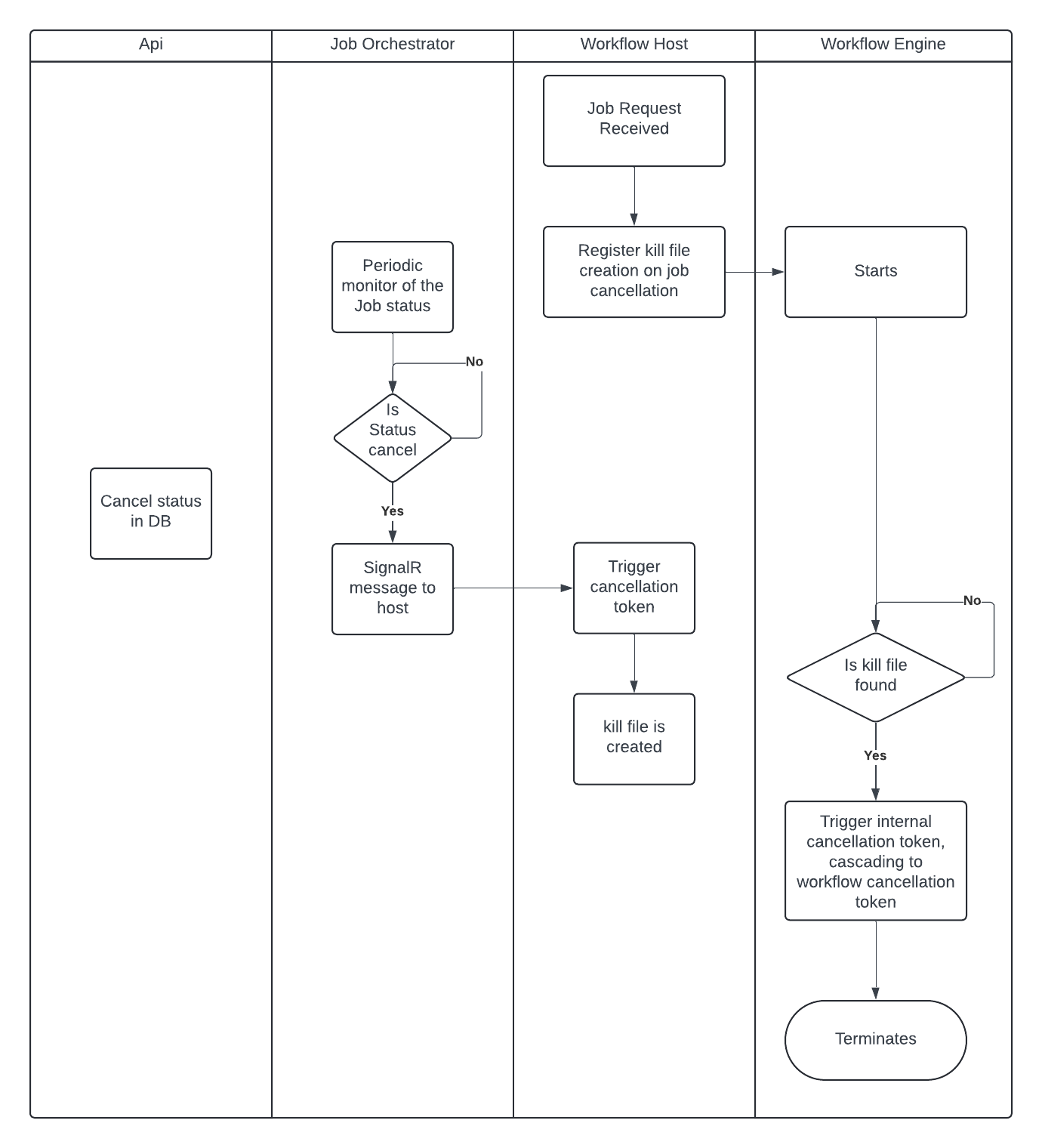
Workflow structure
The Code Workflow follows a specific pattern as shown below
Attribution of CodeWorkflow
  namespace Workflows;

  using DHI.Services.Jobs.Workflows;
  using DHI.Workflow.Actions.Core;
  using Microsoft.Extensions.Logging;

  [Timeout("0:30:00")]
  [WorkflowName("Awesome workflow for creating and deleting a directory")]
  [HostGroup("MyGroup")]
  public class CreateAndDeleteDirectory : BaseCodeWorkflow
  {
      [WorkflowParameter]
      public string FolderName { get; set; } = "C:\\Temp\\MyFolder";

      public CreateAndDeleteDirectory(ILogger logger)  : base(logger)
      {
      }

      public override void Run()
      {
          new CreateDirectory(Logger)
          {
              Directory = FolderName
          }.Run();

          new DeleteDirectory(Logger)
          {
              Directories = FolderName
          }.Run();
      }
  }
  ...
Four specific attributes exists, all are optional
- Timeout: A timeout that specifies to the system the maximum allowed duration of the workflow
- WorkflowName: The name of the workflow is used purely for better identification
- HostGroup: The host group that should be used to manage the execution
- WorkflowParameter: The worflow parameter is used to indicate that this property should be exposed as a parameter that can be changed externally, e.g. by being sent in through the web request. The attribute ensures that when the extractin of meta data is done, then this will appear in hhe meta data for the workflow repostory
In above example two Actions are used: CreateDirectory an DeleteDirectory. Although the workflow itself is C# thus allowing for anything, it is higly encouraged that the Actions pattern is used and that new functionality is added to the Action NuGet packages
Actions are documented here and available through NuGet
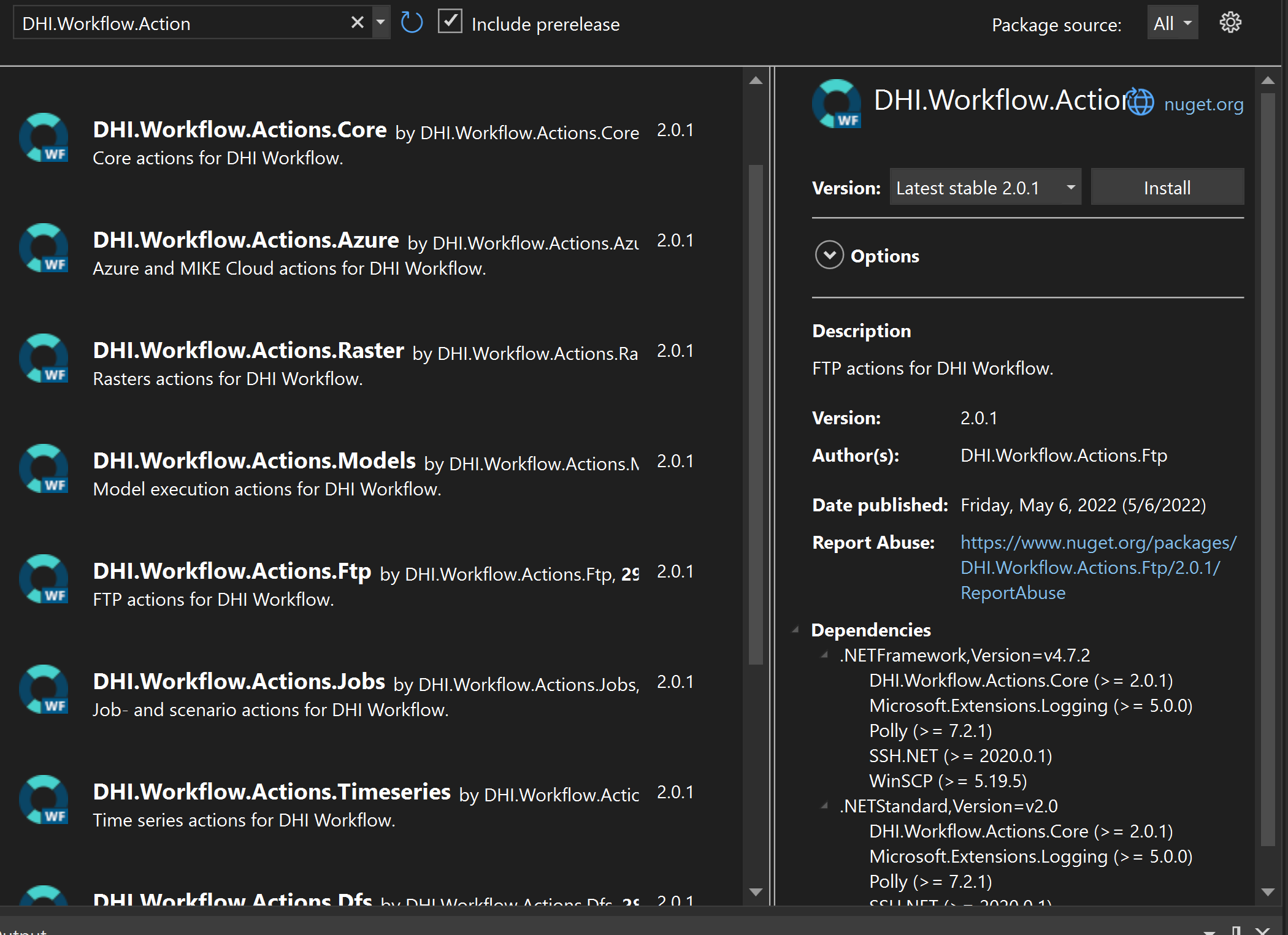
Coherent Logging
At the time of writing 2 logging interfaces exist within the workflow ecosystem.
- DHI.Services.Logging.ILogger
- Microsoft.Extensions.Logging.ILogger
The DHI logger is obsolete and is being phased out, however it is still required for some domain services services and repositories. Is it recommended to wrap this logger so that it can be quickly replaced with a Microsoft ILogger as required.
class WrapperLogger : DHI.Services.Logging.ILogger
{
  private readonly Microsoft.Extensions.Logging.ILogger _logger;
  public WrapperLogger(Microsoft.Extensions.Logging.ILogger logger)  {
    _logger = logger;
  }

  //...
  //implementation of dhi ILogger here
}
Troubleshooting
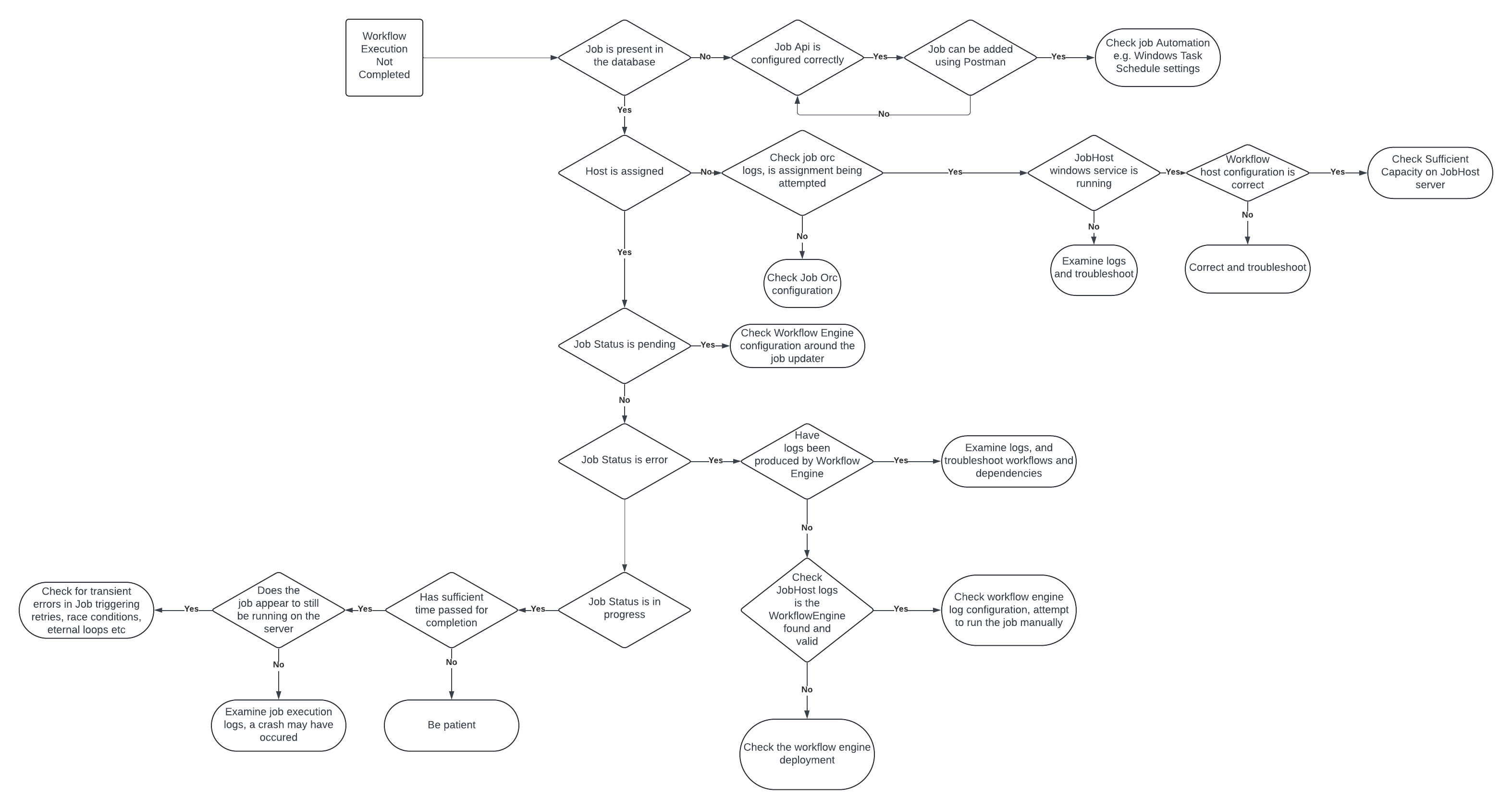
Changes vs the legacy workflow system.
Be aware of the fundamental changes to the workflow execution system, if you are used to the legacy.
- JobRunner -> JobOrchestrator
- Inversion of communication. Workflow Hosts make a connection to Job Orchestrator, rather than Workflow Hosts publishing an endpoint.
- HostGroup configuration is controlled by the Workflow Host.
- WorkflowService -> WorkflowHost (aka JobHost)
- WorkflowEngine is now directly responsible for logging and job status updates.
Logging
In addition to logging the tasks performed by workflows, it is possible to add logging to JobOrchestrator, Workflow Host and Workflow Engine to examine and troubleshoot their interactions. This logging is based on the Microsoft ILogger, and as such any number of log sinks can be configured.
In addition Windows event logs will also often capture useful information about the reason for a crash.
basic logging to seq within a Kubernetes cluster
builder.Services.AddSingleton(s =>
    s.GetRequiredService<ILoggerFactory>().AddSeq(serverUrl: "http://seq").CreateLogger("JobOrchestrator")
);
using structured logging to add detail to logs to seq in Workflow Engine
using (var loggerFactory = LoggerFactory.Create(l => l
    .AddConsole().AddSeq(serverUrl: "http://localhost:32404")))
{
    var logger = loggerFactory.CreateLogger(nameof(CodeWorkflowEngine.CodeWorkflowEngine));

    using (var child = logger.BeginScope(new Dictionary<string, object> {
    { "MachineName", Environment.MachineName },
    { "ProcessId", Process.GetCurrentProcess().Id },
    { "JobId", workflowDto.JobId },
    { "Release", releaseFolderName }
    }))
    {
      ...
      workflowEngine.Run();
      ...
    }
Host Group Reporting
The Workflow Hosts and Job Orchestrator maintain a SignalR connection, and the state of the Workflow Hosts can be queried centrally.
The following can be added to the Job Orchestrator Program.cs (after construction of the app object, but before the RunAsync call) to query the JobHosts and return a json object.
This gives an idea of the connected Workflow Hosts and their state.
app.MapGet("/report/jobhosts", async (IHubContext<WorkerHub> workerHubContext, ReportCache reportCache) =>
{
    await workerHubContext.Clients.All.SendAsync("OnReport");
    await Task.Delay(2000);
    return reportCache.Where(rc => rc.Value.Item2 > DateTime.UtcNow.AddMinutes(-5)).Select(kvp => new { kvp.Key, CacheUpdated = kvp.Value.Item2, Properties = kvp.Value.Item1.Select(d => $"{d.Key}={d.Value}") });
}).RequireAuthorization();
Packages
Keep packages used in Job Orchestrator, Workflow Host, and Workflow Engine up to date and in sync with each other.
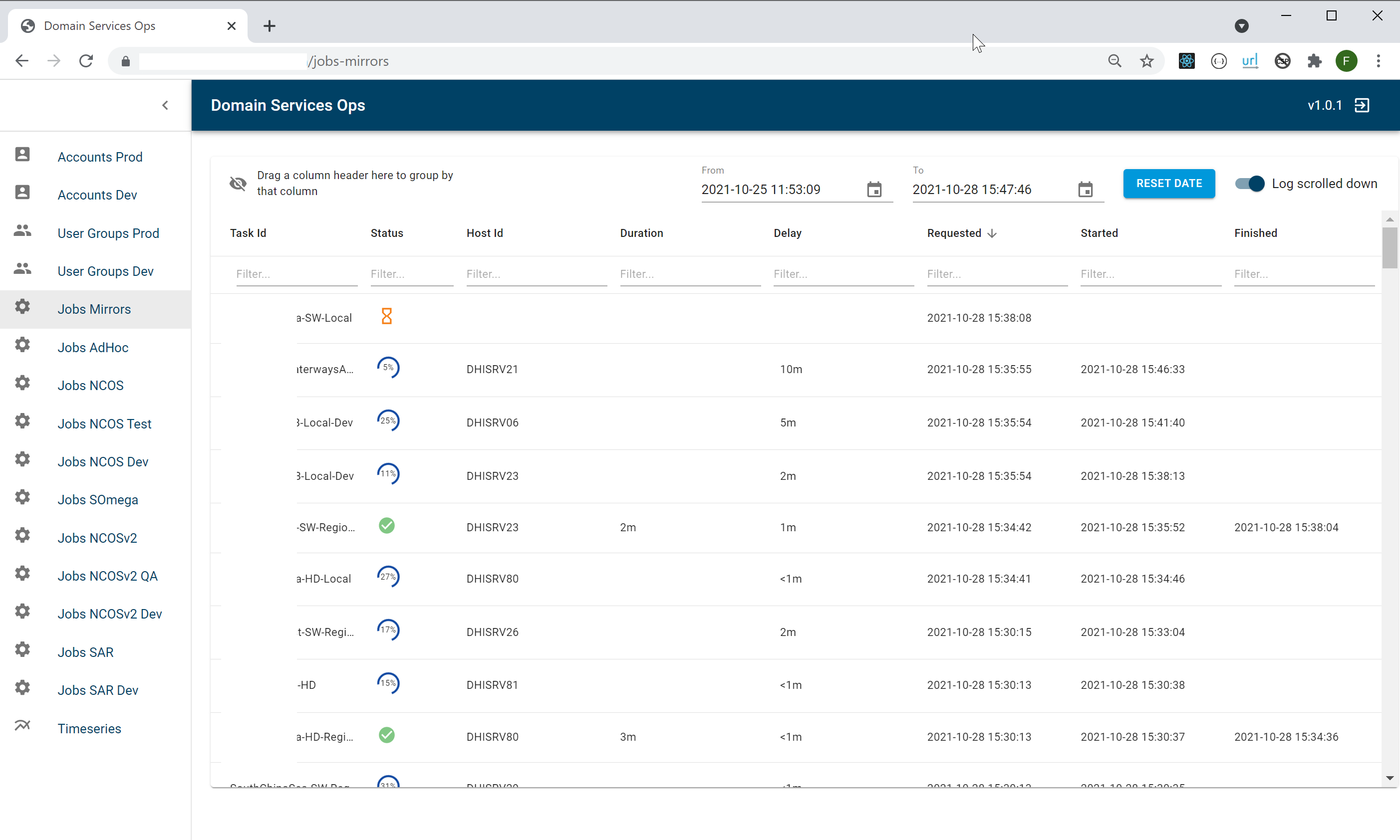
Domain Service Ops
In addition to providing job orchestration as a background service, There is also an out-of-the-box Domain Service Ops portal available. This includes a rich UI for monitoring jobs - including progress and status. This portal is updated realtime with job status.