Plugins Reference
Introduction
Typically, plugins act as adapters between services and specific technologies.
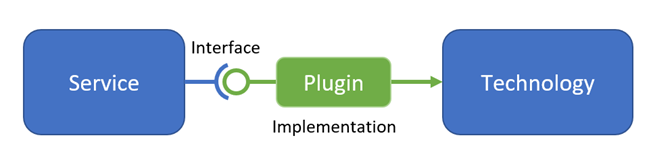
All technology-specific plugins are gathered in their own assembly (DLL). Such an assembly is called a provider.
A few plugins are not technology-specific, because a 3rd party API is not needed to implement it. One such example is a simple CSV-file based implementation of ITimeSeriesRepository. These plugins are defined in the same assembly that defines the abstractions themselves. So for example the CSV-file based time series repository can be found in the DHI.Services.TimeSeries assembly itself. For the same reason, this reference document is separated into a section about the default plugins, defined in the Domain Services assemblies themselves, and a section about the technology-specific provider plugins.
Placeholders in configuration strings
When configuring Web API connections most of the connection types support using the [AppData]- and [env:{envVar}] placeholders in connection strings.
[AppData]
Very often data files are placed in the ASP.NET App_Data folder or sub folders to this. In this case, instead of giving the full path to the App_Data folder when defining the connection string, then the [AppData]-placeholder can be used - for example [AppData]dfs-files\my-files.dfs0. Then the [AppData]-placeholder will be resolved to the full folder path at runtime.
[env:{envVar}]
Secrets such as database connection strings (with passwords) should never be stored directly in configuration files - or directly in the code for that matter. A more secure approach is to define such secrets as environment variables. Then the [env:{envVar}] placeholder - for example [env:myDatabaseConnectionString] - will be resolved at runtime to the value of the given environment variable.
If configuring in code, the Resolve() string extension method will do the same replacement as described above.
String format syntax
In the below format descriptions for connection strings and entity IDs, the following syntax is used:
- {...} denotes a placeholder - e.g.
{path}must be replaced with a path literal such asc:\data\my-file.dfs0 - (...) denotes an alternative to the preceding - e.g.
{ItemNo}(name:{ItemName})means that either the item number (for example2) or the item name (for examplename:WaterLevel) must be given - [...] denotes optional - e.g.
[eumItem]means that an eum item can be given or not.
Repository categories
Repository types support one or more of the following categories of methods:
- Basic (e.g. Get)
- Discrete (e.g Count, Contains, GetAll, GetIds)
- Grouped (e.g. ContainsGroup, GetByGroup, GetFullNames)
- Updatable (e.g. Add, Remove, Update)
For each of the repository types it is shown which of these categories it supports. The listed methods are not necessarily the complete list of available methods.
Default plugins
Core
NuGet package: DHI.Services
SimpleLogger
Type name: DHI.Services.Logging.SimpleLogger
| Format | Example | |
|---|---|---|
| ConnectionString | File path | [Path]DHI.Services.JobRunner.log |
The SimpleLogger writes log entries to a text file. If the SimpleLogger is used in the Job Runner Service or the Notification Service, the [Path] placeholder is supported in the LoggerConnectionString. At runtime, the [Path] placeholder will be resolved to the location of the Job Runner or Notification Service executable.
The SimpleLogger supports writing log entries only (implementing the ILogger interface only).
JsonLogger
Type name: DHI.Services.Logging.JsonLogger
| Format | Example | |
|---|---|---|
| ConnectionString | File name or file path | log.json |
The JsonLogger writes log entries to a JSON file. The connection string is either the full file path to the JSON file or just the file name. If the file name is given, the JSON file is assumed to be located in the folder of the executing assembly.
The JsonLogger supports reading as well as writing log entries (implementing the ILogger interface as well as the ILogReader interface).
Time Series
NuGet package: DHI.Services.TimeSeries
CSV.TimeSeriesRepository
Type name: DHI.Services.TimeSeries.CSV.TimeSeriesRepository
| Supported method categories | |
|---|---|
| Basic (e.g. Get) | X |
| Discrete (e.g. Count, Contains, GetAll, GetIds) | X |
| Grouped (e.g. ContainsGroup, GetByGroup, GetFullNames) | X |
| Updatable (e.g. Add, Remove, Update) |
| Format | Example | |
|---|---|---|
| ConnectionString | Folder path | C:\data\csv-files |
| Time series ID | Time series full-name | sub-folder/test.csv;TimeSeries1 |
CSV.UpdatableTimeSeriesRepository
Type name: DHI.Services.TimeSeries.CSV.UpdatableTimeSeriesRepository
| Supported method categories | |
|---|---|
| Basic (e.g. Get) | X |
| Discrete (e.g. Count, Contains, GetAll, GetIds) | X |
| Grouped (e.g. ContainsGroup, GetByGroup, GetFullNames) | |
| Updatable (e.g. Add, Remove, Update) | X |
| Format | Example | Remarks | |
|---|---|---|---|
| ConnectionString | Folder path | C:\data\csv-files | |
| Time series ID | The relative file path | my-timeseries.csv | The connection string and the ID must combine to the full file path to the CSV file. |
Daylight.TimeSeriesRepository
Type name: DHI.Services.TimeSeries.Daylight.TimeSeriesRepository
This repository dynamically computes a step time series (mean step forward) representing daytime and nighttime at a given geographical location (longitude and latitude) within a given timespan.
| Supported method categories | |
|---|---|
| Core (e.g GetValues) | X |
| Basic (e.g. Get) | |
| Discrete (e.g. Count, Contains, GetAll, GetIds) | |
| Grouped (e.g. ContainsGroup, GetByGroup, GetFullNames) | |
| Updatable (e.g. Add, Remove, Update) |
| Format | Example | |
|---|---|---|
| ConnectionString | N/A | No connection string required. |
| Time series ID | Latitude={lat};Longitude={long}[;DayValue={dayValue}][;NightValue={nightValue}][;TimeZoneFrom={timeZoneFrom}][;TimeZoneTo={timeZoneTo}] | Latitude=-28.016667;Longitude=153.4;TimeZoneTo=E. Australia Standard Time;TimeZoneFrom=UTC |
The default values of a time series ID are the following:
- DayValue = 1
- NightValue = 0
- TimeZoneFrom = UTC
- TimeZoneTo = UTC
Configuration example (startup.cs):
var repository = new Daylight.TimeSeriesRepository();
var timeSeriesService = new CoreTimeSeriesService<string, double>(repository);
ServiceLocator.Register(timeSeriesService, "daylight");
Connection example (connections.json):
"daylight": {
  "$type": "DHI.Services.TimeSeries.WebApi.CoreTimeSeriesServiceConnection, DHI.Services.TimeSeries.WebApi",
  "RepositoryType": "DHI.Services.TimeSeries.Daylight.TimeSeriesRepository, DHI.Services.TimeSeries",
  "Name": "Daylight time series service connection",
  "Id": "daylight"
}
Text.TimeSeriesRepository
Type name: DHI.Services.TimeSeries.Text.TimeSeriesRepository
| Supported method categories | |
|---|---|
| Basic (e.g. Get) | X |
| Discrete (e.g. Count, Contains, GetAll, GetIds) | X |
| Grouped (e.g. ContainsGroup, GetByGroup, GetFullNames) | |
| Updatable (e.g. Add, Remove, Update) |
| Format | Example | |
|---|---|---|
| ConnectionString | Path to json configuration file | C:\data\configuration.json |
| Time series ID | {full-name};{item} | myfolder\myfile.csv;timeSeriesName |
Connection Example:
"text-timeseries": {
    "$type": "DHI.Services.TimeSeries.Web.DiscreteTimeSeriesServiceConnection, DHI.Services.TimeSeries.Web",
    "ConnectionString": "[AppData]configuration.json",
    "RepositoryType": "DHI.Services.TimeSeries.Text.TimeSeriesRepository, DHI.Services.TimeSeries",
    "Name": "Text file based time series connection",
    "Id": "text-timeseries"
},
The configuration.json file defines how the files should be parsed. The information on how to parse time comes in mutually exclusive sections. Either the column is unix time or a datetime string with a column number. Or it's a date and time column with their respective formats.
{
  "DateTimeAsUnixTime": false,            // If this is true, then it's unix time and DateTimeFormat is ignored
  "DateTimeFormat": "yyyy-MM-dd HH:m:ss", // The date time format that the date time should be parsed as
  "DateTimeColumn": 1,                    // The column containing the date time
  "DateFormat": "yyyy-MM-dd",             // The date format that the date should be parsed as
  "DateColumn": 1,                        // The column containing the date
  "TimeFormat": "HH:m:ss",                // The time format that the time should be parsed as
  "TimeColumn": 2,                        // The column containing the time
  "TimezoneFrom": "Tokyo Standard Time",  // The time zone to convert from
  "TimezoneTo": "UTC",                    // The time zone to convert to
  "ValueDelimiter": ",",                  // The value deimiter on each line
  "ValueRegExFilter": "Molineaux Point2", // Filters the line so that the line needs to contain this string to be included
  "ValueRegExFilterExclude": "ignore",    // Filters the line so that the line containing this string will be included
  "Replace": {
    "Instrumentid": "Instrumentid "       // General replacements of all instances of strings in the file
  },
  "TrimCharacter": "\\",                  // If defined, all cells are trimmed
  "HeaderLineNumber": 1,                  // Indicating which line has information on what the time series are called
  "DataLineNumber": 2,                    // This is the line number that the data starts being read from
  "TimeSeriesColumns": [{                 // If no header line is present, then this defines what the individual columns are called
    "Column": 2,                          // This is the column number
    "Id": "MyTimeseries1"                 // This is the time series id
  }],
  "SkipIfCannotParse": true,              // Indicates if the line should be skipped if the value cannot be parsed
  "NullIfCannotParse": false,             // Indicates if the value should be set to null if it cannot be parsed
  "ResampleTimeSpan": "00:10:00"          // It the time series requires resampling before returning it
}
The time zones supported are as follows where daylight savings are applied where applicable and duplicate date times are overwritten by the latest in the data:
'Dateline Standard Time', 'UTC-11', 'Aleutian Standard Time', 'Hawaiian Standard Time', 'Marquesas Standard Time', 'Alaskan Standard Time', 'UTC-09', 'Pacific Standard Time (Mexico)', 'UTC-08', 'Pacific Standard Time', 'US Mountain Standard Time', 'Mountain Standard Time (Mexico)', 'Mountain Standard Time', 'Central America Standard Time', 'Central Standard Time', 'Easter Island Standard Time', 'Central Standard Time (Mexico)', 'Canada Central Standard Time', 'SA Pacific Standard Time', 'Eastern Standard Time (Mexico)', 'Eastern Standard Time', 'Haiti Standard Time', 'Cuba Standard Time', 'US Eastern Standard Time', 'Turks And Caicos Standard Time', 'Paraguay Standard Time', 'Atlantic Standard Time', 'Venezuela Standard Time', 'Central Brazilian Standard Time', 'SA Western Standard Time', 'Pacific SA Standard Time', 'Newfoundland Standard Time', 'Tocantins Standard Time', 'E. South America Standard Time', 'SA Eastern Standard Time', 'Argentina Standard Time', 'Greenland Standard Time', 'Montevideo Standard Time', 'Magallanes Standard Time', 'Saint Pierre Standard Time', 'Bahia Standard Time', 'UTC-02', 'Mid-Atlantic Standard Time', 'Azores Standard Time', 'Cape Verde Standard Time', 'UTC', 'GMT Standard Time', 'Greenwich Standard Time', 'Sao Tome Standard Time', 'W. Europe Standard Time', 'Central Europe Standard Time', 'Romance Standard Time', 'Morocco Standard Time', 'Central European Standard Time', 'W. Central Africa Standard Time', 'Jordan Standard Time', 'GTB Standard Time', 'Middle East Standard Time', 'Egypt Standard Time', 'E. Europe Standard Time', 'Syria Standard Time', 'West Bank Standard Time', 'South Africa Standard Time', 'FLE Standard Time', 'Israel Standard Time', 'Kaliningrad Standard Time', 'Sudan Standard Time', 'Libya Standard Time', 'Namibia Standard Time', 'Arabic Standard Time', 'Turkey Standard Time', 'Arab Standard Time', 'Belarus Standard Time', 'Russian Standard Time', 'E. Africa Standard Time', 'Iran Standard Time', 'Arabian Standard Time', 'Astrakhan Standard Time', 'Azerbaijan Standard Time', 'Russia Time Zone 3', 'Mauritius Standard Time', 'Saratov Standard Time', 'Georgian Standard Time', 'Volgograd Standard Time', 'Caucasus Standard Time', 'Afghanistan Standard Time', 'West Asia Standard Time', 'Ekaterinburg Standard Time', 'Pakistan Standard Time', 'Qyzylorda Standard Time', 'India Standard Time', 'Sri Lanka Standard Time', 'Nepal Standard Time', 'Central Asia Standard Time', 'Bangladesh Standard Time', 'Omsk Standard Time', 'Myanmar Standard Time', 'SE Asia Standard Time', 'Altai Standard Time', 'W. Mongolia Standard Time', 'North Asia Standard Time', 'N. Central Asia Standard Time', 'Tomsk Standard Time', 'China Standard Time', 'North Asia East Standard Time', 'Singapore Standard Time', 'W. Australia Standard Time', 'Taipei Standard Time', 'Ulaanbaatar Standard Time', 'Aus Central W. Standard Time', 'Transbaikal Standard Time', 'Tokyo Standard Time', 'North Korea Standard Time', 'Korea Standard Time', 'Yakutsk Standard Time', 'Cen. Australia Standard Time', 'AUS Central Standard Time', 'E. Australia Standard Time', 'AUS Eastern Standard Time', 'West Pacific Standard Time', 'Tasmania Standard Time', 'Vladivostok Standard Time', 'Lord Howe Standard Time', 'Bougainville Standard Time', 'Russia Time Zone 10', 'Magadan Standard Time', 'Norfolk Standard Time', 'Sakhalin Standard Time', 'Central Pacific Standard Time', 'Russia Time Zone 11', 'New Zealand Standard Time', 'UTC+12', 'Fiji Standard Time', 'Kamchatka Standard Time', 'Chatham Islands Standard Time', 'UTC+13', 'Tonga Standard Time', 'Samoa Standard Time', 'Line Islands Standard Time'
Example 1:
Text File:
2018/11/13 04:6:18,,A032P2,$IIMWV,217.0,R,16.58,K,A,A032P1,$IIMWV,215.0,R,11.43,K,A
0,2018/11/13 04:6:18,,A032P2,$IIMWV,217.0,R,16.58,K,A,A032P1,$IIMWV,215.0,R,11.43,K,A
1,2018/11/13 04:6:19,,A032P2,$IIMWV,217.0,R,16.43,K,A,A032P1,$IIMWV,215.0,R,10.92,K,A
Json File:
{
  "DateTimeFormat": "yyyy'/'MM'/'dd H:m:s",
  "DateTimeColumn": 2,
  "TimeSeriesColumns": [
    {
      "Column": 8,
      "Id": "MyTimeseries1"
    }
  ],
  "DataLineNumber": 2
}
Example 2:
Text File:
"Timestamp","TZ","1SERIAL (State)","Water Speed (Knots)","Water Direction (deg)","Water Level (mLAT)","Heading (deg)","Pitch (deg)","Roll (deg)","Temp (deg)","Mean press","Input Power (V)"
2018/08/06 00:00:00.289,n,0,0.375167,216.57282,-3.585,321.9,-3.6,3.6,18.52,16.152,12.4
2018/08/06 00:01:00.131,n,0,0.397733,216.25364,-3.585,321.9,-3.6,3.6,18.52,16.154,12.4
Json File:
{
  "DateTimeFormat": "yyyy'/'MM'/'dd HH:mm:ss.fff",
  "DateTimeColumn": 1,
  "TrimCharacter": "\"",
  "HeaderLineNumber": 1,
  "DataLineNumber": 2
}
Example 3:
Text File:
2018-09-01T00:04:59.999+10:00,6.67,33.8,14.5,5.405,124.0,6.73,5.73,4.00,6.03,8.24,7.90,0.354,0.673,3.16,2.720E-2,25.00,19.20,7
2018-09-01T00:34:59.999+10:00,6.67,33.8,16.2,5.405,129.0,6.55,5.66,4.04,5.92,7.38,7.58,0.332,0.660,2.71,2.829E-2,25.00,19.20,7
2018-09-01T01:04:59.999+10:00,6.67,33.8,13.3,5.556,129.0,6.82,5.88,4.01,6.16,8.50,7.91,0.352,0.691,3.27,2.677E-2,25.00,19.20,7
Json File:
{
  "DateTimeFormat": "yyyy-MM-ddTHH:mm:ss.fffzzz",
  "DateTimeColumn": 1,
  "TimeSeriesColumns": [
    {
      "Column": 6,
      "Id": "MyTimeseries1"
    }
  ],
  "DataLineNumber": 1
}
Example 4:
Text File:
2017-07-26,15:04,1.725
2017-07-26,15:05,1.733
2017-07-26,15:06,1.741
Json File:
{
  "DateColumn": 1,
  "DateFormat": "yyyy-MM-dd",
  "TimeColumn": 2,
  "TimeFormat": "HH:mm",
  "TimeSeriesColumns": [
    {
      "Column": 3,
      "Id": "MyTimeseries1"
    }
  ],
  "DataLineNumber": 1
}
Example 5:
Text File:
1541561400  39069   17  0.2501221299462628  0.2647777234978017  -0.1797752808988764
1541563200  39069   17  0.4084025403028823  0.1958964338055691  0.3048363458720078
1541565000  39069   17  -0.2398632144601856 -0.1866145578895945 0.0693698094772838
Json File:
{
  "DateTimeColumn": 1,
  "DateTimeAsUnixTime": true,
  "ValueDelimiter": "\t",
  "TimeSeriesColumns": [
    {
      "Column": 6,
      "Id": "MyTimeseries1"
    }
  ],
  "DataLineNumber": 1
}
Example 6:
Text File:
Instrumentid InstrumentLocation     RecordDateUTC           WindSpeed
------------ ---------------------- ----------------------- ----------
BBW01        Molineaux Point1       2019-03-10 23:20:00.000      7.313
BBW01        Molineaux Point1       2019-03-10 23:30:00.000      6.586
BBW02        Molineaux Point2       2019-03-10 23:20:00.000      8.313
BBW02        Molineaux Point2       2019-03-10 23:30:00.000      7.586
In below, we are only interested in the lines that has Molineaux Point2 in it. Also, as there is only one space after Instrumentid, we cannot delimit by double space, so we start by replacing this to get a double space
Json File:
{
  "DateTimeFormat": "yyyy-MM-dd HH:mm:ss.fff",
  "DateTimeColumn": 3,
  "ValueRegExFilter": "Molineaux Point2",
  "ValueDelimiter": "  ",
  "Replace": {
    "Instrumentid": "Instrumentid "
  },
  "TrimCharacter": "\\",
  "HeaderLineNumber": 1,
  "DataLineNumber": 3
}
Example 7:
Text File:
BB3
Periods for 2048 datapoints at 0.50 sec interval.
  28.44444  26.94737  25.60000  24.38095  23.27273  22.26087  21.33333  20.48000  19.69231  18.96296  18.28571  17.65517
  17.06667  16.51613  16.00000  15.51515  15.05882  14.62857  14.22222  13.83784  13.47368  13.12821  12.80000  12.48780
  12.19048  11.90698  11.63636  11.37778  11.13043  10.89362  10.66667  10.44898  10.24000  10.03922   9.84615   9.66038
   9.48148   9.30909   9.14286   8.98246   8.82759   8.67797   8.53333   8.39344   8.25806   8.12698   8.00000   7.87692
   7.75758   7.64179   7.52941   7.42029   7.31429   7.21127   7.11111   7.01370   6.91892   6.82667   6.73684   6.64935
   6.56410   6.48101   6.40000   6.32099   6.24390   6.16867   6.09524   6.02353   5.95349   5.88506   5.81818   5.75281
   5.68889   5.62637   5.56522   5.50538   5.44681   5.38947   5.33333   5.27835   5.22449   5.17172   5.12000   5.06931


10/04/2019,09:23
2048  0.50   0.22896   7.36691   2.93994   0.21439  13.65333  11.88657   0.31366  13.65333   4.53433
   0.00092   0.00061   0.00036   0.00120   0.00287   0.01221   0.03665   0.00997   0.00350   0.00229   0.00493   0.00991
   0.00732   0.01206   0.02472   0.01992   0.05898   0.09430   0.07091   0.12073   0.08620   0.08744   0.07447   0.05067
   0.04323   0.04452   0.03669   0.03487   0.02342   0.03885   0.04303   0.03697   0.03888   0.03441   0.02018   0.01811
   0.01610   0.03030   0.01427   0.01975   0.03260   0.02638   0.01627   0.03401   0.03190   0.03139   0.01605   0.01048
   0.01354   0.02336   0.01161   0.02391   0.02464   0.01806   0.02072   0.02388   0.01414   0.01264   0.01287   0.01624
   0.01143   0.02107   0.02732   0.01812   0.01140   0.00985   0.01478   0.00633   0.00592   0.00628   0.00642   0.00879
   0.00823   0.00825   0.00781   0.00785   0.00894   0.00663   0.00443   0.00465   0.00838   0.00618   0.00704   0.01036


10/04/2019,08:23
2048  0.50   0.22724   7.42029   3.15096   0.23523  13.65333  12.25737   0.32706  13.65333   5.11755
   0.00033   0.00079   0.00068   0.00176   0.00453   0.02475   0.06716   0.01405   0.00334   0.00632   0.00356   0.00292
...
In below, we are only interested in the values that starts with the date time at line 12. But the date time is on the line before the actual values where the first of the 9 values is 0.22896. In order to get that we replace away a line feed and the start of the line. Then we use regex to only give us the lines with the date times on them, start at line 10 as the blank lines got removed and may the individual columns to time series names
Json File:
{
    "DateTimeFormat": "dd'/'MM'/'yyyy,HH:mm",
    "DateTimeColumn": 1,
    "ValueDelimiter": "  ",
    "DataLineNumber": 10,
    "ValueRegExFilter": "/",
    "Replace": {
        "\r\n2048  0.50": ""
    },
    "TimeSeriesColumns": [
        {
            "Column": 2,
            "Id": "MyTimeseries1"
        },
        {
            "Column": 3,
            "Id": "MyTimeseries2"
        }
    ]
}
Json.TimeSeriesRepository
Type name: DHI.Services.TimeSeries.Json.TimeSeriesRepository
| Supported method categories | |
|---|---|
| Basic (e.g. Get) | X |
| Discrete (e.g. Count, Contains, GetAll, GetIds) | X |
| Grouped (e.g. ContainsGroup, GetByGroup, GetFullNames) | |
| Updatable (e.g. Add, Remove, Update) |
| Format | Example | |
|---|---|---|
| ConnectionString | Path to json configuration file | C:\data\configuration.json |
| Time series ID | {full-name}[;{key}={value}] | myfolder\myfile.json;key1=value2;key2=value2 |
The optional keys and values that are fed in through the id are replaced into the DateTimeQuery and ValueQuery so that the configuration files can be easily reused. In example 1 below this would mean that if e.g. the "swell-height" was just one out of many options, the id could include [type]=swell-height and in the query it would say "ValueQuery": "$.data.forecastGraphs.[type].dataConfig.series.groups[].points[].y"
Connection Example:
"json-timeseries": {
    "$type": "DHI.Services.TimeSeries.Web.DiscreteTimeSeriesServiceConnection, DHI.Services.TimeSeries.Web",
    "ConnectionString": "[AppData]configuration.json",
    "RepositoryType": "DHI.Services.TimeSeries.Json.TimeSeriesRepository, DHI.Services.TimeSeries",
    "Name": "Json file based time series connection",
    "Id": "json-timeseries"
},
The configuration.json file defines how the files should be parsed. The information on how to parse time comes in mutually exclusive sections
{
  "DateTimeAsUnixTime": false,            // If this is true, then it's unix time and DateTimeFormat is ignored
  "DateTimeFormat": "yyyy-MM-dd HH:m:ss", // The date time format that the date time should be parsed as
  "TimezoneFrom": "Tokyo Standard Time",  // The time zone to convert from
  "TimezoneTo": "UTC",                    // The time zone to convert to
  "DateTimeQuery": "JSONPath",            // The JSONPath to query for the date time. If omitted, DateTime.Now will be used
  "ValueQuery": "JSONPath",               // The JSONPath to query for the value
}
The DateTimeQuery and ValueQuery is of type JSONPath. A great way of constructing it is to use https://jsonpath.com/
The time zones supported are as follows where daylight savings are applied where applicable and duplicate date times are overwritten by the latest in the data:
'Dateline Standard Time', 'UTC-11', 'Aleutian Standard Time', 'Hawaiian Standard Time', 'Marquesas Standard Time', 'Alaskan Standard Time', 'UTC-09', 'Pacific Standard Time (Mexico)', 'UTC-08', 'Pacific Standard Time', 'US Mountain Standard Time', 'Mountain Standard Time (Mexico)', 'Mountain Standard Time', 'Central America Standard Time', 'Central Standard Time', 'Easter Island Standard Time', 'Central Standard Time (Mexico)', 'Canada Central Standard Time', 'SA Pacific Standard Time', 'Eastern Standard Time (Mexico)', 'Eastern Standard Time', 'Haiti Standard Time', 'Cuba Standard Time', 'US Eastern Standard Time', 'Turks And Caicos Standard Time', 'Paraguay Standard Time', 'Atlantic Standard Time', 'Venezuela Standard Time', 'Central Brazilian Standard Time', 'SA Western Standard Time', 'Pacific SA Standard Time', 'Newfoundland Standard Time', 'Tocantins Standard Time', 'E. South America Standard Time', 'SA Eastern Standard Time', 'Argentina Standard Time', 'Greenland Standard Time', 'Montevideo Standard Time', 'Magallanes Standard Time', 'Saint Pierre Standard Time', 'Bahia Standard Time', 'UTC-02', 'Mid-Atlantic Standard Time', 'Azores Standard Time', 'Cape Verde Standard Time', 'UTC', 'GMT Standard Time', 'Greenwich Standard Time', 'Sao Tome Standard Time', 'W. Europe Standard Time', 'Central Europe Standard Time', 'Romance Standard Time', 'Morocco Standard Time', 'Central European Standard Time', 'W. Central Africa Standard Time', 'Jordan Standard Time', 'GTB Standard Time', 'Middle East Standard Time', 'Egypt Standard Time', 'E. Europe Standard Time', 'Syria Standard Time', 'West Bank Standard Time', 'South Africa Standard Time', 'FLE Standard Time', 'Israel Standard Time', 'Kaliningrad Standard Time', 'Sudan Standard Time', 'Libya Standard Time', 'Namibia Standard Time', 'Arabic Standard Time', 'Turkey Standard Time', 'Arab Standard Time', 'Belarus Standard Time', 'Russian Standard Time', 'E. Africa Standard Time', 'Iran Standard Time', 'Arabian Standard Time', 'Astrakhan Standard Time', 'Azerbaijan Standard Time', 'Russia Time Zone 3', 'Mauritius Standard Time', 'Saratov Standard Time', 'Georgian Standard Time', 'Volgograd Standard Time', 'Caucasus Standard Time', 'Afghanistan Standard Time', 'West Asia Standard Time', 'Ekaterinburg Standard Time', 'Pakistan Standard Time', 'Qyzylorda Standard Time', 'India Standard Time', 'Sri Lanka Standard Time', 'Nepal Standard Time', 'Central Asia Standard Time', 'Bangladesh Standard Time', 'Omsk Standard Time', 'Myanmar Standard Time', 'SE Asia Standard Time', 'Altai Standard Time', 'W. Mongolia Standard Time', 'North Asia Standard Time', 'N. Central Asia Standard Time', 'Tomsk Standard Time', 'China Standard Time', 'North Asia East Standard Time', 'Singapore Standard Time', 'W. Australia Standard Time', 'Taipei Standard Time', 'Ulaanbaatar Standard Time', 'Aus Central W. Standard Time', 'Transbaikal Standard Time', 'Tokyo Standard Time', 'North Korea Standard Time', 'Korea Standard Time', 'Yakutsk Standard Time', 'Cen. Australia Standard Time', 'AUS Central Standard Time', 'E. Australia Standard Time', 'AUS Eastern Standard Time', 'West Pacific Standard Time', 'Tasmania Standard Time', 'Vladivostok Standard Time', 'Lord Howe Standard Time', 'Bougainville Standard Time', 'Russia Time Zone 10', 'Magadan Standard Time', 'Norfolk Standard Time', 'Sakhalin Standard Time', 'Central Pacific Standard Time', 'Russia Time Zone 11', 'New Zealand Standard Time', 'UTC+12', 'Fiji Standard Time', 'Kamchatka Standard Time', 'Chatham Islands Standard Time', 'UTC+13', 'Tonga Standard Time', 'Samoa Standard Time', 'Line Islands Standard Time'
Example 1:
Json File ... the data has been simplified:
{
    "data": {
        "forecastGraphs": {
            "swell-height": {
                "dataConfig": {
                    "series": {
                        "groups": [{
                                "dateTime": 1562630400,
                                "points": [{
                                        "x": 1562632200,
                                        "y": 1.8
                                    }, {
                                        "x": 1562643000,
                                        "y": 1.9
                                    }
                                ]
                            }
                        ]
                    }
                }
            }
        }
    }
}
Json Configuration File:
{
    "DateTimeAsUnixTime": true,
    "DateTimeQuery": "$.data.forecastGraphs.swell-height.dataConfig.series.groups[*].points[*].x",
    "ValueQuery": "$.data.forecastGraphs.swell-height.dataConfig.series.groups[*].points[*].y"
}
Example 2:
Json File ... the data has been simplified:
[
    {
        "id": 1,
        "wave_direction": 217,
        "timelastmeasured": "2019-02-08T05:03:05.057874+00:00",
        "the_geom": "0101000020E6100000BC74931804166240AE47E17A142E43C0"
    },
    {
        "id": 1138,
        "wave_direction": 198,
        "timelastmeasured": "2019-02-26T05:24:05.339534+00:00",
        "the_geom": "4561000020E6100000BC74931804166240AE47E17A142E43C0"
    }
]
Json Configuration File:
{
  "DateTimeQuery": "$[?(@.the_geom == '0101000020E6100000BC74931804166240AE47E17A142E43C0')].timelastmeasured", // The query to get the date time
  "ValueQuery": "$[?(@.the_geom == '0101000020E6100000BC74931804166240AE47E17A142E43C0')].wave_direction" // The query to get the values
}
Example 3:
Json File ... the data has been simplified:
{
    "Data": [
        { "ResultDate": "10/06/19 13:00", "100.00": 13.245 },
        { "ResultDate": "10/06/19 12:00", "100.00": 13.244 },
        { "ResultDate": "10/06/19 11:00", "100.00": 13.247 },
    ]
}
Json Configuration File:
{
  "DateTimeFormat": "dd'/'MM'/'yy HH:mm",
  "DateTimeQuery": "$.Data[*].['ResultDate']",
  "ValueQuery": "$.Data[*].['100.00']"
}
Xml.TimeSeriesRepository
Type name: DHI.Services.TimeSeries.Xml.TimeSeriesRepository
| Supported method categories | |
|---|---|
| Basic (e.g. Get) | X |
| Discrete (e.g. Count, Contains, GetAll, GetIds) | X |
| Grouped (e.g. ContainsGroup, GetByGroup, GetFullNames) | |
| Updatable (e.g. Add, Remove, Update) |
| Format | Example | |
|---|---|---|
| ConnectionString | Path to json configuration file | C:\data\configuration.json |
| Time series ID | {full-name}[;{key}={value}] | myfolder\myfile.Xml;key1=value2;key2=value2 |
The optional keys and values that are fed in through the id are replaced into the DateTimeQuery and ValueQuery so that the configuration files can be easily reused. The repository uses XPath to query xml files to get to an element in the file through DateTimeQuery and ValeuQuery. If the value sits in an attribute, then additional DateTimeAttribute and ValueAttribute must be specified
Connection Example:
"xml-timeseries": {
    "$type": "DHI.Services.TimeSeries.Web.DiscreteTimeSeriesServiceConnection, DHI.Services.TimeSeries.Web",
    "ConnectionString": "[AppData]configuration.json",
    "RepositoryType": "DHI.Services.TimeSeries.Xml.TimeSeriesRepository, DHI.Services.TimeSeries",
    "Name": "Xml file based time series connection",
    "Id": "xml-timeseries"
},
The configuration.json file defines how the files should be parsed. The information on how to parse time comes in mutually exclusive sections
{
  "TimezoneFrom": "Tokyo Standard Time",  // The time zone to convert from
  "TimezoneTo": "UTC",                    // The time zone to convert to
  "DateTimeQuery": "XPath",               // The XPath to query for the date time
  "DateTimeAttribute": "attributename",   // The attribute name on the element produced in DateTimeQuery. If omitted. he value of the element will be used
  "ValueQuery": "JSONPath",               // The XPath to query for the value
  "ValueAttribute": "attributename",      // The attribute name on the element produced in ValueQuery. If omitted. he value of the element will be used
  "SkipIfCannotParse": true               // Indicates if it should be skipped if the value cannot be parsed
}
The time zones supported are as follows where daylight savings are applied where applicable and duplicate date times are overwritten by the latest in the data:
'Dateline Standard Time', 'UTC-11', 'Aleutian Standard Time', 'Hawaiian Standard Time', 'Marquesas Standard Time', 'Alaskan Standard Time', 'UTC-09', 'Pacific Standard Time (Mexico)', 'UTC-08', 'Pacific Standard Time', 'US Mountain Standard Time', 'Mountain Standard Time (Mexico)', 'Mountain Standard Time', 'Central America Standard Time', 'Central Standard Time', 'Easter Island Standard Time', 'Central Standard Time (Mexico)', 'Canada Central Standard Time', 'SA Pacific Standard Time', 'Eastern Standard Time (Mexico)', 'Eastern Standard Time', 'Haiti Standard Time', 'Cuba Standard Time', 'US Eastern Standard Time', 'Turks And Caicos Standard Time', 'Paraguay Standard Time', 'Atlantic Standard Time', 'Venezuela Standard Time', 'Central Brazilian Standard Time', 'SA Western Standard Time', 'Pacific SA Standard Time', 'Newfoundland Standard Time', 'Tocantins Standard Time', 'E. South America Standard Time', 'SA Eastern Standard Time', 'Argentina Standard Time', 'Greenland Standard Time', 'Montevideo Standard Time', 'Magallanes Standard Time', 'Saint Pierre Standard Time', 'Bahia Standard Time', 'UTC-02', 'Mid-Atlantic Standard Time', 'Azores Standard Time', 'Cape Verde Standard Time', 'UTC', 'GMT Standard Time', 'Greenwich Standard Time', 'Sao Tome Standard Time', 'W. Europe Standard Time', 'Central Europe Standard Time', 'Romance Standard Time', 'Morocco Standard Time', 'Central European Standard Time', 'W. Central Africa Standard Time', 'Jordan Standard Time', 'GTB Standard Time', 'Middle East Standard Time', 'Egypt Standard Time', 'E. Europe Standard Time', 'Syria Standard Time', 'West Bank Standard Time', 'South Africa Standard Time', 'FLE Standard Time', 'Israel Standard Time', 'Kaliningrad Standard Time', 'Sudan Standard Time', 'Libya Standard Time', 'Namibia Standard Time', 'Arabic Standard Time', 'Turkey Standard Time', 'Arab Standard Time', 'Belarus Standard Time', 'Russian Standard Time', 'E. Africa Standard Time', 'Iran Standard Time', 'Arabian Standard Time', 'Astrakhan Standard Time', 'Azerbaijan Standard Time', 'Russia Time Zone 3', 'Mauritius Standard Time', 'Saratov Standard Time', 'Georgian Standard Time', 'Volgograd Standard Time', 'Caucasus Standard Time', 'Afghanistan Standard Time', 'West Asia Standard Time', 'Ekaterinburg Standard Time', 'Pakistan Standard Time', 'Qyzylorda Standard Time', 'India Standard Time', 'Sri Lanka Standard Time', 'Nepal Standard Time', 'Central Asia Standard Time', 'Bangladesh Standard Time', 'Omsk Standard Time', 'Myanmar Standard Time', 'SE Asia Standard Time', 'Altai Standard Time', 'W. Mongolia Standard Time', 'North Asia Standard Time', 'N. Central Asia Standard Time', 'Tomsk Standard Time', 'China Standard Time', 'North Asia East Standard Time', 'Singapore Standard Time', 'W. Australia Standard Time', 'Taipei Standard Time', 'Ulaanbaatar Standard Time', 'Aus Central W. Standard Time', 'Transbaikal Standard Time', 'Tokyo Standard Time', 'North Korea Standard Time', 'Korea Standard Time', 'Yakutsk Standard Time', 'Cen. Australia Standard Time', 'AUS Central Standard Time', 'E. Australia Standard Time', 'AUS Eastern Standard Time', 'West Pacific Standard Time', 'Tasmania Standard Time', 'Vladivostok Standard Time', 'Lord Howe Standard Time', 'Bougainville Standard Time', 'Russia Time Zone 10', 'Magadan Standard Time', 'Norfolk Standard Time', 'Sakhalin Standard Time', 'Central Pacific Standard Time', 'Russia Time Zone 11', 'New Zealand Standard Time', 'UTC+12', 'Fiji Standard Time', 'Kamchatka Standard Time', 'Chatham Islands Standard Time', 'UTC+13', 'Tonga Standard Time', 'Samoa Standard Time', 'Line Islands Standard Time'
Example 1:
Xml File ... the data has been simplified:
<?xml version="1.0"?>
<product xmlns:xsi="http://www.w3.org/2001/XMLSchema-instance" version="v1.7.1" xsi:noNamespaceSchemaLocation="http://www.bom.gov.au/schema/v1.7/product.xsd">
  <amoc>
    <source>
      <sender>Australian Government Bureau of Meteorology</sender>
      <region>Queensland</region>
      <office>QLDRO</office>
      <copyright>http://www.bom.gov.au/other/copyright.shtml</copyright>
      <disclaimer>http://www.bom.gov.au/other/disclaimer.shtml</disclaimer>
    </source>
    <identifier>IDQ60920</identifier>
    <issue-time-utc>2020-04-27T06:01:01+00:00</issue-time-utc>
    <issue-time-local tz="EST">2020-04-27T16:01:01+10:00</issue-time-local>
    <sent-time>2020-04-27T06:02:56+00:00</sent-time>
    <status>O</status>
    <service>WSP</service>
    <product-type>O</product-type>
    <phase>NEW</phase>
  </amoc>
  <observations>
    <station wmo-id="94578" bom-id="040842" tz="Australia/Brisbane" stn-name="BRISBANE AERO" stn-height="4.51" type="AWS" lat="-27.3917" lon="153.1292" forecast-district-id="QLD_PW015" description="Brisbane Airport">
      <period index="0" time-utc="2020-04-27T06:00:00+00:00" time-local="2020-04-27T16:00:00+10:00" wind-src="OMD">
        <level index="0" type="surface">
          <element units="Celsius" type="apparent_temp">25.1</element>
          <element type="cloud">Clear</element>
          <element type="cloud_oktas">0</element>
          <element units="Celsius" type="delta_t">4.9</element>
          <element units="km/h" type="gust_kmh">17</element>
          <element units="knots" type="wind_gust_spd">9</element>
          <element units="Celsius" type="air_temperature">25.1</element>
          <element units="Celsius" type="dew_point">17.2</element>
          <element units="hPa" type="pres">1019.0</element>
          <element units="hPa" type="qnh_pres">1019.0</element>
          <element units="%" type="rel-humidity">61</element>
          <element units="km" type="vis_km">74</element>
          <element type="wind_dir">ENE</element>
          <element units="deg" type="wind_dir_deg">59</element>
          <element units="km/h" type="wind_spd_kmh">13</element>
          <element units="knots" type="wind_spd">7</element>
          <element start-time-local="2020-04-27T09:00:00+10:00" end-time-local="2020-04-27T16:02:00+10:00" duration="422" start-time-utc="2020-04-26T23:00:00+00:00" end-time-utc="2020-04-27T06:02:00+00:00" units="mm" type="rainfall">0.0</element>
        </level>
      </period>
    </station>
    <station wmo-id="94576" bom-id="040913" tz="Australia/Brisbane" stn-name="BRISBANE" stn-height="8.13" type="AWS" lat="-27.4808" lon="153.0389" forecast-district-id="QLD_PW015" description="Brisbane">
      <period index="0" time-utc="2020-04-27T06:00:00+00:00" time-local="2020-04-27T16:00:00+10:00" wind-src="metar_10">
        <level index="0" type="surface">
          <element units="Celsius" type="apparent_temp">26.1</element>
        </level>
      </period>
    </station>
  </observations>
</product>
Json Configuration File:
{
    "DateTimeAsUnixTime": true,
    "DateTimeQuery": "//product//observations//station[@stn-name='BRISBANE AERO']//period",
    "DateTimeAttribute": "time-utc",
    "ValueQuery": "//product//observations//station[@stn-name='BRISBANE AERO']//period//level//element[@type='wind_dir_deg']"
}
InMemoryTimeSeriesRepository
Type name: DHI.Services.TimeSeries.InMemoryTimeSeriesRepository
InMemoryTimeSeriesRepository is a generic in-memory time series repository that enables the time series repository APIs for direct in-process use.
| Supported method categories | |
|---|---|
| Basic (e.g. Get) | X |
| Discrete (e.g. Count, Contains, GetAll, GetIds) | X |
| Grouped (e.g. ContainsGroup, GetByGroup, GetFullNames) | |
| Updatable (e.g. Add, Remove, Update) | X |
| Format | Example | Remarks | |
|---|---|---|---|
| ConnectionString | N/A | No connection string is needed (in-memory) | |
| Time series ID | Whatever time series ID type that is defined at design time (for example Guid or string) |
my-timeseries (string) |
Rasters
NuGet package: DHI.Services.Rasters
DelimitedAsciiRepository
Type name: DHI.Services.Rasters.Radar.DELIMITEDASCII.DelimitedAsciiRepository
| Supported method categories | |
|---|---|
| Basic (e.g. Get) | X |
| Discrete (e.g. Count, Contains, GetAll, GetIds) | |
| Grouped (e.g. ContainsGroup, GetByGroup, GetFullNames) | |
| Updatable (e.g. Add, Remove, Update) |
| Format | Example | |
|---|---|---|
| ConnectionString | {folderpath};{filepattern};{datetimeformat} | C:\data\images;Radar33{{datetimeFormat}}.txt;yyyyMMddHHmm |
| Radar image ID | DateTime | DateTime.Now() |
EsriAsciiRepository
Type name: DHI.Services.Rasters.Radar.ESRIASCII.EsriAsciiRepository
| Supported method categories | |
|---|---|
| Basic (e.g. Get) | X |
| Discrete (e.g. Count, Contains, GetAll, GetIds) | |
| Grouped (e.g. ContainsGroup, GetByGroup, GetFullNames) | |
| Updatable (e.g. Add, Remove, Update) |
| Format | Example | |
|---|---|---|
| ConnectionString | {folderpath};{filepattern};{datetimeformat} | C:\data\images;Radar33{{datetimeFormat}}.ascii;yyyyMMddHHmm |
| Radar image ID | DateTime | DateTime.Now() |
Jobs
NuGet package: DHI.Services.Jobs
WorkflowRepository
A repository of workflow-definitions in a JSON-file.
Type name: DHI.Services.Jobs.Workflows.WorkflowRepository
| Supported method categories | |
|---|---|
| Basic (e.g. Get) | X |
| Discrete (e.g. Count, Contains, GetAll, GetIds) | X |
| Grouped (e.g. ContainsGroup, GetByGroup, GetFullNames) | |
| Updatable (e.g. Add, Remove, Update) | X |
| Format | Example | |
|---|---|---|
| ConnectionString | File path | C:\data\my-workflows.json |
| Workflow ID | Workflow name | my-workflow. |
WorkflowXamlFilesRepository
A repository of workflow-definitions in a collection of XAML-files.
Type name: DHI.Services.Jobs.Workflows.WorkflowXamlFilesRepository
| Supported method categories | |
|---|---|
| Basic (e.g. Get) | X |
| Discrete (e.g. Count, Contains, GetAll, GetIds) | X |
| Grouped (e.g. ContainsGroup, GetByGroup, GetFullNames) | |
| Updatable (e.g. Add, Remove, Update) | X |
| Format | Example | |
|---|---|---|
| ConnectionString | File path | C:\data\xaml.json |
| Workflow ID | Workflow name | my-workflow. |
Provider plugins
MCLite
The MCLite provider is a lean provider for the MIKE WORKBENCH (aka. MIKE CUSTOMISED) database. It supports time series, spreadsheets, feature collections and documents.
NuGet package: DHI.Services.MCLite
The connection string for all repositories is a standard MIKE WORKBENCH connection string.
| Format | Example | |
|---|---|---|
| ConnectionString | Standard MIKE WORKBENCH connection string | database=my-database;host=localhost;dbflavour=PostgreSQL;port=5432;workspace=workspace1. |
In the ConnectionString, database is either the PostgreSQL database name or the path to the SQLite database. host is only applicable to PostgreSQL. dbflavour is either PostgreSQL or SQLite. port is only applicable to PostgreSQL is optional and defaults to 5432. workspace is optional and defaults to workspace1.
If you use the MCLite provider in a Web context, you should configure your Web solution as described in Deploying a Web API with providers depending on native DLLs .
TimeSeriesRepository
Type name: DHI.Services.Provider.MCLite.TimeSeriesRepository
| Supported method categories | |
|---|---|
| Basic (e.g. Get) | X |
| Discrete (e.g. Count, Contains, GetAll, GetIds) | X |
| Grouped (e.g. ContainsGroup, GetByGroup, GetFullNames) | X |
| Updatable (e.g. Add, Remove, Update) | X |
Connection Example:
"mclite-timeseries-sqlite": {
    "$type": "DHI.Services.TimeSeries.WebApi.GroupedUpdatableTimeSeriesServiceConnection, DHI.Services.TimeSeries.WebApi",
    "ConnectionString": "database=[AppData]MCSQLiteTest.sqlite;dbflavour=SQLite",
    "RepositoryType": "DHI.Services.Provider.MCLite.TimeSeriesRepository, DHI.Services.Provider.MCLite",
    "Name": "MCLite connection to SQLite database",
    "Id": "mclite-timeseries-sqlite"
},
"mclite-timeseries-postgres": {
    "$type": "DHI.Services.TimeSeries.WebApi.GroupedUpdatableTimeSeriesServiceConnection, DHI.Services.TimeSeries.WebApi",
    "ConnectionString": "database=mydatabase",
    "RepositoryType": "DHI.Services.Provider.MCLite.TimeSeriesRepository, DHI.Services.Provider.MCLite",
    "Name": "MCLite connection to PostgreSQL database",
    "Id": "mclite-timeseries-postgres"
}
By default, the GetFullNames-methods return a recursive list of time series full names. However, the MCLite TimeSeriesRepository supports a convention where you can ask for a non-recursive list of full names by adding ;nonrecursive to the given group name. For example, GetFullNames("MyGroup/MySubGroup;nonrecursive") will return all time series and group full names within the MyGroup/MySubGroup group non-recursively. Group full names are identified by a trailing /. This feature can be used for "lazy loading" of the hierarchy of time series.
TimeSeriesFromSpreadsheetRepository
Type name: DHI.Services.Provider.MCLite.TimeSeriesFromSpreadsheetRepository
| Supported method categories | |
|---|---|
| Basic (e.g. Get) | X |
| Discrete (e.g. Count, Contains, GetAll, GetIds) | X |
| Grouped (e.g. ContainsGroup, GetByGroup, GetFullNames) | |
| Updatable (e.g. Add, Remove, Update) |
| Format | Example | |
|---|---|---|
| Time series ID | Spreadsheet={spreadsheet};Timeseries={timeseries}[;Debug=true|false][;TrimBlanks=true|false] | Spreadsheet=/MySpreadsheet;Timeseries=MyTimeseries1;Debug=true |
Debug is optional and means that spreadsheet will be saved in the Windows temp folder, which thereby provides ability to test, fix and subsequently reimporting the spreadsheet. TrimBlanks is optional and means that null values are trimmed from the start and end of the destination time series.
Connection Example:
"mclite-timeseriesfromspreadsheet-postgres": {
    "$type": "DHI.Services.TimeSeries.WebApi.DiscreteTimeSeriesServiceConnection, DHI.Services.TimeSeries.WebApi",
    "ConnectionString": "database=mydatabase",
    "RepositoryType": "DHI.Services.Provider.MCLite.TimeSeriesFromSpreadsheetRepository, DHI.Services.Provider.MCLite",
    "Name": "MCLite connection to PostgreSQL database",
    "Id": "mclite-timeseriesfromspreadsheet-postgres"
}
The purpose of this repository is to provide time series from a spreadsheet. An obvious use of this functionality is when a time series is constructed by doing complex client specified logic. The spreadsheet by default needs to have three sheets.
The Output sheet holds the resulting time series. The time series are listed in pairs of date time and value column. The sheet needs to be populated with the name of the time series in the first row, e.g. A1, C1, E1 etc. The resulting values here are then referenced from other areas in the spreadsheet The Definitions sheet holds a list of time series to be imported. The first row needs the headers: 'Repository', 'Connection' and 'Id'. The time series will be extracted from start to end time and inserted in the Data sheet The Data sheet holds the data that was imported when the spreadsheet ran and the time series in the Definitions sheet were resolved.
A times series id has the format of Spreadsheet which is the full path to the spreadsheet. Timeseries is the time series name as defined in row 0 of the Output Sheet and Debug i an optional parameter that, if true defines that the spreadsheet should be saved in the Windows temp folder for inspection
SpreadsheetRepository
Type name: DHI.Services.Provider.MCLite.SpreadsheetRepository
| Supported method categories | |
|---|---|
| Basic (e.g. Get) | X |
| Discrete (e.g. Count, Contains, GetAll, GetIds) | X |
| Grouped (e.g. ContainsGroup, GetByGroup, GetFullNames) | X |
| Updatable (e.g. Add, Remove, Update) | X |
| Format | Example | |
|---|---|---|
| Spreadsheet ID | The spreadsheet full-name | group/sub-group/my-spreadsheet |
Connection Example:
"mclite-spreadsheet": {
    "$type": "DHI.Services.Spreadsheets.WebApi.SpreadsheetServiceConnection, DHI.Services.Spreadsheets.WebApi",
    "ConnectionString": "database=mydatabase",
    "RepositoryType": "DHI.Services.Provider.MCLite.SpreadsheetRepository, DHI.Services.Provider.MCLite",
    "Name": "MCLite connection",
    "Id": "mclite-spreadsheet"
},
FeatureRepository
Type name: DHI.Services.Provider.MCLite.FeatureRepository
| Supported method categories | |
|---|---|
| Basic (e.g. Get) | X |
| Discrete (e.g. Count, Contains, GetAll, GetIds) | X |
| Grouped (e.g. ContainsGroup, GetByGroup, GetFullNames) | X |
| Updatable (e.g. Add, Remove, Update) | X |
| Format | Example | |
|---|---|---|
| Feature collection ID | The feature collection full-name | group/sub-group/my-featurecollection |
Connection Example:
"mclite-featurecollection": {
    "$type": "DHI.Services.GIS.WebApi.GroupedUpdatableGisServiceConnection, DHI.Services.GIS.WebApi",
    "ConnectionString": "database=mydatabase",
    "RepositoryType": "DHI.Services.Provider.MCLite.FeatureRepository, DHI.Services.Provider.MCLite",
    "Name": "MCLite connection",
    "Id": "mclite-featurecollection"
},
When adding a new feature collection, a projection string has to be included in the GeoJson payload. This projection string is a well-known text representations of a coordinate system projection. For example, the below projection string represents the EPSG:3857 (WGS 84 / Pseudo-Mercator) projection used by Google Maps.
{
  "FullName": "MyGroup/Cities",
  "Projection": "PROJCS[\"WGS 84 / Pseudo-Mercator\",GEOGCS[\"Popular Visualisation CRS\",DATUM[\"D_Popular_Visualisation_Datum\",SPHEROID[\"Popular_Visualisation_Sphere\",6378137,0]],PRIMEM[\"Greenwich\",0],UNIT[\"Degree\",0.017453292519943295]],PROJECTION[\"Mercator\"],PARAMETER[\"central_meridian\",0],PARAMETER[\"scale_factor\",1],PARAMETER[\"false_easting\",0],PARAMETER[\"false_northing\",0],UNIT[\"Meter\",1]]"
  "features": [
   ...
  ]
}
By default, the GetFullNames- and GetGeometryTypes-methods return a recursive list of feature collection full names and geometry types. However, the MCLite FeatureRepository supports a convention where you can ask for a non-recursive list of full names or geometry types by adding ;nonrecursive to the given group name. For example, GetFullNames("MyGroup/MySubGroup;nonrecursive") will return all full names within the MyGroup/MySubGroup group non-recursively. Group full names are identified by a trailing /. This feature can be used for "lazy loading" of the hierarchy of feature collection fullnames or geometry types.
DocumentRepository
Type name: DHI.Services.Provider.MCLite.DocumentRepository
| Format | Example | |
|---|---|---|
| Document ID | The document full-name | group/sub-group/my-document |
Connection Example:
"mclite-document": {
    "$type": "DHI.Services.Documents.WebApi.DocumentServiceConnection, DHI.Services.Spreadsheets.WebApi",
    "ConnectionString": "database=mydatabase",
    "RepositoryType": "DHI.Services.Provider.MCLite.DocumentRepository, DHI.Services.Provider.MCLite",
    "Name": "MCLite connection",
    "Id": "mclite-document"
},
MIKECore
The MIKECore provider is a provider for MIKE file types such as dfs0, dfs2, dfsu and particle files. It supports time series in dfs0-, dfs2- and dfsu-files, time step data in dfs2-files, feature collections in dfs2- and dfsu-files and maps from dfs2-, dfsu- and particle-files.
NuGet package: DHI.Services.MIKECore
IFileSource
All the MIKECore provider plugins depend on a so-called IFileSource, which is an abstraction for file access. If a plugin is created using a connection string, the default Windows file source DHI.Services.FileSource is created and used under the hood. Here is an example for Dfs0TimeSeriesRepository:
var connectionString = "[AppData]dfs0\\my-data.dfs0".Resolve();
var repository = new Dfs0TimeSeriesRepository(connectionString);
However, an alternative IFileSource instance can be injected into the constructor - for example BlobFileSource which enables file storage in Azure Blob Storage.
Here is an example of injecting an Azure Storage BlobFileSource into a Dfs0TimeSeriesRepository:
var connectionString = "[env:StorageAccountConnectionString]".Resolve();
var blobFileSource = new BlobFileSource(connectionString, "myContainerName");
var repository = new Dfs0TimeSeriesRepository(blobFileSource, "my-files");
Caveats
Depending on the context, there are a few things you should be aware of when deploying a solution involving the MIKE Core provider. These include:
-
Deploying a Web API with providers depending on native DLLs.
-
Hosting an application, which uses the MIKECore provider, as an Azure App Service.
Dfs0GroupedTimeSeriesRepository
Type name: DHI.Services.Provider.MIKECore.Dfs0GroupedTimeSeriesRepository
| Supported method categories | |
|---|---|
| Basic (e.g. Get) | X |
| Discrete (e.g. Count, Contains, GetAll, GetIds) | X |
| Grouped (e.g. ContainsGroup, GetByGroup, GetFullNames) | X |
| Updatable (e.g. Add, Remove, Update) | X |
| Format | Example | |
|---|---|---|
| ConnectionString | Folder path | C:\data |
| Time series ID | {full-name};{item} | dfs-files/test.dfs0;LevelTS |
Configuration example (startup.cs):
var repository = new Dfs0GroupedTimeSeriesRepository("[AppData]dfs0".Resolve());
var timeSeriesService = new GroupedUpdatableTimeSeriesService(repository);
ServiceLocator.Register(timeSeriesService, "dfs0-timeseries");
Connection example (connections.json):
"dfs0-timeseries": {
    "$type": "DHI.Services.TimeSeries.WebApi.GroupedDiscreteTimeSeriesServiceConnection, DHI.Services.TimeSeries.WebApi",
    "ConnectionString": "[AppData]dfs0",
    "RepositoryType": "DHI.Services.Provider.MIKECore.Dfs0GroupedTimeSeriesRepository, DHI.Services.Provider.MIKECore",
    "Name": "MIKE dfs0 time series connection",
    "Id": "dfs0-timeseries"
},
Dfs0TimeSeriesRepository
Type name: DHI.Services.Provider.MIKECore.Dfs0TimeSeriesRepository
| Supported method categories | Remarks | |
|---|---|---|
| Basic (e.g. Get) | X | |
| Discrete (e.g. Count, Contains, GetAll, GetIds) | X | |
| Grouped (e.g. ContainsGroup, GetByGroup, GetFullNames) | ||
| Updatable (e.g. Add, Remove, Update) | Even if a time series as an entity cannot be added, removed or updated, the time series values are updatable. |
| Format | Example | Remarks | |
|---|---|---|---|
| ConnectionString | File path | [AppData]dfs0\my-data.dfs0 | |
| Time series ID | {ItemNo}(name:{ItemName})[eum:{eumItem}] | LevelTS OR 2 | The item can be identified by the item number OR the item name. |
Configuration example (startup.cs):
var repository = new Dfs0TimeSeriesRepository("[AppData]dfs0\\my-data.dfs0".Resolve());
var timeSeriesService = new DiscreteTimeSeriesService(repository);
ServiceLocator.Register(timeSeriesService, "dfs0-timeseries");
Connection example (connections.json):
"dfs0-timeseries": {
    "$type": "DHI.Services.TimeSeries.WebApi.DiscreteTimeSeriesServiceConnection, DHI.Services.TimeSeries.WebApi",
    "ConnectionString": "[AppData]dfs0\my-data.dfs0",
    "RepositoryType": "DHI.Services.Provider.MIKECore.Dfs0TimeSeriesRepository, DHI.Services.Provider.MIKECore",
    "Name": "MIKE dfs0 time series connection",
    "Id": "dfs0-timeseries"
},
Dfs2FeatureRepository
Type name: DHI.Services.Provider.MIKECore.Dfs2FeatureRepository
| Supported method categories | |
|---|---|
| Basic (e.g. Get) | X |
| Discrete (e.g. Count, Contains, GetAll, GetIds) | X |
| Grouped (e.g. ContainsGroup, GetByGroup, GetFullNames) | |
| Updatable (e.g. Add, Remove, Update) |
| Format | Example | Remarks | |
|---|---|---|---|
| ConnectionString | File path OR folder path | C:\data\my-data.dfs2 | |
| Feature collection ID | [File={File};]DateTime={DateTime} | DateTime=2017-12-13T030000 | File is not required if the full file path is defined in the connection string. The DateTimeformat is yyyy-MM-ddTHHmmss. |
Configuration example (startup.cs):
var repository = new Dfs2FeatureRepository("[AppData]dfs2".Resolve());
var gisService = new GisService(repository);
ServiceLocator.Register(gisService, "dfs2-featurecollection");
Connection example (connections.json):
"dfs2-featurecollection": {
    "$type": "DHI.Services.GIS.WebApi.GisServiceConnection, DHI.Services.GIS.WebApi",
    "ConnectionString": "[AppData]dfs2",
    "RepositoryType": "DHI.Services.Provider.MIKECore.Dfs2FeatureRepository, DHI.Services.Provider.MIKECore",
    "Name": "MIKE dfs2 feature collection connection",
    "Id": "dfs2-featurecollection"
},
Dfs2MapSource
Type name: DHI.Services.Provider.MIKECore.Dfs2MapSource
| Format | Example | Remarks | |
|---|---|---|---|
| ConnectionString | File path OR folder path OR empty | C:\data\my-data.dfs2 | If the connection string does not contain the full file path, then the full file path or "the rest" of the file path (the relative file path or the file name - whatever is missing) has to be given as a filepath-parameter in a call to the GetMap() method. |
The only supported coordinate system is 'EPSG:3857' (WGS 84/Pseudo-Mercator) used for rendering maps in Google Maps, OpenStreetMap, etc.
The following parameters are supported in the GetMap() method:
item(mandatory): An item number in the dfs2 file. item=0 returns the item vectors.filepath(optional): The full- or relative path to the dfs2 file. If the full filepath is given in the connection string, this is not necessary.timestamp(optional): A DateTime value for a timestep in the dfs2 file. If not given, or not existing, data for the first timestep will be returned.isoline(optional): A string for specifying isoline option on dfsu map. May take values “None”, “Line” and “LineAndLabel”. Only relevant if item > 0.includevector(optional): A boolean for overlaying item vectors on dfsu map. Only relevant if item > 0.vectornumberhorizontal(optional): The number of vectors in map width (enables dynamic scaling of vector density). Only relevant if item vectors included (item = 0 or includevector = true).scale(optional): Scaling of vector length. If scale parameter is omitted an automatic scaling is applied.
Configuration example (startup.cs):
var mapStyleRepository = new MapStyleRepository("[AppData]styles.json".Resolve());
var mapStyleService = new MapStyleService(mapStyleRepository);
var mapSource = new Dfs2MapSource("[AppData]dfs2".Resolve());
var mapService = new MapService(mapSource, mapStyleService);
ServiceLocator.Register(mapService, "dfs2-maps");
Connection example (connection.json):
"dfs2-maps": {
    "$type": "DHI.Services.GIS.WebApi.MapServiceConnection, DHI.Services.GIS.WebApi",
    "MapSourceConnectionString": "[AppData]dfs2",
    "MapSourceType": "DHI.Services.Provider.MIKECore.Dfs2MapSource, DHI.Services.Provider.MIKECore",
    "MapStyleConnectionString": "[AppData]styles.json",
    "MapStyleRepositoryType": "DHI.Services.GIS.Maps.MapStyleRepository, DHI.Services.GIS",
    "Name": "MIKE dfs2 map source connection",
    "Id": "dfs2-maps"
},
Dfs2TimeSeriesRepository
Type name: DHI.Services.Provider.MIKECore.Dfs2TimeSeriesRepository
| Supported method categories | |
|---|---|
| Basic (e.g. Get) | X |
| Discrete (e.g. Count, Contains, GetAll, GetIds) | |
| Grouped (e.g. ContainsGroup, GetByGroup, GetFullNames) | |
| Updatable (e.g. Add, Remove, Update) |
| Format | Example | Remarks | |
|---|---|---|---|
| ConnectionString | File path | C:\data\my-data.dfs2 | |
| Time series ID | Item={item};ElementId={id}(Latitude={lat};Longitude={lon})(X={x};Y={y});(PolygonLngLat=lng1,lat1,lng2,lat2,lat3,lng3,lng1,lat1),(PolygonXY=X1,Y1,X2,Y2,X3,Y3,X4,Y4,X1,Y1);(ReprojectNorth=false,UItem={U Item},VItem={V Item) | Item=PWD;X=123.4;Y=567.8 | The location is specified in one of the following 3 ways: giving the ElementId OR Longitude and Latitude OR X and Y OR PolygonLngLat OR PolygonXY coordinates. |
The polygon extracts only support simple polygons, the polygons cannot intersect itself or have holes. The use of non-simple polygons is undefined behaviour and may not produce correct results.
Direction items can be reprojected from grid north to true north by specifing ReprojectNorth = true. U V items can be reprojected from grid north to true north by specifing eith the UItem or VItem, whichever one is not in the Item argument. Only one of UItem or VItem needs to be specified. The return values will be the item in the Item argument converted to true north.
Configuration example (startup.cs):
var repository = new Dfs2TimeSeriesRepository("[AppData]dfs2".Resolve());
var timeSeriesService = new TimeSeriesService(repository);
ServiceLocator.Register(GisService, "dfs2-timeseries");
Connection example (connections.json):
"dfs2-timeseries": {
    "$type": "DHI.Services.TimeSeries.WebApi.TimeSeriesServiceConnection, DHI.Services.TimeSeries.WebApi",
    "ConnectionString": "[AppData]dfs2",
    "RepositoryType": "DHI.Services.Provider.MIKECore.Dfs2TimeSeriesRepository, DHI.Services.Provider.MIKECore",
    "Name": "MIKE dfs2 time series connection",
    "Id": "dfs2-timeseries"
},
Dfs2TimeStepServer
Type name: DHI.Services.Provider.MIKECore.Dfs2TimeStepServer
| Format | Example | |
|---|---|---|
| ConnectionString | File path | C:\data\my-data.dfs2 |
Configuration example (startup.cs):
var timeStepServer = new Dfs2TimeStepServer("[AppData]dfs2\\R20141001.dfs2".Resolve());
var timeStepService = new TimeStepService(timeStepServer);
ServiceLocator.Register(timeStepService, "dfs2-timesteps");
Connection example (connections.json):
"dfs2-timesteps": {
    "$type": "DHI.Services.TimeSteps.WebApi.TimeStepServiceConnection, DHI.Services.TimeSteps.WebApi",
    "ConnectionString": "[AppData]dfs2\\R20141001.dfs2",
    "ServerType": "DHI.Services.Provider.MIKECore.Dfs2TimeStepServer, DHI.Services.Provider.MIKECore",
    "Name": "Dfs2 timestep connection",
    "Id": "dfs2-timesteps"
},
DfsuFeatureRepository
Type name: DHI.Services.Provider.MIKECore.DfsuFeatureRepository
| Supported method categories | |
|---|---|
| Basic (e.g. Get) | X |
| Discrete (e.g. Count, Contains, GetAll, GetIds) | X |
| Grouped (e.g. ContainsGroup, GetByGroup, GetFullNames) | |
| Updatable (e.g. Add, Remove, Update) |
| Format | Example | Remarks | |
|---|---|---|---|
| ConnectionString | File path OR folder path | C:\data\my-data.dfsu | |
| Feature collection ID | [File={File}][;Item={item}][;DateTime={datetime}] | DateTime=2017-12-13T030000 | File is not required if the full file path is defined in the connection string. If Item is not specified it will return all data in attributes. If DateTime is not specified, then the first time step is chosen. The DateTime format is yyyy-MM-ddTHHmmss. |
Configuration example (startup.cs):
var repository = new DfsuFeatureRepository("[AppData]dfsu".Resolve());
var gisService = new GisService(repository);
ServiceLocator.Register(gisService, "dfs2-featurecollection");
Connection example (connections.json):
"dfsu-featurecollection": {
    "$type": "DHI.Services.GIS.WebApi.GisServiceConnection, DHI.Services.GIS.WebApi",
    "ConnectionString": "[AppData]dfsu",
    "RepositoryType": "DHI.Services.Provider.MIKECore.DfsuFeatureRepository, DHI.Services.Provider.MIKECore",
    "Name": "MIKE dfsu feature collection connection",
    "Id": "dfsu-featurecollection"
},
DfsuContouringFeatureRepository
Type name: DHI.Services.Provider.MIKECore.DfsuContouringFeatureRepository
| Supported method categories | |
|---|---|
| Basic (e.g. Get) | X |
| Discrete (e.g. Count, Contains, GetAll, GetIds) | X |
| Grouped (e.g. ContainsGroup, GetByGroup, GetFullNames) | |
| Updatable (e.g. Add, Remove, Update) |
| Format | Example | Remarks | |
|---|---|---|---|
| ConnectionString | File path OR folder path | C:\data\my-data.dfsu | |
| Feature collection ID | [File={File}][;Item={item}][;DateTime={datetime}][;ContourIntervals=0.1,0.2,0.3] | DateTime=2017-12-13T030000 | File is not required if the full file path is defined in the connection string. If Item is not specified it will return all data in attributes. If DateTime is not specified, then the first time step is chosen. The DateTime format is yyyy-MM-ddTHHmmss. |
Configuration example (startup.cs):
var repository = new DfsuContouringFeatureRepository("[AppData]dfsu".Resolve());
var gisService = new GisService(repository);
ServiceLocator.Register(gisService, "dfsucontouring-featurecollection");
Connection example (connections.json):
"dfsucontouring-featurecollection": {
    "$type": "DHI.Services.GIS.WebApi.GisServiceConnection, DHI.Services.GIS.WebApi",
    "ConnectionString": "[AppData]dfsu",
    "RepositoryType": "DHI.Services.Provider.MIKECore.DfsuContouringFeatureRepository, DHI.Services.Provider.MIKECore",
    "Name": "MIKE dfsu feature collection connection",
    "Id": "dfsucontouring-featurecollection"
},
DfsuMapSource
Type name: DHI.Services.Provider.MIKECore.DfsuMapSource
| Format | Example | Remarks | |
|---|---|---|---|
| ConnectionString | File path OR folder path OR empty | C:\data\my-data.dfsu | If the connection string does not contain the full file path, then the full file path or "the rest" of the file path (the relative file path or the file name - whatever is missing) has to be given as a filepath-parameter in a call to the GetMap() method. |
The only supported coordinate system is 'EPSG:3857' (WGS 84/Pseudo-Mercator) used for rendering maps in Google Maps, OpenStreetMap, etc.
The following parameters are supported in the GetMap() method:
item(mandatory): An item number in the dfsu file. item=0 returns the item vectors.filepath(optional): The full- or relative path to the dfsu file. If the full filepath is given in the connection string, this is not necessary.timestamp(optional): A DateTime value for a timestep in the dfsu file. If not given, or not existing, data for the first timestep vil be returned.isoline(optional): A string for specifying isoline option on dfsu map. Can be “None”, “Line” or “LineAndLabel”. Only relevant if item > 0. Default value is "None".includevector(optional): A boolean for overlaying item vectors on dfsu map. Only relevant if item > 0. Default value is false.coloringtype(optional): The coloring type. Can be either "DiscreteColoring" or "ContinuousColoring". Default is "DiscreteColoring".
The following parameters are only relevant if item vectors are included (item = 0 or includevector = true).
vectorcolor(optional): The color of the vectors. Default value is "#000000" (black).usevectorfixedlength(optional): A boolean for forcing fixed vector length. Default value is false.vectormaxlength(optional): The max length of vectors- Default value is 10.vectornumberhorizontal(optional): The number of vectors in map width (enables dynamic scaling of vector density). Default value i 0.scale(optional): Scaling of vector length. If scale parameter is omitted an automatic scaling is applied.
Configuration example (startup.cs):
var mapStyleRepository = new MapStyleRepository("[AppData]styles.json".Resolve());
var mapStyleService = new MapStyleService(mapStyleRepository);
var mapSource = new DfsuMapSource("[AppData]dfsu".Resolve());
var mapService = new MapService(mapSource, mapStyleService);
ServiceLocator.Register(mapService, "dfsu-maps");
Connection example (connections.json):
"dfsu-maps": {
    "$type": "DHI.Services.GIS.WebApi.MapServiceConnection, DHI.Services.GIS.WebApi",
    "MapSourceConnectionString": "[AppData]dfsu",
    "MapSourceType": "DHI.Services.Provider.MIKECore.DfsuMapSource, DHI.Services.Provider.MIKECore",
    "MapStyleConnectionString": "[AppData]styles.json",
    "MapStyleRepositoryType": "DHI.Services.GIS.Maps.MapStyleRepository, DHI.Services.GIS",
    "Name": "MIKE dfsu map source connection",
    "Id": "dfsu-maps"
},
DfsuTimeSeriesRepository
Type name: DHI.Services.Provider.MIKECore.DfsuTimeSeriesRepository
| Supported method categories | |
|---|---|
| Basic (e.g. Get) | X |
| Discrete (e.g. Count, Contains, GetAll, GetIds) | |
| Grouped (e.g. ContainsGroup, GetByGroup, GetFullNames) | |
| Updatable (e.g. Add, Remove, Update) |
| Format | Example | Remarks | |
|---|---|---|---|
| ConnectionString | File path | C:\data\my-data.dfsu | |
| Time series ID | Item={item};ElementId={id}(Latitude={lat};Longitude={lon})(X={x};Y={y})[;LayerNumber{no}] | Item=PWD;X=123.4;Y=567.8 | The location is specified in one of the following 3 ways: giving the ElementId OR Longitude and Latitude OR X and Y coordinates. LayerNumber is only applicable for 3D dfsu files. |
Configuration example (startup.cs):
var repository = new DfsuTimeSeriesRepository("[AppData]dfsu".Resolve());
var timeSeriesService = new TimeSeriesService(repository);
ServiceLocator.Register(timeSeriesService, "dfsu-timeseries");
Connection example (connections.json):
"dfsu-timeseries": {
    "$type": "DHI.Services.TimeSeries.WebApi.TimeSeriesServiceConnection, DHI.Services.TimeSeries.WebApi",
    "ConnectionString": "[AppData]dfsu",
    "RepositoryType": "DHI.Services.Provider.MIKECore.DfsuTimeSeriesRepository, DHI.Services.Provider.MIKECore",
    "Name": "MIKE dfsu time series connection",
    "Id": "dfsu-timeseries"
},
DfsuMeshRepository
Type name: DHI.Services.Provider.MIKECore.DfsuMeshRepository
| Supported method categories | |
|---|---|
| Basic (e.g. Get) | X |
| Discrete (e.g. Count, Contains, GetAll, GetIds) | X |
| Grouped (e.g. ContainsGroup, GetByGroup, GetFullNames) | |
| Updatable (e.g. Add, Remove, Update) |
Configuration example (startup.cs):
var meshRepository = new DfsuMeshRepository(new FileSource("[AppData]".Resolve()));
var meshService = new MeshService(meshRepository);
ServiceLocator.Register(meshService, "dfsu-meshes");
ParticleMapSource
Type name: DHI.Services.Provider.MIKECore.ParticleMapSource
| Format | Example | Remarks | |
|---|---|---|---|
| ConnectionString | File path OR folder path OR empty | C:\data\my-data.xml | If the connection string does not contain the full file path, then the full file path or "the rest" of the file path (the relative file path or the file name - whatever is missing) has to be given as a filepath-parameter in a call to the GetMap() method. |
MIKECloud
The MIKECloud provider is a provider for the MIKE Cloud Platform. Currently, it supports time series only.
NuGet package: DHI.Services.MIKECloud
GroupedTimeSeriesRepository
Type name: DHI.Services.Provider.MIKECloud.GroupedTimeSeriesRepository
| Supported method categories | |
|---|---|
| Basic (e.g. Get) | X |
| Discrete (e.g. Count, Contains, GetAll, GetIds) | X |
| Grouped (e.g. ContainsGroup, GetByGroup, GetFullNames) | X |
| Updatable (e.g. Add, Remove, Update) | X |
| Format | Example | |
|---|---|---|
| ConnectionString | apiKey={apiKey};projectId={projectId}[;environment={environment}] | apiKey=eab8f...;projectId=276d0...;environment=dev |
| Time series ID | Time series full-name | /MyProject/MySubProject/MyDataset/MyTimeSeries |
Environment can be either "local", "test", "dev" or "prod". It is optional and defaults to "prod" (production environment).
Configuration example (startup.cs):
var repository = new GroupedTimeSeriesRepository(
    apiKey: new Guid("eab8fee9-c7d5-4498-92a7-129e3ae23d44"),
    projectId: new Guid("276d0bb6-b409-48ed-bd3b-47b67515d838"));
var timeSeriesService = new GroupedUpdatableTimeSeriesService(repository);
ServiceLocator.Register(timeSeriesService, "mikecloud-ts");
Connection example (connections.json):
"mikecloud-ts": {
    "$type": "DHI.Services.TimeSeries.WebApi.GroupedUpdatableTimeSeriesServiceConnection, DHI.Services.TimeSeries.WebApi",
    "ConnectionString": "apiKey=eab8fee9-c7d5-4498-92a7-129e3ae23d44;projectId=276d0bb6-b409-48ed-bd3b-47b67515d838",
    "RepositoryType": "DHI.Services.Provider.MIKECloud.GroupedTimeSeriesRepository, DHI.Services.Provider.MIKECloud",
    "Name": "MIKE Cloud Platform time series service connection",
    "Id": "mikecloud-ts"
},
MIKE1D (Result files)
The MIKE1D provider is a provider for MIKE simulation result file types such as .res1d, .res11, .crf, and .prf.
NuGet package: DHI.Services.Provider.MIKE1D
ResultFileTimeSeriesRepository
Type name: DHI.Services.Provider.MIKE1D.ResultFileTimeSeriesRepository
| Supported method categories | |
|---|---|
| Basic (e.g. Get) | X |
| Discrete (e.g. Count, Contains, GetAll, GetIds) | X |
| Grouped (e.g. ContainsGroup, GetByGroup, GetFullNames) | |
| Updatable (e.g. Add, Remove, Update) |
| Format | Example | Remarks | |
|---|---|---|---|
| ConnectionString | File path | C:\data\test.res1d | |
| Time series ID | {fileName}/{type};{quantity};{id};{chainage} | test.res1d/Reach;Discharge;reach1;0 | type (string): Reach, Node or Catchment. quantity (string): any quantity defined in DHI.Mike1D.Generic.PredefinedQuantity. id (string): type id/name. 'chainage' for reaches only. Can use 'end', 'to', 'start' or 'from' instead of supplying the actual chainage number. Using 'sum' will sum all HD points in reach. |
Type name: DHI.Services.Provider.MIKE1D.ResultFileGroupedTimeSeriesRepository
| Supported method categories | |
|---|---|
| Basic (e.g. Get) | X |
| Discrete (e.g. Count, Contains, GetAll, GetIds) | X |
| Grouped (e.g. ContainsGroup, GetByGroup, GetFullNames) | X |
| Updatable (e.g. Add, Remove, Update) |
| Format | Example | |
|---|---|---|
| ConnectionString | Folder path | C:\data\ |
| Time series ID | {subfolder}/{fileName}/{type};{quantity};{id};{chainage} | subdata/test.res1d/Node;WaterLevel;node1 |
Windows Workflow Foundation
The Windows Workflow Foundation provider is a provider of job execution using Windows Workflow Foundation.
NuGet package: DHI.Services.WF
RemoteWorker
Note:
DHI.Services.WF.RemoteWorkeris obsolete and replaced byDHI.Services.Jobs.WorkflowWorker.RemoteWorker
Type name: DHI.Services.Provider.WF.RemoteWorker
Connection Example:
"wf-jobworker": {
    "$type": "DHI.Services.JobRunner.JobWorkerConnection, DHI.Services.JobRunner",
    "JobRepositoryConnectionString": "Server=localhost;Port=5432;Database=SomeDatabase;User Id=postgres;Password=SomePassword",
    "JobRepositoryType": "DHI.Services.Provider.PostgreSQL.JobRepository, DHI.Services.Provider.PostgreSQL",
    "TaskRepositoryConnectionString": "D:\\Web\\App_Data\\workflows.json",
    "TaskRepositoryType": "DHI.Services.Jobs.Workflows.WorkflowRepository, DHI.Services.Jobs",
    "HostRepositoryConnectionString": "D:\\Web\\App_Data\\hosts.json",
    "HostRepositoryType": "DHI.Services.Jobs.HostRepository, DHI.Services.Jobs",
    "WorkerConnectionString": "",
    "WorkerType": "DHI.Services.Provider.WF.RemoteWorker, DHI.Services.Provider.WF",
    "LoggerConnectionString": "D:\\Web\\App_Data\\Logs",
    "LoggerType": "DHI.Services.Provider.WF.WorkflowLogger, DHI.Services.Provider.WF",
    "Name": "Windows Workflow Foundation Remoteworker",
    "Id": "wf-jobworker"
}
DIMS.CORE
The DIMS.CORE provider is a provider of time series, feature collections (locations) and radar images in a DIMS.CORE database.
NuGet package: DHI.Services.DIMS
TimeSeriesRepository
Type name: DHI.Services.Provider.DIMS.TimeSeriesRepository
| Supported method categories | |
|---|---|
| Basic (e.g. Get) | X |
| Discrete (e.g. Count, Contains, GetAll, GetIds) | X |
| Grouped (e.g. ContainsGroup, GetByGroup, GetFullNames) | |
| Updatable (e.g. Add, Remove, Update) |
| Format | Example | |
|---|---|---|
| ConnectionString | Standard DIMS.CORE token | dimstest2016.dhi.dk;{BB729FC3-0135-11E5-BFFA-24FD526B9663};... |
| Time series ID | The time series name | my-timeseries |
Connection Example:
"dims-timeseries": {
    "$type": "DHI.Services.TimeSeries.Web.DiscreteTimeSeriesServiceConnection, DHI.Services.TimeSeries.Web",
    "ConnectionString": "dimstest2016.dhi.dk;... some dims token",
    "RepositoryType": "DHI.Services.Provider.DIMS.TimeSeriesRepository, DHI.Services.Provider.DIMS",
    "Name": "DIMS time series connection",
    "Id": "dims-timeseries"
},
FeatureRepository
Type name: DHI.Services.Provider.DIMS.FeatureRepository
| Supported method categories | |
|---|---|
| Basic (e.g. Get) | X |
| Discrete (e.g. Count, Contains, GetAll, GetIds) | X |
| Grouped (e.g. ContainsGroup, GetByGroup, GetFullNames) | |
| Updatable (e.g. Add, Remove, Update) |
| Format | Example | Remarks | |
|---|---|---|---|
| ConnectionString | Standard DIMS.CORE token | dimstest2016.dhi.dk;{BB729FC3-0135-11E5-BFFA-24FD526B9663};... | |
| Feature collection ID | locations | locations | A DIMS.CORE database always has one-and-only-one feature collection ID which is "locations". This feature collection is a collection of point features representing the locations of the individual time series in the database. |
Connection Example:
"dims-featurecollection": {
    "$type": "DHI.Services.GIS.Web.GisServiceConnection, DHI.Services.GIS.Web",
    "ConnectionString": "dimstest2016.dhi.dk;... some dims token",
    "RepositoryType": "DHI.Services.Provider.DIMS.FeatureRepository, DHI.Services.Provider.DIMS",
    "Name": "DIMS feature collection connection",
    "Id": "dims-featurecollection"
},
RadarImageRepository
Type name: DHI.Services.Provider.DIMS.RadarImageRepository
| Supported method categories | |
|---|---|
| Basic (e.g. Get) | X |
| Discrete (e.g. Count, Contains, GetAll, GetIds) | |
| Grouped (e.g. ContainsGroup, GetByGroup, GetFullNames) | |
| Updatable (e.g. Add, Remove, Update) |
| Format | Example | Remarks | |
|---|---|---|---|
| ConnectionString | token={token};timeSeriesName={name} | token=dimstest2016.dhi.dk;{BB729FC3-0135-11E5-BFFA-24FD526B9663};...;timeSeriesName=my-images | The timeSeriesName is the name of the time series with the radar images. |
| Radar image ID | DateTime | DateTime.Now() |
OpenXML
The OpenXML provider is a provider for Microsoft Office documents. Currently, it supports Excel spreadsheets.
NuGet package: DHI.Services.OpenXML
SpreadsheetRepository
Type name: DHI.Services.Provider.OpenXML.SpreadsheetRepository
| Supported method categories | |
|---|---|
| Basic (e.g. Get) | X |
| Discrete (e.g. Count, Contains, GetAll, GetIds) | X |
| Grouped (e.g. ContainsGroup, GetByGroup, GetFullNames) | X |
| Updatable (e.g. Add, Remove, Update) | X |
| Format | Example | |
|---|---|---|
| ConnectionString | Folder path | C:\data |
| Spreadsheet ID | The spreadsheet full-name | spreadsheets/my-sheet.xlsx |
Connection Example:
"openxml-spreadsheet": {
    "$type": "DHI.Services.Spreadsheets.Web.SpreadsheetServiceConnection, DHI.Services.Spreadsheets.Web",
    "ConnectionString": "[AppData]xlsx",
    "RepositoryType": "DHI.Services.Provider.OpenXML.SpreadsheetRepository, DHI.Services.Provider.OpenXML",
    "Name": "OpenXML spreadsheet connection to Microsoft Excel worksheet repository",
    "Id": "openxml-spreadsheet"
},
ShapeFile
The ShapeFile provider is a provider of feature collections from ESRI shape files (.shp).
NuGet package: DHI.Services.ShapeFile
FeatureRepository
Type name: DHI.Services.Provider.ShapeFile.FeatureRepository
| Supported method categories | |
|---|---|
| Basic (e.g. Get) | X |
| Discrete (e.g. Count, Contains, GetAll, GetIds) | X |
| Grouped (e.g. ContainsGroup, GetByGroup, GetFullNames) | |
| Updatable (e.g. Add, Remove, Update) | X |
| Format | Example | Remarks | |
|---|---|---|---|
| ConnectionString | File path OR folder path | C:\data\shape-files | |
| Feature collection ID | The full- or relative file path | my-shapes.shp | The connection string and the ID must combine to the full file path to the shape file. |
Connection Example:
"shapefile-featurecollection": {
    "$type": "DHI.Services.GIS.Web.GisServiceConnection, DHI.Services.GIS.Web",
    "ConnectionString": "[AppData]shp",
    "RepositoryType": "DHI.Services.Provider.ShapeFile.FeatureRepository, DHI.Services.Provider.ShapeFile",
    "Name": "ShapeFile feature collection connection",
    "Id": "shapefile-featurecollection"
},
ADONET
The ADONET provider allows for general database access
NuGet package: DHI.Services.ADONET
TimeSeriesRepository
Type name: DHI.Services.Provider.ADONET.TimeSeriesRepository
| Supported method categories | |
|---|---|
| Basic (e.g. Get) | X |
| Discrete (e.g. Count, Contains, GetAll, GetIds) | X |
| Grouped (e.g. ContainsGroup, GetByGroup, GetFullNames) | |
| Updatable (e.g. Add, Remove, Update) |
| Format | Example | |
|---|---|---|
| ConnectionString | The path to the json configuration file describing how to access data in the database | [AppData]configuration.json |
| Time series ID | The id of the time series | UØ68 |
Connection Example:
"adonet-timeseries": {
    "$type": "DHI.Services.TimeSeries.Web.DiscreteTimeSeriesServiceConnection, DHI.Services.TimeSeries.Web",
    "ConnectionString": "[AppData]configuration.json",
    "RepositoryType": "DHI.Services.Provider.ADONET.TimeSeriesRepository, DHI.Services.Provider.ADONET",
    "Name": "ADONET based time series connection",
    "Id": "adonet-timeseries"
},
Json File:
{
    "DbType": "MySQL",
    "ConnectionString": "Server=somedatabaseserver;Database=somedatabase;Uid=someusername;Pwd=somepassword;",
    "GetValues": "SELECT TimeStepId, Overflow FROM `mytable`.`overflow` WHERE OverflowId=@Id AND TimeStepId>@StartTime AND TimeStepId<=@EndTime ORDER BY TimeStepId",
    "GetFirstDateTime": "SELECT MIN(TimeStepId) FROM `mytable`.`overflow` WHERE OverflowId=@Id",
    "GetLastDateTime": "SELECT MAX(TimeStepId) FROM `mytable`.`overflow` WHERE OverflowId=@Id",
    "GetAll": "SELECT OverFlowID, `Name` FROM `mytable`.`overflowinfo`;",
    "GetFirstValueAfter": "SELECT TimeStepId, Overflow FROM `mytable`.`overflow` WHERE OverflowId=@Id AND TimeStepId>@DateTime ORDER BY TimeStepId DESC LIMIT 1;",
    "GetLastValueBefore": "SELECT TimeStepId, Overflow FROM `mytable`.`overflow` WHERE OverflowId=@Id AND TimeStepId<@DateTime ORDER BY TimeStepId ASC LIMIT 1;",
}
PostgreSQL
The PostgreSQL provider is a provider for the PostgreSQL database. It contains several repositories for scenarios, jobs, json documents, scalars, accounts, refresh tokens, user groups and logging.
NuGet package: DHI.Services.PostgreSQL
The connection string for all repositories is a standard PostgreSQL connection string:
| Format | Example | |
|---|---|---|
| ConnectionString | The postgreSQL connection string | Server=localhost;Port=5432;Database=SomeDatabase;User Id=SomeUserName;Password=SomePassword |
Logger
Type name: DHI.Services.Provider.PostgreSQL.Logger
Connection Example:
"postgres-logger": {
    "$type": "DHI.Services.Web.LogServiceConnection, DHI.Services.Web",
    "ConnectionString": "Server=localhost;Port=5432;Database=SomeDatabase;User Id=SomeUserName;Password=SomePassword;Table=public.logging",
    "LogReaderType": "DHI.Services.Provider.PostgreSQL.Logger, DHI.Services.Provider.PostgreSQL",
    "Name": "PostgreSQL logger",
    "Id": "postgres-logger"
},
JobRepository
Type name: DHI.Services.Provider.PostgreSQL.JobRepository
| Supported method categories | |
|---|---|
| Basic (e.g. Get) | X |
| Discrete (e.g. Count, Contains, GetAll, GetIds) | X |
| Grouped (e.g. ContainsGroup, GetByGroup, GetFullNames) | |
| Updatable (e.g. Add, Remove, Update) | X |
Connection Example:
"postgres-jobs": {
    "$type": "DHI.Services.Jobs.Web.JobServiceConnection, DHI.Services.Jobs.Web",
    "JobRepositoryConnectionString": "Server=localhost;Port=5432;Database=SomeDatabase;User Id=postgres;Password=SomePassword",
    "JobRepositoryType": "DHI.Services.Provider.PostgreSQL.JobRepository, DHI.Services.Provider.PostgreSQL",
    "TaskRepositoryConnectionString": "[AppData]Workflows.json",
    "TaskRepositoryType": "DHI.Services.Jobs.Workflows.WorkflowRepository, DHI.Services.Jobs",
    "Name": "Job service connection",
    "Id": "postgres-jobs"
},
Parameters property is stored as a JSON string (the data type jsonb). This enables querying into the Parameters dictionary of a Job - in addition to the other Job properties.
For example the below request will return all Jobs requested since December 2018 where the foobar parameter is false.
POST /api/Jobs/{connectionId}/query
[
  {
    "Item": "foobar",
    "QueryOperator": "Equal",
    "Value": false
  },
  {
    "Item": "Requested",
    "QueryOperator": "GreaterThan",
    "Value": "2018-12-31T23:30:00"
  }
]
The following query operators are supported:
| Value type | Allowed Operators |
|---|---|
| int, float, double, DateTime | Equal, NotEqual, GreaterThan, GreaterThanOrEqual, LessThan, LessThanOrEqual |
| string | Equal, NotEqual, Like |
| bool | Equal, NotEqual |
ScenarioRepository
Type name: DHI.Services.Provider.PostgreSQL.ScenarioRepository
| Supported method categories | |
|---|---|
| Basic (e.g. Get) | X |
| Discrete (e.g. Count, Contains, GetAll, GetIds) | X |
| Grouped (e.g. ContainsGroup, GetByGroup, GetFullNames) | |
| Updatable (e.g. Add, Remove, Update) | X |
Connection Example:
"postgres-scenarios": {
    "$type": "DHI.Services.Jobs.WebApi.ScenarioServiceConnection, DHI.Services.Jobs.WebApi",
    "ConnectionString": "Server=localhost;Port=5432;Database=SomeDatabase;User Id=postgres;Password=SomePassword",
    "RepositoryType": "DHI.Services.Provider.PostgreSQL.ScenarioRepository, DHI.Services.Provider.PostgreSQL",
    "JobRepositoryConnectionString": "Server=localhost;Port=5432;Database=SomeDatabase;User Id=postgres;Password=SomePassword",
    "JobRepositoryType": "DHI.Services.Provider.PostgreSQL.JobRepository, DHI.Services.Provider.PostgreSQL",
    "Name": "Scenario service connection",
    "Id": "postgres-scenarios"
  }
In the Scenario repository, the Data property is stored as a JSON string (the data type jsonb). This enables querying into the Data JSON object of a Scenario - in addition to the other Scenario properties. The path to a child token in the JSON object is made up of property names separated by periods - e.g. Sharing.ReadOnly.
For example the below request will return all scenarios created since December 2018 where the Sharing.ReadOnly token of the Data object is false.
POST /api/scenarios/{connectionId}/query
[
  {
    "Item": "Sharing.ReadOnly",
    "QueryOperator": "Equal",
    "Value": false
  },
  {
    "Item": "Datetime",
    "QueryOperator": "GreaterThan",
    "Value": "2018-12-31T23:30:00"
  }
]
The following query operators are supported:
| Value type | Allowed Operators |
|---|---|
| int, float, double, DateTime | Equal, NotEqual, GreaterThan, GreaterThanOrEqual, LessThan, LessThanOrEqual |
| string | Equal, NotEqual, Like |
| bool | Equal, NotEqual |
JsonDocumentRepositorySecured
Type name: DHI.Services.Provider.PostgreSQL.JsonDocumentRepositorySecured
| Supported method categories | |
|---|---|
| Basic (e.g. Get) | X |
| Discrete (e.g. Count, Contains, GetAll, GetIds) | X |
| Grouped (e.g. ContainsGroup, GetByGroup, GetFullNames) | X |
| Updatable (e.g. Add, Remove, Update) | X |
Configuration example (in startup.cs):
var connectionString = "[env:PostgreSqlConnectionString]".Resolve();
var repository = new JsonDocumentRepositorySecured(connectionString);
ServiceLocator.Register(new JsonDocumentService(repository), "pg-docs" );
In JsonDocumentSecuredRepository, the Data property is stored as a JSON string (the data type jsonb). This enables querying into the Data JSON object of a document - in addition to the other properties. The path to a child token in the JSON object is made up of property names separated by periods - e.g. foo.bar.
For example the below request will return all JSON documents created since December 2018 where the foo.bar token of the Data object is false.
POST /api/jsondocuments/{connectionId}/query
[
  {
    "Item": "foo.bar",
    "QueryOperator": "Equal",
    "Value": false
  },
  {
    "Item": "Datetime",
    "QueryOperator": "GreaterThan",
    "Value": "2018-12-31T23:30:00"
  }
]
| Value type | Allowed Operators |
|---|---|
| int, float, double, DateTime | Equal, NotEqual, GreaterThan, GreaterThanOrEqual, LessThan, LessThanOrEqual |
| string | Equal, NotEqual, Like |
| bool | Equal, NotEqual |
This repository is a secured repository which means that each JSON document has to define permissions with respect to the following operations:
- read
- update (optional)
- delete (optional)
These permissions define the allowed operations for the individual JSON documents.
Below is an example of a JSON document where "Administrators" are allowed all operations, "Editors" are allowed to read and update and "Users" can only read documents. If the requesting user does not belong to any of these groups, they cannot even read documents.
{
  "fullName": "myGroup/mySubGroup/myJsonDocument",
  "data": "{ \"Message\": \"Hello World\" }",
  "permissions": [
    {
      "principals": [
        "Administrators",
        "Editors",
        "Users"
      ],
      "operation": "read"
    },
    {
      "principals": [
        "Administrators",
        "Editors"
      ],
      "operation": "update"
    },
    {
      "principals": [
        "Administrators"
      ],
      "operation": "delete"
    }
  ]
}
ScalarRepository
Type name: DHI.Services.Provider.PostgreSQL.ScalarRepository
| Supported method categories | |
|---|---|
| Basic (e.g. Get) | X |
| Discrete (e.g. Count, Contains, GetAll, GetIds) | X |
| Grouped (e.g. ContainsGroup, GetByGroup, GetFullNames) | X |
| Updatable (e.g. Add, Remove, Update) | X |
Connection Example:
"postgres-scalars": {
    "$type": "DHI.Services.Scalars.WebApi.GroupedScalarServiceConnection, DHI.Services.Scalars.WebApi",
    "RepositoryConnectionString": "Server=localhost;Port=5432;Database=SomeDatabase;User Id=postgres;Password=SomePassword",
    "RepositoryType": "DHI.Services.Provider.PostgreSQL.ScalarRepository, DHI.Services.Provider.PostgreSQL",
    "LoggerConnectionString": "[AppData]scalars.log",
    "LoggerType": "DHI.Services.Logging.SimpleLogger, DHI.Services",
    "Name": "Scalar service connection",
    "Id": "postgres-scalars"
  }
PlaceRepository
Type name: DHI.Services.Provider.PostgreSQL.PlaceRepository
| Supported method categories | |
|---|---|
| Basic (e.g. Get) | X |
| Discrete (e.g. Count, Contains, GetAll, GetIds) | X |
| Grouped (e.g. ContainsGroup, GetByGroup, GetFullNames) | X |
| Updatable (e.g. Add, Remove, Update) | X |
Connection Example:
"postgres-places": {
    "$type": "DHI.Services.Places.WebApi.PlaceServiceConnection, DHI.Services.Places.WebApi",
    "RepositoryConnectionString": "Server=localhost;Port=5432;Database=SomeDatabase;User Id=postgres;Password=SomePassword",
    "RepositoryType": "DHI.Services.Provider.PostgreSQL.PlaceRepository, DHI.Services.Provider.PostgreSQL",
    "GisServiceConnectionId": "shp",
    "TimeSeriesServiceConnectionIds": [ "csv" ],
    "Name": "Place service connection",
    "Id": "postgres-places"
  }
AccountRepository
Type name: DHI.Services.Provider.PostgreSQL.AccountRepository
| Supported method categories | |
|---|---|
| Basic (e.g. Get) | X |
| Discrete (e.g. Count, Contains, GetAll, GetIds) | X |
| Grouped (e.g. ContainsGroup, GetByGroup, GetFullNames) | |
| Updatable (e.g. Add, Remove, Update) | X |
Connection Example:
"postgres-accounts": {
    "$type": "DHI.Services.WebApi.AccountServiceConnection, DHI.Services.WebApi",
    "RepositoryConnectionString": "Server=localhost;Port=5432;Database=SomeDatabase;User Id=postgres;Password=SomePassword",
    "RepositoryType": "DHI.Services.Provider.PostgreSQL.AccountRepository, DHI.Services.Provider.PostgreSQL",
    "Name": "Account service connection",
    "Id": "postgres-accounts"
  }
SqlServer
The SqlServer provider is a provider for the Microsoft SQL Server database. It contains repositories for jobs, accounts, refresh tokens, user groups and logging.
NuGet package: DHI.Services.SqlServer
The connection string for all repositories is a standard Microsoft SQL Server connection string.
| Format | Example | |
|---|---|---|
| ConnectionString | The SQL Server connection string | Server=localhost;Database=MyDatabase;User Id=MyUser;Password=password |
LogRepository
Type name: DHI.Services.Provider.SqlServer.LogRepository
Configuration example (in startup.cs):
var connectionString = "[env:SqlServerConnectionString]".Resolve();
var repository = new LogRepository(connectionString);
ServiceLocator.Register(new LogService(repository), "sql-log" );
JobRepository
Type name: DHI.Services.Provider.SqlServer.JobRepository
Configuration Example (in startup.cs):
var jobRepository = new JobRepository("[env:SqlServerConnectionString]".Resolve());
var workflowService = new WorkflowService(new WorkflowRepository("[AppData]workflows.json".Resolve()));
var accountService = new AccountService(new AccountRepository("[env:SqlServerConnectionString]".Resolve()));
ServiceLocator.Register(new JobService<Workflow, string>(jobRepository, workflowService, accountService), "sql-jobs");
Querying into the Parameters dictionary of a Job is possible - in addition to the other Job properties.
For example the below request will return all Jobs requested since December 2018 where the foobar parameter is false.
POST /api/Jobs/{connectionId}/query
[
  {
    "Item": "foobar",
    "QueryOperator": "Equal",
    "Value": false
  },
  {
    "Item": "Requested",
    "QueryOperator": "GreaterThan",
    "Value": "2018-12-31T23:30:00"
  }
]
The following query operators are supported:
| Value type | Allowed Operators |
|---|---|
| int, float, double, DateTime | Equal, NotEqual, GreaterThan, GreaterThanOrEqual, LessThan, LessThanOrEqual |
| string | Equal, NotEqual, Like |
| bool | Equal, NotEqual |
AccountRepository
Type name: DHI.Services.Provider.SqlServer.AccountRepository
Configuration example (in startup.cs):
private static void ConfigureDomainServices(IServiceCollection services)
{
    services.AddScoped<IAccountRepository>(provider => new AccountRepository("[env:SqlServerConnectionString]".Resolve()));
}
RefreshTokenRepository
Type name: DHI.Services.Provider.SqlServer.RefreshTokenRepository
Configuration example (in startup.cs):
private static void ConfigureDomainServices(IServiceCollection services)
{
    services.AddScoped<IRefreshTokenRepository>(provider => new RefreshTokenRepository("[env:SqlServerConnectionString]".Resolve()));
}
UserGroupRepository
Type name: DHI.Services.Provider.SqlServer.UserGroupRepository
Configuration example (in startup.cs):
private static void ConfigureDomainServices(IServiceCollection services)
{
    services.AddScoped<IUserGroupRepository>(provider => new UserGroupRepository("[env:SqlServerConnectionString]".Resolve()));
}
AzureCompute
The AzureCompute provider is a provider of an Azure virtual machine (VM) handler.
NuGet package: DHI.Services.AzureCompute
VirtualMachineHandler
Type name: DHI.Services.Provider.AzureCompute.VirtualMachineHandler
The VirtualMachineHandler is configured as part of a Host definition.
| Parameter | Description | Example |
|---|---|---|
| ResourceGroupName | The name of the Azure resource group | FloodRisk |
| VirtualMachineName | The name of the Azure virtual machine | FloodRiskWorker |
| AuthorizationFilePath | The filepath to a file with the Azure authorization info | C:\FloodRisk\JobRunner\azureauth.properties |
Host Example:
{
    "Name": "AzureVM-FloodRiskWorker",
    "Id": "23.102.46.105",
    "RunningJobsLimit": 10,
    "Priority": 1,
    "CloudInstanceHandlerType": "DHI.Services.Provider.AzureCompute.VirtualMachineHandler, DHI.Services.Provider.AzureCompute",
    "CloudInstanceParameters": {
        "ResourceGroupName": "FloodRisk",
        "VirtualMachineName": "FloodRiskWorker",
        "AuthorizationFilePath": "C:\\FloodRisk\\JobRunner\\azureauth.properties"
    }
}
Documentation on how to create the authorization file can be found here
ScaleSetHandler
Type name: DHI.Services.Provider.AzureCompute.ScaleSetHandler
The ScaleSetHandler is configured as part of a Host definition.
| Parameter | Description | Example |
|---|---|---|
| ResourceGroupName | The name of the Azure resource group | FloodRisk |
| ScaleSetId | The ID of the scale set | ScaleSet |
| InstanceId | The ID of the instance | 0 |
| AuthorizationFilePath | The filepath to a file with the Azure authorization info | C:\FloodRisk\JobRunner\azureauth.properties |
Host Example:
{
    "Name": "ScaleSet000000",
    "Id": "10.0.0.7",
    "RunningJobsLimit": 1,
    "Priority": 2,
    "CloudInstanceHandlerType": "DHI.Services.Provider.AzureCompute.ScaleSetHandler, DHI.Services.Provider.AzureCompute",
    "CloudInstanceParameters": {
        "ResourceGroupName": "FloodRisk",
        "ScaleSetId": "ScaleSet",
        "InstanceId": "0",
        "AuthorizationFilePath": "C:\\FloodRiskDeploy\\JobRunner\\azureauth.properties"
    }
}
Documentation on how to create the authorization file can be found here
VirtualMachineScaleSetLoadBalancer and VirtualMachineScaleSetHostRepository
Host Repository Type name: DHI.Services.Provider.AzureCompute.VirtualMachineScaleSetHostRepository
Load Balancer Type name: DHI.Services.Provider.AzureCompute.VirtualMachineScaleSetLoadBalancer
VirtualMachineScaleSetLoadBalancer and VirtualMachineScaleSetHostRepository work in unison to manage a Virtual Machine Scale Set where new Virtual Machines are created on-demand and deleted when there no longer is a demand for the machine. The base image of the virtual machine scale set should contain the workflow host and other dependencies to run a workflow. Alternatively, the dependencies and workflow itself can be deployed through mechanisms such as Custom Script Extension for Virtual Machine Scale Sets.
The VirtualMachineScaleSetLoadBalancer and VirtualMachineScaleSetHostRepository is configured as part of a Worker Connections Repository definition.
| Parameter | Description | Example |
|---|---|---|
| CredentialsFile | The path to a file with the Azure authorization info | C:\path-to\azureauth.properties |
| ResourceGroupName | The name of the Azure resource group where the Virtual Machine Scale Set is provisioned | me-prod |
| ScaleSetName | The name of the Virtual Machine Scale Set | me-prod-worker |
| HostRunningJobsLimit | The maximum numbers of concurrent jobs per host | 1 |
| VirtualMachineStopBehaviour | Explicit set what happens to the VM in the scaleset when it is finished with processing jobs (idle). Valid options are: Delete (default), Deallocate, Stop and DoNothing (keep the vm running). If no stop behavior is set the vm will be deleted | Delete |
Configuration example in worker-connections.json
{
  "$type": "System.Collections.Generic.Dictionary`2[[System.String, mscorlib],[DHI.Services.IConnection, DHI.Services]], mscorlib",
  "Worker": {
    "$type": "DHI.Services.JobRunner.JobWorkerConnection, DHI.Services.JobRunner",
    ...
    "HostRepositoryConnectionString": "CredentialsFile=C:\\path-to\\azureauth.properties;ResourceGroupName=vmss-resource-group-name;ScaleSetName=vmss-name;HostRunningJobsLimit=1;VirtualMachineStopBehaviour=Delete",
    "HostRepositoryType": "DHI.Services.Provider.AzureCompute.VirtualMachineScaleSetHostRepository, DHI.Services.Provider.AzureCompute",
    "LoadBalancerType": "DHI.Services.Provider.AzureCompute.VirtualMachineScaleSetLoadBalancer`2[[DHI.Services.Jobs.Workflows.Workflow,DHI.Services.Jobs],System.String], DHI.Services.Provider.AzureCompute",
    ...
  }
}
AzureStorage
The AzureStorage provider adds support for uploading and downloading documents to and from Azure File Storage and Azure Blob Storage.
NuGet package: DHI.Services.AzureStorage
FileDocumentRepository
Type name: DHI.Services.Provider.AzureStorage.FileDocumentRepository
Repository for storing documents in Azure File Storage.
| Format | Example | |
|---|---|---|
| ConnectionString | storageConnectionString={AzureConnectionString}|fileShareName={fileshare}|directory={directory}|createFileShare=[true|false] | storageConnectionString={AzureConnectionString}|fileShareName=myFileshare|directory=myDirectory|createFileShare=true |
| AzureConnectionString | Standard Azure Storage connection string | DefaultEndpointsProtocol=https;AccountName=tempunittest;AccountKey=ByS/s7omSgMF1ZH7...cxWklfd1Y+fA==;EndpointSuffix=core.windows.net |
| Document ID | relative path to document | group\sub-group\my-document.txt |
Connection Example:
"azure-documents": {
    "$type": "DHI.Services.Documents.WebApi.DocumentServiceConnection, DHI.Services.Documents.WebApi",
    "ConnectionString": "storageConnectionString=DefaultEndpointsProtocol=https;AccountName=tempunittest;AccountKey=ByS/s7omSgMF1ZH7...cxWklfd1Y+fA==;EndpointSuffix=core.windows.net|fileShareName=myFileshare|directory=myDirectory|createFileShare=true",
    "RepositoryType": "DHI.Services.Provider.AzureStorage.FileDocumentRepository, DHI.Services.Provider.AzureStorage",
    "Name": "Azure File Storage documents connection",
    "Id": "azure-documents"
},
BlobDocumentRepository
Type name: DHI.Services.Provider.AzureStorage.BlobDocumentRepository
Repository for storing documents in Azure Blob Storage.
| Format | Example | |
|---|---|---|
| ConnectionString | storageConnectionString={AzureConnectionString}|containerName={container}|directory={directory}|createContainer=[true|false] | storageConnectionString={AzureConnectionString}|containerName=myContainer|directory=myDirectory|createcontainer=true |
| AzureConnectionString | Standard Azure Storage connection string | DefaultEndpointsProtocol=http;AccountName=devstoreaccount1;AccountKey=Eby8vdM02xNOc...SZFPTOtr/KBHBeksoGMGw==;BlobEndpoint=http://127.0.0.1:10000/devstoreaccount1; |
| Document ID | relative path to document | group\sub-group\my-document.txt |
Connection Example:
"azure-documents": {
    "$type": "DHI.Services.Documents.WebApi.DocumentServiceConnection, DHI.Services.Documents.WebApi",
    "ConnectionString": "storageConnectionString=DefaultEndpointsProtocol=http;AccountName=devstoreaccount1;AccountKey=Eby8vdM02xNOc...SZFPTOtr/KBHBeksoGMGw==;BlobEndpoint=http://127.0.0.1:10000/devstoreaccount1|containerName=myContainer|directory=myDirectory|createContainer=true",
    "RepositoryType": "DHI.Services.Provider.AzureStorage.BlobDocumentRepository, DHI.Services.Provider.AzureStorage",
    "Name": "Azure File Storage documents connection",
    "Id": "azure-documents"
},
BlobFileSource
Type name: DHI.Services.Provider.AzureStorage.BlobFileSource
A file source implementation for Azure Blob Storage. Used in connection with the MIKE Core Provider.
Configuration example (using an Azure storage account connection string and a container name):
var connectionString = "[env:StorageAccountConnectionString]".Resolve();
var blobFileSource = new BlobFileSource(connectionString, "myContainerName");
Configuration example (using a CloudBlobContainer):
var blobFileSource = new BlobFileSource(cloudBlobContainer);
AzureAD
The AzureAD provider adds support for authentication against users in an Azure Active Directory.
NuGet package: DHI.Services.AzureAD
AuthenticationProvider
Type name: DHI.Services.Provider.AzureAD.AuthenticationProvider
Authentication using an Azure Active Directory.
| Format | Example | |
|---|---|---|
| ConnectionString | resourceUri={resourceUri};clientId={clientId};authority={authority} | resourceUri=api://0dd9633e-c3eb-4755-9635-84b6f9622de6;clientId=6e98b3f3-a195-4efa-9ade-7d9d081c8a05;authority=https://login.microsoftonline.com/dhigroupdev.onmicrosoft.com |
Connection Example:
"Authentication": {
    "$type": "DHI.Services.WebApi.AuthenticationServiceConnection, DHI.Services.WebApi",
    "AuthenticationProviderConnectionString": "resourceUri=api://0dd9633e-c3eb-4755-9635-84b6f9622de6;clientId=6e98b3f3-a195-4efa-9ade-7d9d081c8a05;authority=https://login.microsoftonline.com/dhigroupdev.onmicrosoft.com",
    "AuthenticationProviderType": "DHI.Services.Provider.AzureAD.AuthenticationProvider, DHI.Services.Provider.AzureAD",
    "Name": "Authentication service connection",
    "Id": "Authentication"
},
GoogleAuthenticator
The GoogleAuthenticator provider adds support for two-factor authentication using one-time passwords managed by Google Authenticator.
NuGet package: DHI.Services.GoogleAuthenticator
OtpAuthenticator
Type name: DHI.Services.Provider.GoogleAuthenticator.GoogleOtpAuthenticator
| Format | Example | |
|---|---|---|
| ConnectionString | appName={appName};secretKey={secretKey}[;qrPixelsPrModule={qrPixelsPrModule};tolerance={tolerance}] | appName=MyApp;secretKey=[env:OtpSecretKey]" |
qrPixelsPrModule is the number of pixels pr module of the generated QR code. The default value is 5.
tolerance is a time span defining the acceptable ‘clock drift’. The default value is 5 minutes (00:05:00) from the current time. This means that if your user’s device is perfectly in sync with the server time, their OTP will be ‘correct’ for a 10-minute window of time.
The OtpAuthenticator is configured by injection into the OTPService
Configuration example (in startup.cs):
private static void ConfigureDomainServices(IServiceCollection services)
{
    services.AddScoped(provider => new OtpService(new Dictionary<string, IOtpAuthenticator>() {
        { "GOOGLE", new GoogleOtpAuthenticator(TimeSpan.FromMinutes(1)) }
    }));
}
DS
The DS provider is a provider for Domain Services own Web APIs. This provider is convenient for example in service-to-service communication where two backend services need to communicate with each other. For example, the Job Runner can query and update a job in the job repository using the Jobs Web API.
NuGet package: DHI.Services.DS
All repository types have a constructor that expects a baseUrl string and an IAccessTokenProvider instance as arguments.
An alternative constructor takes a ConnectionString argument where this can be expressed declaratively. The connection string has the following format:
baseUrl={baseUrl};baseUrlTokens={baseUrlTokens};userName={userName};password={password}
For example:
baseUrl=https://domainservices.dhigroup.com/api/jobs/wf-jobs;baseUrlTokens=https://domainservices.dhigroup.com;userName=myUser;password=mySecretPassword
A connection string with this format will create an instance of the built-in AccessTokenProvider.
If you want to use an alternative implementation of an IAccessTokenProvider, it can be done with a connection string with the following format:
baseUrl={baseUrl};accessTokenProviderType={accessTokenProviderType};accessTokenProviderConnectionString={accessTokenProviderConnectionString}
JobRepository
Type name: DHI.Services.Provider.DS.JobRepository
HostRepository
Type name: DHI.Services.Provider.DS.HostRepository
GroupdHostRepository
Type name: DHI.Services.Provider.DS.GroupedHostRepository
WorkflowRepository
Type name: DHI.Services.Provider.DS.WorkflowRepository
GeoServer
The GeoServer provider is a provider to access geospatial data through a GeoServer. A GeoServer can be used to provide a consistant access point to geospatial data with varying data sources.
NuGet package: DHI.Services.GeoServer
MapSource
Type name: DHI.Services.Provider.GeoServer.MapSource
The following are the inputs to the GetMap() method, no parameters are supported:
MapStyle(required): Will replace[mapstyle]with MapStyle.Name in query string. A mapstyle where the name is matched to a style name regestered in GeoServer.crs(optional): Will replace[crs]in query string. The wanted output crs, if the source crs is not the same, GeoServer will convert between them.boundingbox(required): Will replace[boundingbox]in query string. A bounding box in the crs specified above or the source crs if not.width(required): Will replace[width]in query string. The width of the bitmap.height(required): Will replace[height]in query string. The height of the bitmap.group(required): Will replace[group]in the query. Use to specify GeoServer Workspace.layer(required): Will replace[layer]in the query. Use to specify GeoServer layerdatetime(optional): If time is support in the layer, will return a map at datetime.
The following are the inputs to the GetMaps() method:
MapStyle(required): Will replace[mapstyle]with MapStyle.Name in query string. A mapstyle where the name is matched to a style name regestered in GeoServer.boundingbox(required): Will replace[boundingbox]in query string. A bounding box in the crs specified above or the source crs if not.size(required): Will replace[width]and[height]in query string. The width of the bitmap.group(required): Will replace[group]in the query. Use to specify GeoServer Workspace.timeSteps(required): A dictionary of datetime:string mapping todatetime:layerdefined above.
GetMaps() support one optional parameter: 'crs' which is used as defined in the GetMap() method.
Example of [GeoServerUrl]: "https://geoserver.dhigroup.com/geoserver"
Example of [MapSourceQuery]: "[group]/wms?service=WMS&version=1.1.0&request=GetMap&format=image/png&layers=[group]:[layer]&bbox=[boundingbox]&width=[width]&height=[height]&crs=[crs]"
Configuration example (startup.cs):
var mapStyleRepository = new MapStyleRepository("[GeoServerUrl]".Resolve(), "[MapStyleQuery]".Resolve());
var mapStyleService = new MapStyleService(mapStyleRepository);
var mapSource = new MapSource("[GeoServerUrl]".Resolve(), "[MapSourceQuery]".Resolve());
var mapService = new MapService(mapSource, mapStyleService);
ServiceLocator.Register(mapService, "geoserver-maps");
Connection example (connections.json):
"geoserver-maps": {
    "$type": "DHI.Services.GIS.WebApi.MapServiceConnection, DHI.Services.GIS.WebApi",
    "MapSourceConnectionString": "BaseUrl=[GeoServerUrl];Query=[MapSourceQuery];UserName=username;Password=#{secret}#",
    "MapSourceType": "DHI.Services.Provider.GeoServer.MapSource, DHI.Services.Provider.GeoServer",
    "MapStyleConnectionString": "BaseUrl=[GeoServerUrl]",
    "MapStyleRepositoryType": "DHI.Services.GIS.Maps.MapStyleRepository, DHI.Services.GIS",
    "Name": "GeoServer map source connection",
    "Id": "geoserver-maps"
},
FeatureCollectionRepository
Type name: DHI.Services.Provider.GeoServer.FeatureCollectionRepository
| Supported method categories | |
|---|---|
| Basic (e.g. Get) | X |
| Discrete (e.g. Count, Contains, GetAll, GetIds) | |
| Grouped (e.g. ContainsGroup, GetByGroup, GetFullNames) | |
| Updatable (e.g. Add, Remove, Update) |
| Format | Example | Remarks | |
|---|---|---|---|
| Feature collection ID | Size={width,height};Crs={epsg code};BoundingBox={xmin,ymin,xmax,ymax};Layer={layer};Group={group};Time={DateTime} | Size=100,100;Crs=Epsg:3857;BoundingBox=-180,-90,180,90;Layer=Nordhavnen-Water;Group=Denmark | Only those defined in the query string need to be supplied |
Connection Example:
"geoserver-featurecollection": {
    "$type": "DHI.Services.GIS.WebApi.GisServiceConnection, DHI.Services.GIS.WebApi",
    "ConnectionString": "BaseUrl=[GeoServerUrl];Query=[FeatureCollectionQuery]",
    "RepositoryType": "DHI.Services.Provider.GeoServer.FeatureCollectionRepository, DHI.Services.Provider.GeoServer",
    "Name": "GeoSever connection",
    "Id": "geoserver-featurecollection"
},
Example of [GeoServerUrl]: "https://geoserver.dhigroup.com/geoserver"
Example of [FeatureCollectionQuery]: "[group]/ows?service=WFS&version=1.0.0&request=GetFeature&typeName=[group]:[layer]&outputFormat=application/json"
Configuration example (startup.cs):
var mapStyleRepository = new MapStyleRepository("[GeoServerUrl]".Resolve(), "[MapStyleQuery]".Resolve());
var mapStyleService = new MapStyleService(mapStyleRepository);
ServiceLocator.Register(mapService, "geoserver-maps");
MapStyleRepository
Type name: DHI.Services.Provider.GeoServer.MapStyleRepository
| Supported method categories | |
|---|---|
| Basic (e.g. Get) | X |
| Discrete (e.g. Count, Contains, GetAll, GetIds) | |
| Grouped (e.g. ContainsGroup, GetByGroup, GetFullNames) | |
| Updatable (e.g. Add, Remove, Update) | X |
| Format | Example | Remarks | |
|---|---|---|---|
| Feature collection ID | Size={width,height};Crs={epsg code};BoundingBox={xmin,ymin,xmax,ymax};Layer={layer};Group={group};Time={DateTime} | Size=100,100;Crs=Epsg:3857;BoundingBox=-180,-90,180,90;Layer=Nordhavnen-Water;Group=Denmark | Only those defined in the query string need to be supplied |
var mapStyleRepository = new MapStyleRepository("[GeoServerUrl]".Resolve(), "[MapStyleQuery]".Resolve());
var mapStyleService = new MapStyleService(mapStyleRepository);
var mapSource = new MapSource("[GeoServerUrl]".Resolve(), "[MapSourceQuery]".Resolve());
var mapService = new MapService(mapSource, mapStyleService);
ServiceLocator.Register(mapService, "geoserver-maps");
Connection example (connections.json):
"geoserver-maps": {
    "$type": "DHI.Services.GIS.WebApi.MapServiceConnection, DHI.Services.GIS.WebApi",
    "MapSourceConnectionString": "BaseUrl=[GeoServerUrl];Query=[MapSourceQuery];UserName=username;Password=#{secret}#",
    "MapSourceType": "DHI.Services.Provider.GeoServer.MapSource, DHI.Services.Provider.GeoServer",
    "MapStyleConnectionString": "BaseUrl=[GeoServerUrl]",
    "MapStyleRepositoryType": "DHI.Services.GIS.Maps.MapStyleRepository, DHI.Services.GIS",
    "Name": "GeoServer map source connection",
    "Id": "geoserver-maps"
},