Reference manual for MIKE FM Data assimilation
This page contains possible settings allowed by the DA module.
PFS file
To make the engine recognize that your model is a DA model, it needs to be told to look for the DA section in the PFS by adding the following to the [MODULE_SELECTION]:
   [MODULE_SELECTION]
      mode_of_data_assimilation_module = 2
   EndSect  // MODULE_SELECTION
This will make the engine look for the PFS section [DATA_ASSIMILATION_MODULE].
PFS section [DATA_ASSIMILATION_MODULE]
Below sections of this user guide correspond to different PFS sections in the overall DA PFS structure
[DATA_ASSIMILATION_MODULE]
    [TIME]
    [METHOD]
    [ENSEMBLE_FORCINGS]
    [MODEL_ERROR_MODEL]
    [MODEL_STATE_SPACE]
    [MEASUREMENTS]
    [ESTIMATOR]
    [ERRCOV_IO]
    [ENSEMBLE_IO]
    [DIAGNOSTICS]
EndSect
Time
The TIME section controls the time stepping of the DA module. The settings are relative to the overall time stepping of the MIKE FM model.
The TIME section offers control over the two levels of time stepping in the DA module:
- DA module time stepping - effectively only when the DA module should start (the step factor will always be 1)
- Assimilation times - concerning only assimilation
A few things should be noted here:
- Error propagation: always happens before model propagation and will be done on DA module time steps
- Model propagation: after error propagation and at all time steps
- Diagnostics: diagnostics outputs and statistics will be done at all steps (step_factor=1) within DA module start-end after propagation
- Assimilation: will be done at assimilation steps after propagation (cannot be less than 1)
- Ensemble outputs: will be done within DA module start-end, but can have different step-factor and other start and end
PFS Section TIME
[TIME]
    start_time_step = 0

    start_time_step_assimilation = 1200
    time_step_factor_assimilation = 30
EndSect
| Keyword |
Values |
|
|---|---|---|
| start_time_step | start step of DA module relative to the overall time stepping |
default:0 |
| start_time_step_assimilation | starting point of assimilation relative to the overall time stepping (would often be larger than 1 to allow the ensemble to spread first before assimilating) |
default: start_time_step+1 |
| time_step_factor_assimilation | step factor of assimilation relative to the overall time stepping (must be an integer multiple of the module time_step_factor) |
default: time_step_factor |
Method
The METHOD section lets you set the overall properties of your data assimilation model.
| DA Type | Propagation | Assimilation | Errcov |
|---|---|---|---|
| 0:Free run | Ensemble | No | N/A |
| 1:EnKF, with algorithms 1. Serial ESRF 2. DEnKF 3. ETKF |
Ensemble | Yes | Dynamic |
| 2:Optimal Interpolation | 1 | Yes | Static |
| 3:Steady | 1 | Yes | Static |
| 4:EnOI | 1 | Yes | Static |
Ensemble model and free run
Type 0. We create an ensemble of slightly different realizations of our model by either perturbing initial conditions, forcings, model parameters or any combination hereof. The next chapter details how this is done in MIKE FM. For now, it is enough to realize that an ensemble model consist of m realizations---called members---of our system state. Each of these are propagated individually one time step forward at a time by the numerical model e.g. MIKE 3 FM HD. On top of this, the DA model also has a separate mean state, which is not propagated by the numerical model. We use the term “free” or “open loop” run for an ensemble model run without assimilating measurements (type 0).
It is advised to perform a “free” run and assessing the ensemble spread etc before proceeding with a data assimilation model. The ensemble should have enough spread to “cover” the observations in some sense.
The output of a free run may also be used for defining a static background ensemble which can be used as input to an Ensemble OI model (see EnsembleIO below).
The free run may be conducted with just one ensemble member and without perturbation (no model errors). The model run will then be the same as the base model (e.g. MIKE 21 HD or MIKE 21 SW) but with the validation and output capabilities of the DA engine. It can be useful as a baseline run as the very first simulation.
Ensemble Kalman filter
Type 1. Now having an ensemble of states and thereby the anomalies, we can estimate the model error covariance P for any variable and in any point of our domain. This sample error covariance is perhaps the most important component in the ensemble Kalman filter EnKF. In practice two steps needs to be performed:
- Forecast: Propagate all ensemble members (and model errors --- see Model Errors).
- Update: assimilate observations using the update equation. Mean state and anomalies are updated separately. Each update is a linear combination of anomalies which ensures physically sound updates.
The forecast step is performed for every numerical model time step, the update step is performed after some forecast steps (e.g. when measurements are available).
All EnKF implementation in MIKE FM are “deterministic” so-called square-root type filters (ESRF) opposed to the original stochastic perturbed-measurements-EnKF proposed by Evensen 1994. ESRF performs much better than perturbed-measurements-EnKF for small ensembles. Three different ESRF schemes or algorithms can be chosen: one with serial processing of measurements and two formulated in the ensemble transform Kalman filter formulation.
A serial algorithm (algorithm 1) The serial ESRF also called the Potter scheme processes one independent measurement at a time and only works for 0D station data (e.g. water levels from tide gauge stations). It allows for the use of error covariance smoothing (see Regularization) and for the possibility of saving the error covariance in the measurement points (see ErrCovIO) for further analysis or for a “steady” run (see Steady ).
Ensemble transform Kalman filters (algorithm 2 and 3) Ensemble Transform Kalman filters and the related Deterministic Ensemble Kalman Filter avoid explicit construction of the error covariance or Kalman gain matrix which has several advantages from a computational point of view and it allows for general measurements that may change size and position over time (e.g. satellite tracks). The drawback of these schemes is that they do not allow for the possibility to save error covariance output (e.g. for a steady run) and that the smoothing is less effective (see Regularization).
Steady
Type 3. If a previous EnKF (type 1) run have been made with the serial algorithm (algorithm 1) and the average error covariance outputs have been saved, then a so-called “Steady” run can be performed by setting the type to 3 and inputting the previously saved time-averaged error covariance files (see ErrCovIO). In this case the model error covariance will be static (in contrast to the dynamic nature of the EnKF) but multivariate and anisotropic and only require one member. It will therefore be almost as fast as the base MIKE FM model. The results are in most cases less accurate than the full EnKF but much cheaper and typically significantly better than using simpler OI techniques.
Ensemble optimal interpolation
Type 4. EnOI is similar to Steady since it requires integration of only one member and is hence computational cheap. It is more general, however, as it is not limited to using a fixed number of station measurements. EnOI works by loading a number (e.g. 100) of background anomaly vector from a previously run ensemble model and using these to perform the update using measurements of any size and in any part of the domain (with algorithm 1 or 2).
The procedure is to first run an ensemble model for a shorter period with high temporal resolution of the ensemble output (see EnsembleIO) and then run a post-processing tool that calculates anomalies from each time step and randomly selects a number (e.g. 100) anomalies (from different members and different time steps). Then EnOI model (type 4) is created reading the anomaly files using the ensemble input (see EnsembleIO).
In EnOI, the strength of the assimilation needs to be calibrated by setting Rfactor_all – typically to a relatively low number e.g. 0.05.
Optimal Interpolation
Type 2. Optimal Interpolation (OI or "statistical interpolation") is a relatively simple univariate data assimilation technique assuming that the model error covariance is static. In most OI implementations including this, the so-called background error covariance describing the model error statistics is assumed to be isotropic and univariate. The implementation in MIKE FM does however allows for a spatially varying error covariance description if the user supplies a map of model standard deviation and horizontal correlation length scale. This gives the user the ability to describe long range correlations in offshore areas and short range correlations in coastal waters or to disregard some areas during the model update.
In OI a single variable (the observed) is updated directly at the point of observation and decreasing gradually away from the point of observation at a scale specified by the user. The "gain" at the observation point is a weighted estimate between the model variance P (supplied by the user as "st_dev") and the measurement variance R (supplied by the user in the MEASUREMENT section below): gain=P/(P+R).
where the gain matrix K giving the "optimal" solution (minimum variance) is given by
But note that this solution is only "optimal" if the error covariance P is really known.
Note
Only the observed variable will be updated! This can lead to model imbalance (e.g. if you update water level in a HD model without changing velocities, salinity and temperature). The update assumes a simple distance-based model error covariance structure (isotropic, univariate) which is unrealistic.
Note
The current implementation of Optimal Interpolation has been added after release of MIKE Zero 2020. Previously, type 2 assimilation referred to a similar section called SIMPLE.
Local approach
The above OI approach is global in the way that updates all elements at the same time and principally using all measurements (although the effect of the update will linger off away from the measurement with the specified horizontal correlation length scale). If you have many measurement points (e.g. a satellite map) this can be too heavy for the model. A local_approach exists as an alternative to the above "global approach". The local approach updates one model element at a time but only considering a small number of nearest measurement points.
Inflation and R-factor
The ensemble Kalman filter uses the sample error covariance in place for the real error covariance (which is infeasible for large systems) this unavoidably leads to a sampling error and an underestimation of the variance. When applying the EnKF in practice, assimilation will often reduce the ensemble spread too much. R-factor-anomalies and spread_reduction_factor are two ad-hoc compensation strategies to minimize this effect.
An Rfactor_anomalies larger than 1.0 works by increasing the uncertainty of the measurement (which is described by the measurement error covariance matrix R) when updating the anomalies relative to when updating the ensemble mean. This gives a larger spreading in the ensemble.
Alternatively, spread_reduction_factor allows you to directly modify the spread reduction which the ensemble experience upon assimilation. The spread reduction will typically be too strong due to the small ensemble size and a spread_reduction_factor smaller than 1 will then limit this effect.
PFS Section METHOD
[METHOD]
    type = 1               // 0=Free, 1=EnKF (ensemble), 2=OI, 3=Steady, 4=EnOI
    ensemble_size = 10
    algorithm = 1          // (for type=1) 1=serialESRF, 2=DEnKF, 3=ETKF

    spread_reduction_factor = 1.0
    Rfactor_anomalies = 1.0 // inflation only where model was updated (e.g. 2.0)
    Rfactor_all = 1.0      // factor on st_dev for *all* measurements
EndSect  // METHOD
| Keyword |
Values |
|
|---|---|---|
| [METHOD] | Section for overall DA settings | |
| type | Type of data assimilation | 0: No assim. (“free” run) 1: Ensemble Kalman filter 2: OI 3: Steady 4: Ensemble OI Default value: 1 |
| ensemble_size | Number of ensemble members if type=0, 1 or 4. Note that in case of type 4 the ensemble is static! |
Default value: 10 |
| algorithm | Algorithm or scheme to use in EnKF (type=1) |
1: Serial ESRF 2: DEnKF 3: ETKF Default value: 1 |
| spread_reduction_factor | Factor to modify the spread reduction which occurs during assimilation |
Typical value is 0.5 Default value: 1.0 (off) |
| Rfactor_anomalies | Alternative to inflation where a factor is multiplied on the measurement error covariance R only when updating anomalies. Don't use both Rfactor_anomalies and spread_reduction_factor. |
Typical value is 2.0 Default value: 1.0 (off) |
| Rfactor_all | A quick way to adjust error level on all measurements by a factor. Used in EnOI (type=4) to adjust effect of assimilation. |
In case of EnOI it will typically be relatively small e.g. 0.05. Default value: 1.0 (off) |
PFS Section OPTIMAL INTERPOLATION
If type 2 assimilation is selected, the subsection OPTIMAL_INTERPOLATION needs to be specified. The method is univariate but can be applied for several variables after each other
[METHOD]
    type = 2       // 0=Free, 1=EnKF (ensemble), 2=OI, 3=Steady, 4=EnOI
    [OPTIMAL_INTERPOLATION]
        number_of_variables = 2
        [VARIABLE_1]
            // add specification here
        EndSect
        [VARIABLE_2]
            // add specification here
        EndSect
    EndSect
EndSect
Optimal interpolation for a single variable can be specified either by:
a) specifying constant model error covariance characteristics (format=0):
    [VARIABLE_1]
        variable_name = 'surface elevation'
        horizontal_corr_function = 1
        format = 0
        constant_st_dev = 0.2
        constant_horizontal_corr = 50000
    EndSect
or b) by supplying a file with spatially varying model error covariance characteristics (format=2):
    [VARIABLE_1]
        variable_name = 'surface elevation'
        horizontal_corr_function = 1
        format = 2
        file_name = |.\data\wl_background_error_covariance.dfsu|
        item_number_st_dev = 1
        item_number_horizontal_corr = 2
    EndSect
| Keyword |
Values |
|
|---|---|---|
| [OPTIMAL_INTERPOLATION] | Section for specifying Optimal Interpolation DA | |
| number_of_variables | Number of variables for which OI should be applied | Default value: 1 |
| [VARIABLE_x] | Section for specifying OI for a variable Note! the variable needs to match the variable referenced in associated measurements |
|
| variable_name | Name of this variable (must be in state) | Default value: '' |
| algorithm | Algorithm for constructing and inverting the denominator of K = P H^T (H P H^T + R)^{-1} . |
1: Direct inversion 2: SVD inversion 3: Diagonal only Default value: 1 |
| local_approach | Use the local element-wise approach where only a few local measurement points are used? |
True/False Default value: False |
| number_of_local_points | if local_approach: how many nearest measurement points should be used for the update? |
Default value: 5 |
| horizontal_corr_function | Correlation function (e.g. Gaussian) to be used for distance weighting |
1: Gaussian 2: Exponential 3: Gaspari & Cohn 4: Cubic exponential 5: Cubic polynomial 6: Step Default value: 1 |
| vertical_corr_function | For 3d variables. Vertical version of horizontal_corr_function |
Default value: horizontal_corr_function |
| format | Constant in space and time (0), Varying in space, constant in time (2) or varying in space and time (3). |
Default value: 0 |
| file_name | If format>=2: File name | Default value: |
| item_number_st_dev | Item num of model st_dev | Default value: 1 |
| item_number_horizontal_corr | Item num of correlation length scale provided from file. If 0, then constant value will be read instead |
Default value: 0 |
| item_number_vertical_corr | For 3d variables: Vertical correlation. see item_number_horizontal_corr |
Default value: 0 |
| constant_st_dev | If format=0: The model uncertainty (to be weighted against the measurement uncertainty). Most be positive. |
Default value: 0.0 |
| constant_horizontal_corr | Constant correlation length scale if not provided from file |
Default value: 100000.0 |
| constant_vertical_corr | For 3d variables: Constant vertical correlation length scale. |
Default value: 1000.0 |
ENSEMBLE_FORCINGS
If an ensemble forcing is available (e.g. ensemble wind from GFS or ECMWF) it can be used to force your ensemble FM model by using the ENSEMBLE_FORCINGS section. The ensemble members of the forcing needs to be in the same dfs file as different items. If the forcing requires several items, e.g. speed and direction for wind forcings in SW, all most be given as ensemble forcing items.
ENSEMBLE_FORCINGS is new in release 2022 update 1.
Ensemble item numbers imputation
Usually, ensemble input files are structured such that the number and sequence of variable items (e.g. pressure, x-velocity, y-velocity) are the same for all ensemble members. The engine can use this structure to impute (guess) the ensemble item numbers if they are not all given. It is enough for the user to provide ensemble_item_numbers = 1, 4 for the engine to guess 1, 4, 7, 10, 13 (for 5 members).
Available ensemble forcings per model
Hydrodynamic module HD
| forcing_type | Specification |
|---|---|
| wind | format=1 (constant in space): 2 items: * item_name='speed' * item_name='direction' format=3 (variable in space): 3 items: * item_name='pressure' * item_name='x_velocity' * item_name='y_velocity' |
Spectral wave module SW
| forcing_type | Specification |
|---|---|
| wind | Wind type=1 (speed/direction): 2 items: * item_name='speed' * item_name='direction' Wind type=2 (wind components): 2 items: * item_name='x_velocity' * item_name='y_velocity' |
PFS Section ENSEMBLE_FORCINGS
If the model is an ensemble SW model the following section can be used to specify how it shall read the ensemble forcing.
[ENSEMBLE_FORCINGS]
    number_of_forcings = 1
    [FORCING_1]
        forcing_type = 'wind'
        number_of_items = 2

        [ITEM_1]
            item_name = 'speed'
            ensemble_item_numbers = 1, 3, 5
        EndSect

        [ITEM_2]
            item_name = 'direction'
            ensemble_item_numbers = 2, 4, 6
        EndSect
    EndSect
EndSect
| Keyword |
Values |
|
|---|---|---|
| [ENSEMBLE_FORCINGS] | Section for specifying ensemble forcings | |
| number_of_forcings | Number of ensemble forcings | Default value: 0 |
| [FORCING_x] | Section for specifying a single forcing | |
| forcing_type | Name of this forcing (e.g. wind) | Default value: '' |
| number_of_items | Number of items for this forcing | Default value: 1 |
| [ITEM_x] | Section for specifying a single item | |
| item_name | Name of this item (depending on the forcing), e.g. "speed" | Default value: '' |
| ensemble_item_numbers | Item numbers for each ensemble member, e.g. 1, 4, 7. Note: duplicate entries are not allowed. |
Default value: |
Model errors
The ensemble of model states in a MIKE FM DA model is created by stochastically perturbing model forcings, initial conditions or model parameters. These perturbations are called model errors. This section focuses on specifying the MODEL_ERROR_MODEL pfs section, if you need to understand how ensemble modelling works in MIKE FM then read the page on ensemble modelling in MIKE FM.
PFS format
The PFS section for specification of the model errors has its own section. It has the following overall format:
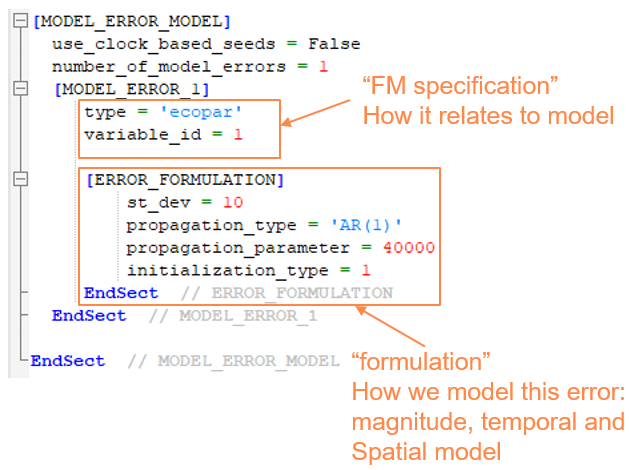
[MODEL_ERROR_MODEL]
    Number_of_model_errors = 2
    [MODEL_ERROR_1] // (…)
    [MODEL_ERROR_2] // (…)
EndSect
The child sections to ´MODEL_ERROR_MODEL´ are individual errors, e.g. MODEL_ERROR_1. Note that any error type can have more than one model error, e.g., one representing “slow” dynamics and another representing “fast” dynamics.
List of model errors per FM module
As stated above, the specification of a model error consists of a) the FM specification and b) the error formulation.
The following types of errors are currently supported by the DA module:
Hydrodynamic module HD
| Type | Specification | Description | Dim |
|---|---|---|---|
| wlbc | n_bounds = 2 bound_codes = 2, 3 |
Water level boundary [m] | 1d |
| flowbc | n_bounds = 2 bound_codes = 2, 3 |
Velocity/flux boundary [m/s] | 1d or 2dv |
| wlbc/flowbc | n_bounds = 2 bound_codes = 2, 3 is_phase_error = true |
Boundary phase error [s] | 0d |
| wind | - | u and v wind components [m/s] | 2d |
| windspeed | - | wind speed [m/s] | 2d |
| windphase | - | Wind phase error [s] | 0d |
| HD_parameter | parameter_name = "bed_resistance_coefficient" |
Manning (HD2d) or Roughness(HD3d) |
2d |
| HD_parameter | parameter_name = "bed_resistance" |
Any type of roughness | 2d |
Temperature/salinity module TS
| Type | Specification | Description | Dim |
|---|---|---|---|
| tempbc | n_bounds = 2 bound_codes = 2, 3 |
Temperature boundary | 1d or 2dv |
| saltbc | n_bounds = 2 bound_codes = 2, 3 |
Salinity boundary | 1d or 2dv |
| tempbc/saltbc | n_bounds = 2 bound_codes = 2, 3 is_phase_error = true |
Boundary phase error [s] | 0d |
| adsource | component_name = "salinity"/"temperature" source_id = 1 |
Concentration of source | 0d |
| AD_parameter | component_name = "salinity"/"temperature" parameter_name = "vertical_dispersion_coefficient" |
2d perturbation of 3d vertical dispersion |
2d |
| AD_parameter | component_name = "salinity"/"temperature" parameter_name = "vertical_eddy_viscosity_coefficient" |
2d perturbation of 3d vertical dispersion |
2d |
| HD_parameter | parameter_name = "light_extinction" |
For heat exchange | 0d |
Transport module TR
| Type | Specification | Description | Dim |
|---|---|---|---|
| adbc | n_bounds = 2 bound_codes = 2, 3 component_id = 1 |
Concentration boundary | 1d or 2dv |
| adbc | n_bounds = 2 bound_codes = 2, 3 component_id = 1 is_phase_error = true |
Boundary phase error [s] | 0d |
| adsource | component_id = 1 source_id = 1 |
Concentration of source | 0d |
| AD_parameter | component_id = 1 parameter_name = "vertical_dispersion_coefficient" |
2d perturbation of 3d vertical dispersion | 2d |
| AD_parameter | component_id = 1 parameter_name = "vertical_eddy_viscosity_coefficient" |
2d perturbation of 3d vertical dispersion | 2d |
| TR_parameter | component_id = 1 | Decay rate | 0d |
Mud Transport module MT
| Type | Specification | Description | Dim |
|---|---|---|---|
| adbc | n_bounds = 2 bound_codes = 2, 3 fraction_id = 1 |
Concentration boundary | 1d or 2dv |
| adbc | n_bounds = 2 bound_codes = 2, 3 fraction_id = 1 is_phase_error = true |
Boundary phase error [s] | 0d |
| adsource | fraction_id = 1 source_id = 1 |
Concentration of source | 0d |
| AD_parameter | fraction_id = 1 parameter_name = "vertical_dispersion_coefficient" |
2d perturbation of 3d vertical dispersion | 2d |
| AD_parameter | fraction_id = 1 parameter_name = "vertical_eddy_viscosity_coefficient" |
2d perturbation of 3d vertical dispersion | 2d |
| MT_parameter | parameter_name = settling_velocity fraction_id = 1 |
2d | |
| MT_parameter | parameter_name = settling_velocity_coefficient fraction_id = 1 |
2d | |
| MT_parameter | parameter_name = "deposition_critical_shear_stress" fraction_id = 1 |
2d | |
| MT_parameter | parameter_name = "erosion_critical_shear_stress" fraction_id = 1 |
2d | |
| MT_parameter | parameter_name = "roughness" | Bottom roughness | 2d |
| MT_dredging | dredger_id = 1 parameter_name = "rate" |
Dredging rate | 0d |
| MT_dredging | dredger_id = 1 parameter_name = "spill" |
Dredging spill | 0d |
| MT_dredging | dredger_id = 1 parameter_name = "phase" |
Dredging phase error [s] | 0d |
Ecolab module EL
| Type | Specification | Description | Dim |
|---|---|---|---|
| adbc | n_bounds = 2 bound_codes = 2, 3 state_variable_id = 1 |
Concentration boundary | 1d or 2dv |
| adbc | n_bounds = 2 bound_codes = 2, 3 state_variable_id = 1 is_phase_error = true |
Boundary phase error [s] | 0d |
| adsource | state_variable_id = 1 source_id = 1 |
Concentration of source | 0d |
| AD_parameter | state_variable_id = 1 parameter_name = "vertical_dispersion_coefficient" |
2d perturbation of 3d vertical dispersion | 2d |
| AD_parameter | state_variable_id = 1 parameter_name = "vertical_eddy_viscosity_coefficient" |
2d perturbation of 3d vertical dispersion | 2d |
| EL_constant | constant_id = 1 | 0d or 2d Ecolab constants | 0d or 2d |
| EL_state_variable | state_variable_id = 1 | 0d EL variables (only white_noise) | 0d |
| EL_forcing | forcing_id = 1 | 0d or 2d Ecolab forcing | 0d or 2d |
Spectral wave module SW
| Type | Specification | Description | Dim |
|---|---|---|---|
| wavebc | n_bounds = 2 bound_codes = 2, 3 subtype = "wave_height" |
Scaling of total energy [-] (multiplicative) example st_dev: 0.05 (5%) |
0d |
| wavebc | n_bounds = 2 bound_codes = 2, 3 subtype = "wave_period" |
Shift of wave periods [s] example st_dev: 0.25 |
0d |
| wavebc | n_bounds = 2 bound_codes = 2, 3 subtype = "wave_direction" |
Shift of directions [degree] example st_dev: 12.5 |
0d |
| wavebc | n_bounds = 2 bound_codes = 2, 3 is_phase_error = true |
Boundary time-shift [s] example st_dev: 900.0 |
0d |
| wind | - | u and v wind components [m/s] example st_dev: 0.5 |
2d |
| windspeed | - | wind speed [m/s] example st_dev: 0.5 |
2d |
| windphase | - | Wind time-shift [s] example st_dev: 900.0 |
0d |
| SW_parameter | parameter_name = "background_Charnock_parameter" |
example st_dev: 0.0005 | 0d |
| SW_parameter | parameter_name = "wind_non_dimensional_growth" |
beta max example st_dev: 0.05 |
0d |
| SW_parameter | parameter_name = "wind_corr_friction_velocity_CAP" |
wind CAP ratio of Ufric over U10 example st_dev: 0.005 |
0d |
| SW_parameter | parameter_name = "whitecapping_dissipation_cdiss" |
Settings:Modifed WAM Cycle 4 example st_dev: 0.3 |
2d |
| SW_parameter | parameter_name = "whitecapping_dissipation_delta" |
Settings:Modifed WAM Cycle 4 example st_dev: 0.05 |
2d |
| SW_parameter | parameter_name = "whitecapping_cds_sat" |
Settings:Ardhuin et al example st_dev: 0.000002 |
0d |
| SW_parameter | parameter_name = "Nikuradse_roughness" |
Bottom friction example st_dev: 0.005 |
2d |
Model error type specification
Any type of model error needs to be related to the underlying MIKE FM model. In some cases, this is done simply be specifying the type of the model error in other cases the user needs to supply more information e.g. the id of a FM quantity.
Boundary errors
A MIKE FM model typically has several open boundaries (“bounds”) each having its own unique code (e.g. 3). Often some of these boundaries are adjacent which also means that the errors on these correlates to some extent. To describe this correlation across different boundaries the DA module require the user to specify groups of boundaries. The specification is as follows in a case of a group consisting of two bounds:
[MODEL_ERROR_1]
    type = 'wlbc'
    n_bounds = 2
    bound_codes = 2, 3
    // (…)
Measurement bias
Measurement bias is a special kind of 0d model error which is used for estimating bias in a particular measurement. The Ensemble Kalman filter assumes that errors in measurements are white---measurement bias can be used if that is not the case.
Error formulation
After specifying the model error’s relation to the FM model, we need to specify its formulation in the ERROR_FORMULATION sub-section. The formulation contains the following:
- Amplitude and perturbation type (additive, multiplicative, …)
- Temporal propagation including initialization
- Spatial discretization (horizontal and vertical)
- Spatial correlation (horizontal and vertical)
Each of these are explained in detail in the Model error modelling section.
Perturbation type
The two basic perturbation types: additive and multiplicative are explained in the Amplitude and perturbation type section. In total, these perturbation_type are available:
- additive (default)
- additive_non_negative
- log_additive
- additive_bounded
- multiplicative
- multiplicative_non_negative
- log_multiplicative
- multiplicative_bounded
The X_non_negative variants will make sure that the quantity which is perturbed will not be negative after the perturbation (e.g. the wind_speed).
The log_X variants will perform a log-transformation of the quantity to perturbed before doing the perturbation. The inverse log-transform will be performed afterwards. This could be relevant for non-Gaussian quantities e.g. wind speed.
The X_bounded variants require the user to provide perturbation_bounds that the quantity which is perturbed will be enforced to stay within. If your instead wish to bound the value of the perturbation you can set the minimum_value and maximum_value.
Temporal propagation
The model error will have a temporal propagation model associated. The following propagation_type are available:
- AR(1) – first order autoregressive process (default)
- persistence – i.e. no temporal propagation
- whitenoise
If the propagation_type is ‘AR(1)’ then a propagation_parameter, which is the process half-life in seconds, must be supplied as well. See ensemble modelling page for an example and experiment with the AR(1) app to get a better understanding of auto-regressive processes.
An initialization_type may be supplied if the propagation_type is not ‘whitenoise’. initialization_type=0 means to start from zero; initialization_type=1 means to start from the specified error amplitude (set by the st_dev).
Horizontal discretization
If the model error has a spatial extent (e.g. a boundary or wind error) it needs to be discretized in space. The discretization will typically be coarser than the resolution of the corresponding MIKE FM quantity. The DA engine will perform a (bi-) linear interpolation from the discretized error on to the model quantity before the actual perturbation is done.
Currently three options exist for horizontal_discretization_type of model errors:
- 0: Constant
- 1: Linear
- 2: Equidistant grid
If horizontal_discretization_type=2 then a horizontal_grid_spacing should be provided as well.
Horizontal correlation
The spatially distributed errors are in most cases correlated in space. Internally in the code the correlation is described by a covariance matrix Q which describes how the errors co-vary across the domain. The user can control that both by the horizontal discretization (see above section) and more directly by specifying a horizontal_corr length scale (and horizontal_corr_function). A typically value for the horizontal_corr could be 5-10 times larger than the horizontal_grid_spacing.
Experiment with the horizontal correlation app to get a better understanding of correlated errors on an equidistant grid.
Vertical discretization and correlation
Some errors, e.g. 2dv boundary errors, may be discretized in the vertical direction using the number_of_layers keyword. The error layers will follow relative vertical coordinates ranging from 0 (=bottom) to 1 (=surface). It is possible to specify specific layer_positions if equidistant layers are not sufficient. The relative vertical coordinate will be applied for the error regardless of the vertical discretization of the model (sigma vs sigma-z).
It is possible to specify vertical_corr_function and vertical_corr in the same way as horizontal correlation. The vertical_corr is also given in meters.
PFS Section MODEL_ERROR_MODEL
The overall structure of the MODEL_ERROR_MODEL section is:
[MODEL_ERROR_MODEL]
    number_of_model_errors = 2
    [MODEL_ERROR_1] // (…)
    [MODEL_ERROR_2] // (…)
EndSect
Each of the model errors has first a FM specification part and the and error formulation part. For a wlbc error it could look like this:
[MODEL_ERROR_1]
    type = ‘wlbc’
    n_bounds = 2
    bound_codes = 2, 3
    [Error_Formulation]
        // (…)
    EndSect // Error_Formulation
EndSect
And the error formulation could look like this:
[Error_Formulation]
    st_dev = 0.05
    perturbation_type = ‘multiplicative’
    propagation_type = 'AR(1)'
    propagation_parameter = 21600.0
    initialization_type = 0
    horizontal_discretization_type = 2
    horizontal_grid_spacing = 1000.0
    horizontal_corr_function = 1
    horizontal_corr = 10000.0
EndSect // Error_Formulation
Overall specification
| Keyword |
Values |
|
|---|---|---|
| [MODEL_ERROR_MODEL] | Section for specifying all model errors | |
| use_clock_based_seeds | The seed is the starting point of the random number generator used for generating the model errors. If use_clock_based_seeds=true it will be different each time the model is executed. If it is false the same sequence of random numbers will be obtained each time |
true/false default: true |
| random_seed | If use_clock_based_seeds=false, a specific seed (an integer value) can be used for initializing the random number generator such that the same sequence of random numbers are obtained each time |
default: 1000000 |
| number_of_model_errors | Default: 0 |
Hereafter follows the specification of each model error.
Basic model error specification
| Keyword |
Values |
|
|---|---|---|
| [MODEL_ERROR_x] | Section for specifying a single model error | |
| type | type of model error | see table above |
| n_bounds, bound_codes | specification of water level boundary error if type='wlbc' | |
| module_name, parameter_name, etc... | specification of each type of model will be different - see table above | |
| include_in_state | Should the model error be part of the state vector and thereby be updated upon assimilation? |
true/false default: true |
| name | Optionally, a user-defined name for the model error can be specified. |
Default: according to number and type e.g. “err01_wind_u” |
Every model error has an Error_Formulation which is defined in a separate section.
Error formulation
Amplitude and perturbation type
| Keyword |
Values |
|
|---|---|---|
| Error_Formulation | Section for specifying error formulation | |
| st_dev | Standard deviation of the error | |
| minimum_value | Lower bound of the error (typically not used) | Default: -1e10 |
| maximum_value | Upper bound of the error (typically not used) | Default: 1e10 |
| perturbation_type | How should the FM quantity be modified? | 'additive' (default) 'multiplicative' 'additive_non_negative' 'log_additive' 'additive_bounded' 'multiplicative_non_negative' 'log_multiplicative' 'multiplicative_bounded' |
| perturbation_bounds | For perturbation_type X_bounded vector with minimum and maximum value for the perturbed quantity |
Default: -1e10, 1e10 |
Temporal propagation
| Keyword |
Values |
|
|---|---|---|
| propagation_type | Name of temporal propagation model | 'whitenoise' 'presistence' 'AR(1)' (default) |
| propagation_parameter or propagation_parameters |
Parameters for the temporal propagation model |
If 'whitenoise' or 'persistance': not used If ‘AR(1)’: half time in sec Default: 21600.0 |
| initialization_type | How should the model error be in the first time step |
0: No initialization (start from 0) 1: (start from st_dev) Default: 0 |
Horizontal discretization and correlation
| Keyword |
Values |
|
|---|---|---|
| horizontal_discretization_type | Type of discretization | 0: Horizontally constant 1: (Piecewise) Linear 2: Equidistant grid Default: 2 |
| horizontal_grid_spacing | Grid spacing in meters (only if type=2). Be careful not to set this number too small as it will make the error initialization process extremely slow. |
Default: 25% of the average of x- and y- domain lengths |
| horizontal_corr_function | Correlation function (e.g. Gaussian). | 1: Gaussian 2: Exponential 3: Gaspari & Cohn 4: Cubic exponential 5: Cubic polynomial 6: Step Default value: 1 |
| horizontal_corr | Correlation length scale in meters | Default: 10000.0 |
Vertical discretization and correlation
Some errors can also be discretized in the vertical direction, e.g. 2dv boundary errors.
| Keyword |
Values |
|
|---|---|---|
| number_of_layers | Number of error layers (1=no vertical discretization) |
Default: 1 |
| layer_positions | Position of each layer in relative coordinates from 0 (=bottom) to 1 (=top). Must start with 0 and end with 1. |
Default: equally distributed between 0 and 1 |
| vertical_corr_function | Correlation function (e.g. Gaussian) for vertical correlation |
1: Gaussian 2: Exponential 3: Gaspari & Cohn 4: Cubic exponential 5: Cubic polynomial 6: Step Default value: 1 |
| vertical_corr | Vertical correlation length scale in meters | Default: 100.0 |
State space
Variables and meshes
The state vector should contain the prognostic variables of a given model and potentially a few auxiliary variables that are used by the model across timesteps (and are different for the different members).
HD
The state vector of a HD model (mode=2) is populated by setting hd_state_space_type = 1. That is sufficient in most applications but if the user would like fine-grained control over what should be included in the state vector it can be done by setting the type_x parameters shown below (here shown with default values). See table below for the possible options.
[MODEL_STATE_SPACE]
    hd_state_space_type = 1
    type_surface = 1
    type_velocity = 1
    type_flux = 0
    type_temperature = 1
    type_salinity = 1
    type_turbulence = 1
EndSect
TR
The state vector of a decoupled TR model will be populated by setting tr_state_space_type = 1. The hd_state_space_type should be 0 (or not set) since the HD field is read as a forcing in the decoupled mode. In a coupled model both should be 1.
MT
The state vector of a decoupled MT model will be populated by setting mt_state_space_type = 1. The hd_state_space_type should be 0 (or not set) since the HD field is read as a forcing in the decoupled mode. In a coupled model both should be 1.
EL
The state vector of a decoupled EL model will be populated by setting el_state_space_type = 1. The hd_state_space_type should be 0 (or not set) since the HD field is read as a forcing in the decoupled mode. In a coupled model both should be 1.
SW
The action density 'SW%a' is the only prognostic variable in the spectral wave module. It belongs to the “spectrum” mesh
[MODEL_STATE_SPACE]
    sw_state_space_type = 1
    type_Hm0 = 1
    type_Tp = 0
    type_MWD = 0
    type_windspeed = 1
EndSect
Variable names and id
A list of all variables (id, name and size) will be outputted to the log file in the setup phase of the simulation (MODEL_STATE_SPACE section). It could like this:
============== Model/error variables included in state ===============

     -------------------------------------------------------
      var type     id                name     size   ndim
     -------------------------------------------------------
      model-var:    1                HD%s     3992     2
      model-var:    2                HD%u    41400     3
      model-var:    3                HD%v    41400     3
      model-var:    4                HD%w    41400     3
      model-var:    5               HD%ws    41400     3
      model-var:    6             TS%temp    41400     3
      model-var:    7             TS%salt    41400     3
      model-var:    8               KE%tk    41400     3
      model-var:    9               KE%ep    41400     3
      error-var:   10          err01_wlbc        2     1
Variable Transformation
Non-gaussian variables---e.g. significant wave height Hm0---may be log-transformed before and after the assimilation for better performance. The same transformation will be applied to the measurement of the same variable. Note that the measurement error description will now also be in the transformed space - so you may want to reconsider the st.dev of the measurement error. It does not make sense to transform variables which are not used for assimilation.
[MODEL_STATE_SPACE]
    // (…)
    number_of_variable_transforms = 1
    [VARIABLE_TRANSFORM_1]
        variable_name = "SW%Hm0"
        transform_type = 1   // 1=log, 2=square, -1=exp, -2=sqrt
    EndSect
EndSect
MODEL_STATE_SPACE section) of an initial simulation to obtain the variable_name of the variable you wish to transform.
PFS Section MODEL_STATE_SPACE
[MODEL_STATE_SPACE]
    hd_state_space_type = 0
    type_surface = 0
    type_velocity = 0
    type_flux = 0
    type_temperature = 0
    type_salinity = 0
    type_turbulence = 0

    tr_state_space_type = 0
    mt_state_space_type = 0
    el_state_space_type = 0
    sw_state_space_type = 0

    sw_state_space_type = 1
    type_Hm0 = 1
    type_Tp = 0
    type_MWD = 0
    type_windspeed = 1

    number_of_variable_transforms = 1
    [VARIABLE_TRANSFORM_1]
        variable_name = "SW%Hm0"
        transform_type = 1
    EndSect
EndSect  // MODEL_STATE_SPACE
HD
| Keyword |
Values |
|
|---|---|---|
| hd_state_space_type | HD model | 0: not included 1: included |
| type_surface | Type of state variable for the free surface |
0: not included 1:s (surface elev) (default) 2:h (total water depth) |
| type_velocity | Type of state variables for the velocity components |
0: not included 1:u,v,w,ws, (default) 2:hu,hv,hw,hws |
| type_flux | 0: not included (default) 1: included |
|
| type_temperature | 0: not included 1: included (default) |
|
| type_salinity | 0: not included 1: included (default) |
|
| type_turbulence | 0: not included 1: included (default) |
TR, MT and EL
| Keyword |
Values |
|
|---|---|---|
| tr_state_space_type | 0: not included 1: included |
|
| mt_state_space_type | 0: not included 1: included |
|
| el_state_space_type | 0: not included 1: included |
SW
| Keyword |
Values |
|
|---|---|---|
| sw_state_space_type | 0: not included 1: included |
|
| type_Hm0 | Significant wave height | 0: not included 1: included (default) |
| type_Tp | Peak period | 0: not included (default) 1: included |
| type_MWD | Mean wave direction | 0: not included (default) 1: included |
| type_windspeed | 0: not included (default) 1: included |
Variable Transforms
| Keyword |
Values |
|
|---|---|---|
| number_of_variable_transforms | Number of variables that should be transformed |
Default 0 |
| VARIABLE_TRANSFORM_x | Section for a specification of a single variable transformation |
|
| variable_name | Variable name for variable that should be transformed. |
Default: '' |
| transform_type | Type of transformation | 0: no transformation (=deactivated) 1: log-transform 2: square-transform |
Nudging
Full-field nudging of a variable (typically from another model) is possible for any DA type. It is activated if the [NUDGING] is present. The technique, which blends the computed solution of a variable (e.g. salinity) with data provided from a file, can be used for maintaining long term deep ocean solutions. It can be combined with any type of data assimilation.
Let f denote a vector of values for a single variable (e.g. salinity) at a given time step. The nudging now blends the computed solution f_{FM} with the inputted values f_{input} by the nudging factor \alpha:
The factor \alpha may be supplied either directly or as "half-life" \tau making it independent of the nudging time step (=assimilation time step) dt by this relation
The factor \alpha can be a constant (format 0) or provided as a "map" (format 2) with the same spatial dimensions as the values.
The nudging section also allows for directly specifying an update for a given variable by setting the is_update switch to true in which case f is updated by
In which case the factor \alpha_m is a moderation factor.
Note
Full-field nudging was introduced with MIKE Zero 2021 as a subsection of [METHOD]. For MIKE Zero 2021 update 1, it has been moved to it's own section.
PFS Section NUDGING
[NUDGING]
    number_of_inputs = 1
    [INPUT_1]
        variable_name = 'salinity'
        file_name = |.\data\salinity_from_CMEMS.dfsu|
        item_number_values = 1

        factor_type = 2   // 1:plain factor or 2:half-life
        factor_format = 0
        // file_name_factor = |.\data\nudging_factor_map.dfsu|
        // item_number_factor = 2
        factor = 1200   // half-life in seconds if factor_type=2
    EndSect // INPUT_1
EndSect // NUDGING
The NUDGING section may also be used for directly providing an update on a single variable if the switch is_update is to true.
    [INPUT_1]
        variable_name = 'surface elevation'
        is_update = true
        moderation_factor = 1.0
        file_name = |.\data\StateUpdate_area.dfsu|
        item_number_values = 1
    EndSect // INPUT_1
| Keyword |
Values |
|
|---|---|---|
| [NUDGING] | Section for specifying full field nudging | |
| number_of_inputs | Number of input files | Default value: 0 |
| [INPUT_x] | Section for specifying Nudging for a single input field (and variable) |
|
| variable_name | Name of this variable (must be in state) | Default value: '' |
| file_name | File with data | Default value: '' |
| item_number_values | Item number of data to be used for nudging | Default value: 1 |
| factor_format | Is the factor a constant (0) or a map (2) | Default value: 0 |
| factor_type | Should the factor be given as direct blending factor (1) or as a half time (2) |
Default value: 1 |
| factor | If factor_format=0, then this constant factor will be used. |
Default value: 0.2 or 1800s (if factor_type=2) |
| file_name_factor | File with factor (if factor_format=2) | Default value: '' |
| item_number_factor | Item number of nudging factor in factor file | Default value: 1 |
| is_update | Use standard nudging blending computed and inputted field (false) or simply add input to computed solution (true) |
Default value: false |
| moderation_factor | If is_update=true. This factor is for reducing the effect of the update. If set to 1 then the update will done fully, if 0.9 then only 90%. |
Default value: 1.0 |
| type_of_space_interpolation | Should the values be spatially interpolated when read from disk? Not needed if the same mesh is used. |
0: no interpolation 1: linear interpolation Default value: 0 (off) |
Measurements
The EnKF assumes that measurements are mutually independent and that the measurement errors are gaussian distributed and non-correlated in time.
Types of measurements
Different model quantities can be observed depending on the type of model
- HD
- Water level (2d)
- ua, va (2d)
- u, v (3d)
- TS
- salinity
- temperature
- TR
- e.g. TR%COMPONENT_2
- MT
- e.g. MT%SSC_FRACTION_1
- EL
- e.g. EL%STATE_VARIABLE_3
- SW
- Significant wave height
In terms of data file types, the following types are supported:
- Fixed position station data (scalar) in dfs0 (type 1)
- Track data in dfs0 with first two items as x,y-coordinates (type 2)
- Horizontal grid data in dfs2 (type 3)
- Horizontal flexible mesh data in dfsu2d (type 4)
- Vertical column data as multiple items in dfs0 (type 5)
Station measurements
Type 1. Station measurements are fixed position scalar measurements relating to a single observable variable in the FM model. The data is supplied in a dfs0 file and the user needs to provide the following information:
- Measured variable
- File name and item number
- Position of the measurement
- St.dev (=the level of error in the measurement – see section below)
3D measurements
If the observed quantity is a 3d field (e.g. salinity), the user needs to provide the z-coordinate as well. Note that a specific layer is found in the model initialization phase with surface level as specified by the initial condition. It does not change dynamically during the simulation.
Track measurements
Type 2. Track measurements are scalar measurements with changing position relating to a single observable variable in the FM model – it could be altimeter SSH data from a satellite. The data is provided in a dfs0 file in which the two first items are the x,y-coordinates. The user needs to provide the following information:
- Measured variable
- File name and item number of the data (x,y-coordinates are the first two items)
- St.dev (=the level of error in the measurement – see section below)
- Error correlation along track
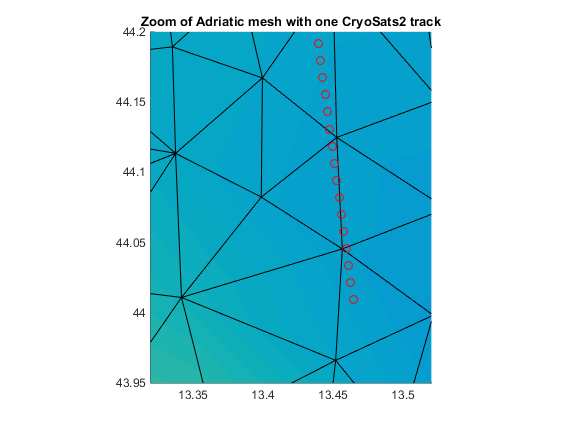
Chart shows an example of a track measurement on top of a MIKE FM mesh
NOTE: 3D track measurements are not yet supported
Horizontal grid measurements (raster)
Type 3. Horizontal grid measurements are vector measurements with fixed positions relating to a single observable variable in the FM model – it could be gridded Chlorophyll maps obtained from satellite. The data is provided in a dfs2 file which contains the geographical specification of the measured points. The user needs to provide the following information:
- Measured variable
- File name and item number of the data (x,y-coordinates are read from dfs file)
- St.dev (=the level of error in the measurement – see section below)
- Error correlation
NOTE: dfs1 and dfs3 are not yet supported.
Flexible mesh measurements (horizontal)
Type 4. Unstructured (dfsu) measurements are vector measurements with fixed positions relating to a single observable variable in the FM model. The mesh of the measurement can be the same or different to the model mesh. The data is provided in a dfsu file which contains the geographical specification of the measured points. The user needs to provide the following information:
- Measured variable
- File name and item number of the data (x,y-coordinates are read from dfsu file)
- St.dev (=the level of error in the measurement – see section below)
- Error correlation
NOTE: dfsu files with vertical data (3d or 2dv) are not yet supported.
Vertical column measurements
Type 5. Vertical column measurements can be provided as multiple-item dfs0 where the different items represent different depths. Dfs0 files are chosen over dfs1 as the depths often will be non-equidistant which is not easily handled with dfs1 files. Both the horizontal and vertical positions needs to be provided by the user. The following information should be provided:
- Measured variable
- File name and item numbers of the data
- Horizontal position of the column
- Vertical positions (depths) corresponding to each of the items
- St.dev (=the level of error in the measurement – see section below)
- Vertical error correlation (optional)
Observation operator and relation to model
After the observed data have been read from file it needs to be related to model:
- which variable have been measured?
- At what time should the data be used?
- Where in the model is the observation located?
- And should neighbouring cells also be taken into account as well?
Measurement errors
A good specification of the measurement errors is essential to the performance of the data assimilation scheme.
The errors description should account for both:
- Instrumentation/acquisition errors
- Representation errors
The first type is relatively easy to understand - what is the accuracy of a certain sensor e.g. on a satellite. The representation error has to do with how well the model can represent an observable quantity which is a consequence of model equations, numerical techniques, parametrizations and discretization. As an example, a tide gauge in a harbour may determine the surface elevation very accurately but if harbour resonance is recorded by the sensor and the model is a regional model it will not include a description of harbour resonance or other local scale effects. That is representation error.
Varying measurement errors
In some cases, measurement errors vary in time (e.g. may be larger for larger values) or vary in space (e.g. satellite data may have different errors close to land than at open sea).
It is possible to provide spatially and/or temporally varying errors as an item 'item_number_stdev' in the dfs data file. The values will be interpolated in time the same way as the actual observation data. If values are missing or below 1e-7, the default value for st_dev will be applied.
Correlation of measurement errors
It can be quite difficult to determine the correlation between errors e.g. along an altimeter track.
NOTE: it is not possible to set the correlation function yet. It is hard-coded to the exponential function.
Maximum innovation
The measurement-model difference in the observation position is called innovation. If the measurement is very different from the model (e.g. erroneous data point) then the data assimilation update may become radical and could potentially lead to model blow up or other unwanted effects. The user have the possibility to disregard measurement points with values that result in absolute innovation which is larger than a specified threshold called max_abs_innovation_point. This is a point-wise assessment.
A similar threshold can be set on the mean of the absolute innovation of a batch of points (e.g. points in a track measurement within one time step) by max_mean_abs_innovation_batch. This assessment will only be done in case of multiple points in the same measurement in a timestep and only on the points which has not been disregarded due to the point-wise test using max_abs_innovation_point.
If measurement points (or batches of points) are discarded a message will be printed in the log file.
PFS Section MEASUREMENTS
[MEASUREMENTS]
    number_of_independent_measurements = 1

    [MEASUREMENT_1]
        include = 1
        name = 'ts_WL_NW'

        type = 1
        file_name = |.\..\Measurements\ts_WL_NW.dfs0|
        item_number = 1
        item_number_stdev = 2
        data_offset = 0.0

        measured_variable = 'water level'
        type_time_interpolation = 1
        time_window_in_seconds = 300
        position = 251, 752
        coordinate_type = 'NON-UTM'
        type_of_space_interpolation = 1

        st_dev = 0.01
        error_temporal_corr = 1
        error_horizontal_corr = 1
        max_abs_innovation_point = 0.30

        group = 1
    EndSect
EndSect
For a simple station measurement the following will suffice in most cases:
[MEASUREMENT_1]
    include = 1
    name = 'ts_WL_NW'

    type = 1
    measured_variable = 'water level'

    file_name = |.\..\Measurements\ts_WL_NW.dfs0|
    item_number = 1
    position = 251, 752

    st_dev = 0.01
    max_abs_innovation_point = 0.30
    group = 1
EndSect
A typical track measurement would look like this:
[MEASUREMENT_1]
    include = 1
    name = 'track A'

    type = 2
    measured_variable = 'water level'

    file_name = |.\..\Measurements\track_A.dfs0|
    item_number = 3

    st_dev = 0.03
    error_horizontal_corr = 300
    max_abs_innovation_point = 0.40
    time_window_in_seconds = 300
EndSect
A typical horizontal grid (raster) measurement could be specified like this:
[MEASUREMENT_1]
    include = 1
    name = 'Raster'

    type = 3
    measured_variable = 'EL%STATE_VARIABLE_1'

    file_name = |.\obs\BOD.dfs2|
    item_number = 1

    st_dev = 1.0
    type_of_space_interpolation = 0
    time_window_in_seconds = 1800
EndSect
A typical vertical column measurement would look like this:
[MEASUREMENT_1]
    include = 1
    name = 'Column B'
    type = 5
    measured_variable = 'u'
    horizontal_position = 150, 150

    file_name = |.\..\Measurements\column_B.dfs0|
    number_of_items = 6
    item_numbers = 1, 2, 3, 4, 5, 6
    vertical_positions = -200, -150, -100, -80, -60, -40
    type_of_spatial_interpolation = 1

    st_dev = 0.02
    error_vertical_corr = 200
EndSect
Basic specification
| Keyword |
Values |
|
|---|---|---|
| include | Should this measurement be included for data assimilation, only for validation or not at all? |
0: not included 1: used for assimilation 2: used only for validation Default: 1 |
| name | User-defined name for this measurement (optional) |
Default: e.g. Meas001 |
Data file specification
| Keyword |
Values |
|
|---|---|---|
| type | Type of measurement data file | 1: fixed station series (dfs0) 2: track time series (dfs0) 3: fixed gridded data (dfs2) 4: fixed unstruct data (dfsu) 5: vertical column (dfs0) Default: 1 |
| file_name | Path of the data file | |
| item_number | Which item in the file contains the data (note that for track data files it is assumed that the x,y coordinates are the two first items) (type 1-4) |
Default: 1 |
| item_number_stdev | Which item in the file contains the measurement error (described as standard deviation)? (type 1-4) |
Default: 0 (inactive) |
| number_of_items | In vertical column data files, how many items/depths does the file contain (type 5 only) |
Default: 1 |
| item_numbers | Which items in the file contains the vertical column data (type 5 only) |
Default: 1 |
| data_offset | Add this amount to all data in file |
Default: 0.0 |
FM model specification
How do the observations relate to the model: what variable? at what times? in what positions?
| Keyword |
Values |
|
|---|---|---|
| measured_variable | Which of the MIKE FM model variables are being measured |
See variable list Default: ‘water level’ |
| type_time_interpolation | If type not 2: When should the model consider the measurement? |
0: no interpolation 1: linear interpolation 2: cubic spline interp. Default: 1 |
| time_window_in_seconds | If type_time_interpolation is 0 you can add a “window” around the observation time. |
|
| position | Where spatially in the model is the observation? (type 1) |
x,y,z coordinate of measurement |
| horizontal_position | Where horizontally in the model is the vertical col. observation? (type 5) |
x,y coordinate of vertical col. |
| coordinate_type | Optionally. If the position is given in another coordinate system than the model. |
Default: model default |
| vertical_position | At what depths are the vertical column observations? (type 5) |
z coordinate of vertical col. |
| type_of_spatial_interpolation | Should the observation operator only refer to the cell the observation is located in (0) or should it be a weighted average between the cell and its neighbours (1 or 2) |
0: no interpolation 1: linear interpolation 2: inv dist weight. (neighbours) Default: 1 |
Specification of measurement errors
| Keyword |
Values |
|
|---|---|---|
| st_dev | What is the average measurement error (see also item_number_stdev above) |
Default: 0.1 |
| error_temporal_corr | Correlation time in seconds (only track measurements - type 2) |
Default: 0 (no correlation) |
| error_horizontal_corr | Correlation length scale in meters (2d measurements - type 3 and 4) |
Default: 0 (no correlation) |
| error_vertical_corr | Correlation length scale in meters (vertical column measurements - type 5) |
Default: 0 (no correlation) |
| max_error_corr | Limit correlation of meas errors for numerical reasons. Model may be become unstable if this value is set too high. |
>=0 and <=1 Default: 0.85 (no correlation) |
| Rinv_singular_values_cutoff | When doing the pseudo-inverse of R where should we apply the (relative) cut-off on the singular values |
>=0 and <=1 typical 0.001--0.1 Default: 0.001 |
Specification of maximum measurement-model difference
| Keyword |
Values |
|
|---|---|---|
| max_abs_innovation_point | Measurement points with values that result in innovation (model-measurement difference in observation point) which is the absolute value is larger than this threshold will be disregarded |
Default: 1e10 (off) |
| max_mean_abs_innovation_batch | Measurements consisting of several points in a time step (e.g. satellite track) with values that gives a mean absolute innovation (model-measurement abs. difference as mean over all points in a batch/timestep) larger than this threshold will be disregarded |
Default: 1e10 (off) |
Localization
| Keyword |
Values |
|
|---|---|---|
| group | Group number of this measurement used for assigning per-group localization settings. |
Default: 1 |
Estimator (and regularization)
The EnKF approximates the “true” error covariance by the sample error covariance by the ensemble representation. The limited size of the ensemble inevitably introduces noise which increases with decreasing ensemble size. The noise is evident both in spatial and temporal directions.
The spatial noise in the error covariance often referred to as spurious long-range correlations may be accounted for by so-called localisation, where the effect of the update is decreased gradually away from the point of observation by multiplying by a taper function. In the Serial ESRF, this can be conveniently done directly on the error covariance P (called covariance localisation CL). In the ETKF and DEnKF, the so-called Local Analysis (LA) performs the localisation by element-by-element formulation of the update equations.
Smoothing in the serial ESRF
The EnKF approximates the “true” error covariance by the sample error covariance using an ensemble representation. The limited size of the ensemble inevitably introduces noise that increases with decreasing ensemble size. The noise is evident both in spatial and temporal directions. In this report, we are concerned only with the temporal behavior.
If the observations are scalar and fixed in space (like tide gauge stations), the Serial ESRF gives us the opportunity to reduce the noise in the temporal direction by smoothing the error covariance exponentially with a smoothing factor s with
which is a good approximation for slowly-varying error covariance. In practice for tidal and storm surge models, smoothing of the error covariance allows for the use of much smaller ensemble e.g. 8 instead of 50. The choice of smoothing factor becomes a tuning parameter and a compromise between a reduction of high-frequency error covariance noise and maintaining the EnKF’s ability to adapt dynamically to new situations. The smoothing factor s is determined from desired half time \tau and the time step length \Delta t by the relation
In practical coastal-ocean applications, a smoothing factor corresponding to a 3-hour half time has shown to be a good choice. If the time step \Delta t 5 minutes, then the smoothing factor amounts to s = 0.0191. The figure below shows the relative weights for the previous time steps with these values.
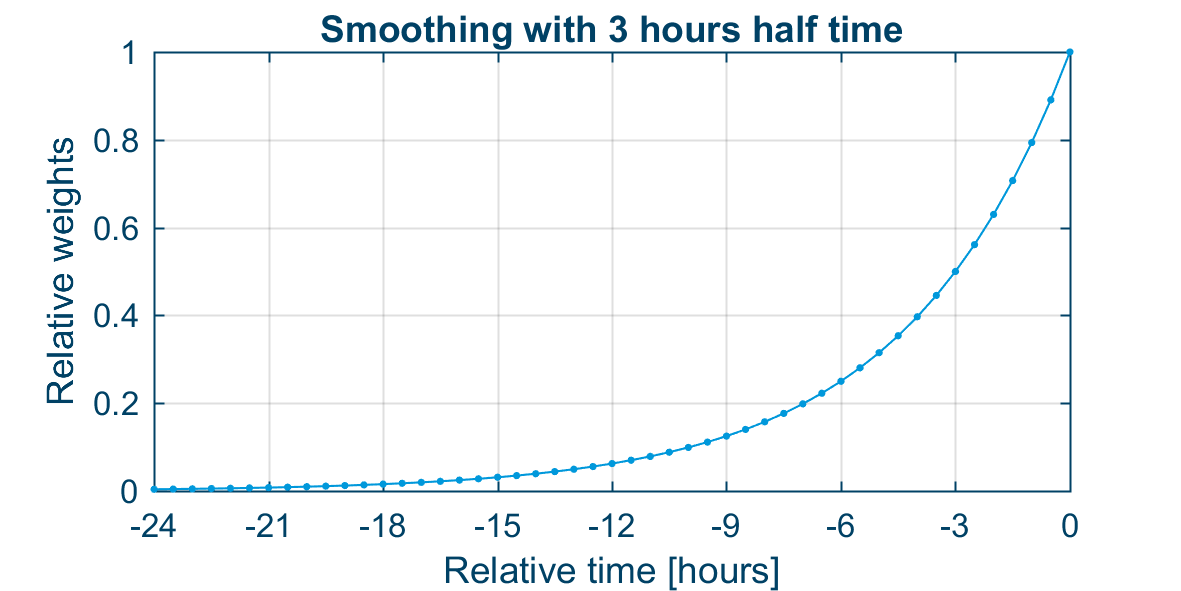
Relative weights of first order smoothing for previous hours with time step \Delta t = 5 minutes and half time \tau = 3 hours.
The figure below shows time series of three different error covariances. Notice how noisy the 8 member P_m appears and how much better the smoothed 8 members P_{smooth} becomes. Smoothing inevitably introduces a time lag as it uses information from previous time steps, which the figure also reveals.
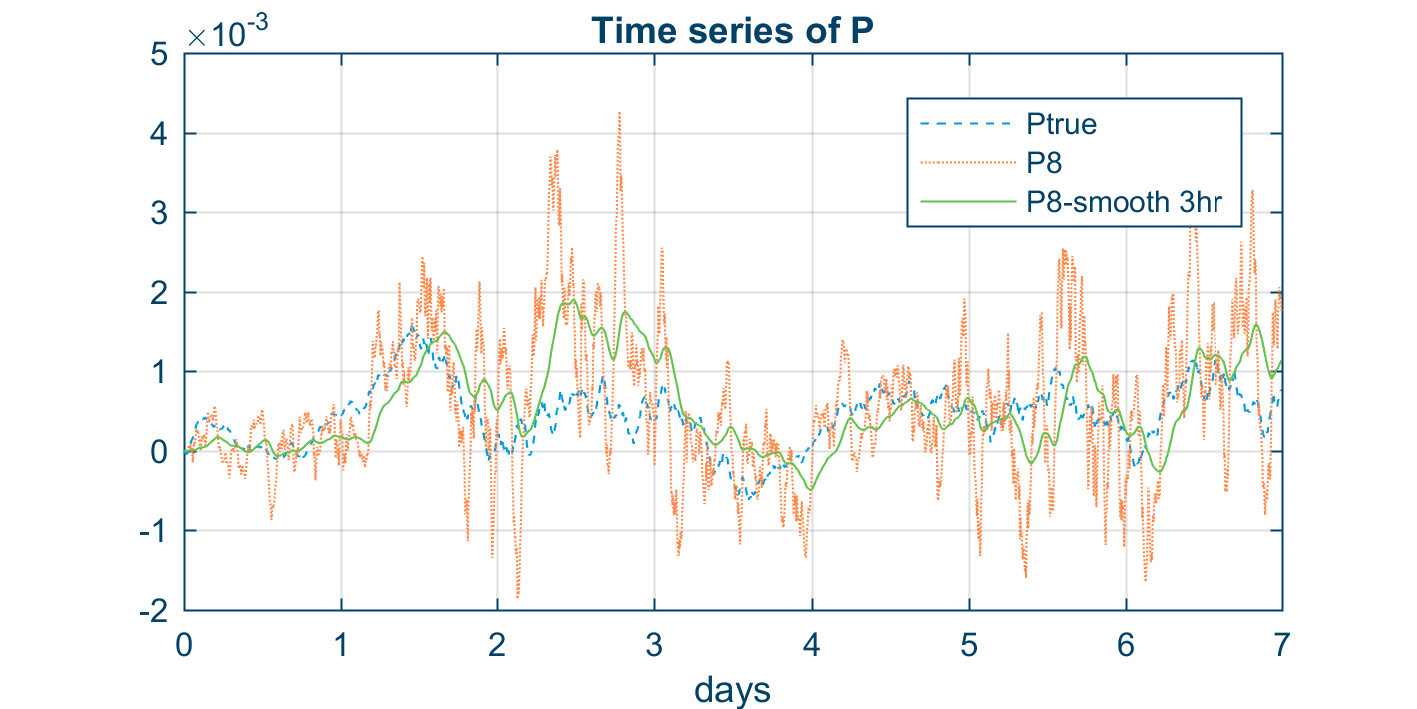
Time series of three different error covariances: the converged P_{true}, a noisy 8 member P_m and a 3-hour smoothed P_{smooth} also with 8 members.
Random anomaly tail smoothing (RAT)
Only the serial ESRF allows us to use direct smoothing of the error covariance P since P is saved for the (few) positions where we need it. This is not generally possible. One way to implement a smoothing technique in an ESRF which does not rely on a few fixed measurement stations would be to keep all previous anomaly vectors to be able to construct the anomaly matrix and thereby smoothed error covariance matrix anywhere and at any time. This, however, would require huge amounts of storage and massive computational powers in the analysis step. Furthermore, many anomaly vectors would be linearly dependent (unless the time steps are large) and weights would be vanishing small far away from the current time step anyway. This is clearly not a realistic path to follow.
Another idea is to instead keep only a reduced number m_{tail} of “old” anomaly vectors in an anomaly tail A_{tail}. At each time step, we update the anomaly tail by replacing m_{rep} random anomaly vectors with m_{rep} random vectors from the dynamic anomaly matrix A_{dyn}. The dynamic anomaly matrix is here simply the normal anomaly matrix, but named “dynamic” to distinguish it from the anomaly tail.
We define also the hybrid anomaly matrix A consisting of both the dynamic anomaly matrix A_{dyn} with m_d members and the anomaly tail A_{tail} with m_{tail} members in the following way
This new temporal smoothing technique is called Random Anomaly Tail abbreviated RAT. Notice that the technique contains three tuning parameters:
- the number of vectors in the tail m_{tail} ,
- the number of replacements pr step m_{rep}, and
- the weighting factor \beta between the dynamic anomaly matrix and the anomaly tail.
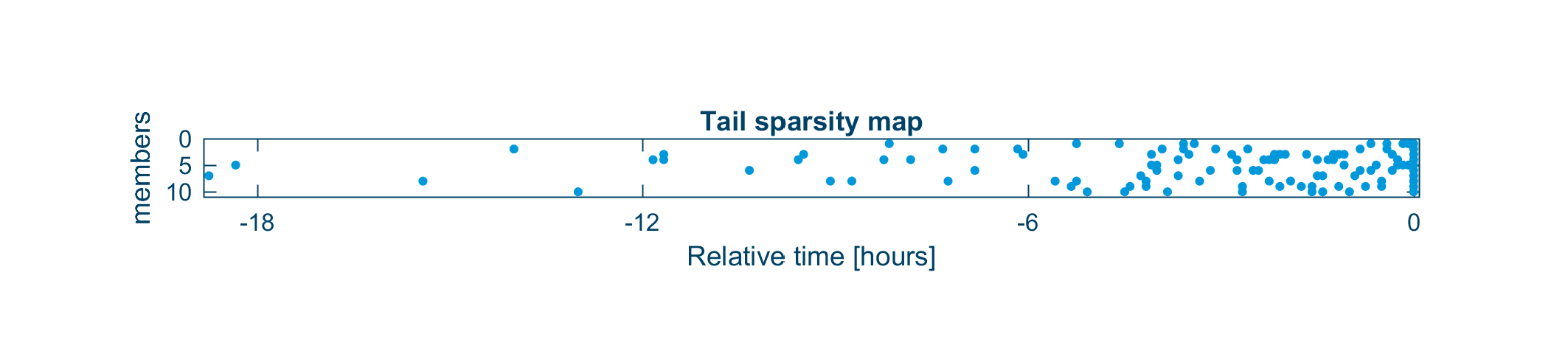
An example of a sparsity map from RAT smoothing with m=10, m_{tail}=100, and m_{rep}=2 showing a dot for each anomaly vector in a timestep-vs-member coordinate system.
By collecting these randomly picked anomaly vectors in 1-hour bins (12 time steps) and multiplying with the relevant weight (\beta or (1-\beta ) ), we can express the same data as relative weights as seen in the figure below. Notice how the distribution of the anomaly tail stochastically approximates the 3-hour smoothing from the figure shown above.
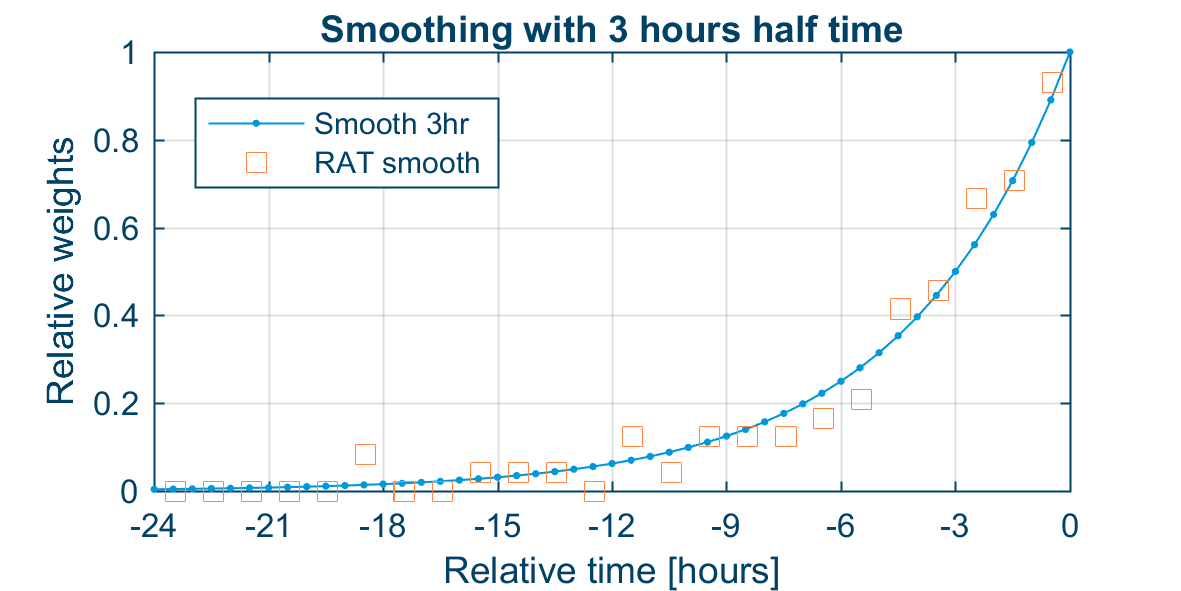
An example of relative weights from RAT smoothing aggregated in 1-hour bins and plotted on top of the standard 3-hour smoothing. The aggregated RAT weights are from the same case as shown on the figure above with m=10, m_{tail}=100, and m_{rep}=2.
Advice on parameters
The amount of smoothing to be used in a given DA model is dependent on the dynamics of the model and the typical time scales of the underlying system. As already mentioned, for many coastal-ocean models that include tides, a good practical choice is 3-hour smoothing. And typically, if one is concerned mainly with water levels, then 8 members would give quite good results with this amount of smoothing.
The new RAT smoothing has three tuning parameters m_{tail}, m_{rep} and \beta . Considering similar types of coastal-ocean applications, the following settings seem to lead to best results with moderate number of members m with 8 < m < 15:
| Parameter | min | max | Comment |
|---|---|---|---|
| m_{tail} | 5m | 15m | More tail members give more smoothing (but is also computational expensive). Increasing the number seems to have a significant positive effect especially if m is small (e.g. m<10). |
| m_{rep} | 1 | 2 | Few replacements will give longer tail (and more smoothing); use m_{rep}=1 if m<10 |
| \beta | 0.01 | 0.4 | 0.1 seems like a good practical choice. Larger value means more smoothing. |
To resemble 3-hour smoothing with m=8 members, it is suggested to use m_{tail}=100, m_{rep}=1 and \beta =0.1. Note below that the smoothing_tail_weight equals (1 - \beta ).
PFS Section ESTIMATOR
[ESTIMATOR]
    type = 1
    [REGULARIZATION]
        use_temporal_smoothing = false
        smoothing_halftime = 21600
        use_localization = false
        [LOCALIZATION]
            number_of_groups = 1
            [GROUP_1]
                horizontal_corr_function = 3
                horizontal_corr = 200000
                vertical_corr_function = 3
                vertical_corr = 150
            EndSect  // GROUP_1
        EndSect  // LOCALIZATION
    EndSect  // REGULARIZATION
EndSect
Smoothing
The smoothing of the error covariance is relevant for EnKF models (type 1). The technique is different for the serial algorithm (algorithm 1) and the transform-algorithms (algorithm 2 and 3).
| Keyword |
Values |
|
|---|---|---|
| use_temporal_smoothing | Should the error covariance smoothing be activated? | Default: false |
| smoothing_halftime | If algorithm=1: Half-life in seconds for the first order smoothing filter applied to the error covariance |
Default: 0 (=off) |
Using RAT smoothing (algorithm 2 or 3), the following parameters will instead need to be specified (see above section for advice on parameters):
| Keyword |
Values |
|
|---|---|---|
| smoothing_tail_size | How many “old” ensemble anomalies should be stored in the tail. |
Default: 100 |
| smoothing_tail_weight | How much should the tail be weighted relative to anomalies of the current time step? smoothing_tail_weight = 1- \beta |
Default: 0.8 |
| smoothing_num_re placements_pr_step |
How many ensemble anomalies should be replaced in the tail in each time step (use 1 or 2) |
Default: 2 |
Localization
The localization works on groups of measurements. When a measurement is defined it can be assigned a group id by the user (see Measurements ). Localization settings can now be controlled for each group individually in the LOCALIZATION section.
| Keyword |
Values |
|
|---|---|---|
| use_localization | Default: false | |
| LOCALIZATION | Section for specifying localization (spatial regularization) |
|
| number_of_groups | Number of measurement groups for which the localization will be defined. |
|
| GROUP_x | Section for specifying localization for a specific measurement group |
|
| horizontal_corr_function | Correlation function (e.g. Gaussian) to be used for distance-based tapering |
1: Gaussian 2: Exponential 3: Gaspari & Cohn 4: Cubic exponential 5: Cubic polynomial 6: Step Default value: 3 |
| horizontal_corr | The horizontal correlation length scale in metres |
Default: 100000 |
| vertical_corr_function | Correlation function (e.g. Gaussian) to be used for vertical distance-based tapering (3d models only) |
1: Gaussian 2: Exponential 3: Gaspari & Cohn 4: Cubic exponential 5: Cubic polynomial 6: Step Default value: 3 |
| vertical_corr | The vertical correlation length scale in metres (3d models only) |
Default: 10000000 (=full) |
ErrCovIO
ErrCovIO is short for Error Covariance Input-Output. If only fixed station measurements have been used in an EnKF simulation (DA type=1) the error covariance matrix for the measurement station positions for all model variables can be outputted to disk. This is only possible if DA type=1 and algorithm=1 (serial EnKF algorithm) is selected.
The stored error covariance matrices can be read by the DA model in a so-called steady run (DA type=3) which requires only one model instance (not an ensemble model). See also Steady.
Specifying the error covariance input and output is done in the [ERRCOV_IO] section.
Error covariance files and file names
Model variables will be outputted to files according to the field type. Water level in an 3d HD model will as example be outputted to a 2d “area” file whereas velocities will be outputted to 3d “volume” file.
For HD/TR/MT/EL models the following file names (dfsu) need to be specified:
- File_name_area
- File_name_volume (only if 3d model)
For SW models the following file names (dfsu) need to be specified:
- File_name_area
- File_name_spectrum
Error variables (model errors) will be outputted to separate files (one file per model error)
- File_name_[model_error_name]
Where the model error name is the one specified in the corresponding model error section or the default model error name according to type. The file type will be dfs0, dfs1 or dfs2 according to dimension and discretization of the model error.
Error covariance output
If the simulation is EnKF (DA type=1) with algorithm 1, the error covariance can be saved to file in the [OUTPUTS] subsection of [ERRCOV_IO]. It is possible to specify any number of error covariance outputs. For each of outputs the following needs to be specified:
- Include or not
- Time stepping: first and last time step and step factor
- Time average or not
- Output the smoothen error covariance (see Regularization) or not
- Relevant file names
Error covariance input
If the simulation is a steady run (DA type=3), the error covariance needs to be loaded from file in the [INPUT] subsection of [ERRCOV_IO]. The following needs to be specified:
- include (active or not)
- Is the input time averaged or not?
- Relevant file names
Note: non time-averaged error covariance inputs are not currently supported. It will give an error if you try.
Note: the number and sequence of measurements needs to fit for the steady run (which reads the error covariance input) and the previously run ensemble model which created the error covariance outputs.
Use cases
Error covariance input/output and the various settings can be used for a number of different use cases:
In EnKF run mode (DA type 1, only algorithm 1):
- INPUT (not possible)
- OUTPUTS
- discrete times (time_average=false)
- normal (smoothed_out=false)
- time varying for diagnostics
- smoothed (smoothed_out=true; only if smoothing is active!)
- time varying for diagnostics
- hot-out (last time step) for input in continued EnKF run
- normal (smoothed_out=false)
- time-averaged (time_average=true, smoothed_out=false)
- Over (almost) whole simulation (to be used in steady simulation)
- (over time intervals)
- discrete times (time_average=false)
In steady run mode (DA type 3):
- INPUT
- read time-invariant input (otherwise error)
- OUTPUTS: not possible
PFS Section ERRCOV_IO
The overall structure of the ERRCOV_IO section is as follows:
[ERRCOV_IO]

    [INPUT]
    EndSect  // INPUT

    [OUTPUTS]
        number_of_outputs = 2
        [OUTPUT_1]  // (...)
        [OUTPUT_2]  // (...)
    EndSect  // OUTPUTS

EndSect
Error covariance input
[INPUT]
    include = 1
    time_average = true

    file_name_area = |.\input\ErrCovIO_avg_Area.dfsu|
    file_name_volume = |.\input\ErrCovIO_avg_Volume.dfsu|
    file_name_err01_wind_u = |.\input\ErrCovIO_avg_Wind_err_u.dfs2|
    file_name_err01_wind_v = |.\input\ErrCovIO_avg_Wind_err_v.dfs2|
EndSect
| Keyword |
Values |
|
|---|---|---|
| INPUT | Section for specifying error cov input | |
| include | Is the input active (1) or not (0)? | 0: not active 1: active Default: 0 |
| time_average | Is the input time-averaged? | true/false Default: true |
| file_name_x | File names of the input files according to the model and error variables selected |
Error covariance output
[OUTPUT_1]
    include = 1
    first_time_step = 0
    last_time_step = 360
    time_step_frequency = 360
    time_average = true
    smoothed_out = false

    file_name_area = 'ErrCovIO_avg_Area.dfsu'
    file_name_volume = 'ErrCovIO_avg_Volume.dfsu'
    file_name_err01_wind_u = 'ErrCovIO_avg_Wind_err_u.dfs2'
    file_name_err01_wind_v = 'ErrCovIO_avg_Wind_err_v.dfs2'
EndSect
| Keyword |
Values |
|
|---|---|---|
| OUTPUT_x | Section for specifying a single error cov output | |
| include | Should this output be active? | 0: not included 1: included Default: 1 |
| first_time_Step | First time step (relative to the model overall time stepping) of the output |
Default: DA-start |
| last_time_step | Last time step (relative to the model overall time stepping) of the output |
Default: DA-end |
| time_step_frequency | Time step factor relative to the model overall time stepping |
Default: start-end (1 step) |
| time_average | Should the values be time-averaged over each step (true) or instantaneous (false) |
true/false Default: true |
| smoothed_out | If smoothing is active: should the smoothened error covariance (true) or the instantaneous error covariance be outputted (false) |
true/false Default: false |
| file_name_x | File names of the output files according to the model and error variables selected |
EnsembleIO
The state vector for all ensemble members can be outputted to disk in the ENSEMBLE_IO section. Likewise, the DA model can read the state vectors to “hot start” a DA model.
Ensemble files and file names
Model variables will be outputted to files according to the field type.
For HD/TR/MT/EL models the following file names (dfsu) need to be specified:
- File_name_area
- File_name_volume (only if 3d model)
For SW models the following file names (dfsu) need to be specified:
- File_name_area
- File_name_spectrum
Error variables (model errors) will be outputted to separate files
- File_name_[model_error_name]
Where the model error name is the one specified in the corresponding model error section or the default model error name according to type. The file type will be dfs0, dfs1 or dfs2 according to dimension and discretization of the model error.
Note that the file name PFS keywords for the Ensemble IO is identical to those for ERRCOV_IO.
It is possible to exclude model variables or model errors in the output if you wish. You do this by setting one of these to false:
- include_model_variables = true/false
- include_model_errors = true/false
StateUpdate
All assimilation models allow the user to output the mean update enforced during the assimilation step (the "increment") for all state variables. This is very useful for assessing the performance of the assimilation scheme. This feature is activated by setting the is_stateupdate keyword to true.
Use cases
Ensemble input/output and the various settings can be used for a number of different use cases:
In ensemble run mode (DA type 0 or 1):
- INPUT
- hot-start in continued ensemble run
- OUTPUTS
- all members (type 2)
- hot-out (last time step only) for continued ensemble run
- at discrete times for background ensemble in EnOI (DA type 4) or for diagnostics
- mean state (type 1)
- model errors only: hot-out for hot-starting of steady
- all members (type 2)
In steady run mode (DA type 3):
- INPUT
- model errors only: hot-start in continued steady (model variables from normal FM hot start)
- OUTPUTS
- (all variables for diagnostic purposes)
- model errors only: hot-out in continued steady (last time step only)
In EnOI run mode (DA type 4):
- INPUT
- background ensemble as anomalies (NOTE! requires processing of previously saved ensemble output)
In any assimilation model (DA type > 0):
- OUTPUTS
- stateupdate - for assessing the change on all state variables by assimilation
PFS Section ENSEMBLE_IO
The overall structure of the ensemble input and output section is as follows:
[ENSEMBLE_IO]
    [INPUT]  // (…)

    [OUTPUTS]
        number_of_outputs = 2
        [OUTPUT_1] // (…)
        [OUTPUT_2] // (…)
    EndSect  // OUTPUTS
EndSect
A complete input and output section could look like this:
[ENSEMBLE_IO]

  [INPUT]
    type = 0
    include_model_variables = true
    include_model_errors = true

    file_name_area = |.\input\State_Area.dfsu|
    file_name_volume = |.\input\State_Volume.dfsu|
    file_name_err01_wind_u = |.\input\State_Wind_err_u.dfs2|
    file_name_err01_wind_v = |.\input\State_Wind_err_v.dfs2|
  EndSect  // INPUT

  [OUTPUTS]
    number_of_outputs = 1

    [OUTPUT_1]
      type = 2
      is_stateupdate = false
      include_model_variables = true
      include_model_errors = true

      file_name_area = 'State_Area_out.dfsu'
      file_name_volume = 'State_Volume_out.dfsu'
      file_name_err01_wind_u = 'State_Wind_err_u.dfs2'
      file_name_err01_wind_v = 'State_Wind_err_v.dfs2'

      first_time_step = 0
      last_time_step = 3600
      time_step_frequency = 100
    EndSect  // OUTPUT_1
  EndSect  // OUTPUTS

EndSect  // ENSEMBLE_IO
Ensemble Input
The ensemble input (the state vector at the first DA module step) can be read from disk using the following specification:
[INPUT]
    type = 2
    include_model_variables = true
    include_model_errors = true

    file_name_area = |.\input\State_Area.dfsu|
    file_name_volume = |.\input\State_Volume.dfsu|
    file_name_err01_wind_u = |.\input\State_Wind_err_u.dfs2|
    file_name_err01_wind_v = |.\input\State_Wind_err_v.dfs2|
EndSect
| Keyword |
Values |
|
|---|---|---|
| INPUT | Section for specifying the ensemble input | |
| type | Should input be active? And should only the mean be read (1) or the whole ensemble (2)? |
0: not active 1: mean only 2: ensemble Default: 0 |
| include_model_variables | Should model variables be read? | Default: true |
| include_model_errors | Should error variables be read? | Default: true |
| File_name_x | File names of the input files according to the model and error variables selected |
Ensemble Output
A single ensemble output is specified in the following way:
[OUTPUT_1]
    type = 2
    is_stateupdate = false
    include_model_variables = true
    include_model_errors = true

    first_time_step = 0
    last_time_step = 3600
    time_step_frequency = 100

    file_name_area = 'State_Area.dfsu'
    file_name_volume = 'State_Volume.dfsu'
    file_name_err01_wind_u = 'State_Wind_err_u.dfs2'
    file_name_err01_wind_v = 'State_Wind_err_v.dfs2'
EndSect
| Keyword |
Values |
|
|---|---|---|
| OUTPUT_x | Section for specifying a single ensemble output | |
| type | Should this output be active? And should only the mean be outputted (1) or the whole ensemble (2)? |
0: not active 1: mean only 2: ensemble Default: 0 |
| is_stateupdate | Should the update (increment) be outputted instead of the state itself? (it's only possible to output the mean update i.e. type=1) |
Default: false |
| include_model_variables | Should model variables be outputted? | Default: true |
| include_model_errors | Should error variables be outputted? | Default: true |
| First_time_Step | First time step (relative to the model overall time stepping) of the output |
Default: 0 |
| Last_time_step | Last time step (relative to the model overall time stepping) of the output |
|
| Time_step_frequency | Time step factor relative to the model overall time stepping |
Default: 1 |
| File_name_x | File names of the output files according to the model and error variables selected if the file_name_x is blank the file will be omitted |
Diagnostics
It is possible to “probe” or sample the DA model by outputting time series (dfs0) of specific model or error variables in specific positions (type 1 or 2). The output will show all the ensemble members with values both before and after assimilation.
Three types of diagnostic outputs are available:
- Type 1: measurement point output
- Measurement_id
- Type 2: non-measurement point output
- Position
- Variable_name
- Type 3: global assimilation statistics
Global assimilation statistics
Type 3 diagnostics gives the user a time series file (dfs0) with a record for each assimilation step featuring the number of points assimilated, diagnostic values “dfs” and “srf”, and the mean, minimum and maximum update for each variable.
PFS Section DIAGNOSTICS
[DIAGNOSTICS]
    [OUTPUTS]
        number_of_outputs = 3

        [OUTPUT_1]
            include = 1
            type = 1
            measurement_id = 2
            file_name = 'Diagnostics_measTS2_SoutWest.dfs0'
        EndSect  // OUTPUT_1

        [OUTPUT_2]
            type = 2
            position = 500, 500
            variable_name = 'water level'
            file_name = 'Diagnostics_TS_pos_500_500.dfs0'
        EndSect  // OUTPUT_2

        [OUTPUT_3]
            type = 3
            file_name = 'Diagnostics_DA_stats.dfs0'
        EndSect  // OUTPUT_3

    EndSect  // OUTPUTS
EndSect
Basic specification
| Keyword |
Values |
|
|---|---|---|
| include | Should this diagnostic output be included? | 0: not included (inactive) 1: included (active) Default: 1 |
| type | What type of diagnostic output is this? | 1: measurement point 2: non-measurement point 3: global assimilation statistics |
Specification of measurement points
| Keyword |
Values |
|
|---|---|---|
| measurement_id | Id referring to a specific measurement |
Specification of non-measurement points
| Keyword |
Values |
|
|---|---|---|
| variable_name | Name of the variable (model or error) wished to be outputted. A list of possible state variables can be seen in the log file in the MODEL_STATE_SPACE section. |
Default: ‘water level’ |
| position | Where in the model domain is this point? | x,y coordinate x,y,z (if model is 3d) |
| coordinate_type | Optionally: If the position is given in another coordinate system than the model. |
Default: model default |
References
- Cañizares, R., Madsen, H., Jensen, H. R. & Vested, H. J. (2001), ‘Developments in operational shelf sea modelling in Danish waters’,Estuarine, Coastal and Shelf Science 53, 595–605. http://dkprojects/99000020/Publications/ca%C3%B1izares2001.pdf
- Cheng, Yongcun and Andersen, Ole Baltazar, “Improvement of Global Ocean Tide Models in Shallow Water Regions”, Altimetry for Oceans and Hydrology OST-ST Meeting, Technical University of Denmark, 2010.
- DHI, “Water Forecast for the Inner Danish Waters and the Baltic Sea, Set-up and validation of flow and wave models”, November 2011.
- DHI, “xx” Nov
- Evensen, G., Sequential data assimilation with a non-linear quasi-geostrophic model using Monte Carlo methods to forecast error statistics, J. Geophys. Res., Vol. 99(C5), (1994), pp 10,143-10,162
- Hamill, TM, and Snyder, C. (2000) A hybrid ensemble Kalman filter–3D variational analysis scheme, Monthly Weather Review 128 (8), 2905-2919.
- Hunt, B.R., Kostelich, E.J., Szunyogh, I., 2007. Efficient data assimilation for spatiotemporal chaos: a local ensemble transform Kalman filter, Phys. D Nonlinear Phenom., 230(1–2), 112–126.
- Madsen, H. and Cañizares, R. (1999), Comparison of extended and ensemble Kalman filters for data assimilation in coastal area modelling. International Journal for Numerical Methods in Fluids 31(6). 961-981.
- Mariegaard, J. S., & Huiban, M. R. (2017). WP4: Assessment of optimal position of open model boundaries and assimilation approach to regional scale ocean models. Technical report, DHI.
- Mariegaard, J. S. (2018). WP4: xx. Technical report, DHI.
- Sakov, P (2018). EnKF-c User Guide, enkf-userguide.pdf
- Sakov, P., Oke, P.R., 2008. A deterministic formulation of the ensemble Kalman filter: an alternative to ensemble square root filters, Tellus A, 60(2), 361–371. https://doi.org/10.1111/j.1600-0870.2007.00299.x
- Sørensen, J.V.T., Madsen H. and Madsen H. (2004), Efficient sequential techniques for the assimilation of tide gauge data in three dimensional modeling of the North Sea and Baltic Sea system, J. Geophys. Res., 109, 10.1029/2003JC002144.
- Sørensen, J.V.T, Madsen H. and Madsen H. (2005), Parameter sensitivity of three Kalman filter schemes for assimilation of water levels in shelf sea models, Ocean Modelling 11 (2006) 441–463.
- Wang, X., T. M. Hamill, C. Snyder, and C. H. Bishop, 2007: A comparison of hybrid ensemble transform Kalman filter-optimum interpolation and ensemble square root filter analysis schemes. Mon. Wea. Rev., 135, 1055–1076.
- Whitaker, J. S., & Hamill, T. M. (2002). Ensemble data assimilation without perturbed observations. Monthly Weather Review, 130, 1913-1924.