MIKE OPERATIONS Report Manager’s Content Provider
Introduction
This focuses on how to develop MIKE OPERATIONS Report Manager’s Content Provider.
It is assumed that the reader is familiar with MIKE OPERATIONS plugin architecture and configuration through runtime.config. If not, the reader should familiarize himself with reference /1/ and /2/.
Accompanying this document is a zip-file with the source code of the Visual Studio solutions and projects discussed in the text.
What is a Report Content Povider?
A Report Content Provider is a pluggable element of Report Manager that allows user to include desired data in a report. Each report consists of some static data (like text, images, etc.) defined in the report template and dynamic (also can be text, image, etc.) data provided by MIKE OPERATIONS. Content of each dynamic data item (or content item) is produced by a preconfigured Report Content Provider. A given Report Content Provider produces content of one of following types:
-
Text
-
Image
-
Table
-
Report
-
Typically Report Content Provider focuses on one type of data that the content is produced from. Examples of content providers included in Report Manager are:
-
Time series plot (creates an Image from Time series)
-
Spreadsheet table (creates a Table from a Spreadhseet)
-
Script text (creates Text based on a Scripe)
-
Content providers typically return content based on data stored in MIKE OPERATIONS system, but are by no means limited to that. They can easily return content based on data from external data sources (files, databases, web services, etc.)
Configuration of each Content Provider consists of two elements:
-
Content configuration (defines where to get the data from, e.g. path to a time series)
-
Content formatting (defines how to render the data, e.g. type and size of an image)
-
Both content configuration and content formatting are part of a content provider implementation and can include any options that are necessary.
A walk-through - the CsvFileTableContentProvider
This section describes the steps for implementing a specific Content Provicer, the CsvFileTableContentProvider which exemplifies many of the aspects of creating a content provider in the Platform without requiring difficult data handling logic.
A Content Provider will normally comprise of:
-
Content configuration
-
Cotnent configuration UI
-
Content formatting
-
Content formatting UI
-
Content provider logic
Design of the content provider
The CsvFileTableContentProvider will provide a Table content based on a CSV file located on a disk.
User will be able to specify whether he wants the column headers to be included in the output data or not.
The Visual Studio project structure
Figure 1 shows a typical example of how to organize a Content Provider in a Visual Studio project.
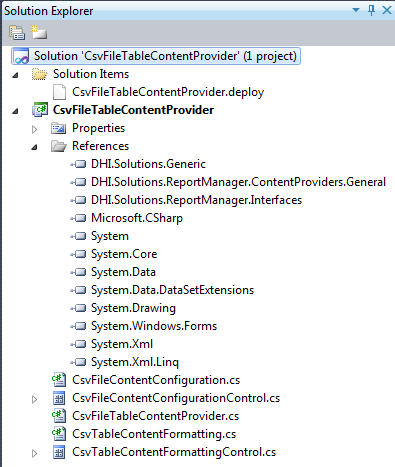
Figure 1 The solution structure
It is enough to have content provider included in a single project in a Visual Studio solution. The project should reference (among standard .Net libraries) following MIKE OPERATIONS libraries:
-
DHI.Solutions.Generic
-
DHI.Solutions.ReportManager.Interfaces
-
DHI.Solutions.ReportManager.ContentProviders.General (this library is optional but simplifies a few things)
-
The example project consists of following files:
-
CsvFileContentConfiguration – represents the configuration of content for the provider
-
CsvFileContentConfigurationControl – allows user to edit the content configuration
-
CsvTableContentFormatting – represents the formatting of content for the provider
-
CsvTableContentFormattingControl – allows user to edit the content formatting
-
CsvFileTableContentProvider – contains the logic of content generation
Content configuration
The content configuration class should represent all information necessary to determine the source of content. It should implement the DHI.Solution.ReportManager.Interfaces.IReportContentConfiguration interface.
    /// <summary>
    /// This interface should be implemented by a class representing report content configuration.
    /// </summary>
    public interface IReportContentConfiguration : IDssSerializable, ICloneable
    {
    }
Listing 1 - IReportContentConfiguration interface
The interface does not include any members itself, just states that each content configuration class should be able to serialize and deserialize itself to/from XML (this is needed to persist the configuration in database), notify about changes in it’s content and should be cloneable.
Serialization and cloning can be implemented from scratch but can also be reused by inheriting from DHI.Solutions.ReportManager.ContentProviders.General.BaseContentConfiguration class.
The code listing for CsvFileContentConfiguration is as follows:
public class CsvFileContentConfiguration : BaseContentConfiguration, IReportContentConfiguration
{
    private string _csvFileName;

    /// <summary>
    /// Gets or sets the name of csv file.
    /// </summary>
    [DssElement]
    public string CsvFileName
    {
        get
        {
            return _csvFileName;
        }

        set
        {
            if (value != _csvFileName)
            {
                _csvFileName = value;
                _isModified = true;
                OnModified();
            }
        }
    }
}
Listing 2 - CsvFileContentConfiguration
Serialization and cloning are taken care of in BaseContentConfiguration class. What is added in CsvFileContentConfiguration is the field and property representing CSV file name. Please note that:
-
CsvFileName property is marked as DssElement, so that dss serialization from BaseContentConfiguration takes the property into account.
-
Setter of CsvFileName sets _isModified and calls OnModified() so that IDssSerializable contract is met (notification about changes)
Content configuration control
The control should allow user to edit the content configuration. Control should implement the DHI.Solution.ReportManager.Interfaces.IReportContentConfigurationControl interface.
/// <summary>
/// This interface should be implemented by controls that should handle report content configuration.
/// </summary>
public interface IReportContentConfigurationControl : IControl
{
    /// <summary>
    /// Binds content configuration object to the control, so that it reflects the state of the object
    /// and changes made by user in the control are propagated back to the content configuration object.
    /// </summary>
    /// <param name="configuration">Content configuration object.</param>
    void BindConfiguration(IReportContentConfiguration configuration);

    /// <summary>
    /// Unbinds content configuration object from control.
    /// </summary>
    void UnbindConfiguration();
}
Listing 3 - IReportContentConfigurationControl
The interface extends DHI.Solutions.Generic.IControl that represents a general MIKE OPERATIONS control and adds two methods to bind and unbind report content configuration.
Layout of the control will be very simple just a label and a textbox for entering the csv file path.
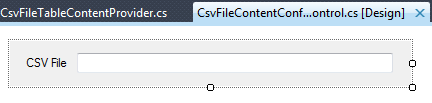
Figure 2 - CsvFileContentConfigurationControl layout
The listing of control’s code is as follows:
public partial class CsvFileContentConfigurationControl : UserControl, IReportContentConfigurationControl
{
    private CsvFileContentConfiguration _contentConfiguration;

    public CsvFileContentConfigurationControl()
    {
        InitializeComponent();
    }

    public void BindConfiguration(IReportContentConfiguration configuration)
    {
        _contentConfiguration = (CsvFileContentConfiguration)configuration;
        tbCsvFile.DataBindings.Add("Text", _contentConfiguration, "CsvFileName");
    }

    public void UnbindConfiguration()
    {
        tbCsvFile.DataBindings.Clear();
        _contentConfiguration = null;
    }

    public string Caption
    {
        get { return null; }
    }

    public Control Control
    {
        get { return this; }
    }

    public int IconHandle
    {
        get { return 0; }
    }

    public void Initialize(DHI.Solutions.Generic.IShell shell)
    {
    }
}
Listing 4 - CsvFileContentConfigurationControl code
Please note that:
-
Control binds CsvFileContentConfiguration properties to its children and unbinds them when requested
-
There’s no need to initialize the control with IShell, as no interaction with Shell or Application are performed in CsvFileContentConfigurationControl
-
Caption and IconHandle are not needed, as the control will be embedded in an already existing DataView
Content formatting
Content formatting class should contain all properties needed to format the content during rendering. It should implement the DHI.Solution.ReportManager.Interfaces.IReportContentFormatting interface.
/// <summary>
/// Base interface for interfaces representing content formatting options for various content types.
/// </summary>
public interface IReportContentFormatting : IDssSerializable, ICloneable
{
}
Listing 5 – IreportContentFormatting
The interface does not include any members itself, just states that each content formatting class should be able to serialize and deserialize itself to/from XML (this is needed to persist the formatting in database), notify about changes in its content and should be cloneable.
Serialization and cloning can be implemented from scratch but can also be reused by inheriting from DHI.Solutions.ReportManager.ContentProviders.General.ReportNoFormatting class.
The code listing for CsvTableContentFormatting is as follows:
public class CsvTableContentFormatting : ReportNoFormatting, IReportContentFormatting
{
    private bool _includeHeaderNames;

    /// <summary>
    /// Gets or sets a value indicating whether header names should be included in the table.
    /// </summary>
    [DssElement]
    public bool IncludeHeaderNames
    {
        get
        {
            return _includeHeaderNames;
        }

        set
        {
            if (value != _includeHeaderNames)
            {
                _includeHeaderNames = value;
                IsModified = true;
                OnModified();
            }
        }
    }
}
Listing 6 - CsvTableContentFormatting
Serialization and cloning are taken care of in ReportNoFormatting class. What is added in CsvTableContentFormatting is the field and property representing include header names formatting option. Please note that:
-
IncludeHeaderNames property is marked as DssElement, so that dss serialization from ReportNoFormatting takes the property into account.
-
Setter of IncludeHeaderNames sets IsModified and calls OnModified() so that IDssSerializable contract is met (notification about changes)
Content formatting control
The control should allow user to edit the content formatting. Control should implement the DHI.Solution.ReportManager.Interfaces.IReportContentFormattingControl interface.
/// <summary>
/// Interface for controls providing user a way to edit formatting of report content.
/// </summary>
public interface IReportContentFormattingControl : IControl
{
    /// <summary>
    /// Binds content formatting object to the control, so that it reflects the state of the object
    /// and changes made by user in the control are propagated back to the content formatting object.
    /// </summary>
    /// <param name="formatting">Content formatting object.</param>
    void BindFormatting(IReportContentFormatting formatting);

    /// <summary>
    /// Unbinds current formatting object from control.
    /// </summary>
    void UnbindFormatting();
}
Listing 7 - IReportContentFormattingControl
The interface extends DHI.Solutions.Generic.IControl that represents a general MIKE OPERATIONS control and adds two methods to bind and unbind report content formatting.
Layout of the control will be very simple just a checkbox for indicating whether a user wants to include header names in the output table.
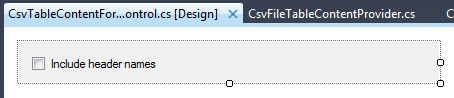
Figure 3 - CsvFileContentConfigurationControl layout
The listing of control’s code is as follows:
public partial class CsvTableContentFormattingControl : UserControl, IReportContentFormattingControl
{
    private CsvTableContentFormatting _formatting;

    public CsvTableContentFormattingControl()
    {
        InitializeComponent();
    }

    public void BindFormatting(IReportContentFormatting formatting)
    {
        _formatting = (CsvTableContentFormatting)formatting;
        cbIncludeHeaders.DataBindings.Add("Checked", _formatting, "IncludeHeaderNames");
    }

    public void UnbindFormatting()
    {
        cbIncludeHeaders.DataBindings.Clear();
        _formatting = null;
    }

    public string Caption
    {
        get { return null; }
    }

    public Control Control
    {
        get { return this; }
    }

    public int IconHandle
    {
        get { return 0; }
    }

    public void Initialize(DHI.Solutions.Generic.IShell shell)
    {
    }
}
Listing 8 - CsvTableContentFormattingControl code
Please note that:
-
Control binds CsvTableContentFormatting properties to its children and unbinds them when requested
-
There’s no need to initialize the control with IShell, as no interaction with Shell or Application are performed in CsvTableContentFormattingControl
-
Caption and IconHandle are not needed, as the control will be embedded in an already existing DataView
Content Provider
Content provider is the actual plugin in the MIKE OPERATIONS that provides the system with configuration and formatting classes and controls. Content provider also produces the actual content based on provided content configuration and formatting.
Each content provider has to implement DHI.Solutions.ReportManager.Interfaces.IReportContentProvider interface.
/// <summary>
/// This interface represents content provider that is responsible for providing report content based on its configuration and content formatting.
/// </summary>
public interface IReportContentProvider : IPlugin
{
    /// <summary>
    /// Gets and id that uniquely identifies this content provider in the system.
    /// </summary>
    Guid Id { get; }

    /// <summary>
    /// Gets or sets the reference to the application object;
    /// </summary>
    IApplication Application { get; set; }

    /// <summary>
    /// Gets information about content type that this content provider supports.
    /// </summary>
    ReportContentType SupportedContentType { get; }

    /// <summary>
    /// Gets the name (as displayed for user) of this content provider.
    /// </summary>
    string ContentProviderName { get; }

    /// <summary>
    /// Gets the description of this content provider.
    /// </summary>
    string ContentProviderDesctiption { get; }

    /// <summary>
    /// Creates an object representing the configuration of a report content.
    /// </summary>
    /// <returns>Default content configuration.</returns>
    IReportContentConfiguration CreateContentConfiguration();

    /// <summary>
    /// Creates a control allowing user to configure report content configuration.
    /// </summary>
    /// <returns>Content configuration control.</returns>
    IReportContentConfigurationControl CreateContentConfigurationControl();

    /// <summary>
    /// Creates an object representing the formatting of a report content.
    /// </summary>
    /// <returns>Default content formatting.</returns>
    IReportContentFormatting CreateContentFormatting();

    /// <summary>
    /// Creates a control allowing user to configure report content formatting.
    /// </summary>
    /// <returns>Content formatting control.</returns>
    IReportContentFormattingControl CreateContentFormattingControl();

    /// <summary>
    /// Generates and returns content to be included in the report based on content configuration and content formatting.
    /// </summary>
    /// <param name="configuration">Report content configuration.</param>
    /// <param name="formatting">Formatting that should be applied to the content.</param>
    /// <returns>Content to be included in a report.</returns>
    /// <remarks>
    /// Depending on the SupportedContentType following content should be returned:
    /// Text   - string
    /// Table  - string[,]
    /// Image  - byte[]
    /// Report - IReportHandle
    /// </remarks>
    object GenerateContent(IReportContentConfiguration configuration, IReportContentFormatting formatting);
}
Listing 9 - IContentProvider
The code of CsvFileTableContentProvider class is following:
public class CsvFileTableContentProvider : IReportContentProvider
{
    IApplication _app;

    public Guid Id
    {
        get { return new Guid("8C147011-DCA2-401B-BDB9-1FC623E1B4AA"); }
    }

    public ReportContentType SupportedContentType
    {
        get { return ReportContentType.Table; }
    }

    public string ContentProviderDesctiption
    {
        get { return "Produces table content based on CSV file"; }
    }

    public string ContentProviderName
    {
        get { return "CSV file table"; }
    }

    public DHI.Solutions.Generic.IApplication Application
    {
        get
        {
            return _app;
        }
        set
        {
            _app = value;
        }
    }

    public IReportContentConfiguration CreateContentConfiguration()
    {
        return new CsvFileContentConfiguration();
    }

    public IReportContentConfigurationControl CreateContentConfigurationControl()
    {
        return new CsvFileContentConfigurationControl();
    }

    public IReportContentFormatting CreateContentFormatting()
    {
        return new CsvTableContentFormatting();
    }

    public IReportContentFormattingControl CreateContentFormattingControl()
    {
        return new CsvTableContentFormattingControl();
    }
}
Listing 10 - CsvFileTableContentProvider part1
Please note following:
-
Content provider has its own GUID assigned that will identify the provider among other providers
-
Content provider specifies that it will return table content
-
Content provider returns a name and description that will be shown to the user (typically these come from a resource file, so they can be localized)
-
Application object is saved but just as an example, it’s not used anywhere in current provider
-
Content configuration, content configuration control, content formatting and content formatting control are returned from appropriate methods to allow user to configure the provider
public class CsvFileTableContentProvider : IReportContentProvider
{
    public object GenerateContent(IReportContentConfiguration configuration, IReportContentFormatting formatting)
    {
        CsvFileContentConfiguration csvConfig = (CsvFileContentConfiguration)configuration;

        if (string.IsNullOrEmpty(csvConfig.CsvFileName))
        {
            throw new ArgumentException("CSV file path should be provided");
        }

        string[] lines = File.ReadAllLines(csvConfig.CsvFileName);
        int columns = lines[0].Split(',').Length;

        string[,] table;

        int startFrom = 0;
        if (!((CsvTableContentFormatting)formatting).IncludeHeaderNames)
        {
            startFrom = 1;
        }

        table = (string[,])Array.CreateInstance(typeof(string), lines.Length - startFrom, columns);
        for (int i = startFrom; i < lines.Length; i++)
        {
            for (int j = 0; j < columns; j++)
            {
                table[i - startFrom, j] = lines[i].Split(',')[j];
            }
        }

        return table;
    }
}
Listing 11 - CsvFileTableContentProvider part 2
This listing shows the implementation of IReportContentProvider.GenerateContent method. Please note following:
-
Method gets content configuration and content formatting objects which need to be casted to correct types
-
According to the csv file path and formatting option, content provider produces a table output. The output is of string[,] type, as is required by the method contract.
-
When content configuration, formatting or underlying data is incorrect method should throw ArgumentException with a user readable message explaining what the problem is (exception handling in the above code is simplified, there would be much more checks in production code)
Deploy file
Part of the solution is also a CsvFileTableContentProvider.deploy file. This is needed to ensure easy inclusion of CsvFileTableContentProvider in runtime.config.
<file
   Name="CsvFileTableContentProvider.dll"
   SourceDir="CsvFileTableContentProvider\bin\$(Mode)"
   TargetDir="Bin"
   Distribute="Yes"
   Action="">
      <plugins>
        <plugin
          Name="CsvFileTableContentProvider.CsvFileTableContentProvider"
          Type="DHI.Solutions.ReportManager.Interfaces.IReportContentProvider"
          Enabled="Yes" />
      </plugins>
  </file>
Listing 12 - CsvFileTableContentProvider.deploy
Deploy file for the content provider has only one plugin listed. The plugin is of type DHI.Solutions.ReportManager.Interfaces.IReportContentProvider. It is not a requirement though, that a single dll should contain a single content provider. Typically there are multiple content providers related to a given data source grouped in a single dll.
Use in application
After the content provider has been built, copied to Bin folder of MIKE OPERATIONS and included in runtime.config it should appear as one of Content sources in content configuration data view. It can be configured using provided content and formatting configuration controls and content should be generated according to the implemented code.
Examples with the content preview are presented below.
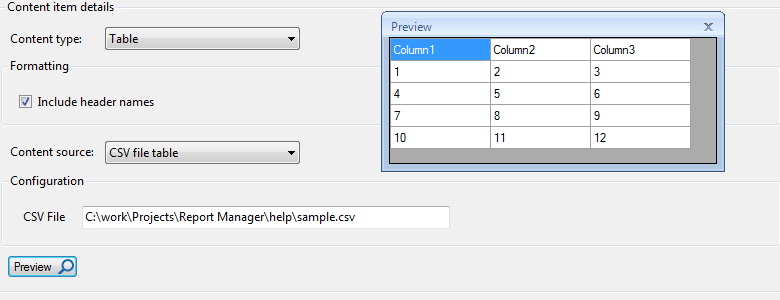
Figure 4 – CsvFileTableContentProvider – include headers
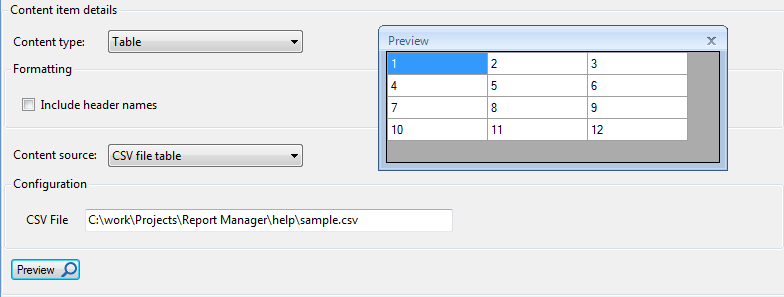
Figure 5 - CsvFileTableContentProvider - do not include headers
Following file was used as the content source
Column1,Column2,Column3
1,2,3
4,5,6
7,8,9
10,11,12
Listing 13 - sample.csv
Content provider alternative – Scripting
In order to include a certain data in a report there’s an alternative to creating a new content provider. For each type of report content (Text, Table, Image, Report) there’s a corresponding Script content provider, which along with a specialized script can produce the same result as a new content provider.
Example of how to get the same results as in CsvFileTableContentProvider using scripting will be described.
Script
The first step is to create a script that will get data from a csv file and produce the output table according to “include header names” flag.
The script listing can be found below.
import clr
import System
import csv

def CsvFileTable(csvPath, includeHeaders):
    """
    <Script>
    <Author>admin</Author>
    <Description>Script produces a table out of csv file</Description>
    <Parameters>
    <Parameter name="csvPath" type="string">Path of csv file</Parameter>
    <Parameter name="includeHeaders" type="bool">Should column headers be included in the output table</Parameter>
    </Parameters>
    <ReturnValue type="string[,]">CSV based table</ReturnValue>
    </Script>
    """
    if csvPath == None or csvPath == '':
        raise System.ArgumentException('CSV file path should be provided')

    startFrom = 0
    if includeHeaders == False:
        startFrom = 1

    rows = None
    with open(csvPath, 'rb') as csvfile:
        reader = csv.reader(csvfile, delimiter=',')
        rows = list(reader)

    totalrows = len(rows)
    table = System.Array.CreateInstance(str, len(rows) - startFrom, len(rows[0]))
    for i in range(table.GetLength(0)):
        for j in range(table.GetLength(1)):
            table[i,j] = rows[i + startFrom][j]

    return table
Listing 14 - CsvFileTable script
Please note following:
-
“CSV file path” and “Include header names” are passed to the script as parameters
-
The script produces string[,] as an output
-
Exception handling should be done the same way as in CsvFileTableContentProvider, i.e. ArgumentException should be thrown when user provided data is wrong. Again exception handling in this particular script is limited to a minimum compared to production code.
Script table output configuration
Now when the script is ready one can configure Script table output content source to use it.
Below are screenshots showing configuration of Script table output content source using CsvFileTable script, along with results preview with “Include headers” flag turned on and off.
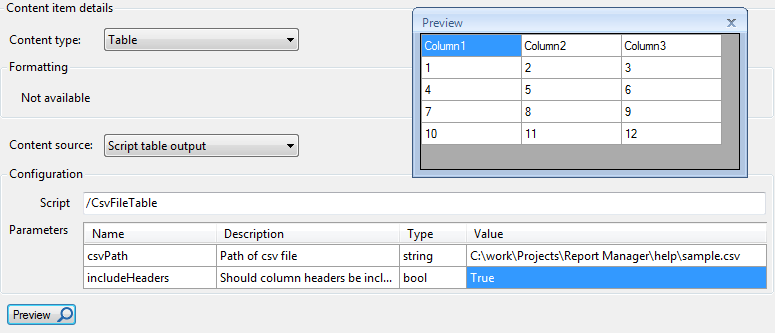
Listing 15 - CsvFileTable script applied with headers
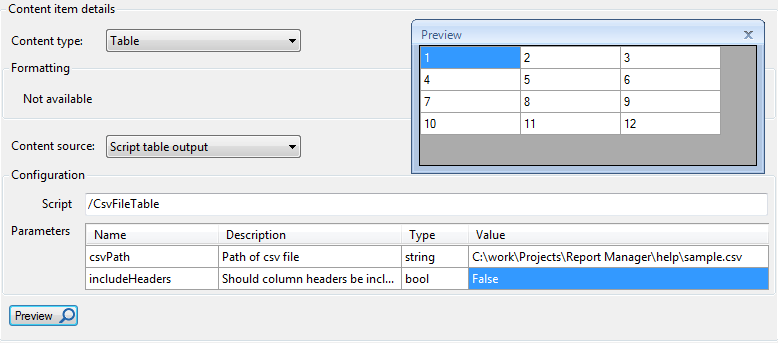
Listing 16 - CsvFileTable script applied without headers
Comparison
As we have seen producing content using script is a good alternative to writing a new content provider. There are following advantages of using scripting as a way to provide report content:
-
It’s much quicker to write script code (a single function) than to implement full content provider which requires implementation of 5 interfaces
-
A script doesn’t need to be deployed to all clients, it’s automatically shared once it’s saved in the database
But there are also disadvantages of using scripts for providing content:
-
Content source definition and formatting are provided only as script parameters so it’s values are entered by user in the script definition grid, whereas stand-alone content provider can define it’s own controls which can handle arbitrarily complex content source definitions and formatting
-
If the content provider’s logic and possibly communication with other systems is very complex, it’s easier to manage and test such solution in Visual Studio rather than in Script Manager