Troubleshooting
This section describes common issue using the MIKE OPERATIONS SDK and how to investigate issues.
Common SDK issues
User is not mapped
When trying to startup the application, MIKE OPERATIONS throws an exception User is not mapped [select user from User user where user.UserName = :username]".
The reason for this is that the runtime.config cannot be found.
- The file has not been properly generated because of missing deploy files.
- On Linux, the file name is case sensitive when specifying the file name in
DHI.Solutions.Generic.Plugin.RuntimeConfig = "Runtime.config";.
Deploy files of NuGet packages are copied to the output folder when building the project depending on the runtime identified specified on the project.
Please specify one of the following runtime identifiers.
- linux-x64
- win-x64
The sample below shows a project file using the win-x64 runtime identifier.
<Project Sdk="Microsoft.NET.Sdk">

  <PropertyGroup>
    <OutputType>Exe</OutputType>
    <TargetFramework>net6.0</TargetFramework>
    <GeneratePackageOnBuild>false</GeneratePackageOnBuild>
    <CopyLocalLockFileAssemblies>true</CopyLocalLockFileAssemblies>
  </PropertyGroup>

  <PropertyGroup Condition="'$(Configuration)|$(Platform)'=='Debug|AnyCPU'">
    <PlatformTarget>x64</PlatformTarget>
    <RuntimeIdentifier>win-x64</RuntimeIdentifier>
  </PropertyGroup>

  <ItemGroup>
    <PackageReference Include="DHI.MikeOperations.TimeseriesManager" Version="12.1.0" />
    <PackageReference Include="DHI.MikeOperations.TimeseriesManager.Provider.MikeCloud" Version="12.1.0" />
    <PackageReference Include="Npgsql" Version="5.0.1.1" />
  </ItemGroup>

</Project>
Also refer to the section about Using Visual Studio.
CPython: 'IModule' object has no attribute ...
When using CPython scripts, the .NET objects needs to be cast into the type containing the morthod or property.
The sample below shows how to cast the time series module into the correct type in Python.
import clr
clr.AddReference('DHI.Solutions.TimeseriesManager.Interfaces')
import DHI.Solutions.TimeseriesManager.Interfaces

def CPythonGetTsModule():
    """
    <Script>
    <Author>admin</Author>
    <Description>CPython Get ts module sample.</Description>
    </Script>
    """
    # Get the module (type IModule) and cast it into the correct type (ITimeSeriesModule).
    module = app.Modules.Get('Time series Manager');
    tsModule = DHI.Solutions.TimeseriesManager.Interfaces.ITimeSeriesModule(module)

    # Get a time series using the object of type ITimeSeriesModule
    ts = tsModule.TimeSeriesList.Fetch('/MyTimeSeries');
Debugging with dnSpy
At client sites, it is not possible to install a full development environment, to be able to debug into source code. dnSpy is a debugger and .NET assembly editor enabling debugging .NET assemblies if you don't have source code.
Use the following approach to debug with dnSpy.
Install and start dnSpy
UnZip dnSpy to a folder on the computer containing the MIKE OPERATIONS installation.
Start dnspy.exe with “run as Administrator”.
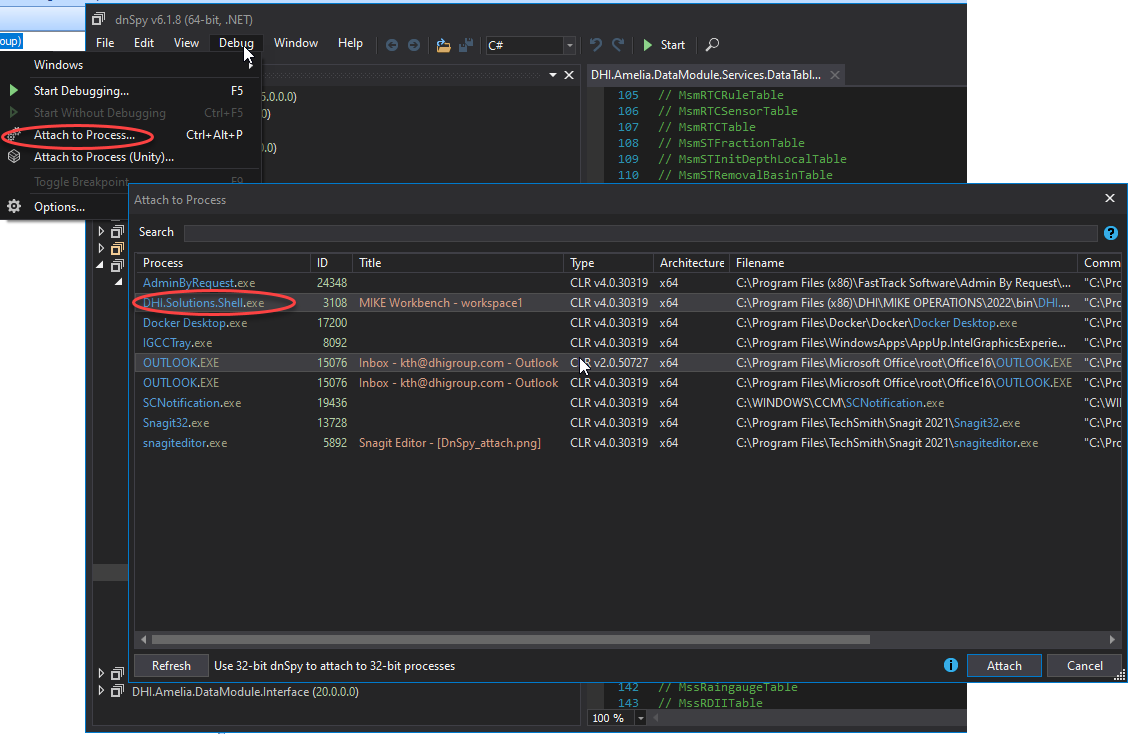
Select process to debug
Select Debug -> Attach to process and pick DHI.Solutions.Shell.exe
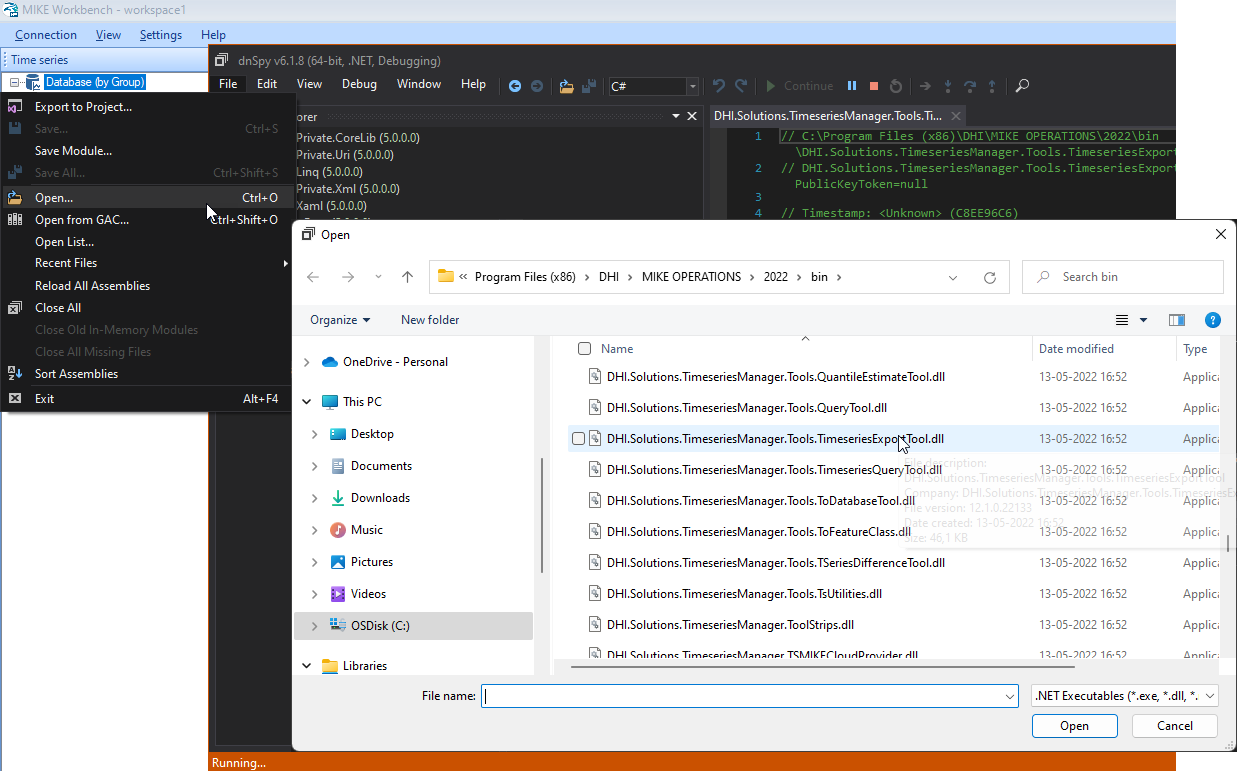
Add assemblies to debug
Add the assemblies to debug.
Set breakpoints
Navigate to the source code to debug and set a breakpoint.
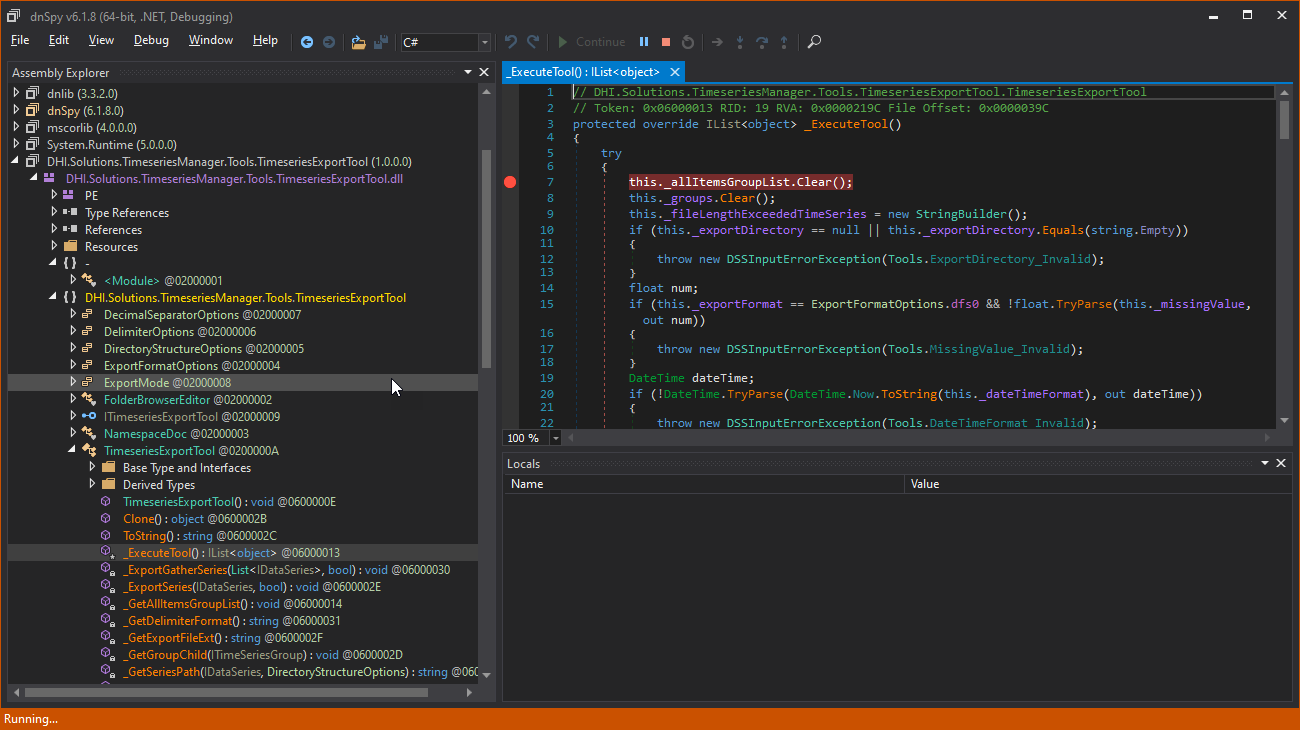
See below where to set breakpoints depending on the type of component to debug.
- Tool: set a breakpoint in the _ExecuteTool() method. This method is the first method being called in the tool.
- Data Provider: Navigate to the Reader or Writer depending on the issue.
- Default Provider: Navigate to the provider Fetch(), Get() methods depending on the issue.
Reproduce issue and step into the code
When reproducing the problem to debug, the breakpoint will be hit in dnSpy, and it is now possible to step into the code to find the issue.