Getting Started
Add the DHI Azure NuGet feed alongside nuget.org, then install packages.
Installation Guidelines
Domain Services components are packaged as NuGet libraries. They are distributed from two locations:
- nuget.org – the public feed (most packages live here).
- DHI Azure NuGet Feed – for internal packages not yet public (requires company VPN).
Note: The old “MFL” file share feed is no longer used. Its packages are now hosted on the DHI Azure NuGet server.
Option 1 – Configure Package Sources in Visual Studio
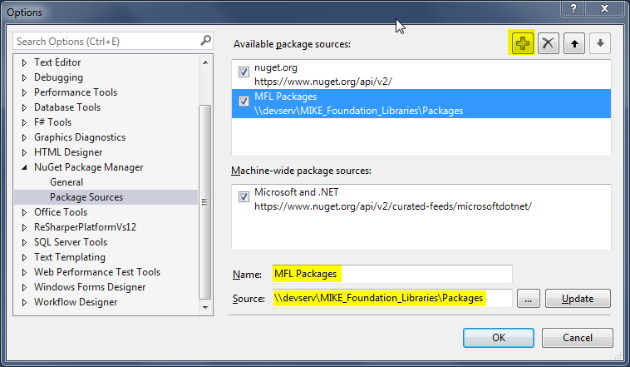
- In Visual Studio, open Tools → NuGet Package Manager → Package Manager Settings.
- Select Package Sources.
-
Add or verify these entries:
Name Source URL / Path nuget.org https://api.nuget.org/v3/index.jsonDHI Packages https://dhi-nuget-server.azurewebsites.net/nuget -
Make sure nuget.org is listed first so it has the highest priority.
- Connect to the company VPN before attempting to access the DHI Packages feed.
Option 2 – Use a nuget.config File (Recommended)
Instead of configuring NuGet in Visual Studio manually, you can create a NuGet.config file in your solution folder or the root of your repository folder:
<?xml version="1.0" encoding="utf-8"?>
<configuration>
  <packageSources>
    <add key="nuget.org" value="https://api.nuget.org/v3/index.json" />
    <add key="DHI Packages" value="https://dhi-nuget-server.azurewebsites.net/nuget" />
  </packageSources>
</configuration>
- Priority: NuGet uses the order in this file when searching for packages. Listing nuget.org first ensures public packages are downloaded from there by default.
- VPN Required: You must be connected to the DHI VPN to install packages from the Azure feed.
Installing a Domain Services Package
Once your NuGet configuration is ready, installing a package is straightforward:
- Right-click your project in Solution Explorer -> Manage NuGet Packages.
- Go to the Browse tab.
- Select the feed you want to search (or choose “All”).
- Search for a package, e.g.
DHI.Services.Jobs. - Click Install.
NuGet will automatically install the package along with its dependencies and update your project references.
First Example – Managing Jobs
Here’s a minimal example using DHI.Services.Jobs and a JSON repository to persist job data locally:
using DHI.Services;
using DHI.Services.Jobs;

class JobManager
{
    private readonly JsonRepository<Job, Guid> _jobRepo;

    public JobManager()
    {
        _jobRepo = new JsonRepository<Job, Guid>(
            "[AppData]jobs.json".Resolve()
        );
    }

    public Job CreateNewJob(string taskId, string accountId)
    {
        var job = new Job(Guid.NewGuid(), taskId, accountId);
        _jobRepo.Add(job);
        return job;
    }

    public void UpdateJobProgress(Guid jobId, int progress, string statusMessage = "")
    {
        var maybeJob = _jobRepo.Get(jobId);
        if (!maybeJob.HasValue)
        {
            Console.WriteLine("Job not found!");
            return;
        }

        var job = maybeJob.Value;
        job.Progress = progress;
        job.StatusMessage = statusMessage;
        job.Updated = DateTime.UtcNow;
        _jobRepo.Update(job);
    }

    public void PrintAllJobs()
    {
        foreach (var job in _jobRepo.GetAll())
        {
            Console.WriteLine($"{job.Id} - {job.TaskId} - {job.Status} - {job.Progress}%");
        }
    }
}

class Program
{
    static void Main()
    {
        var manager = new JobManager();

        var newJob = manager.CreateNewJob("RunMonthlyReport", "finance-admin");
        manager.UpdateJobProgress(newJob.Id, 20, "Job Started");

        manager.PrintAllJobs();
    }
}
Next: Domain Services Web API