MIKE OPERATIONS Report Manager’s Report Writer
Introduction
This document focuses on how to develop MIKE OPERATIONS Report Manager’s Report Writer.
It is assumed that the reader is familiar with MIKE OPERATIONS plugin architecture and configuration through runtime.config. If not, the reader should familiarize himself with reference /1/ and /2/.
Accompanying this document is a zip-file with the source code of the Visual Studio solutions and projects discussed in the text.
What is a Report Writer?
A Report Writer is a pluggable element of Report Manager that allows Report Manager to deliver MIKE OPERATIONS content in a specific form to the user. Typically Report Writer produces a document that is a mix of static (defined in the report template) and dynamic (generated by MIKE OPERATIONS) content. An example of a Report Writer is a MS Word Report Writer, which produces MS Word documents containing MIKE OPERATIONS data like maps, time series plots, spreadsheet, etc.
A crucial feature of a Report Writer is the ability to read and understand report templates. A report template is a document that typically defines static content and placeholders for MIKE OPERATIONS content (dynamic content). The role of a Report Writer is to detect placeholders for MIKE OPERATIONS data, inform Report Manager about them and later fill these placeholders with the data that Report Manager provides based on content configuration that user performs.
A Report Writer supports report properties which are defined by user and applied to the generated report. They can be treated as a metadata that is included in the final document (e.g. author, title, company, etc.)
Each report writer generates report based on provided generation settings, which refer to technical aspects of a report generation, e.g. location of the generated report.
The process can be summarized on the diagram below (MS Word writer is used here).
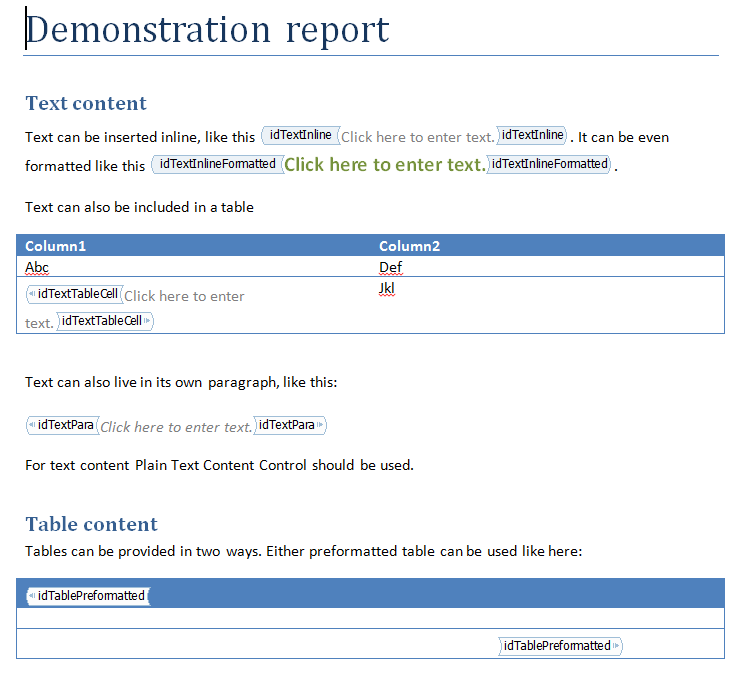
Figure 1 Report Generation process
-
User provides report template which is read by Report Writer and all content items are identified
-
User configures identified content items (this is independent from Report Writer)
-
User provides Report Writer specific report properties
-
User provides Report Writer specific report generation settings
-
Report Writer generates the final report based on: report template, content provided by Report Manager, report properties and report generation settings
A walk-through
This section describes the steps for implementing a specific Report Writer, the TextReportWriter which exemplifies many of the aspects of creating a report writer in the Platform without requiring difficult data handling logic.
A Report Writer will normally comprise of:
-
Report properties class
-
Report writer settings class
-
Report writer settings UI
-
Report handle
-
Report writer
Design of the report writer
The TextReportWriter will create a text report based on a text template. The template will be a simple text file with report content items defined as $itemA, $itemB.
This is an example of text report. Content subsititution $one.
$two
And another substitution $three.
Listing 1 Text report template example
TextReportWriter will support only Text and Report content type, which means that it will not handle Image and Table content.
User will be able to specify following report properties: Author, Title. Since text files have no built in metadata mechanism (like MS Word), properties will be simply written at the beginning of file content.
User will be able to specify following report generation settings: output folder (where to save text report), mark as read-only (created text report file can be marked as read-only).
The Visual Studio project structure
Figure 2 shows a typical example of how to organize a Report Writer in a Visual Studio project.
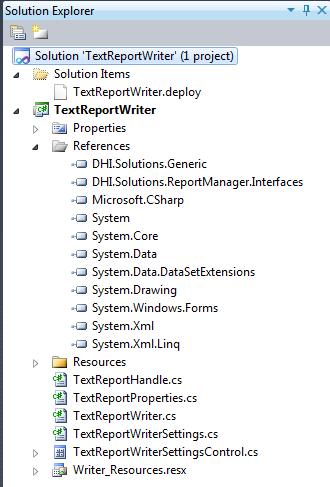
Figure 2 The solution structure
It is enough to have report writer included in a single project in a Visual Studio solution. The project should reference (among standard .Net libraries) following MIKE OPERATIONS libraries:
-
DHI.Solutions.Generic
-
DHI.Solutions.ReportManager.Interfaces
-
The example project consists of following classes:
-
TextReportHandle – represents the report handle of the text report
-
TextReportProperties – represents properties of the text report
-
TextReportWriter – text report writer itself
-
TextReportWriterSettings – represents generation settings of the text report writer
-
TextReportWriterSettingsControl – control to configure TextReportWriterSettings
Report handle
The report handle class provides the access to the generated report. It should implement the DHI.Solution.ReportManager.Interfaces.IReportHandle interface.
/// <summary>
/// Represents a generated report that can be later included in another report as a subreport.
/// </summary>
public interface IReportHandle
{
    /// <summary>
    /// Gets the report name.
    /// </summary>
    string Name { get; }

    /// <summary>
    /// Gets the location of the report.
    /// </summary>
    string Location { get; }

    /// <summary>
    /// Gets or sets a list of problems that occured while generating the report.
    /// </summary>
    /// <remarks>
    /// Each warning related to content item should consist of content item name, colon and a problem description, e.g.
    /// idImage: Image expected, Text provided
    /// idSubtitle: No data provided
    /// </remarks>
    string[] Warnings { get; set; }

    /// <summary>
    /// Deletes the report from where it's located.
    /// </summary>
    void Delete();
}
Listing 2 IReportHandle interface
The code listing for TextReportHandle is as follows:
public class TextReportHandle : IReportHandle
{
    public string Name { get; set; }

    public string[] Warnings { get; set; }

    public string Location { get; set; }

    public void Delete()
    {
        if (File.Exists(Location))
        {
            File.Delete(Location);
        }
    }
}
Listing 3 TextReportHandle code
The implementation of TextReportHandle is very simple. It is mostly a container for information set by Report Writer.
Report properties
The report properties class allows the user to set certain properties of the generated report. It should implement the DHI.Solution.ReportManager.Interfaces.IReportProperties interface.
/// <summary>
/// This interface should be implemented by all report properties classes.
/// </summary>
public interface IReportProperties : IDssSerializable, ICloneable
{
}
Listing 4 IReportProperties interface
The interface does not include any members itself, just states that each report properties class should be able to serialize and deserialize itself to/from XML (this is needed to persist the properties in database), notify about changes in its content and should be cloneable.
The code listing for TextReportProperties is as follows:
class TextReportProperties : IReportProperties
{
    private string _author;
    private string _title;
    private bool _isModified;

    /// <summary>
    /// Gets or sets the author of the report.
    /// </summary>
    [PropertyName("TextReportProperties_Author", typeof(Writer_Resources))]
    [PropertyDescription("TextReportProperties_Author_Description", typeof(Writer_Resources))]
    [DssElement]
    public string Author
    {
        get
        {
            return _author;
        }

        set
        {
            if (value != _author)
            {
                _author = value;
                _isModified = true;
                OnModified();
            }
        }
    }

    /// <summary>
    /// Gets or sets the title of the report.
    /// </summary>
    [PropertyName("TextReportProperties_Title", typeof(Writer_Resources))]
    [PropertyDescription("TextReportProperties_Title_Description", typeof(Writer_Resources))]
    [DssElement]
    public string Title
    {
        get
        {
            return _title;
        }

        set
        {
            if (value != _title)
            {
                _title = value;
                _isModified = true;
                OnModified();
            }
        }
    }

    /// <inheritdoc />
    public override string ToString()
    {
        return Writer_Resources.TextReportProperties_ToString;
    }
Listing 5 TextReportProperties code, part 1
    /// <inheritdoc />
    public void Deserialize(System.Xml.XmlElement xmlElement)
    {
        DssSerializer serializer = new DssSerializer(this);
        serializer.Deserialize(xmlElement);
    }

    /// <inheritdoc />
    [Browsable(false)]
    public bool IsModified
    {
        get
        {
            return _isModified;
        }

        set
        {
            _isModified = value;
        }
    }

    /// <inheritdoc />
    public event EventHandler Modified;

    /// <inheritdoc />
    public void Serialize(System.Xml.XmlElement xmlElement)
    {
        DssSerializer serializer = new DssSerializer(this);
        serializer.Serialize(xmlElement);
    }

    /// <summary>
    /// Raises the Modified event
    /// </summary>
    protected virtual void OnModified()
    {
        if (Modified != null)
        {
            Modified(this, new EventArgs());
        }
    }

    /// <inheritdoc />
    public object Clone()
    {
        TextReportProperties clone = (TextReportProperties)this.MemberwiseClone();
        clone.Modified = null;

        return clone;
    }
}
Listing 6 TextReportProperties code, part 2
Following can be observed in the implementation:
-
IDssSerializable is implemented using DssSerializer class (DssElement attribute is used to mark properties which should be handled by DssSerializer)
-
Cloning is implemented using object.MemberwiseClone(), please note that events have to be nulled in cloned object
-
Author and Title properties are serialized by DssSerializer and are marked with PropertyName and PropertyDescription attributes so that they are properly described in MIKE OPERATIONS property window.
-
Object.ToString() method is overloaded to display a user friendly name for report properties node in the MIKE OPERATIONS property window
Report writer settings
Report writer settings class should contain all properties needed for the Report Writer to know where and how to write the report. It should implement the DHI.Solution.ReportManager.Interfaces.IReportWriterSettings interface.
/// <summary>
/// Interface of classes implementing writer specific settings.
/// </summary>
public interface IReportWriterSettings : IDssSerializable
{
    /// <summary>
    /// Gets or sets a value indicating whether the report will be used as a sub-report.
    /// </summary>
    /// <remarks>
    /// Sub-report is a report that is included in another report. When flag is set to True the report writer
    /// should generate the report in a way that will allow it to be included in another report.
    /// It is also recommended that the sub-report is generated in a temporary location.
    /// </remarks>
    bool IsSubReport { get; set; }
}
Listing 7 IreportWriterSettings
The interface states that each report writer settings class should be able to serialize and deserialize itself to/from XML (this is needed to persist the settings in database) and notify about changes in its content. It additionally requires that the implementing class has IsSubReport property, so that Report Manager can communicate to the Report Writer that the report should be generated as a sub-report.
The code listing for TextReportWriterSettings is as follows:
public class TextReportWriterSettings : IReportWriterSettings
{
    private string _outputFolder;
    private bool _isModified;
    private bool _isSubReport;
    private bool _markReadonly;

    /// <summary>
    /// Gets or sets the location on disk where document should be saved.
    /// </summary>
    [DssElement]
    public string OutputFolder
    {
        get
        {
            return _outputFolder;
        }

        set
        {
            if (value != _outputFolder)
            {
                _outputFolder = value;
                _isModified = true;
                OnModified();
            }
        }
    }

    /// <summary>
    /// Gets or sets the flag indicating whether generated report should be marked as readonly.
    /// </summary>
    [DssElement]
    public bool MarkReadonly
    {
        get
        {
            return _markReadonly;
        }

        set
        {
            if (value != _markReadonly)
            {
                _markReadonly = value;
                _isModified = true;
                OnModified();
            }
        }
    }

    /// <inheritdoc />
    public bool IsSubReport
    {
        get
        {
            return _isSubReport;
        }

        set
        {
            if (value != _isSubReport)
            {
                _isSubReport = value;
                _isModified = true;
                OnModified();
            }
        }
    }
Listing 8 TextReportWriterSettings, part 1
    /// <inheritdoc />
    public void Deserialize(System.Xml.XmlElement xmlElement)
    {
        DssSerializer serializer = new DssSerializer(this);
        serializer.Deserialize(xmlElement);
    }

    /// <inheritdoc />
    public bool IsModified
    {
        get
        {
            return _isModified;
        }

        set
        {
            _isModified = value;
        }
    }

    /// <inheritdoc />
    public event EventHandler Modified;

    /// <inheritdoc />
    public void Serialize(System.Xml.XmlElement xmlElement)
    {
        DssSerializer serializer = new DssSerializer(this);
        serializer.Serialize(xmlElement);
    }

    /// <summary>
    /// Raises the Modified event
    /// </summary>
    protected virtual void OnModified()
    {
        if (Modified != null)
        {
            Modified(this, new EventArgs());
        }
    }
}
Listing 9 TextReportWriterSettings, part 2
Following can be observed in the implementation:
-
IDssSerializable is implemented using DssSerializer class (DssElement attribute is used to mark properties which should be handled by DssSerializer)
-
OutputFolder and MarkReadonly properties are serialized by DssSerializer
-
IsSubReport property is not serialized as it’s provided each time by Report Manager and needs not to be saved in the database
Report writer settings control
Unlike Report properties which are edited in the MIKE Workbench properties control, Report writer settings need to have specialized control provided. The control should implement the DHI.Solution.ReportManager.Interfaces.IReportWriterSettingsControl interface.
/// <summary>
/// This interface is used by controls which are able to handle IReportWriterSettings objects.
/// </summary>
public interface IReportWriterSettingsControl : IControl
{
    /// <summary>
    /// Binds writer settings object to the control, so that it reflects the state of the object
    /// and changes made by user in the control are propagated bakc to the generation settings object.
    /// </summary>
    /// <param name="settings">Report writer settings object.</param>
    void BindSettings(IReportWriterSettings settings);
}
Listing 10 IReportWriterSettingsControl
The interface extends DHI.Solutions.Generic.IControl that represents a general MIKE OPERATIONS control and adds a method to bind report writer settings.
Layout of the control reflects the properties of TextReportWriterSettings class. Textbox and checkbox are moved to the right so that they align well with general report generation settings that will be present on the same form in Report Manager.
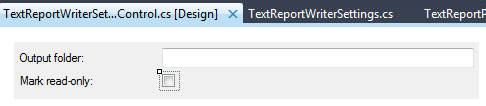
Figure 3 TextReportWriterSettingsControl layout
The listing of control’s code is as follows:
public partial class TextReportWriterSettingsControl : UserControl, IReportWriterSettingsControl
{
    private TextReportWriterSettings _settings;

    public TextReportWriterSettingsControl()
    {
        InitializeComponent();
    }

    public void BindSettings(IReportWriterSettings settings)
    {
        _settings = (TextReportWriterSettings)settings;
        tbOutputFolder.DataBindings.Add("Text", _settings, "OutputFolder");
        cbReadOnly.DataBindings.Add("Checked", _settings, "MarkReadonly");
    }

    public string Caption
    {
        get { return string.Empty; }
    }

    public Control Control
    {
        get { return this; }
    }

    public int IconHandle
    {
        get { return 0; }
    }

    public void Initialize(DHI.Solutions.Generic.IShell shell)
    {
    }
}
Listing 11 CsvTableContentFormattingControl code
Please note that:
-
Control binds TextReportWriterSettings properties to its children
-
There’s no need to initialize the control with IShell, as no interaction with Shell or Application are performed in TextReportWriterSettingsControl
-
Caption and IconHandle are not needed, as the control will be embedded in a form
Report Writer
Report writer is the actual plugin in the MIKE OPERATIONS that generates reports, analyses report templates and provides the system with properties and setting classes and controls.
Each report writer has to implement DHI.Solutions.ReportManager.Interfaces.IReportWriter interface.
/// <summary>
/// An interface representing a report writer, i.e. a component responsible for producing the actual report.
/// </summary>
public interface IReportWriter : IPlugin
{
    /// <summary>
    /// Gets a unique identifier of a given report writer plugin.
    /// </summary>
    Guid Id { get; }

    /// <summary>
    /// Gets the name of the report writer, e.g. MS Word
    /// </summary>
    string Name { get; }

    /// <summary>
    /// Gets description of the report writer
    /// </summary>
    string Description { get; }

    /// <summary>
    /// Gets an icon which should represent a report in report explorer.
    /// </summary>
    System.Drawing.Image ReportExplorerIcon { get; }

    /// <summary>
    /// Gets an icon which should represent a derived report in report explorer.
    /// </summary>
    System.Drawing.Image DerivedReportExplorerIcon { get; }

    /// <summary>
    /// Gets a list of content types supported by current report writer
    /// </summary>
    IEnumerable<ReportContentType> SupportedContentTypes { get; }

    /// <summary>
    /// Gets the filter specifying supported file types.
    /// </summary>
    /// <remarks>
    /// Filter should be specified in format supported by OpenFileDialog.Filter,
    /// e.g. "Text files (*.txt)|*.txt|All files (*.*)|*.*"
    /// </remarks>
    string SupportedFilesFilter { get; }

    /// <summary>
    /// Creates a dss serializable object representing default report properties.
    /// </summary>
    /// <returns>Default report properties</returns>
    IReportProperties CreateReportProperties();

    /// <summary>
    /// Creates a dss serializable object representing default report writer settings.
    /// </summary>
    /// <returns>Default report writer settings</returns>
    IReportWriterSettings CreateReportWriterSettings();

    /// <summary>
    /// Creates a control for configuration of ReportWriterSettings object.
    /// </summary>
    /// <returns>Control object</returns>
    IReportWriterSettingsControl CreateReportWriterSettingsControl();

    /// <summary>
    /// Analyzes report template and returns a list of content items, which later should be substituted with data
    /// </summary>
    /// <param name="template">template to analyze</param>
    /// <returns>List of content items.</returns>
    string[] GetContentItems(byte[] template);
Listing 12 IReportWriter, part1
    /// <summary>
    /// Opens editor for the template that is located under specified path.
    /// </summary>
    /// <param name="templatePath">Path to the template</param>
    void EditTemplate(string templatePath);

    /// <summary>
    /// Generates report based on provided template, content bindings, report properties and report generation settings.
    /// </summary>
    /// <param name="reportName">Name of the report</param>
    /// <param name="template">Template of the report</param>
    /// <param name="contentBindings">Actual content for report content items.</param>
    /// <param name="reportProperties">Report properties or null if default values should be used</param>
    /// <param name="reportWriterSettings">Report writer settings or null is default values should be used</param>
    /// <returns>A handle to the report</returns>
    /// <remarks>
    /// When run with default settings, generated report should be usable as a subreport.
    /// </remarks>
    IReportHandle Generate(string reportName, byte[] template, IDictionary<string, object> contentBindings, IReportProperties reportProperties, IReportWriterSettings reportWriterSettings);
}
Listing 13 IReportWriter, part 2
The code of TextReportWriter class is following:
public class TextReportWriter : IReportWriter
{
    public Guid Id
    {
        get { return new Guid("BD3F26EA-EAD1-4354-8356-70361A3D1D9C"); }
    }

    public string Name
    {
        get { return "Text"; }
    }

    public string Description
    {
        get { return "Creates text based reports"; }
    }

    public System.Drawing.Image ReportExplorerIcon
    {
        get { return Writer_Resources.text_report_icon; }
    }

    public System.Drawing.Image DerivedReportExplorerIcon
    {
        get { return Writer_Resources.text_report_derived_icon; }
    }

    public IEnumerable<ReportContentType> SupportedContentTypes
    {
        get { return new ReportContentType[] { ReportContentType.Text, ReportContentType.Report }; }
    }

    public string SupportedFilesFilter
    {
        get { return "Text Documents (*.txt)|*.txt"; }
    }

    public IReportProperties CreateReportProperties()
    {
        return new TextReportProperties();
    }

    public IReportWriterSettings CreateReportWriterSettings()
    {
        return new TextReportWriterSettings();
    }

    public IReportWriterSettingsControl CreateReportWriterSettingsControl()
    {
        return new TextReportWriterSettingsControl();
    }

    public void EditTemplate(string templatePath)
    {
        Process.Start(templatePath);
    }

    public string[] GetContentItems(byte[] template)
    {
        string str = Encoding.UTF8.GetString(template);
        List<string> items = new List<string>();
        foreach (Match match in Regex.Matches(str, @"\${1}\b\w+\b"))
        {
            items.Add(match.Value);
        }

        return items.ToArray();
    }
Listing 14 TextReportWriter basic properties and methods
Please note following:
-
Report writer has its own GUID assigned that will identify the writer among other report writers
-
Report writer returns a name and description that will be shown to the user (typically these come from a resource file, so they can be localized)
-
Report writer returns explorer icons for normal and derived report definitions that will distinguish them from report definitions from other report writers
-
Report writer returns a list of content types that it will support (Text, Report), i.e. it will only include these types of content in the report and not include other types of content in the report
-
Report writer returns supported files filter, which indicates which files can be read as templates. In case of TextReportWriter, only text files are supported.
-
Report properties, report writer settings and report writer settings control are returned from appropriate methods to allow user to configure the report generation
-
EditTemplate method starts the default process which handles template files. In case of .txt files it is Notepad.exe
-
GetContentItems method uses regular expressions to find all content items, for TextReportWriter these are all words starting with a dollar sign, e.g. $title, $indicatorA
    public IReportHandle Generate(string reportName, byte[] template, IDictionary<string, object> contentBindings, IReportProperties reportProperties, IReportWriterSettings reportWriterSettings)
    {
        List<string> warnings = new List<string>();

        // validate report writer settings
        TextReportWriterSettings settings = (TextReportWriterSettings)reportWriterSettings;
        if (!settings.IsSubReport && string.IsNullOrWhiteSpace(settings.OutputFolder))
        {
            throw new ArgumentException("Report output folder should be provided");
        }

        TextReportProperties properties = (TextReportProperties)reportProperties;

        // write "metadata" to the file
        StringBuilder metadata = new StringBuilder();
        if (!string.IsNullOrWhiteSpace(properties.Author))
        {
            metadata.AppendFormat("Author: {0}", properties.Author);
            metadata.AppendLine();
        }
        if (!string.IsNullOrWhiteSpace(properties.Title))
        {
            metadata.AppendFormat("Title: {0}", properties.Title);
            metadata.AppendLine();
        }

        // set the report content
        string templateStr = Encoding.UTF8.GetString(template);
        string[] contentItems = GetContentItems(template);
        foreach (var contentItem in contentItems)
        {
            if (!contentBindings.ContainsKey(contentItem) || contentBindings[contentItem] == null)
            {
                warnings.Add(string.Format("{0}: data is missing"));
                continue;
            }

            if ((contentBindings[contentItem] is string))
            {
                // replace Text content
                templateStr = templateStr.Replace(contentItem, (string)contentBindings[contentItem]);
            }
            else if (contentBindings[contentItem] is IReportHandle)
            {
                // replace Report content
                templateStr = templateStr.Replace(contentItem, File.ReadAllText(((IReportHandle)contentBindings[contentItem]).Location));
            }
            else
            {
                warnings.Add(string.Format("{0}: provided content type is not supported"));
            }
        }
Listing 15 TextReportWriter.Generate() part 1
This listing shows first part of the implementation of TextReportWriter.Generate() method. Please note the following:
-
Method gets the report writer settings object which needs to be casted to correct type. Generate method is also responsible for ensuring that the provided settings are correct. Here it checks if the output folder for the report is specified if the report is not a subreport (subreport should use a temporary path)
-
Method prepares metadata object which in this case is just a string that will be later written to the output file
-
Content items in the report template are replaced with the actual content. Text content is provided as string by Report Manager and Report content is provided as IReportHandle (which points to a file which can be read). All problems that occur during content substitution have to be reported as warnings. They will be later presented to the user by the Report Manager.
        // determine save path
        string path;
        if (settings.IsSubReport)
        {
            path = Path.GetTempFileName();
        }
        else
        {
            path = Path.Combine(settings.OutputFolder, reportName + ".txt");
            if (!Directory.Exists(settings.OutputFolder))
            {
                try
                {
                    Directory.CreateDirectory(settings.OutputFolder);
                }
                catch (Exception ex)
                {
                    throw new ArgumentException(string.Format("Report couldn't be saved to disk: ", ex.Message));
                }
            }
        }

        // save file
        try
        {
            if (File.Exists(path))
            {
                // clear read-only flag
                FileAttributes attributes = File.GetAttributes(path);
                File.SetAttributes(path, attributes & ~FileAttributes.ReadOnly);
            }

            File.WriteAllText(path, metadata.ToString() + templateStr);
        }
        catch (Exception ex)
        {
            throw new ArgumentException(string.Format("Report couldn't be saved to disk: ", ex.Message));
        }

        // apply readonly flag
        if (!settings.IsSubReport && settings.MarkReadonly)
        {
            FileAttributes attributes = File.GetAttributes(path);
            File.SetAttributes(path, attributes | FileAttributes.ReadOnly);
        }

        // create handle
        TextReportHandle handle = new TextReportHandle();
        handle.Location = path;
        handle.Warnings = warnings.ToArray();
        handle.Name = reportName;

        return handle;
    }
Listing 16 TextReportWriter.Generate() part2
This listing shows a second part of TextReportWriter.Generate() implementation. What happens here is:
-
Report output location is determined. If the report is to be generated as a subreport it will be written to a temporary location. Otherwise the provided folder should be used.
-
The report is written to the file on disk (metadata + template with subsitituted content).
-
Read-only attribute is set on file according to the user preferences provided in ReportWriterSettings object. This is just an example of user provided setting, other report writers don’t have to define and use read-only setting.
-
Report handle is created and all required properties are assigned
-
Report handle is returned
Deploy file
Part of the solution is also a TextReportWriter.deploy file. This is needed to ensure easy inclusion of TextReportWriter in runtime.config.
<file
      Name="TextReportWriter.dll"
      SourceDir="TextReportWriter\bin\$(Mode)"
      TargetDir="Bin"
      Distribute="Yes"
      Action="">
    <plugins>
      <plugin
        Name="TextReportWriter.TextReportWriter"
        Type="DHI.Solutions.ReportManager.Interfaces.IReportWriter"
        Enabled="Yes" />
    </plugins>
  </file>
Listing 17 TextReportWriter.deploy
Deploy file for the report writer has only one plugin listed. The plugin is of type DHI.Solutions.ReportManager.Interfaces.IReportWriter.
Use in application
After the report writer has been built, copied to Bin folder of MIKE OPERATIONS and included in runtime.config it should appear as one of report types in the “Add new report definition” dialog.
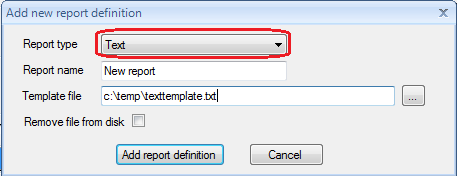
Figure 4 Add new report definition
After the report definition is created it is displayed in report explorer with its own icon.
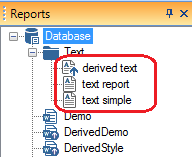
Figure Report explorer with text report defintions
Example template for the text report writer can look like this:
This is an example of text report. Content subsititution $one.
$two
And another substitution $three.
Listing 18 Text report writer temlpate example
Content items in the template (bold font) are: $one, $two, $three.
After setting the content and properties in the Report Manager final report can look like this (substituted content in bold):
Author: Michal
Title: Test report
This is an example of text report. Content subsititution one two three.
This content was included
from another report.
And another substitution xxxxxx.
Listing 19 Text report writer report example