Version Control & Branching Strategy Guidelines
Version History
| Version | Date | Description/Updates |
|---|---|---|
| 1.0 | 2025-11-13 | Initial version |
Introduction
Version and source control are systems or processes used to track changes to files over time. This helps individuals and teams:
- Keep a history of changes
- Collaborate with others
- Revert to earlier versions of files if needed
- Branch and experiment without affecting the main project
Contacts
| Guidelines Owner | Sam Johnson |
| Task force | Sam Johnson; Jesper Grooss; Kristian Thage; Franz Thomsen |
| Stakeholders | Olaf Arndt; Wen Wu; Henrik Andersson; Arnold Engelmann; Rasmus Samsig; Paulina Zimny; Tomas Koukolik; Marie Lund Larsen |
| Approver(s) | Architecture Board |
Roles to Apply
Development roles:
- Architects
- Backend developers
- Frontend developers
- Infrastructure/DevOps Engineers
Enforcement Levels
| Section | Enforcement Level | When/what |
|---|---|---|
| Version Control | Mandatory | When setting up a new project or repository |
| General Good Practices | Expected | Throughout development |
| Branching Strategies | Expected | When choosing a branching strategy for a new project |
| Recommendations | DHI good practice | When setting up and evolving development workflows |
| Case Study: MIKE Software | DHI good practice | When looking for a concrete reference implementation |
References
Version Control
Within DHI, Git is the required distributed version control system to use. Git is supported by several platforms like Azure DevOps and GitHub.
DHI is focusing on GitHub Enterprise as the strategic platform for source control. Azure DevOps and GitHub are both currently approved platforms, but the default choice for new repositories should be GitHub unless there is a clear reason to remain on Azure DevOps.
-
GitHub / GitHub Enterprise Preferred default for new repositories, both for internal and open-source development.
-
Azure DevOps Acceptable for existing repositories, migration transition periods, or where specific Azure DevOps integrations/processes are still required.
Other version control systems are not permitted.
Branching Strategy
A well-defined branching strategy is the foundation of successful software development workflows. It determines how your team collaborates, how features are integrated, and how code is deployed to different environments.
Branching strategies refer to the systematic approach by which a Git repository is structured and maintained. The right strategy enables your development team to work efficiently while maintaining code quality and deployment reliability.
Why Branching Strategy Matters
A good branching strategy provides several critical benefits:
- Conflict Prevention: Minimizes merge conflicts between developers working on different features
- CI/CD Integration: Enables automated testing, building, and deployment processes
- Environment Management: Supports reproducible and predictable deployments across different environments
- Release Management: Facilitates rolling back to known working versions when issues arise
- Team Coordination: Provides clear workflows for code review, testing, and integration
Without a clear branching strategy, teams often struggle with integration issues, deployment confusion, and difficulty tracking what code is deployed where.
General Good Practices
These practices apply regardless of which specific branching strategy you choose. Following these guidelines will help ensure smooth development workflows and reduce common integration problems.
Use Feature Branches
Feature branches are short-lived branches created for developing specific features or fixes. Feature branches provide isolation for development work and enable parallel development across team members.
Naming Convention: Use descriptive names that clearly indicate the purpose, e.g., feature/user-authentication, bugfix/login-validation, hotfix/security-patch
Key Benefits: - Feature-specific code is contained in an isolated branch - Changes should be merged into the appropriate target branch only after code review - Branches should be deleted after successful merge to keep the repository clean - Enables parallel development without interfering with other team members' work - Long-running feature branches can periodically merge in changes from the integration branch to stay current and reduce merge conflicts at completion
Avoid Combining Multiple Features
One feature per branch is a fundamental principle that prevents many common development issues.
Why this matters:
- Work Distribution: Makes it difficult to distribute work between multiple developers
- Release Flexibility: If one feature needs to be delayed, all other features in the branch are also delayed
- Code Review Quality: Reviews become complex when reviewers must understand multiple unrelated features simultaneously
- Conflict Resolution: Increases the likelihood of merge conflicts and makes them harder to resolve
- Testing Isolation: Makes it difficult to test individual features independently
Protect Main Branches
Branch protection prevents accidental damage to critical branches and enforces quality gates through automation.
Essential Protections:
- Prevent force pushes to environment-tied branches (e.g.,
main,staging,production) - Require pull request reviews before merging
- Require status checks (CI/CD) to pass before allowing merges
- Restrict who can push directly to protected branches
CI/CD Integration:
- Automated build and test steps should run on all branch changes
- Merging to protected branches should require passing validation pipelines
- Consider running different test suites based on the target branch
Choose a PR Merge Strategy
When merging a PR, choose the merge type that suits the work:
- Squash and merge — best for bug-fixes and minor updates where intermediate commits aren't meaningful.
- Merge commit (no fast-forward) — best for larger features where preserving the commit history matters.
Agree on a team default and document it. Consistency matters more than which option you pick.
Commit Messages
Commit messages are the primary record of why a change was made. A useful message includes a short subject line describing what changed, and optionally a body explaining the reasoning. Linking to a work item (e.g. an Azure DevOps issue or GitHub issue ID) is good practice and enables traceability — but the exact format is left to the team to define.
Merge vs. Rebase
To preface this; when in doubt, use merge.
Both git merge and git rebase can be used to incorporate upstream changes into a working branch, with different trade-offs:
- Merge creates a new merge commit that preserves the full history of both branches. It is always safe to use but can produce a busier commit graph.
- Rebase replays your commits on top of the target branch, producing a linear history. It is cleaner but rewrites commit history.
When rebase is safe: only when the commits being rebased exist solely in a local repository and have not yet been pushed to the remote. Rebasing commits that have already been pulled by others will cause inconsistencies in those local repositories. Be careful, and be aware of the consequences may occur as it can cause you more problems than it's worth!
Use Feature Flags
Feature flags (also called feature toggles) allow you to deploy code without immediately exposing new functionality to users. This decouples deployment from feature releases.
In practice, a "feature flag" can be implemented in different ways (e.g., runtime toggles, tenant/client enablement, role-based access, configuration-driven routing). The key idea is that code can be deployed to production while remaining inaccessible or inactive for end users until explicitly enabled.
Benefits:
- Deploy features that aren't ready for production without blocking other changes
- Enable gradual rollouts and A/B testing
- Quickly disable problematic features without requiring a rollback
- Allow different features to be enabled in different environments
Example: A new user dashboard feature can be deployed to production but kept disabled via a feature flag, allowing other bug fixes in the same release to go live while the dashboard undergoes further testing.
Branching Strategies
This section covers the most common branching strategies, the trade-offs of each, and when to use them. Two primary strategies are recommended based on team size, deployment frequency, and operational requirements.
Note: these strategies are not mutually exclusive. Many teams use environment branches to control promotion between environments while also using feature flags to ship incremental or customer-specific changes safely (including deploying to production without exposing the feature to users until it is enabled).
Environment Branching: ✅ RECOMMENDED
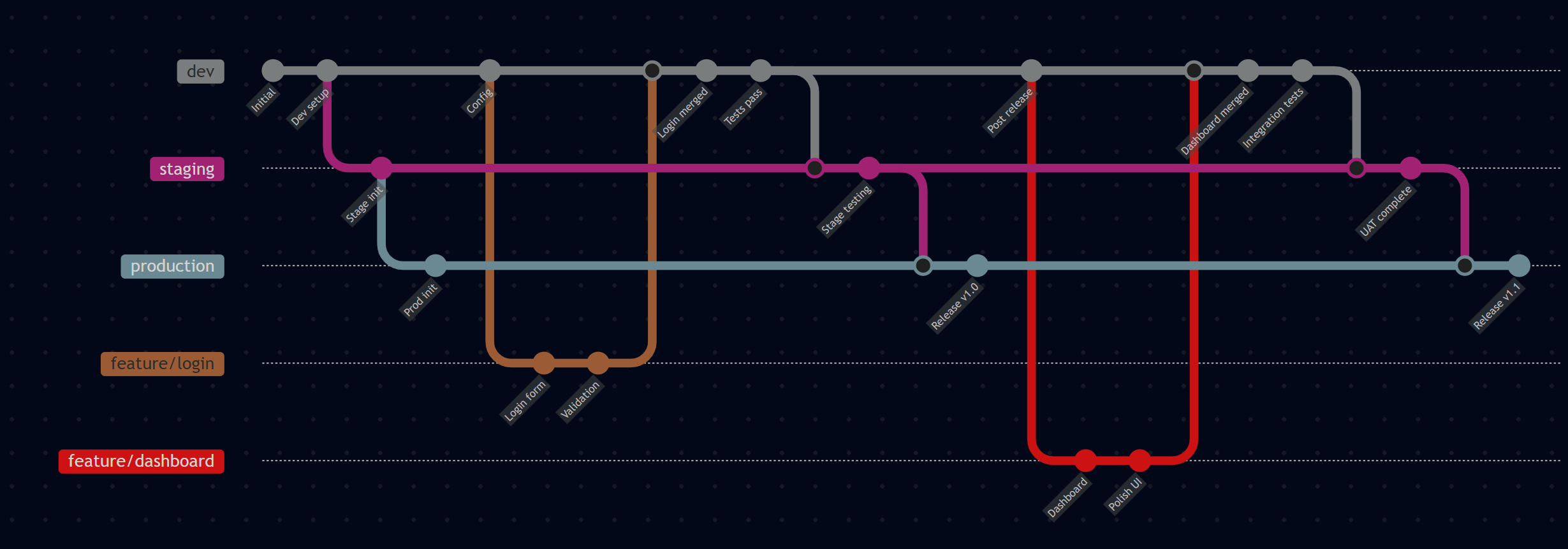
Environment Branching creates a direct mapping between Git branches and deployment environments. This approach provides clear visibility into what code is deployed where and simplifies the deployment process.
How it works:
- Each environment has a corresponding long-lived branch (
dev,staging,production) - Feature branches are created from and merged into the
devbranch - Code is promoted through environments by merging
dev→staging→production - Each branch represents the exact state of its corresponding environment
Key Benefits:
- Environment Clarity: Always know what code is deployed to each environment by checking the branch
- Simplified CI/CD: Deployment pipelines are straightforward - deploy the branch to its corresponding environment
- Easy Rollbacks: Roll back by reverting commits or resetting the environment branch
- Controlled Promotion: Code must pass through each environment stage before reaching production
Best For: Services like websites and applications where you deploy to multiple environments, need clear environment tracking, and prefer controlled release processes.
Trunk-Based Development: ✅ RECOMMENDED
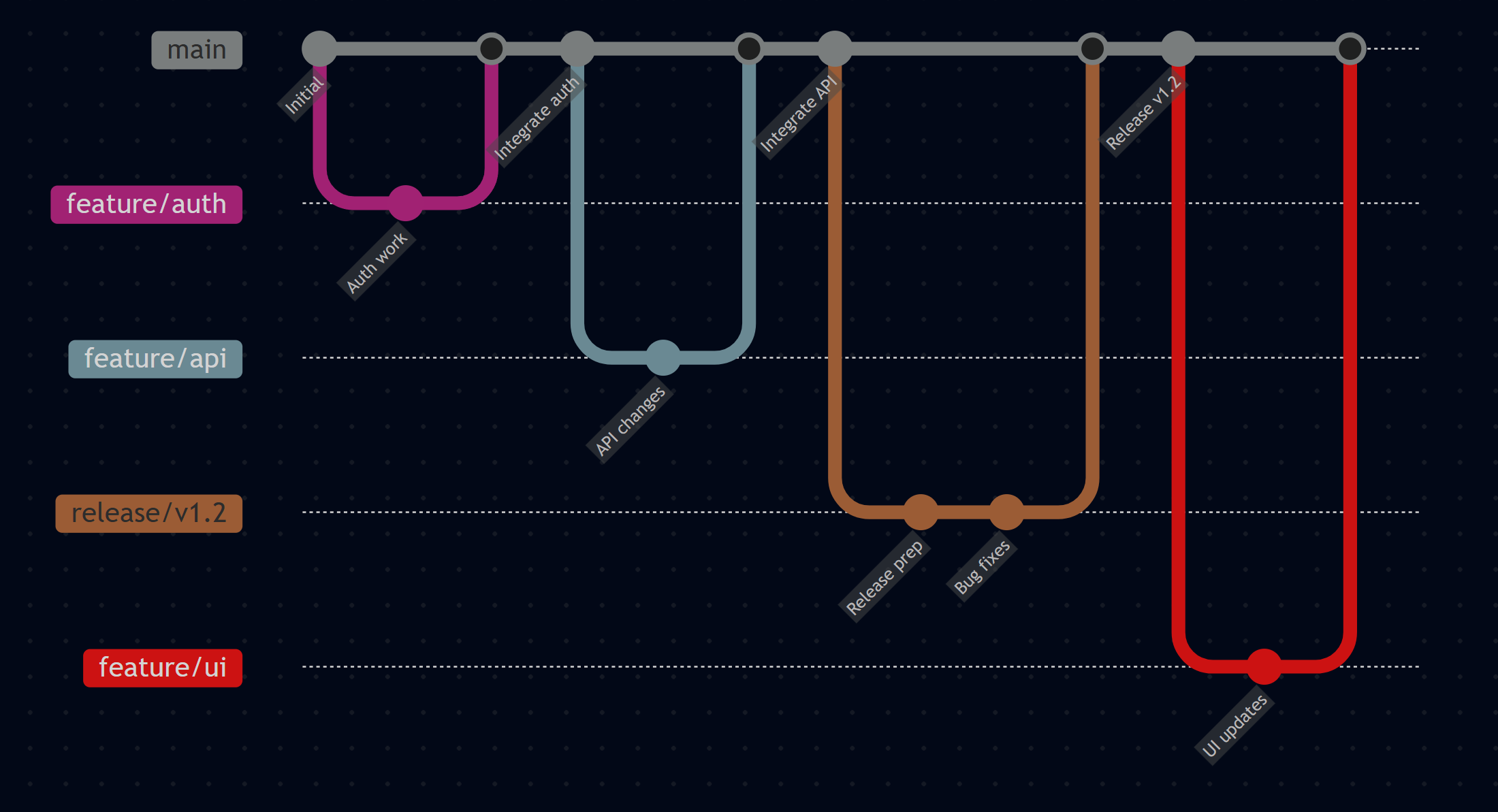
Trunk-Based Development maintains a single long-lived branch (usually main) that is always in a deployable state. All development work is integrated frequently into this main branch.
How it works:
- One main branch that is always stable and deployable
- Short-lived feature branches (ideally less than 2 days)
- Frequent integration (multiple times per day)
- Releases are created from
main, typically using semantic versions and release tags - For applications and deployable products, feature flags are often used to keep unfinished functionality out of users' hands while still integrating frequently
- Maintenance or release branches are created only when there is a clear need to support older release lines in parallel
Key Benefits:
- Fast Integration: Reduces merge conflicts through frequent integration
- Simplified Branching: Minimal branch management overhead
- Continuous Deployment Ready: Main branch is always deployable
- Reduced Complexity: Fewer long-lived branches to manage
Considerations:
- Tooling Required: Need robust CI/CD and release automation to keep
mainstable - Fast Feedback Matters: Automated builds and tests are important because integration happens frequently
- Feature Flags for Products: For applications and user-facing products, feature flags are often an important practice to decouple deployment from release
- Versioning for Packages: For packages, libraries, and SDKs, semantic versioning, pre-releases, and release tags often provide the main release control mechanism instead of feature flags
- Team Discipline: Requires team commitment to frequent integration and maintaining main branch stability
Best For: Packages, libraries, SDKs, and products that benefit from frequent integration and versioned releases, especially where main can be kept releasable through automation and good engineering practices.
Use Tags Deliberately
Git tags should be used to mark important immutable points in history, not as a substitute for branches.
Use tags for:
- Released package versions (for example
v1.4.0) - Released application versions when you need a durable link between source, artifact, and release notes
- Important milestones that must remain easy to reference for audits, rollback analysis, or reproducibility
Do not use tags for:
- Ongoing development work or personal checkpoints
- Representing environments such as
dev,test, orproduction - Replacing feature, release, or maintenance branches
For release tags, prefer annotated tags created by the release process so the tag points to the exact commit used to build and publish the released artifact.
Common variant — integration branch: Many teams add a persistent develop (or integration) branch as a buffer between short-lived branches and main. Day-to-day bug-fixes and minor updates merge into develop; main is updated only when a set of changes is ready for release. This reduces churn on main while preserving its stability. See the MIKE Software case study for a concrete example of this pattern.
Recommendations
Choose Based on Your Team's Needs
The most important factor in selecting a branching strategy is consistency and team adherence. A well-executed simple strategy is better than a poorly-followed complex one.
Environment Branching is a strong fit if you:
- Deploy to multiple environments (dev, staging, production)
- Need clear visibility into what's deployed where
- Have a controlled release process
- Want a simple promotion model tied directly to environments
Trunk-Based Development is a strong fit if you:
- Practice continuous integration/deployment
- Have strong automated testing and CI/CD infrastructure
- Want frequent integration with minimal long-lived branches
- Want to minimize branching complexity
- Are building packages, libraries, SDKs, or other artifacts that are primarily consumed by version rather than by environment
Package and Library Release Guidance
For packages, libraries, and SDKs, Trunk-Based Development is often the preferred model, because consumers adopt released versions of an artifact rather than tracking environment branches.
Recommended approach:
- Keep
mainas the primary integration branch - Use short-lived feature branches and merge frequently
- Build pre-release packages for testing and consumer validation when needed
- Create stable releases from a commit already merged to
main - Create a release tag that matches the released version
- Publish artifacts from CI so the released package can be traced back to the exact source revision
When to use release or maintenance branches for packages:
- When you must support multiple released major/minor versions in parallel
- When you need to hotfix an older supported version without taking newer unreleased changes
When not to use environment branches for packages:
- When the package lifecycle is controlled by package versions and feeds/registries rather than deployed environments
- When branch-per-environment adds process overhead without improving traceability or release control
Where applicable, align package versioning and promotion with the package governance policy for the technology in use (for example semantic versioning, pre-release versions for validation, and promotion of tested artifacts).
Documentation is Critical
Whatever strategy you choose must be clearly documented and consistently followed:
Essential Documentation:
- Document the strategy in
CONTRIBUTING.mdorREADME.mdwithout ambiguity - Include branch naming conventions and merge procedures
- Provide examples of common workflows (feature development, hotfixes, releases)
- Document environment promotion processes
CI/CD Alignment:
- Build your CI/CD pipelines around your chosen branching strategy
- Ensure automated tests run appropriately for each branch type
- Configure deployment triggers that match your branching model
- Set up proper branch protection rules
Implementation Tips
Start Simple: Begin with a basic implementation and evolve as your team becomes comfortable with the workflow.
Tool Integration: Modern platforms provide excellent support:
- GitHub: Use branch protection rules, environments, and Actions workflows
- Azure DevOps: Leverage branch policies, release pipelines, and environment configurations
AI-Assisted Setup: When implementing your chosen strategy, AI assistants can help generate documentation and pipeline configurations. However, be prepared for platform-specific integration challenges that may require manual adjustment.
Team Training: Ensure all team members understand the chosen strategy through documentation, training sessions, and clear examples.
Monitoring and Evolution
Regular Review: Periodically assess whether your branching strategy still serves your team's needs as you grow and evolve.
Metrics to Track:
- Merge conflict frequency and resolution time
- Time from feature completion to production deployment
- Deployment success rates and rollback frequency
- Developer satisfaction with the workflow
Remember: The best branching strategy is the one your team actually follows consistently.
Examples
- Trunk Based Branching:
- MIKEDevelopmentProcedures.pdf for an example of how to document your branching strategy
- MIKE Software Branching Model — see the case study below for a detailed real-world implementation
- Environment Based Branching:
- North Sea Portal
Case Study: MIKE Software Branching Model
MIKE Software at DHI uses a Trunk-Based Development variant adapted for a large, multi-team product with yearly versioned releases. This section documents the model as a concrete reference implementation — illustrating how the principles described above translate into day-to-day practice.
Branching Model Overview
Three long-lived branches form the backbone of the model:
| Branch | Purpose | Protected |
|---|---|---|
main |
Stable branch; always in a deployable state and part of the nightly build | ✅ Yes — PRs only |
develop |
Maintenance and integration buffer; accumulates bug-fixes and minor updates before promotion to main |
❌ No |
release/YYYY |
Per-release snapshot; owned and managed exclusively by the Deployment Team | ✅ Yes — PRs only |
All other branches are short-lived and must be deleted after the PR is merged:
| Branch Pattern | Purpose |
|---|---|
feature/MyFeature |
Larger features, potentially spanning multiple releases |
minor/MyMinorFeature |
Small updates or experimental changes |
bug/DO12345_MyBugDescription |
Bug-fixes, referencing a work-item ID |
hotfix/Rel2024/DO12345_MyBugDescription |
Critical fixes to already-released software |
maintenance/MyWorkName |
Coordinated changes spanning multiple repositories |
Branch description components use PascalCase (e.g.
feature/UserAuthentication).
Development Workflows
Feature Development
Features branch from main (preferred) or develop, depending on whether isolation from ongoing maintenance work is needed.
git checkout main
git pull
git checkout -b feature/MyFeature
- Feature PRs target
mainand require approval before merging. - A feature branch can merge in changes from
developat any point to pick up the latest fixes. - If a feature spans multiple repositories and a merge in one would break downstream builds, all PRs must be coordinated and completed simultaneously.
- Use the PR description to document: the component directly affected, any components indirectly affected (consumers of the changed component), and any deployment or dependency changes.
- Delete the feature branch after the PR is merged.
Maintenance
Routine bug-fixes and minor updates target the develop branch:
git checkout develop
git pull
git checkout -b minor/MyUpdate    # or: bug/DO12345_MyFix
- Use Squash commit as the PR merge type for minor updates and simple bugs — this keeps
develophistory clean and readable. - Use Merge (no fast-forward) when the commit history itself is important (e.g. many work items, or a complex multi-step fix).
- Promote
develop→mainvia PR when the accumulated changes are ready for the next build cycle. - Never delete the
developbranch. - After
mainis updated, always merge those changes back down intodevelopto keep it current.
Bug-fixing
Ordinary (develop-track) bug-fix:
- Branch from
develop. - Fix the bug; reference the work-item ID in the commit message.
- PR back to
develop(team-managed; prefer Squash commit). - Delete the branch.
When fixing several related bugs together, a single branch is acceptable (e.g. bug/MyBugCollection). Each work item should have its own commit within that branch.
Beta-period bug-fix (when a release/YYYY branch exists):
The fix must land in two places — the release track and the main/develop track:
- Branch from the relevant
release/YYYYbranch and apply the fix. - PR into
release/YYYY— requires Repo Admin approval. - Create a separate branch from
mainordevelop, cherry-pick or re-implement the same fix. - PR into
main/develop— requires Repo Admin approval. - Delete both fix branches after both PRs are merged.
If the bug was already fixed on main before the beta period, cherry-pick the existing commit into a branch off release/YYYY and open a single PR to the release branch.
Hot-fixing
Hot-fixes address critical bugs in already-released software that cannot wait for the next regular release.
When the fix does not yet exist anywhere:
git checkout release/2024
git pull
git checkout -b hotfix/Rel2024/DO12345_MyBug
# Fix and open PR → release/2024 (Deployment Team approval)
# Then cherry-pick the fix to a branch off main → PR → main (Deployment Team approval)
When the fix already exists on main:
Cherry-pick the relevant commit(s) from main directly into a hotfix branch off release/YYYY, then open a PR into the release branch.
Delete all hotfix branches after both PRs are merged.
Cross-Repository Maintenance
When a change must be coordinated across several repositories simultaneously (e.g. a breaking change in a shared library):
- Create a
maintenance/MyWorkNamebranch frommainin each affected repository. - Work proceeds independently per repository.
- When complete, all PRs across all repositories must be merged together to avoid a broken build chain.
- Delete all
maintenance/MyWorkNamebranches after completion.
Releases
Release branches (release/YYYY) are owned and managed by the Deployment Team:
- Created at the start of the Beta period for the upcoming release.
- Locked — only modifiable via approved PRs (Deployment Team).
- Post-release changes reach the release branch exclusively through the hot-fix procedure above.