Getting Started
The MIKE OPERATIONS API can be used either directly in the Script Manager of MIKE Workbench or by installing NuGet packages in a project.
The NuGet packages are published on the internal DHI NuGet feed: http://dhi-nuget-server.azurewebsites.net/nuget.
All NuGet MIKE OPERATIONS packages are prefixed with DHI.MikeOperations.
Prerequisites
When using the API for running tasks on Windows, a DHI Licence Management installation as well as a valid license is required to load MIKE OPERATIONS components using the MIKE OPERATIONS NuGet packages.
On Linux, a license confuration file must be generated using an internet license or a license server. The following command shows how to generate the license configuration file for an internet license. The command should be executed before the MIKE OPERATIONS application starts, e.g. using a command prompt or in a Dockerfile.
licconfig set --type=internet --iuser=[e-mail] --ipassword=[password] --file=/[folder]/NetLmLcwConfig.xml
Important
When using NuGet packages in Linux Docker Images published on the DHI Cloud Platform, a license for the MIKE OPERATIONS API is required.
When making projects for the .NET Framework, the NuGet packages of MIKE OPERATIONS are 64-bit only. Please be sure to target x64 when building using the .NET Framework.
The following NuGet packages should be installed depending on the database type used.
- PostgreSQL: Npgsql = 5.0.*
- SQLite: System.Data.SQLite >= 1.0.114.4 and mod_spatialite >= 4.3.0.1
- MSSQL: System.Data.SqlClient >= 4.8.2
The application object
The application object of MIKE OPERATIONS, is the main access point for modules and tools loaded.
Refer to the section on Using Visual Studio for a description about the required project properties Target Framework, Runtime Identifier and Platform Target.
The C# code sample below shows how to startup a MIKE OPERATIONS application.
// Generate the runtime.config file from the deploy files of the installed MIKE OPERATIONS NuGet pakages.
// Run this method once, when deploy files has been added, changed or removed e.g. when installing MO NuGet packages.
DHI.Solutions.Utility.RuntimeConfig.Generator.Generate(new string[] {});

// Create the application object. The application object contains information about modules, tools and data providers loaded.
var application = new DHI.Solutions.Application.Application();

// Set the database connection information. Dbflavours supported are PostgreSQL, SQLite, MSSQL.
application.SetConnection("database=[databasename];host=localhost;port=5432;dbflavour=PostgreSQL");

// Set the runtime.config containing modules to load (file name is case sensitive on Linux). The runtime.config file is generated using the RuntimeConfig.Generator.
DHI.Solutions.Generic.Plugin.RuntimeConfig = "Runtime.config";

// Login with user (e.g. admin), password and database workspace. The default workspace is workspace1.
application.Login("admin", "[password]", "workspace1");

// Startup will load all modules, tools and providers specified in the runtime.config.
application.StartUp();
import os
# Folder containing the MIKE OPERATIONS installation or a project build with MIKE OPERATIOND NuGet packages.
binFolder = "[application output folder]"

# Change the current directory to the binFolder, so that MIKE OPERATIONS dll's can be found.
os.chdir(binFolder)

# import the clr library so that .NET dll's as well as MIKE OPERATIONS dll's can be referenced.
import clr

# Run this code once (uncomment lines) to generate the Runtime.config file, after deploy files has been added, changed or removed e.g. when installing MO NuGet packages.
# NOTE, Do NOT run this method in a MIKE OPERATIONS folder created by the MIKE OPERATIONS installer, as the runtime.config is already there and used by MIKE Workbench.
#clr.AddReference("RuntimeConfigGenerator")
#import DHI.Solutions.Utility.RuntimeConfig
#DHI.Solutions.Utility.RuntimeConfig.Generator.Generate([])

# Add reference to required assemblies
clr.AddReference("DHI.Solutions.Application")
clr.AddReference("DHI.Solutions.Generic")
clr.AddReference("DHI.Solutions.TimeseriesManager.Interfaces")

# Import the MIKE OPERATIONS namespaces/types to use from the added references.
import DHI.Solutions.Application
import DHI.Solutions.Generic
import DHI.Solutions.TimeseriesManager.Interfaces

# Create the MIKE OPERATIONS application object.
app = DHI.Solutions.Application.Application()

# Set the connection
app.SetConnection("database=[database name];host=localhost;port=5432;dbflavour=PostgreSQL")

# Set the runtime config.
DHI.Solutions.Generic.Plugin.RuntimeConfig = "Runtime.config"

# Login with user name and password.
app.Login("admin", "[password]", "workspace1")

# Startup the application, so that modules, providers and tools are loaded.
app.StartUp()
Properties
Properties commonly used.
| Property name | Description |
|---|---|
| Modules | Collection of modules (managers) loaded at application startup. |
| Tools | Collection of tools loaded. Use application.Tools.CreateNew("[toolname]") to get a tool already loaded. |
| ToolList | List of persisted tools (stored tool sequences). Use application.ToolList.PersistedTools.Get("Persisted tool name") to get a persisted tool. |
| EntityProviders | Collection of entity providers loaded at application startup (e.g. TimeSeriesList, TimeSeriesGroupList, SpreadsheetList etc.). |
| EntityTypeList | Provider for getting entity types of the application. |
| EntityDescriptionList | Provider for getting entity descriptions (paths) of entities. |
| WorkspaceSettings | Maintains workspace settings. |
| UserSettings | Maintains user settings. |
Methods
Commonly used application methods.
| Method name | Description |
|---|---|
| void Login(string username, string password, string workspaceName) | Logs a user into the database using the specified workspace. |
| void LogOff() | Logoff the user. |
| void StartUp() | Startup the application, loading modules, providers and tools specified in the runtime.config |
| void ShutDown() | Shutdown the application. |
Sample Code
Sample code are shown for modules, providers and tools in C#. The samples can easily be used in Python code in MIKE Workbench as well with a few modifications.
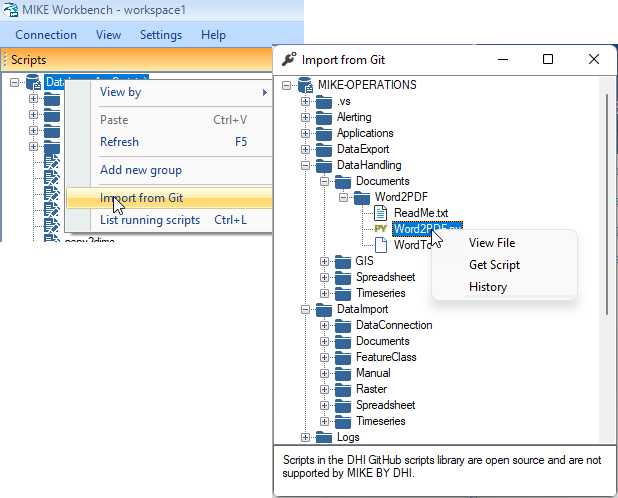
Also a range of sample Python scripts has been published to GitHub. These sample scripts can be view and/or installed from the script explorer of MIKE Workbench from the context menu "Import from Git" of a script group or the root node of the script explorer.
C# and Python
Samples in this documentation are shown in C# and the two Python implementations IronPython and CPython. Some sample code is ony shown in C#, but can be used in Python with only minor modifications to the C# code (see below).
// Create the tool from the tool name and cast it to the tool interface.
var tool = application.Tools.CreateNew("Resample") as DHI.Solutions.TimeseriesManager.Tools.Processing.IResampleTool;

// Add input items to the tool.
tool.InputItems.Add(ts);

// Set the properties of the tool.
tool.TimeStepDay = 1;

// Execute the tool.
tool.Execute();

// Get the output of the tool (if any).
var resampledTs = tool.OutputItems[0];
# Create the tool from the tool name and cast it to the tool interface.
tool = app.Tools.CreateNew("Resample")

# Add input items to the tool.
tool.InputItems.Add(ts)

# Set the properties of the tool.
tool.TimeStepDay = 1

# Execute the tool.
tool.Execute()

# Get the output of the tool (if any).
resampledTs = tool.OutputItems[0]
# Create the tool from the tool name and cast it to the tool interface.
tool = DHI.Solutions.TimeseriesManager.Tools.Processing.IResampleTool(app.Tools.CreateNew("Resample"))

# Add input items to the tool.
tool.InputItems.Add(ts)

# Set the properties of the tool.
tool.TimeStepDay = 1

# Execute the tool.
tool.Execute()

# Get the output of the tool (if any).
resampledTs = tool.OutputItems[0]
Python
Sample C# code can become Python code, with a few modifications, so that the code samples can be used in the script manager of MIKE Workbench.
- The application object name is
appin Python scripts in the scenario manager. Changeapplicationtoapp. - Inline comments use "#" instead of "//"
- No type declaration. "var tool" becomes "tool"
- No cast. Remove "as
" (IronPython only) - Semi colon at the end of each line is not required (but can be used).
Note
The CPython implementation is type safe for .NET types and requires that modules and providers are casted into the interfaces of the models and tools. Please refer to the tool documentation on DHI Developers for code samples.
# Get the tool from the tool name.
tool = app.Tools.CreateNew("Resample")

# Add input items to the tool.
tool.InputItems.Add(ts)

# Set the properties of the tool.
tool.TimeStepDay = 1

# Execute the tool.
tool.Execute()

# Get the output of the tool (if any).
resampledTs = tool.OutputItems[0]
# Get the tool from the tool name (use the tool interface specified in API Reference of the tool to cast).
tool = DHI.Solutions.TimeseriesManager.Tools.Processing.IResampleTool(app.Tools.CreateNew("Resample"))

# Add input items to the tool.
tool.InputItems.Add(ts)

# Set the properties of the tool.
tool.TimeStepDay = 1

# Execute the tool.
tool.Execute()

# Get the output of the tool (if any).
resampledTs = tool.OutputItems[0]
Note
Note that MIKE OPERATIONS (MIKE Workbench) supports two variants of Python.
- IronPython - Implementation of the Python programming language based on IronPython, tightly integrated top .NET. IronPython can use .NET and Python libraries.
- CPython - Python implementation based on Python.net supporting both Python and .NET libraries.
Git Integration
With MIKE OPERATIONS 2024, the Imort from Git functionality has been replaced by an actual integration to GitHub and DevOps using providers.
The new Git integration makes it possible to use scripts stored in Git, to be executed from the MIKE OPERATIONS script manager as well as from schedules jobs.
Import from Git
A range of Python script samples has been published on GitHub and can be viewed and installed from the script explorer of MIKE Workbench.
Note
Note that Import from Git has been replaced by DevOps and GitHub providers in MIKE OPERATIONS 2024 (preview in 2023.3).
Modules
When the application has been started up, modules configured in the runtime.config file has been loaded and are ready to be used.
Get a module from the list of modules on the application object application.Modules.
// Get the time series module if the NuGet package DHI.MikeOperations.TimeseriesManager has been installed.
var tsModule = application.Modules.Get("Timeseries module") as as DHI.Solutions.TimeseriesManager.Interfaces.ITimeSeriesModule;
# Get the time series module from the loaded modules of the app object.
tsModule = app.Modules.Get("Timeseries module")
# Get the time series module from the loaded modules of the app object and cast.
tsModule = DHI.Solutions.TimeseriesManager.Interfaces.ITimeSeriesModule(app.Modules.Get("Timeseries module"))
The following module names can be used, if the specified module has been loaded e.g. by installing NuGet packages.
| Module name | Module interface |
|---|---|
| Analysis Manager | DHI.Solutions.AnalysisManager.Interfaces.IAnalysisModule |
| ChangeLog Manager | DHI.Solutions.Generic.IChangeLogModule |
| Document Manager | DHI.Solutions.DocumentManager.Interfaces.IDocumentModule |
| Event Manager | DHI.Solutions.EventManager.Interfaces.IEventModule |
| Favorite Manager | DHI.Solutions.FavoriteManager.Interfaces.IFavoriteModule |
| Gauge Manager | DHI.Solutions.GaugeManager.Interfaces.IGaugeModule |
| GIS Manager | DHI.Solutions.GISManager.Interfaces.IGISModule |
| Indicator Manager | DHI.Solutions.IndicatorManager.Interfaces.IIndicatorModule |
| Job Manager | DHI.Solutions.JobManager.Interfaces.IJobModule |
| Metadata Manager | DHI.Solutions.MetadataManager.Interfaces.IMetadataModule |
| Operations Manager | DHI.Solutions.OperationsManager.Interfaces.IOperationsModule |
| Places Manager | DHI.Solutions.PlacesManager.Interfaces.IPlaceModule |
| RealtimeModule | DHI.Solutions.RealtimeManager.Interfaces.IRealtimeModule |
| Report Manager | DHI.Solutions.ReportManager.Interfaces.IReportModule |
| Scenario Manager | DHI.Solutions.ScenarioManager.Interfaces.IScenarioModule |
| Script Manager | DHI.Solutions.ScriptManager.Interfaces.IScriptModule |
| Spreadsheet Manager | DHI.Solutions.SpreadsheetManager.Interfaces.ISpreadsheetModule |
| System Manager | DHI.Solutions.SystemManager.Interfaces.ISystemModule |
| Time series Manager | DHI.Solutions.TimeseriesManager.Interfaces.ITimeSeriesModule |
| Workflow Manager | DHI.Solutions.WorkflowManager.Interfaces.IWorkflowModule |
Using Tools
Tools can be used either by making an instance of the tool or by loading the tool from the runtime.config.
When using the API for running tools, every tool is following the concept in the below sample showing the use of the Time Series Resample tool.
Instantiate a tool
Loading tools from the runtime.config is not required. Instead, a tool can be instantiated directly.
// Create the tool object.
var tool = new DHI.Solutions.TimeseriesManager.Tools.Processing.ResampleTool();

// Some tools requires database queries, to be able to access additional data. Initializing the tool using the application object is required for such tools.
tool.Initialize(application);

// Add input items to the tool.
tool.InputItems.Add(ds);

// Set the properties of the tool.
tool.TimeStepDay = 0;
tool.TimeStepMinute = 10;

// Execute the tool
tool.Execute();

// Get the output of the tool.
var resampledTs = tool.OutputItems[0];
Get tool loaded from runtime.config
When the application has been started up, tools configured in the runtime.config file has been loaded.
Tools loaded are available in the Tools property of the application object. The loaded tool can be fetched using the CreateNew(["tool name]") method.
// Get the tool from the tool name.
var tool = application.Tools.CreateNew("Resample") as DHI.Solutions.TimeseriesManager.Tools.Processing.IResampleTool;

// Add input items to the tool.
tool.InputItems.Add(ts);

// Set the properties of the tool.
tool.TimeStepDay = 1;

// Execute the tool.
tool.Execute();

// Get the output of the tool (if any).
var resampledTs = tool.OutputItems[0];
# Get the tool from the tool name.
tool = app.Tools.CreateNew("Resample")

# Add input items to the tool.
tool.InputItems.Add(ts)

# Set the properties of the tool.
tool.TimeStepDay = 1

# Execute the tool.
tool.Execute()

# Get the output of the tool (if any).
var resampledTs = tool.OutputItems[0]
# Get the tool from the tool name.
tool = DHI.Solutions.TimeseriesManager.Tools.Processing.IResampleTool(app.Tools.CreateNew("Resample"))

# Add input items to the tool.
tool.InputItems.Add(ts)

# Set the properties of the tool.
tool.TimeStepDay = 1

# Execute the tool.
tool.Execute()

# Get the output of the tool (if any).
var resampledTs = tool.OutputItems[0]
Generic Tools
Generic tools are tools available even though no managers have been loaded.
Generic ftp download
Tool for downloading files from a FTP site.
| Tool Info | Generic ftp download |
|---|---|
| NuGet Package | DHI.MikeOperations.Core.Tools.FTPDownload |
| API Reference | DHI.Solutions.Generic.UI.Tools.GenericFTPDownload.IGenericFTPDownloadTool |
| Input Items | No input items required |
| Output Items | No output items |
Tool Properties
- ServerAddress: Gets or sets the server address.
- UserName: Gets or sets the username to use for downloading from FTP.
- Password: Gets or sets the password of the user used for downloading files from FTP.
- LocalDownloadFolder: Gets or sets the local folder to download to.
- DownloadFileOlderThan: Gets or sets the date of files to download to. Files older then this date will be downloaded.
- DownloadFileNewerThan: Gets or sets the date from where files should be downloaded. Files newer than this date will be downloaded.
- NamePattern: Gets or set the pattern of file names to download.
- ProtocolType: Gets or set the protocol to use for downloading.
- Host: Gets or sets the host to use for downloading for ProtocolType SFTP.
- SshHostKeyFingerprint: Gets or sets the host key fingerprint for protokol SFTP.
- PrivateKeyFile: Gets or sets the private key file to use for protokol SFTP.
- PrivateKeyPassphrase: Gets or sets the key password phrase to use for protokol SFTP.
- Overwrite: Gets or sets a value indicating whether existing local files should be overwritten during download.
- DeleteRemoteFile: Gets or sets a value indicating whether files should be deleted from the FTP site after they have been downloaded.
Code Sample
// Get the tool.
var tool = application.Tools.CreateNew("Generic ftp download") as DHI.Solutions.Generic.UI.Tools.GenericFTPDownload.IGenericFTPDownloadTool;
# Get the tool.
tool = app.Tools.CreateNew("Generic ftp download")
# Get the tool.
tool = DHI.Solutions.Generic.UI.Tools.GenericFTPDownload.IGenericFTPDownloadTool(app.Tools.CreateNew("Generic ftp download"))
To list
The ToList tool. Displays the output of tools to a ListView
| Tool Info | To list |
|---|---|
| NuGet Package | DHI.MikeOperations.Core.Tools.ToList |
| API Reference | DHI.Solutions.Generic.UI.Tools.ToList.ToList |
| Input Items | No input items required |
| Output Items | No output items |
Tool Properties
The tool has no properties.
Code Sample
// Get the tool.
var tool = application.Tools.CreateNew("To list") as DHI.Solutions.Generic.UI.Tools.ToList.ToList;
# Get the tool.
tool = app.Tools.CreateNew("To list")
Stored Tool Sequences
Stored tool sequences (persisted tools), are sequences of tools stored with parameters. Tool sequences can be executed as tools.
// Get the persisted tool from the persisted tool sequence name.
var persistedTool = application.ToolList.PersistedTools.Get("My Sequence_2");

// Execute the persited tool sequence
persistedTool.Execute();
Providers
A provider is either a data provider included in a module, or a plugin that provides data from external data sources like the DHI Platform cloud storage or data in a DIMS CORE database.
Providers are associated to modules and can be accessed from here.
The sample below, shows how to get the DHI Platform time series provider from the time series module, if the provider has already been loaded because the provider has been configured in MIKE Workbench.
// Get the time series module.
var tsModule = application.Modules.Get("Time series Manager") as DHI.Solutions.TimeseriesManager.Interfaces.ITimeSeriesModule;

// Get the provider.
var provider = tsModule.TimeSeriesDataProviders.Single(p => p.Name == "MIKE Cloud Time Series Provider");
All providers are implementing the same interface for managing data.
Provider Properties
| Property | Description |
|---|---|
| Count | Return the number of entities in the provider list (cache). |
| CurrentQuery | The current query used for filling the provider entity cache. |
| EntityType | The type of entities in the list/provider |
| EntityName | Gets the name of the entity supported by the entity provider. |
Provider Methods
| Method | Description |
|---|---|
| Add(Entity entity) | Adds a new entity to the list and to the database. |
| Add(IList |
Adds a list of entities to the list and to the database. |
| AreNotCurrent(IList |
Checks which of given entities have different version in database. |
| Contains(Entity entity) | Gets a value indicating whether an entity is contained in the list |
| Contains(object id) | Gets a value indicating whether an entity with a given id is contained in the list |
| CreateNew() | Creates a new instance of an entity without adding it to the list or the database. |
| Delete(Entity entity) | Deletes an entity from the list and from the database |
| Delete(object id) | Deletes an entity with a given id from the list and from the database |
| Delete(object id, bool deleteChildren) | Deletes an entity from the list and from the database. If deleteChildren=true, child entities of given entity will be deleted, if False only given entity will be deleted |
| Delete(IList |
Deletes a list of entities from the list and from the database |
| Delete(IList |
Deletes a list of entities from the list and from the database. If deleteChildren=true, child entities of the entities will be deleted, if False only given entity will be deleted |
| Exists(object id) | Checks whether entity with given ID exists in database. |
| Fetch(object id) | Gets the entity for a given id from the database |
| Fetch(string descriptor) | Gets the entity for a given descriptor (full path) from the database |
| Fetch(IQuery query) | Queries the database and returns a list of entities according to query |
| Fetch(IList | Gets a list of entities for given ids from the database |
| FetchAll() | Gets all entities from the database |
| Get(object id) | Gets the entity for a given id from the entity cache (CurrentQuery). |
| Get(IList | Gets a list of entities for given ids from the entity cache (CurrentQuery). |
| GetAll() | Gets all entities contained in the list (cache) |
| GetEntityDescriptor(Entity entity) | Gets descriptor (full path) of the entity in the database |
| GetEntityDescriptor(object id) | Gets descriptor (full path) of the entity in the database. |
| IsCurrent(Entity entity, out bool deleted) | Checks whether entity version is the same as in database. |
| Query(IQuery query) | Queries the database, clears the list and fills the list according to query (cache) |
| Update(Entity entity) | Updates an entity in the list and in the database |
| Update(IList |
Updates a list of entities in the list and in the database |
Provider Cache
Providers support using cache instead of making the same queries to the database many times.
When working with a limited set of data of a data of a provider, the provider cache can be filled so that anly these data are available in the cache, so that the data can be returend instantly.
It is important to understand how the provider cache work to get the full benefit of the provider cache.
The following code sample shows how to get data directly from the database with Fetch, and how to update the cache with Query and getting the provider cached using Get.
// Get the time series module.
var tsModule = application.Modules.Get("Time series Manager") as DHI.Solutions.TimeseriesManager.Interfaces.ITimeSeriesModule;

// Fetch a time series group.
var tsGroup = tsModule.TimeSeriesGroupList.Fetch("/TsGroup1/TsGroup11");

// Fill the provider (cache) using a query (here with the time series of a group with a specific id).
var query = new DHI.Solutions.Generic.Query();
query.Add(new DHI.Solutions.Generic.QueryElement("ParentId", tsGroup.Id, DHI.Solutions.Generic.QueryOperator.Eq);
tsModule.TimeSeriesList.Query(query);

// Get the time series of the group from the cache (after the query). This will return data instantly without accessing the database
var tsList = tsModule.TimeSeriesList.GetAll();
# Get the time series module.
tsModule = app.Modules.Get("Time series Manager")

# Fetch a time series group.
tsGroup = tsModule.TimeSeriesGroupList.Fetch("/TsGroup1/TsGroup11")

# Fill the provider (cache) using a query (here with the time series of a group with a specific id).
query = DHI.Solutions.Generic.Query()
query.Add(DHI.Solutions.Generic.QueryElement("ParentId", tsGroup.Id, DHI.Solutions.Generic.QueryOperator.Eq)
tsModule.TimeSeriesList.Query(query)

# Get the time series of the group from the cache (after the query). This will return data instantly without accessing the database
tsList = tsModule.TimeSeriesList.GetAll()
# Get the time series module.
tsModule = DHI.Solutions.TimeseriesManager.Interfaces.ITimeSeriesModule(app.Modules.Get("Time series Manager"))

# Fetch a time series group.
tsGroup = tsModule.TimeSeriesGroupList.Fetch("/TsGroup1/TsGroup11")

# Fill the provider (cache) using a query (here with the time series of a group with a specific id).
query = DHI.Solutions.Generic.Query()
query.Add(DHI.Solutions.Generic.QueryElement("ParentId", tsGroup.Id, DHI.Solutions.Generic.QueryOperator.Eq)
tsModule.TimeSeriesList.Query(query)

# Get the time series of the group from the cache (after the query). This will return data instantly without accessing the database
tsList = tsModule.TimeSeriesList.GetAll()
Queries
Custom queries can be used to fetch specific data from providers.
The query element uses the property name for the type being queried in a provider.
Query Elements
The filter (the WHERE clause) of a query is defined using query elements.
Query elements specifies the:
- property/column name
- value
- query operator
query = DHI.Solutions.Generic.Query()
query.Add(DHI.Solutions.Generic.QueryElement("name", "MyTimeSeries", DHI.Solutions.Generic.QueryOperator.Gte))
ts = timeseriesModule.TimeseriesList.Fetch(query)
Note
Find supported query property names under each provider module.
Query Operators
Queries support the following query operators.
| Query Operator | Description |
|---|---|
| Lte | Less than or equal |
| Lt | Less than |
| Eq | Equal |
| Gt | Greater than |
| Gte | Greater than or equal |
| Neq | Not equal |
| Between | Between two values |
| In | In a list |
| Like | String comparisson supporting wildcards '*' and '?' |
Samples
// Get the time series module.
var tsModule = application.Modules.Get("Time series Manager") as DHI.Solutions.TimeseriesManager.Interfaces.ITimeSeriesModule;

// Create a query to find time series starting with "Q".
var query = new DHI.Solutions.Generic.Query();
query.Add(new DHI.Solutions.Generic.QueryElement("Name", "Q*", DHI.Solutions.Generic.QueryOperator.Like));

// Fetch the list of time series using the query.
var tsList = tsModule.TimeSeriesList.Fetch(query);
# Get the time series module.
tsModule = app.Modules.Get("Time series Manager")

# Create a query to find time series starting with "Q".
query = DHI.Solutions.Generic.Query()
query.Add(DHI.Solutions.Generic.QueryElement("Name", "Q*", DHI.Solutions.Generic.QueryOperator.Like))

# Fetch the list of time series using the query.
var tsList = tsModule.TimeSeriesList.Fetch(query);
# Get the time series module.
tsModule = DHI.Solutions.TimeseriesManager.Interfaces.ITimeSeriesModule(app.Modules.Get("Time series Manager"))

# Create a query to find time series starting with "Q".
query = DHI.Solutions.Generic.Query()
query.Add(DHI.Solutions.Generic.QueryElement("Name", "Q*", DHI.Solutions.Generic.QueryOperator.Like))

# Fetch the list of time series using the query.
var tsList = tsModule.TimeSeriesList.Fetch(query);
The number of results to get from a query can be limited to a maximum (supported from MIKE OPERATIONS 2023.1).
// Limit query results
// Create a query to find time series starting with "Q".
var query = new DHI.Solutions.Generic.Query();
query.MaxResults = 2;
query.Add(new DHI.Solutions.Generic.QueryElement("Name", "Q*", DHI.Solutions.Generic.QueryOperator.Like));

// Fetch the list of time series using the query.
var tsList = tsModule.TimeSeriesList.Fetch(query);
# Limit query results
# Create a query to find time series starting with "Q".
query = DHI.Solutions.Generic.Query()
query.MaxResults = 2
query.Add(DHI.Solutions.Generic.QueryElement("Name", "Q*", DHI.Solutions.Generic.QueryOperator.Like))

# Fetch the list of time series using the query.
tsList = tsModule.TimeSeriesList.Fetch(query)
Note
Note that a few tables are not implemented as providers. This is the case for e.g. time steps of a time series. For these tables, the property mapping are custom. Refer to each manager for a description of the mapping.
The sample below shows how to make a custom query on time steps of a time series.
// Get the time series module.
var tsModule = application.Modules.Get("Time series Manager") as DHI.Solutions.TimeseriesManager.Interfaces.ITimeSeriesModule;

// Fetch a time series from its path.
var ts = tsModule.TimeSeriesList.Fetch("/MyTimeSeries");

// Get time steps for a specific period of a time series using a custom query.
var query = new DHI.Solutions.Generic.Query();
query.Add(new DHI.Solutions.Generic.QueryElement("datetime", start, DHI.Solutions.Generic.QueryOperator.Gte));
query.Add(new DHI.Solutions.Generic.QueryElement("datetime", end, DHI.Solutions.Generic.QueryOperator.Lte));
var timeSteps = ts.Fetch(query);
# Get the time series module.
tsModule = app.Modules.Get("Time series Manager")

# Fetch a time series from its path.
ts = tsModule.TimeSeriesList.Fetch("/MyTimeSeries")

# Get time steps for a specific period of a time series using a custom query.
query = DHI.Solutions.Generic.Query()
query.Add(DHI.Solutions.Generic.QueryElement("datetime", start, DHI.Solutions.Generic.QueryOperator.Gte))
query.Add(DHI.Solutions.Generic.QueryElement("datetime", end, DHI.Solutions.Generic.QueryOperator.Lte))
timeSteps = ts.Fetch(query)
# Get the time series module.
tsModule = DHI.Solutions.TimeseriesManager.Interfaces.ITimeSeriesModule(app.Modules.Get("Time series Manager"))

# Fetch a time series from its path.
ts = tsModule.TimeSeriesList.Fetch("/MyTimeSeries")

# Get time steps for a specific period of a time series using a custom query.
query = DHI.Solutions.Generic.Query()
query.Add(DHI.Solutions.Generic.QueryElement("datetime", start, DHI.Solutions.Generic.QueryOperator.Gte))
query.Add(DHI.Solutions.Generic.QueryElement("datetime", end, DHI.Solutions.Generic.QueryOperator.Lte))
timeSteps = ts.Fetch(query)
Sample using the Like operator.
// Query using the Like operator
var query = new DHI.Solutions.Generic.Query();
query.Add(new DHI.Solutions.Generic.QueryElement("Url", "HTTP*", DHI.Solutions.Generic.QueryOperator.Like));
# Query using the Like operator
query = DHI.Solutions.Generic.Query()
query.Add(DHI.Solutions.Generic.QueryElement("Url", "HTTP*", DHI.Solutions.Generic.QueryOperator.Like))
Max Results
It is possible to only get a limited number (first result) of results using the MaxResults property on a query.
E.g. MaxResults=2 will get the first two rows of the query.
Using MaxResults, will make sure that the database will only fetch the number of rows specified. This increases query performance multiple times.
The sample below shows how only two time steps will be returned from a query.
# Get the time series module.
tsModule = DHI.Solutions.TimeseriesManager.Interfaces.ITimeSeriesModule(app.Modules.Get("Time series Manager"))

# Fetch a time series from its path.
ts = tsModule.TimeSeriesList.Fetch("/MyTimeSeries")

# Get time steps for a specific period of a time series using a custom query.
query = DHI.Solutions.Generic.Query()

# Only return two rows in the query result.
query.MaxResults = 2
query.Add(DHI.Solutions.Generic.QueryElement("datetime", start, DHI.Solutions.Generic.QueryOperator.Gte))
query.Add(DHI.Solutions.Generic.QueryElement("datetime", end, DHI.Solutions.Generic.QueryOperator.Lte))
timeSteps = ts.Fetch(query)
Query Order (OrderBy)
Queries can be ordered by columns (properties) of entities using OrderBy on queries.
Using OrderBy will make sure that the database will sort the results and will perform better than ordering results after the query has executed.
The sample below shows how query results can ordered.
# Get the time series module.
tsModule = DHI.Solutions.TimeseriesManager.Interfaces.ITimeSeriesModule(app.Modules.Get("Time series Manager"))

# Create a query using OrderBy.
query = DHI.Solutions.Generic.Query()
query.OrderBy.Add(QueryOrder("name", queryOrder.Ascending))

# Fetch the ordered time series.
tsList = tsModule.TimeseriesList.Fetch(query)