MIKE+ Plugins tool
Introduction
MIIKE+ plugins tool gives an easy way for user to extend the MIKE+ functions. Plugins tool can manipulate the current model data, add/delete/refresh layer data on model map, use some of MIKE+ tool functions and run simulations.
Plugin manager is hidden by default. To make it visible, please change the "EnablePlugin" setting on [MIKE+ installer]\bin\x64\DHI.MIKEPlus.Shell.exe.config to "True". Once it has been enabled, you can find the plugin manager in ‘Ttools’ ribbon.
How to make a plugin tool for MIKE+?
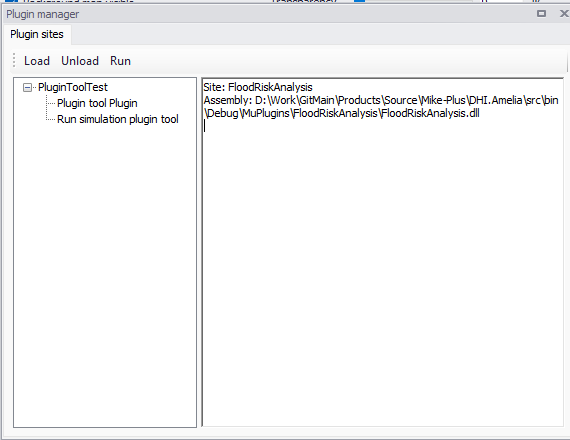
Plugins tool application should be a NET class library application. The plugin function class should inherit from DHI.Amelia.PluginsModule.Interface.Plugins.IMPPlugin. You can have several plugin functions in your plugins tool application. E.g. there are two plugin functions for PluginToolTest in the above picture (That means there are two IMPPlugin type classes in the PluginToolTest project.).
Table 1: IMPPlugin members and methods
| Method name | Description |
|---|---|
| Name | The name of the tool, it will be shown on the tree view |
| Initialize(IMPApplication muApp) | muApp is the MIKE+ application, it contains data service, map service, tool service and simulation service |
| Run() | The entrance of your Plugin tool logic, it could open a UI interface or just run function without any GUI. |
An example of implementing plugin tool
public class PluginToolTest : IMPPlugin, IDisposable
{
    private IMPApplication _muApp;
    private PluginForm _view;
    private bool disposed = false;
    public string Name
    {
        get
        {
            return "Plugin tool Plugin";
        }
    }
    public void Initialize(IMPApplication muApp)
    {
        this._muApp = muApp;
    }

    public void Run()
    {
        this._view = new PluginForm() { TopMost = true, MuApp = _muApp, };
        this._view.Show();
    }
    public void Dispose()
    {
        bool flag = !this.disposed;
        if (flag)
        {
            this.Dispose(true);
            GC.SuppressFinalize(this);
        }
    }
    protected virtual void Dispose(bool disposing)
    {
        if (disposing)
        {
            bool flag = this._view != null;
            if (flag)
            {
                this._view.Dispose();
                this._view = null;
            }
        }
        this.disposed = true;
    }
}
How to manually load your plugin tool in MIKE+?
Open plugin manager, click "Load" and browse you plugin tool dll. Plugin manager will load all the plugin functions of this dll.
How to make MIKE+ load plugin tools automatically?
If you don't want to manually load your plugin tool every time, there is a way to have MIKE+ automatically load the tool for you. Put all your plugin tool binaries into a folder. The folder name should be set the same as the name of the plugin dll. Put this folder into [MIKE+ installer]\bin\x64\MPPlugins , MIKE+ will automatically load the tool.