Job Automator – Architecture Overview
The Job Automator system is made up of several cooperating components that together enable web-based workflow automation in the Domain Services ecosystem.
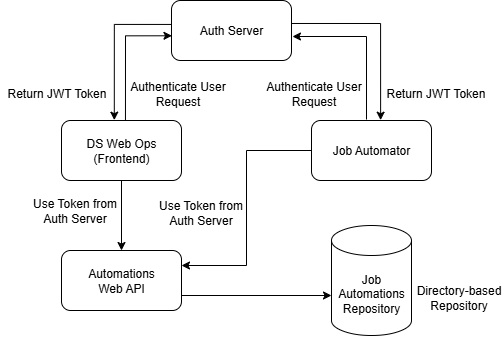
Big Picture
Five key components:
-
Auth Server Acts as the Authentication & Authorization provider. It handles sign-in and permission checks for DS Web Ops and all backend services
-
DS Web Ops The web UI where teams create/edit automations, enable/disable or manually trigger them, and review history/progress.
-
Automations Web API Central service that manages automation definitions (create/edit/delete), exposes an extensible trigger catalog (plugin-style, so new trigger types can be added without rebuilding the UI), and enriches each automation with its last run job +
IsMetvia scalars and jobs. -
Job Automator A background worker that regularly checks automations, evaluates triggers, creates jobs in the right Host Group when the triggers
IsMet, and updates scalars. -
Automations Repository Stores automation definitions as simple files (one JSON per automation) so changes are reviewable and easy to roll back.
Typical responsibilities & ownership:
- Security/Platform → Auth Server
- Operation → DS Web Ops
- Backend/Platform → Automations Web API & Job Automator
- Team owning automation content → Automations Repository (with PR/review policy)
Persistence & Host Groups (where things actually live)
The system intentionally splits data across purpose-built stores. This lets you scale jobs independently per host group and keep automation definitions simple and portable.
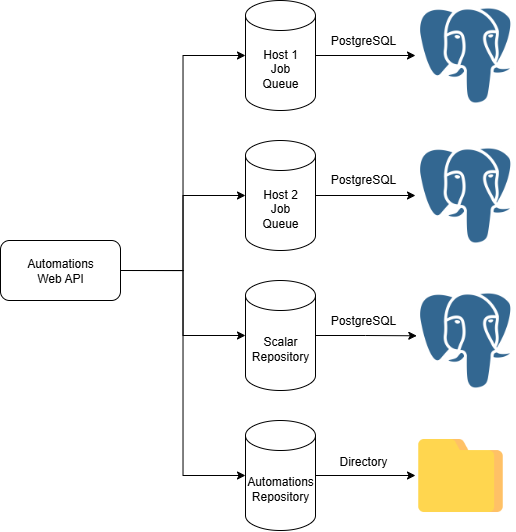
Storage map
| Data | Where it’s stored | Who writes | Who reads | Config keys |
|---|---|---|---|---|
| Automations (definitions, groups, triggers, params, enable switch) | Directory via DirectoryAutomationRepository (one JSON per automation) |
Automations Web API (on create/update/delete) | Automations Web API, Job Automator | JobAutomations (absolute path) |
| Scalars (progress flags, last-met, chaining helpers, last job id ref) | PostgreSQL (shared “workflow” DB) | Job Automator | Automations Web API (for enrichment), DS Web Ops (via API) | Postgres-scalars:ConnectionString |
| Jobs (queued/executed tasks) | PostgreSQL per Host Group (one DB per host) | Job Automator (writes to the host selected by the automation’s HostGroup) |
Automations Web API (via ReadOnlyCompositeJobRepository), DS Web Ops | Postgres-jobs (array of { Id, JobRepositoryConnectionString }) |
Many hosts supported. The
Postgres-jobsarray can define any number of host groups (e.g.,wf-jobs-Minion,wf-jobs-Titan, …). Add/remove entries to scale horizontally.
How host routing works
- Each Automation sets
HostGroup(e.g.,"Minion"). - Job Automator creates the job in the repository registered under that host group id (from
Postgres-jobs). - Automations Web API uses a ReadOnlyCompositeJobRepository to read from all host job DBs, so it can always show the last job regardless of where it ran.
Minimal config recap (excerpt)
{
  "JobAutomations": "C:\\Services\\JobAutomator\\Automations",
  "Postgres-scalars": {
    "ConnectionString": "Server=localhost;Port=5432;Database=JobWorkflow;User Id=Solutions;Password=P@ssword!;"
  },
  "Postgres-jobs": [
   {
      "JobRepositoryConnectionString": "Server=localhost;Port=5432;Database=JobMinion;User Id=Solutions;Password=P@ssword!",
      "Id": "wf-jobs-Minion"
   },
   {
      "JobRepositoryConnectionString": "Server=localhost;Port=5432;Database=JobTitan;User Id=Solutions;Password=P@ssword!",
      "Id": "wf-jobs-Titan"
   }
  ]
}
In your automation JSON, set:
"HostGroup": "Minion"
and Job Automator will write the job to wf-jobs-Minion.
Default host roles: The system comes preconfigured with two host groups:
- Minion – For smaller, lightweight jobs that require minimal resources.
- Titan – For large, resource-intensive jobs that need significant processing power.
This default split helps balance workloads and ensures that heavy jobs do not impact smaller, frequent automations.
How It Works – High Level Flow
- User Login
- User opens DS Web Ops.
- DS Web Ops authenticates via Auth Server and obtains a JWT token.
- Automation Management
- From DS Web Ops, users create/update automations (form or JSON editor).
- Automations Web API persists them in the Automations Repository and exposes trigger schemas (MEF) for dynamic forms.
- Background Execution
- Job Automator periodically polls Automations Web API for current definitions.
- For each automation, it evaluates trigger conditions.
- If conditions are satisfied:
- A new job is created in the appropriate host group (mapped by
HostGroup). - Scalars are updated to reflect execution state and enable chaining.
- A new job is created in the appropriate host group (mapped by
- Monitoring & Diagnostics
- DS Web Ops displays automation status, last job, and history using the Automations Web API (and related Domain Services endpoints).
Job Automator – Runtime
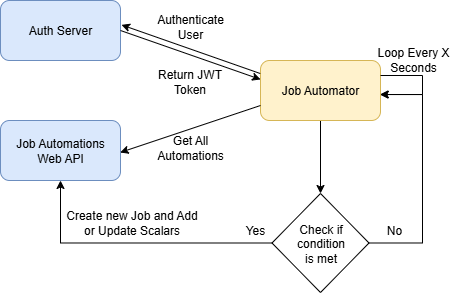
Flow (from the Job Automator’s perspective):
- Authenticate against Auth Server to obtain/refresh a token (handled by
AccessTokenProviderin the template). - Read automations from Automations Web API (wrapped by
CachingAutomationRepositoryto avoid unnecessary calls). - Evaluate each automation’s triggers with
AutomationExecutor.- Writes per-trigger “Is Met” scalars for observability.
- If met:
- Route to a host-specific Jobs endpoint via
JobServiceFactory(mapsHostGroup→{Jobs}/api/jobs/{serviceKey}). - Create a new job; prevent duplicates by checking the Last Job Id scalar.
- Write the new Last Job Id scalar.
- Route to a host-specific Jobs endpoint via
- Repeat on the configured interval.
The concrete code paths for this loop live in the template under:
JobAutomator.Start/Stop/ExecutionTimerElapsedAutomationExecutor.Execute(AND vs. expression mode)JobServiceFactory.GetJobService(host-group routing)ReadLastJobIdScalar/WriteLastJobIdScalar(duplicate-prevent + observability)
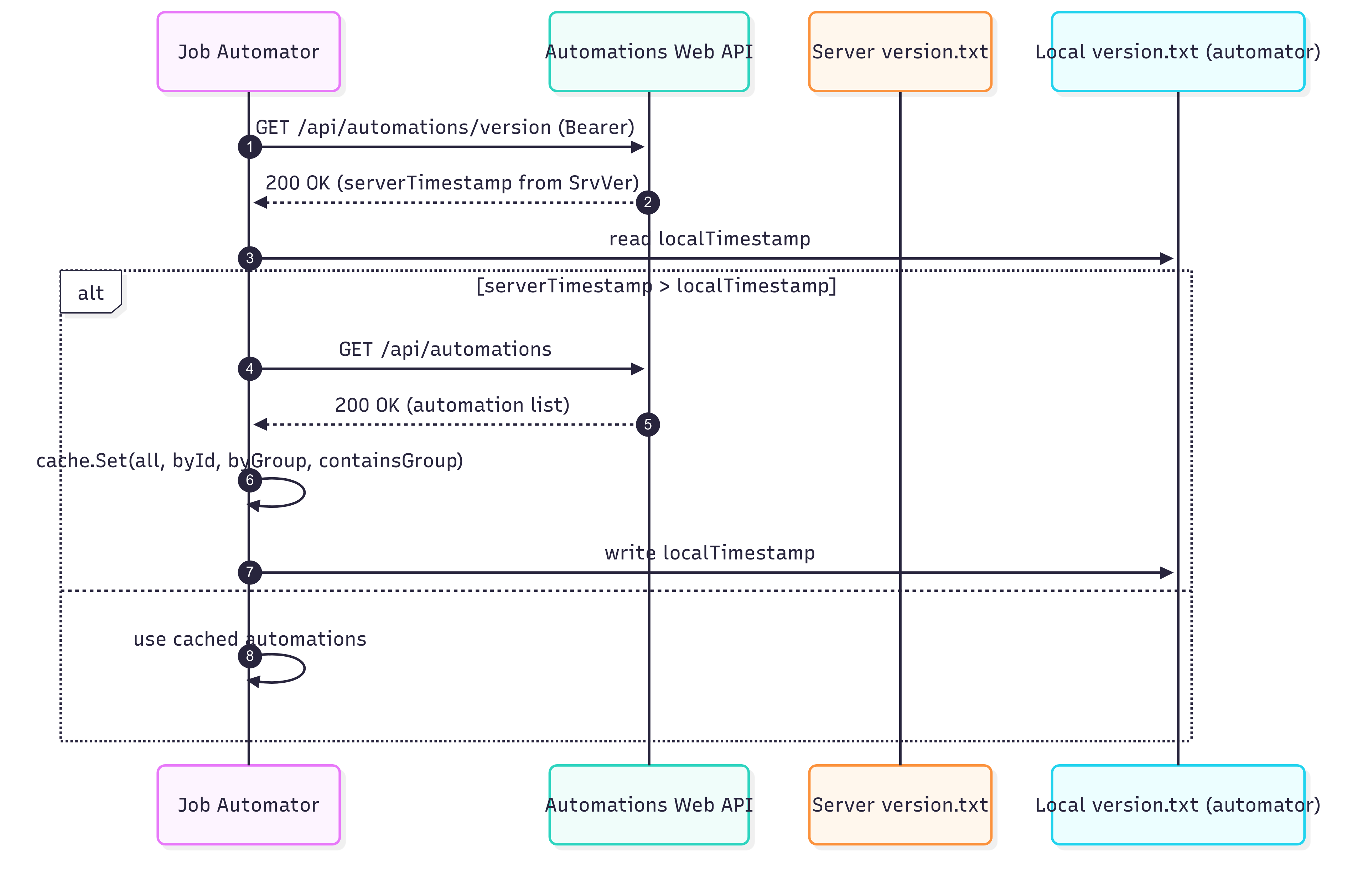
Caching model (Automations freshness)
The Automations Web API exposes a simple server version timestamp at:
GET /api/automations/version
This is backed by a version.txt stored next to your automations (in the same root as the directory repository). The API updates that timestamp on any Create/Update/Delete or Enable/Disable of automations.
The Job Automator keeps its own local version file (path configurable) and uses it for server-driven cache invalidation:
- Server > Local → Invalidate in-memory cache, fetch GetAll, and rewrite local
version.txt. - Server ≤ Local → Keep using cache (no roundtrip for definitions).
Where files live
- Server-side version file: maintained by Automations Web API, co-located with automation JSON.
- Automator-side version file: configured via
Cache.LocalVersionFilePathin the automator’sappsettings.json.
Sequence (simplified)
Minimal config for the automator cache (excerpt)
{
  "Cache": {
    "LocalVersionFilePath": "C:\\Services\\JobAutomator\\Automations\\Version"
  }
}
Notes:
- Only
LocalVersionFilePathis used; TTLs are internal in the template.- The version file will be auto-created if it doesn’t exist.
/api/automations/versionrequires a Bearer token (issued by the Auth Server).
Next Steps
- Auth setup: Authorization Server Project Template
- Automations backend & endpoints: Jobs Automations Web API Project Template
- Job Automator template & deployment: Job Automator Project Template