DHI.Services.GIS — Internal Developer Guide
This module is the GIS backbone of Domain Services. It gives you a consistent, provider-agnostic way to read, query, transform (reproject), and—when supported, update vector datasets called Feature Collections. You plug in a repository (e.g., PostgreSQL, files, cloud, etc.), and the service layer exposes a stable API your app and Web APIs can use.
Why use this module?
- Uniform API across providers: read one, switch providers later with no code changes.
- Strong typing & guardrails:
Maybe<T>at the repo layer; exceptions at the service layer for clean error handling. - Filtering & projection: attribute filters via
QueryCondition; reprojection viaoutSpatialReference. - Geometry utilities: envelopes, footprints, and raw
GeometryCollectionaccess. - Updatable workflows (optional): add/update/remove features and attributes with safe checks.
Mental model
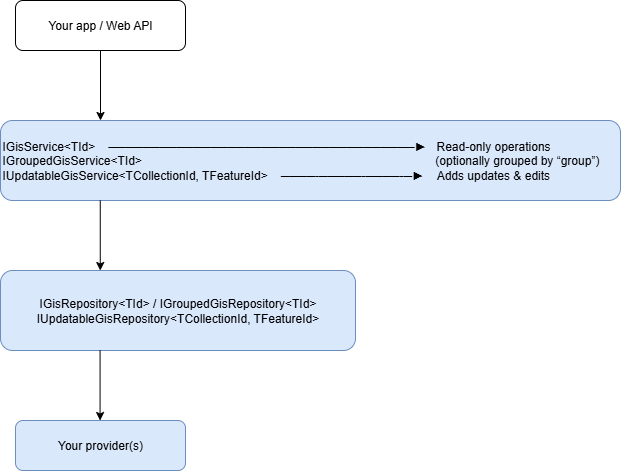
- Id types are usually
stringfor feature collections; feature IDs are oftenGuid. - Groups let you organize collections hierarchically (e.g.,
Basins/Nile/Stations).
Core types you’ll work with
FeatureCollection<TId>— a named/grouped collection withFeatures,Attributes(schema), and metadata.FeatureCollectionInfo<TId>— metadata + schema only (no feature geometries/values).IGeometry,GeometryCollection— spatial types (fromDHI.Services.Spatial).QueryCondition/QueryOperator— attribute filtering primitives (fromDHI.Services).Maybe<T>— “value or nothing”. Repositories returnMaybe<T>; services throw if nothing is found (cleaner for app code).
What you can do
Read (every repo)
- Get a collection (optionally with associations, reprojection)
- Get schema/info for a collection
- Get only the geometries
- Get envelope (bbox) and footprint (union outline + optional simplification)
- Enumerate IDs by filter and list geometry types per collection
- (Optional) stream a serialized data format (if the provider supports
GetStream)
Group-aware reads
- Test if a group exists
- List collections by group
- List full names (
Group/Name) and geometry types by group - Get Info for all collections in a group
Updates (only updatable repos)
- Add/Update/Remove feature collections
- Add/Update/Remove features
- Batch updates to attribute values by feature IDs or by a filter
- Add/Update/Remove attributes (schema)
- Add/Remove feature associations (relations)
Wiring it up
1) Register a connection (read-only, single collection id type)
using DHI.Services;
using DHI.Services.GIS;

// Example: provider fully-qualified name in a config string/JSON
var repoType = "DHI.Services.Provider.ShapeFile.FeatureRepository, DHI.Services.Provider.ShapeFile";
// e.g., connection string or any provider-specific parameter string
var connString = "[AppData]shp";

// Construct via the connection helper (reflection + DI friendly)
var connection = new GisServiceConnection<string>("gis:prod", "Main GIS")
{
    RepositoryType = repoType,
    ConnectionString = connString
};

var gisService = (GisService<string>) connection.Create();
ServiceLocator.Register(gisService, "gis-prod");  // connectionId used by your app/frontend
2) Register a grouped connection
connString = "database=mc2014.2";
var grouped = new GroupedGisServiceConnection<string>("gis:groups", "GIS (Grouped)")
{
    RepositoryType = "DHI.Services.Provider.MCLite.FeatureRepository, DHI.Services.Provider.MCLite",
    ConnectionString = connString
};

var groupedService = (GroupedGisService<string>) grouped.Create();
ServiceLocator.Register(groupedService, "gis-groups");
3) Register an updatable connection
connString = "database=[AppData]MCSQLiteTest.sqlite;dbflavour=SQLite";
var updatable = new UpdatableGisServiceConnection<string, Guid>("gis:edit", "GIS (Editable)")
{
    RepositoryType = "DHI.Services.Provider.MCLite.FeatureRepository, DHI.Services.Provider.MCLite",
    ConnectionString = connString
};

var editService = (UpdatableGisService<string, Guid>) updatable.Create();
ServiceLocator.Register(editService, "gis-edit");
Discovering providers at runtime If you inject
ConnectionTypeService(AppContext.BaseDirectory)(like in Documents), the connection type helpers (e.g.,GisServiceConnection<T>.CreateConnectionType<TConnection>()) will scan assemblies (by default names starting withDHI.Services) for compatible repositories so your UI/config tooling can present a drop-down of provider implementations.
Using the services
Assume you’ve retrieved a service with:
var gis = Services.Get<GisService<string>>("gis-prod");
Get a collection
// associations: include provider-specific linked data if available
// outSpatialReference: e.g., "EPSG:3857" or provider-specific string (WKT ok).
var fc = gis.Get("Basins/Nile/Stations", associations: false, outSpatialReference: "EPSG:4326");
Get just schema/metadata
var info = gis.GetInfo("Basins/Nile/Stations");
foreach (var a in info.Attributes)
{
    Console.WriteLine($"{a.Name} ({a.DataType})");
}
Filter by attributes
using DHI.Services; // QueryCondition, QueryOperator

var filter = new[]
{
    new QueryCondition("station_type", QueryOperator.Equal, "gauging"),
    new QueryCondition("discharge", QueryOperator.GreaterThanOrEqual, 1000)
};

// Get a filtered collection (geometry + attributes of matching features)
var fcFiltered = gis.Get("Basins/Nile/Stations", filter, associations:false, outSpatialReference:"EPSG:4326");

// Or: just the geometries (faster if you don't need attribute values)
var geoms = gis.GetGeometry("Basins/Nile/Stations", filter, "EPSG:4326");
The service validates filter attribute names via
ContainsAttributeand will throw if you reference a non-existing attribute.
Envelopes & footprints
var envelope = gis.GetEnvelope("Basins/Nile/Stations", "EPSG:3857");
var footprint = gis.GetFootprint("Basins/Nile/Stations", "EPSG:3857", simplifyDistance: 1000); // meters or provider units
Enumerate IDs that match a query
var ids = gis.GetIds(new[] { new QueryCondition("country", QueryOperator.Equal, "EG") });
Geometry types present per collection
var types = gis.GetGeometryTypes();
foreach (var (fullName, geomTypes) in types)
{
    Console.WriteLine($"{fullName}: {string.Join(", ", geomTypes)}");
}
Stream a collection (provider dependent)
// Some repos support exporting a collection as e.g. GeoPackage, zipped Shapefile, etc.
var (stream, fileType, fileName) = gis.GetStream("Basins/Nile/Stations");
// fileType is a short token such as "gpkg", "zip", “json” — provider dependent
Group-centric usage
If your repository is grouped, work with IGroupedGisService<TId>:
var grouped = Services.Get<GroupedGisService<string>>("gis:groups");

bool exists = grouped.ContainsGroup("Basins/Nile");
var list = grouped.GetByGroup("Basins/Nile");             // IEnumerable<FeatureCollection<string>>
var fullNames = grouped.GetFullNames("Basins/Nile");       // ["Basins/Nile/Stations", …]
var infos = grouped.GetInfo("Basins/Nile");                // IEnumerable<FeatureCollectionInfo<string>>
var typesByGroup = grouped.GetGeometryTypes("Basins/Nile");
Editing data (updatable repositories only)
Important: Feature ID must be available as the attribute named
"id". ForTFeatureId = Guid,UpdatableGisServiceconverts the attribute to aGuid.
var edit = Services.Get<UpdatableGisService<string, Guid>>("gis-edit");

// Add a feature
var newFeature = FeatureFactory.Point(
    id: Guid.NewGuid(),
    x: 31.2, y: 30.1, srid: 4326,
    attributes: new Dictionary<string, object> { ["name"] = "New Station", ["id"] = Guid.NewGuid() }
);
edit.AddFeature("Basins/Nile/Stations", newFeature);

// Update a feature
var toUpdate = edit.GetFeature("Basins/Nile/Stations", someFeatureId, associations: true);
toUpdate.AttributeValues["name"] = "Renamed";
edit.UpdateFeature("Basins/Nile/Stations", toUpdate);

// Remove features
edit.RemoveFeature("Basins/Nile/Stations", someFeatureId);
edit.RemoveFeatures("Basins/Nile/Stations", new [] { id1, id2 });

// Attribute schema ops
edit.AddAttribute("Basins/Nile/Stations", AttributeFactory.String("owner", length: 80));
edit.RemoveAttribute("Basins/Nile/Stations", "deprecatedField");

// Attribute value updates (by id, ids, or filter)
edit.UpdateAttributeValue("Basins/Nile/Stations", someFeatureId, "owner", "DHI");
edit.UpdateAttributeValues("Basins/Nile/Stations", new[]{ id1, id2 }, "owner", "DHI");
edit.UpdateAttributeValue("Basins/Nile/Stations",
    filter: new[]{ new QueryCondition("country", QueryOperator.Equal, "EG") },
    attributeName: "owner", value: "MWRI");

// Associations
edit.AddAssociation("Basins/Nile/Stations", someFeatureId, AssociationFactory.RelatesTo("Documents/…"));
edit.RemoveAssociation("Basins/Nile/Stations", someFeatureId, AssociationFactory.RelatesTo("Documents/…"));
Errors you’ll see (thrown by services):
KeyNotFoundException— collection/feature/attribute not found.ArgumentException— invalid inputs, e.g., missing"id"on a feature you try to add/update.
Repositories use Maybe<T> internally; services standardize this into exceptions for consumers.
Filtering cheat-sheet (QueryCondition)
You build filters with items (attribute names), operators, and values:
new QueryCondition("discharge", QueryOperator.GreaterThan, 1000);
new QueryCondition("station_type", QueryOperator.Like, "%gauging%");
new QueryCondition("country", QueryOperator.Any, new [] { "EG", "SD", "ET" });
new QueryCondition("geometry", QueryOperator.SpatiallyWithinDistance, new { wkt="POINT(…)", distance=1000 }); // provider-specific support
Spatial operators (
Intersects,Contains,SpatiallyWithin*, etc.) are defined inQueryOperator, but availability depends on the provider.
Reprojection (outSpatialReference)
Almost every read method can take outSpatialReference. Common values are the literal EPSG:xxxx or a WKT string; the exact forms accepted are provider-specific. If reprojection is not supported, the repo may ignore the parameter or throw an error.
Streaming export (GetStream)
IGisRepository<TId>.GetStream is optional. If your provider implements it, you’ll get (Maybe<Stream>, fileType, fileName). Typical fileType values might be "zip", "gpkg", "json". Use the tuple to set HTTP content types in your Web API.
If not supported, the base repository throws NotSupportedException.
Dynamic file patterns (utility)
DynamicFileSource lets you compute a file path from date/time and parameters, with optional choice lists:
var src = new DynamicFileSource(
  @"C:\tiles\?yyyy\\MM\\dd?\?hour|0:6:HH|6:18:HH|18:23:HH?\layer_""level"".png:layer_01|layer_02:"
);

// At runtime:
var filePath = src.GetFile(DateTime.UtcNow, new Parameters { ["level"] = "01" });
// - Replaces ?…? with DateTime.ToString(format) (special “hour” rule chooses a format by time range)
// - Replaces "paramName" with parameters[paramName]
// - If a :choiceA|choiceB: segment exists, picks the first existing file
Great for file-backed vector/rasters that roll over hourly/daily.
Helpful extensions (misc)
SKColor ToColor(string)— parses “#RRGGBB”, “rgba(…)”, or named colors viaSkiaSharp.SKColors.Bitmap.CropAndResize(SKRectI src, SKRectI dst)— quick graphics helper for map/raster generation.IEnumerable<Tile>.GetEnvelope()— compute tile set bbox.DateTime.ToIdStandard()->"yyyyMMdd_HHmmss".
Example: expose your GIS via ASP.NET Core
Even without a dedicated WebApi package, you can expose endpoints quickly:
[ApiController]
[Route("api/gis/{connectionId}")]
public class GisController : ControllerBase
{
    [HttpGet("{id}/info")]
    public ActionResult<FeatureCollectionInfo<string>> Info(string connectionId, string id)
    {
        var service = Services.Get<GisService<string>>(connectionId);
        return Ok(service.GetInfo(id));
    }

    [HttpGet("{id}")]
    public ActionResult<FeatureCollection<string>> Get(string connectionId, string id, [FromQuery] string sref = null)
    {
        var service = Services.Get<GisService<string>>(connectionId);
        return Ok(service.Get(id, associations:false, outSpatialReference:sref));
    }

    [HttpPost("{id}/query")]
    public ActionResult<GeometryCollection> QueryGeom(string connectionId, string id, [FromBody] QueryDTO dto, [FromQuery] string sref = null)
    {
        var service = Services.Get<GisService<string>>(connectionId);
        return Ok(service.GetGeometry(id, dto.ToQueryConditions(), sref));
    }

    [HttpGet("{id}/stream")]
    public IActionResult Stream(string connectionId, string id)
    {
        var service = Services.Get<GisService<string>>(connectionId);
        var (stream, fileType, fileName) = service.GetStream(id);
        stream.Seek(0, SeekOrigin.Begin);
        var contentType = fileType?.ToLowerInvariant() switch
        {
            "zip" => "application/zip",
            "gpkg" => "application/geopackage+sqlite3",
            "json" => "application/json",
            _ => "application/octet-stream"
        };
        return File(stream, contentType, fileName ?? $"{id}.{fileType}");
    }
}
connections.json examples (GIS)
If you prefer the same pattern you used for Documents:
[
  {
    "type": "DHI.Services.GIS.WebApi.GisServiceConnection, DHI.Services.GIS.WebApi",
    "id": "gis-prod",
    "name": "GIS (Read-only)",
    "repositoryType": "DHI.Services.Provider.ShapeFile.FeatureRepository, DHI.Services.Provider.ShapeFile",
    "connectionString": "[AppData]shp"
  },
  {
    "type": "DHI.Services.GIS.WebApi.GroupedGisServiceConnection, DHI.Services.GIS.WebApi",
    "id": "gis-groups",
    "name": "GIS (Grouped)",
    "repositoryType": "DHI.Services.Provider.MCLite.FeatureRepository, DHI.Services.Provider.MCLite",
    "connectionString": "database=mc2014.2"
  },
  {
    "type": "DHI.Services.GIS.WebApi.GroupedUpdatableGisServiceConnection, DHI.Services.GIS.WebApi",
    "id": "gis-edit",
    "name": "GIS (Editable)",
    "repositoryType": "DHI.Services.Provider.MCLite.FeatureRepository, DHI.Services.Provider.MCLite",
    "connectionString": "database=[AppData]MCSQLiteTest.sqlite;dbflavour=SQLite"
  }
]
Loader sketch (same idea as in Documents):
foreach (var e in entries)
{
    object service = e.type switch
    {
        "GisServiceConnection" =>
            (GisService<string>) new GisServiceConnection<string>(e.id, e.name)
            { RepositoryType = e.repositoryType, ConnectionString = e.connectionString }.Create(),
        "GroupedGisServiceConnection" =>
            (GroupedGisService<string>) new GroupedGisServiceConnection<string>(e.id, e.name)
            { RepositoryType = e.repositoryType, ConnectionString = e.connectionString }.Create(),
        "UpdatableGisServiceConnection" =>
            (UpdatableGisService<string, Guid>) new UpdatableGisServiceConnection<string, Guid>(e.id, e.name)
            { RepositoryType = e.repositoryType, ConnectionString = e.connectionString }.Create(),
        _ => throw new NotSupportedException(e.type)
    };

    ServiceLocator.Register(service, e.id);
}
Practical tips
- Attribute
"id"is mandatory for editing. For Guid features, make sure it’s parsable as a GUID. - Attribute validation happens before filtered geometry queries; typo’d attribute names lead to
KeyNotFoundException. - Spatial reference strings vary by provider. Prefer
"EPSG:xxxx"when in doubt. - Streaming is provider-specific. If your downloads show
application/octet-stream, set your content types from the returnedfileType. - Maybe vs exceptions: Repository APIs return
Maybe<T>; service APIs throw. When building your own repos, adhere to this pattern (don’t throw for “not found”, returnMaybe.Empty). - Groups: Use forward slashes (
Group/Sub/Name). If you mirror a documents pattern, remember that Web routing often uses|and is decoded back to/by helpers (FullNameStringin WebApiCore).
When to choose which service
- Use
GisService<TId>if you just need reads over a flat namespace of feature collections. - Use
GroupedGisService<TId>if your collections are organized hierarchically and you want group queries. - Use
UpdatableGisService<TCollectionId, TFeatureId>when your store supports edits and you want safe, high-level operations.